|
User Manual for Eventide Physion - Structural Effects Plug-In Click to enlarge the picture
 Contents of the user manual for the Eventide Physion - Structural Effects Plug-In
- Product category: Virtual Processor Plug-Ins Eventide
- Brand: Eventide
- Description and content of package
- Technical information and basic settings
- Frequently asked questions – FAQ
- Troubleshooting (does not switch on, does not respond, error message, what do I do if...)
- Authorized service for Eventide Virtual Processor Plug-Ins
|
User manual for the Eventide Physion - Structural Effects Plug-In contain basic instructions
that need to be followed during installation and operation.
Before starting your appliance, the user manual should be read through carefully.
Follow all the safety instructions and warnings, and be guided by the given recommendations.
User manual is an integral part of any Eventide product,
and if it is sold or transferred, they should be handed over jointly with the product.
Following the instructions for use is an essential prerequisite for protecting
health and property during use, as well as recognition of liability on the part of the manufacturer
for possible defects should you make a warranty claim. Download an official Eventide user manual in which you will find instructions on how to install, use, maintain and service your product.
And do not forget – unsuitable use of a Eventide product will considerably shorten its lifespan!
|
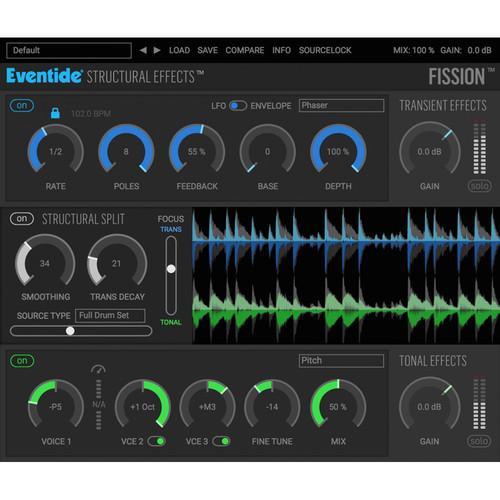
Product description Eventide Physion uses the company's proprietary Structural Effects technology to split a sound into its transient and tonal parts, independently manipulate them, and recombine them with minimal glitches, noise, or other artifacts. It provides engineers, producers, and musicians with a wide range of creative possibilities for sound design, drum tuning, vocal modification, audio restoration, or loop-mangling applications, from the subtle to the extreme.Physion offers four Structural Split controls that enable you to fine-tune the transient/tonal split. The controls let you choose the source type, select the transition region where audio splits, smooth the transitions to reduce unwanted artifacts, and adjust how quickly audio is allowed to transition (in time and frequency) from transient to tonal. The waveform viewer displays the resulting post-structural-split waveforms with the transient audio in the top blue viewer and the tonal audio in the bottom green viewer.Rather than applying effects to the entire signal, Physion allows you to separately process the transients with six custom Eventide effects, and process the tonal parts with seven custom Eventide effects. You can, for example, treat the transients with compression and delay, while adding a spacious reverb to just the tonal part.The plug-in lets you easily save/recall your presets, and includes a library of factory presets created by renowned artists and engineers such as Richard Devine, Chris Carter, Suzanne Ciani, Joe Chiccarelli, John Agnello, Stewart Lerman, Steve Rosenthal, Kaitlyn Aurelia Smith, and more. - Key Features
-
- Structural Effects technology—allows you to split a sound into its transient and tonal parts, independently manipulate them, and recombine them with minimal glitches, noise, or other artifacts
- Produces a wide range of effects, from the subtle to the extreme
- Six custom Eventide effects on the Transient stream
- Seven custom Eventide effects on the Tonal stream
- Fine-tune the split using four Structural Split controls—Source Type, Focus, Trans Decay, and Smoothing
- Post-Structural Split waveform viewer for clear tracking of Transient/Tonal audio in real time
- Preset bar for easily saving and recalling presets
- Artists presets from Richard Devine, Chris Carter, Suzanne Ciani, Joe Chiccarelli, John Agnello, Stewart Lerman, Steve Rosenthal, Kaitlyn Aurelia Smith, and more
- Applications
-
- Tune the tonal ring out of a snare without changing the pitch of the strike
- Sound design—remove transients from pianos or pick attack from guitars, to create bowed sounds
- Modify vocals—emphasize or reduce sibilance, add or remove resonance, or turn robust vocals into whispers
- Morph and transform your loops using independent Tonal and Transient delays
- Radically reshape a sound by soloing the Tonal and Transient channels
- Make subtle changes to the timbre of an instrument by adding short delays to either advance or retard the transients relative to the tonal component
- Audio restoration—beef up the transients from old instrumental recordings to improve presence in a mix without squashing the life out of the tonal material
- Extreme effects (delay, reverb, tremolo, and more) can be independently applied to the tonal and transient audio streams, enabling the creation of completely new sounds
- Transient Processing Effects
-
- Transient delay—standard delay echo effect with Tempo Sync capability and low-/high-cut filtering
- Transient tap delay—multi-tap delay line with Tempo Sync capability for rhythmic delays, wacky comb-filtering, volume swells, or unique reverberant sounds
- Transient dynamics—combined compressor/limiter and expander/gate
- Transient phaser—classic multi-stage all-pass-based phaser effect, which can be controlled via LFO or envelope
- Transient reverb—room reverb designed with high echo density, imparting a fast and smooth build-up of reflections
- Transient gate and EQ—gate followed by a 3-band overdrive-able EQ
- Tonal Processing Effects
-
- Tonal delay—standard delay echo effect with Tempo Sync capability and low- / high-cut filtering
- Tonal compressor—standard compressor/limiter
- Tonal pitch—voice pitch shifter with +/-1 octave shift per voice and an overall fine tuning control, for retuning drums, creating harmonies, or micro-pitch chorusing/double-tracking, all without transient slap back or smearing
- Tonal chorus—multivoiced chorus with randomized modulation
- Tonal reverb—large-space reverb designed with lower echo density (compared to Transient Reverb) and targeted, high modal density
- Tonal tremolo—standard Tremolo effect driven by an LFO in (optional) combination with the Envelope of the plug-in’s input
- Tonal EQ—3-band overdrive-able EQ
Table of Contents
|
Upload User Manual
Have you got an user manual for the Eventide Physion - Structural Effects Plug-In in electronic form? Please send it to us and help us expand our library of instruction manuals.
Thank you, too, on behalf of other users.
To upload the product manual, we first need to check and make sure you are not a robot. After that, your "Submit Link" or "Upload File" will appear.
Technical parametersEventide Fission Structural Effect Specs | System Requirements | Windows 7 and later
Mac OS X 10.7 and later
Required for Activation: iLok user ID and PACE iLok License Manager software (free download available separately) | | Plug-In Support | AAX Native, VST, AU (32- / 64-bit) |
Rating100% users recommend this product to others. And what about you?

This product has already been rated by 45 owners. Add your rating and experience with the product.
Discussion
 Ask our technicians if you have a problem with your settings,
or if anything is unclear in the user manual you have downloaded.
You can make use of our moderated discussion.
The discussion is public and helps other users of our website who may be encountering similar problems.
Ask our technicians if you have a problem with your settings,
or if anything is unclear in the user manual you have downloaded.
You can make use of our moderated discussion.
The discussion is public and helps other users of our website who may be encountering similar problems.
The discussion is empty - enter the first post
Post a new topic / query / comment:
|
|
|
| Request for user manual |
You can’t find the operation manual you are looking for? Let us know and we will try to add the missing manual:
I’m looking for a manual / Request for manual
Current requests for instruction manuals:
Call Of Duty World War Two For Xbox...
controller stratus XL...
stratus XL...
smart whatch serie S11 42mm...
Allen & Heath SQ-6 manual...
|
| Discussion |
Latest contributions to the discussion:
AEW R 4100
Name: MAURICIO ANGARITA
Audio-Technica AEW-R4100 UHF Diversity Receiver for
AEW R 4100 has the mute function blocked and does not allow audio to pass. I tried several times to turn off the mute from the transmitter but it does nothing, the mute stays on. Solution?
Thank you...
Instructions for assembling the 2015 Forecast Image Master Consoles GC3-A
Name: mike elam
Forecast Consoles GC3-A ImageMaster Editing Console
Looking for instructions for assembling this console. ...
EMPTY TONER ERROR MESSAGE AFTER REPLACING TONER
Name: LINDA BAD YELLOW EYES
Brother TN223BK Standard-Yield Toner
I HAD TO CHANGE OUT ALL THREE TONERS DUE TO LEAKS IN THE YELLOW AND CYAN. AFTER I REPLACED THEM, THE MACHINE KEEPS GIVING ME AN EMPTY TONER ERROR MESSAGE. HELP!!...
PS480D 20/24 pin Switching 480W Power Supply
Name: swkargo
Logisys 480W Power Supply
This item states in can run -5vdc .It is NOT listed on the board or I beleive is r4 is missing the resitior. Any body have thid issue. Shawn
...
Help needed
Name: Ann Carter
SanDisk 1TB Extreme Portable USB 3.1
When I click the link to download the user manual for my Sandisk Extreme external hard drive, it gives me the manual for the LG Cricket. Can you please change the link so I can download the Sandisk manual and begin using this drive? Thank you....
|
|


