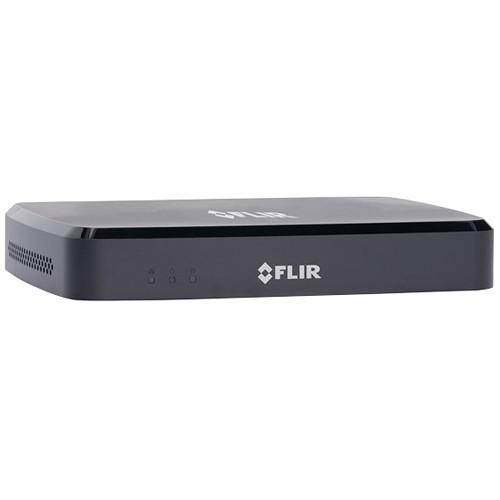
User Manual for FLIR DNR210 Series 4-Channel 8MP NVR with 1TB HDD Click to enlarge the picture
 Contents of the user manual for the FLIR DNR210 Series 4-Channel 8MP NVR
- Product category: Network Video Recorders (NVRs) FLIR
- Brand: FLIR
- Description and content of package
- Technical information and basic settings
- Frequently asked questions – FAQ
- Troubleshooting (does not switch on, does not respond, error message, what do I do if...)
- Authorized service for FLIR Network Video Recorders (NVRs)
|
User manual for the FLIR DNR210 Series 4-Channel 8MP NVR contain basic instructions
that need to be followed during installation and operation.
Before starting your appliance, the user manual should be read through carefully.
Follow all the safety instructions and warnings, and be guided by the given recommendations.
User manual is an integral part of any FLIR product,
and if it is sold or transferred, they should be handed over jointly with the product.
Following the instructions for use is an essential prerequisite for protecting
health and property during use, as well as recognition of liability on the part of the manufacturer
for possible defects should you make a warranty claim. Download an official FLIR user manual in which you will find instructions on how to install, use, maintain and service your product.
And do not forget – unsuitable use of a FLIR product will considerably shorten its lifespan!
|
Product description Manage up to 4 cameras to the DNR210 Series 4-Channel 8MP NVR with 1TB HDD from FLIR to monitor your business or home. This NVR has a recording resolution of up to 3840 x 2160, enabling you to capture detailed 4K UHD video. It comes equipped with a preinstalled 1TB HDD, which can be expanded up to 8TB HDD. The four integrated PoE inputs simplify installation. This NVR automatically discovers FLIR IP cameras on a network without programming or configuration. Additionally, this camera has both HDMI and VGA video outputs. The DNR210 series can be accessed remotely through a Windows or Mac PC, or via an iOS or Android mobile device using the free FLIR Cloud app. - Auto-discovery of FLIR IP Cameras with no programming allows for easy integration
- Pentaplex operation allows viewing, recording, playback, backup, and remote monitoring
- 4 Ethernet ports with built-in PoE and PoE+ support
- Automatic firmware upgrades over the internet & via USB device and network
- Instant backup via USB 2.0 ports
- Includes USB mouse, HDMI cable, Ethernet cable, and power adapter
UPC: 841430018490 In the Box FLIR DNR210 Series 4-Channel 8MP NVR with 1TB HDD USB Mouse HDMI Cable Ethernet Cable Power Adapter Limited 1-Year Warranty Table of Contents
|
Upload User Manual
Have you got an user manual for the FLIR DNR210 Series 4-Channel 8MP NVR with 1TB HDD in electronic form? Please send it to us and help us expand our library of instruction manuals.
Thank you, too, on behalf of other users.
To upload the product manual, we first need to check and make sure you are not a robot. After that, your "Submit Link" or "Upload File" will appear.
Technical parametersFLIR DNR2141 Specs | | | Operating System | Linux (embedded) | | Pentaplex Operation | View, record, playback, backup & remote monitoring | | Number of Channels | 4 | | | | Video In | 4 x PoE | | VGA Out | Yes | | HDMI | Yes | | Audio In | 1 x RCA line in for service only | | Audio Out | 1 x RCA line out for service only | | USB Port | 2 x USB 2.0 (back panel) | | Video Output Resolution | 4K UHD (3840 x 2160), 4 MP, 1080p (1920 x 1080), 1280 x 1024, 1280 x 720, 1024 x 768 | | PTZ Control | FLIR IP PTZ cameras only | | | | Live Display | 1, 4 | | Live Display Speed | 120 fps NTSC, 100 fps PAL | | OSD | On/off | | System Navigation | USB mouse, IR remote controller, front panel buttons | | Motion Area Setting | Fixed grid (22 x 18) | | Sensitivity Levels | 100 | | Firmware Upgrade | Automatic over the Internet & via USB device and network | | User Authority | By user group | | Time Synchronization | Auto time sync by NTP server | | | | Video Compression | H.264, H.265 | | Audio Compression | G.711 | | Recording Resolution | 720p (1280 x 720), 1080p (1920 x 1080), 4K UHD (3840 x 2160) | | Frame Rate | 140 fps at 1280 x 720, 1920 x 1080, 3 MP, 4 MP, 8 MP (4K) | | Recording Quality Control | 6 levels | | Recording Schedule | By hour, by day, by recording mode, by motion, by alarm, by channel | | Pre Recording | Max. 4 seconds | | Post Recording | Max. 5 minutes | | Reliability | Watch-Dog, auto-recovery after power failure | | Covert Video | Yes | | | | Playback Channel | 1, 4 | | Playback Speed | Variable, max 16x | | Playback Players | Backup player | | Search | By time & event | | Log Search | Up to 1000 lines for motion detected, configuration changes, connects/disconnects, and video loss | | Audio Play | Yes (audio camera required) | | | | Storage | 1 x HDD SATA | | Maximum Capacity | Up to 1 x 8 TB SATA (max) | | Backup Media | USB flash drive & HDD | | Backup File Format | DAV or ASF | | Cloud Connection | FLIR Cloud | | Supported Operating Systems | Windows, Mac OS X | | Remote Software | Client software (PC/Mac) | | Email Notification | Text with snapshot | | Supported Mobile Devices | Android, iPad, iPhone | | DDNS | Free FLIR DDNS | | System Configuration | Full setup configuration over network | | Ports | Programmable by user | | Network Protocol | HTTP, IPv4/IPv6, TCP/IP, UPNP, RTSP, UDP, SMTP, NTP, DHCP, DNS, PPPOE, DDNS, FTP, IP Filter | | Network Interface | 1 x RJ45, 10/100Base-TX | | | | Power Consumption | 10 W (no HDD installed) | | Supply Voltage | 100-240 VAC, 48 VDC, 1.5 A, 60/50 Hz | | PoE Power Output | 50 W (max 25 W per camera) across all channels | | Operating Temperature | 14 to 131°F (-10 to 55°C) | | Humidity | 10 to 90% RH | | Dimensions (W x H x D) | 8.1 x 1.8 x 8.1" (205 x 45 x 205 mm) | | Weight | 1.1 lb (0.5 kg) (no HDD) | | | | Package Weight | 4.52 lb | | Box Dimensions (LxWxH) | 14.5 x 10.65 x 3.75" |
Rating70% users recommend this product to others. And what about you?

This product has already been rated by 61 owners. Add your rating and experience with the product.
Discussion
 Ask our technicians if you have a problem with your settings,
or if anything is unclear in the user manual you have downloaded.
You can make use of our moderated discussion.
The discussion is public and helps other users of our website who may be encountering similar problems.
Ask our technicians if you have a problem with your settings,
or if anything is unclear in the user manual you have downloaded.
You can make use of our moderated discussion.
The discussion is public and helps other users of our website who may be encountering similar problems.
The discussion is empty - enter the first post
Post a new topic / query / comment:
|
|


