User Manual for Focal Clear Professional Open-Back Studio Monitor Headphones Click to enlarge the picture
 Contents of the user manual for the Focal Clear Professional Open-Back Studio Monitor
- Product category: Headphones Focal
- Brand: Focal
- Description and content of package
- Technical information and basic settings
- Frequently asked questions – FAQ
- Troubleshooting (does not switch on, does not respond, error message, what do I do if...)
- Authorized service for Focal Headphones
|
User manual for the Focal Clear Professional Open-Back Studio Monitor contain basic instructions
that need to be followed during installation and operation.
Before starting your appliance, the user manual should be read through carefully.
Follow all the safety instructions and warnings, and be guided by the given recommendations.
User manual is an integral part of any Focal product,
and if it is sold or transferred, they should be handed over jointly with the product.
Following the instructions for use is an essential prerequisite for protecting
health and property during use, as well as recognition of liability on the part of the manufacturer
for possible defects should you make a warranty claim. Download an official Focal user manual in which you will find instructions on how to install, use, maintain and service your product.
And do not forget – unsuitable use of a Focal product will considerably shorten its lifespan!
|
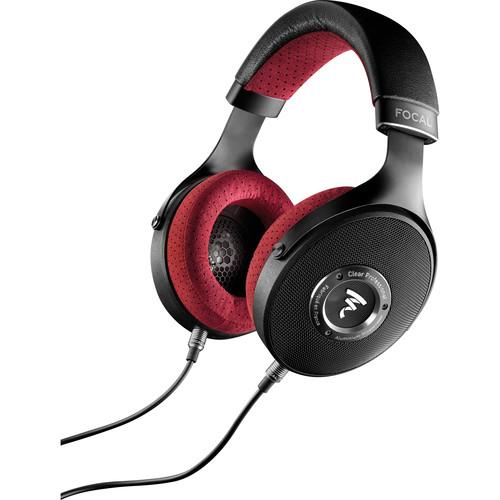
Product description NAMM 2018: Focal Introduces Shape Twin Speakers and Reference Headphones Read More The Focal Clear Professional Headphones are circumaural open-back studio monitor headphones designed to deliver comfortable and accurate reference monitoring for audiophiles, mixing and mastering engineers, and producers in home, project, and commercial studios. The low-impedance, high-sensitivity 40mm M-shaped dome drivers yield a wide frequency response of 5 Hz to 28 kHz with 0.5 dB variation. The 20mm thick memory foam ear cushions and leather and perforated microfiber headband maintain comfortable wearability without sonic interference or degradation.The two supplied OFC copper 24 AWG cables—one with a 1/4" connector and the other with a 3.5mm jack—are detachable and connect to the locking 3.5mm sockets at the base of the earcups. Two spare ear cushions are provided along with a hardshell carry case. - Enhanced Driver Design
- Clear Professional uses a new generation of Focal 40mm full-range speaker utilizing a 24.5mm diameter, 5.5mm long unsupported copper coil. This major innovation weighs just 100mg and has the effect of achieving a high magnetic field in the coil. With this, the moving parts are always under control, even at maximum capacity, providing bass articulation worthy of the best subwoofers. The proprietary 75-micron suspension combines low mass with high elongation. It contributes to exceptional impulse response with break-up raised to 24 kHz. Thus, high frequencies are extremely linear and transients totally respected.
- M-Shaped Dome
- Formed of an aluminum/magnesium alloy and designed to deliver outstanding breadth and dynamics, the M-shaped dome offers an ideal ratio, combining low mass, high rigidity, and excellent damping.
- Purpose-Built Ear Cushions
- 1mm diameter micro-perforations on the outside edge of the ear cushions give a sensation of listening in the room and not through headphones. Another benefit to this design is its extreme tolerance to ear cushion positioning, regardless of head profile and size. This degree of openness provides excellent readability of upper bass and low-mid registers, typically where headphones find their limits in comparison with monitors. At the same time, the ear cushions are designed to define a "listening room" acoustic. Here, special care was taken to the ratio between absorption and diffusion in order to offer ideal acoustics. This resulted in a specific design of the inside of the ear cushion. An open acoustic fabric over 50% of the height of the cushion generates absorption, while the perforated microfiber on the remaining 50% controls acoustic diffusion.
- Comfort
- Focal's constant curvature headband design delivers comfort regardless of listener head size. The weight of the headphones is evenly distributed over the head, support being concentrated into one or two points. The solid aluminum yoke is coated with structured black paint offering not only sleek design but also resistance to impacts and scratches. The yoke is free from the traditional vertical rotation mechanism, which has been transferred to the headband for even greater comfort. The asymmetry of the yoke's attachment points to the ear pads provides optimal clamping force distribution, thus ensuring an excellent fit, especially under the ears, to avoid any sound leakage translating as significant losses in the bass. The high-resilience memory foam used in the ear cushions ensures a perfect fit to the face. This guarantees tonal stability and extra comfort for all.
- Versatile Cabling
- Clear Professional comes with two cables so that users have the best solution for their device of choice. These OFC copper 24 AWG cables offer very low resistance and high acoustic transparency. The first cable, a 16' spiral, is terminated with a 1/4" jack for use in the studio or with a traditional audio interface or high-end headphone amplifier. The second, 3.9' in length, is fitted with a 3.5mm stereo jack connector, making it the cable of choice for use with mobile devices. It can also be directly connected to a computer headphone output, where its low 55 Ohm impedance gives it a decisive advantage. The headset is equipped with two locking 3.5mm mono jack sockets to secure the connection cable.
- Quality Control
- A dedicated production line on Focal's site in France ensures exceptional levels of precision to be achieved. When the five manufacturing stages of the speaker are complete, every transducer is tested and measured, after which they are paired. In this way, every pair of headphones has guaranteed speakers with a frequency response curve of
|
Upload User Manual
Have you got an user manual for the Focal Clear Professional Open-Back Studio Monitor Headphones in electronic form? Please send it to us and help us expand our library of instruction manuals.
Thank you, too, on behalf of other users.
To upload the product manual, we first need to check and make sure you are not a robot. After that, your "Submit Link" or "Upload File" will appear.
Technical parametersFocal FOPRO-CLEARPRO Specs | Type | Circumaural open-back headphones | | Drivers | 1.6" / 40 mm aluminum/magnesium M-shaped dome | | Frequency Range | 5 Hz to 28 kHz (
Rating100% users recommend this product to others. And what about you?

This product has already been rated by 44 owners. Add your rating and experience with the product.
Discussion
 Ask our technicians if you have a problem with your settings,
or if anything is unclear in the user manual you have downloaded.
You can make use of our moderated discussion.
The discussion is public and helps other users of our website who may be encountering similar problems.
Ask our technicians if you have a problem with your settings,
or if anything is unclear in the user manual you have downloaded.
You can make use of our moderated discussion.
The discussion is public and helps other users of our website who may be encountering similar problems.
The discussion is empty - enter the first post
Post a new topic / query / comment:
|
|
|
| Request for user manual |
You can’t find the operation manual you are looking for? Let us know and we will try to add the missing manual:
I’m looking for a manual / Request for manual
Current requests for instruction manuals:
Call Of Duty World War Two For Xbox...
controller stratus XL...
stratus XL...
smart whatch serie S11 42mm...
Allen & Heath SQ-6 manual...
|
| Discussion |
Latest contributions to the discussion:
AEW R 4100
Name: MAURICIO ANGARITA
Audio-Technica AEW-R4100 UHF Diversity Receiver for
AEW R 4100 has the mute function blocked and does not allow audio to pass. I tried several times to turn off the mute from the transmitter but it does nothing, the mute stays on. Solution?
Thank you...
Instructions for assembling the 2015 Forecast Image Master Consoles GC3-A
Name: mike elam
Forecast Consoles GC3-A ImageMaster Editing Console
Looking for instructions for assembling this console. ...
EMPTY TONER ERROR MESSAGE AFTER REPLACING TONER
Name: LINDA BAD YELLOW EYES
Brother TN223BK Standard-Yield Toner
I HAD TO CHANGE OUT ALL THREE TONERS DUE TO LEAKS IN THE YELLOW AND CYAN. AFTER I REPLACED THEM, THE MACHINE KEEPS GIVING ME AN EMPTY TONER ERROR MESSAGE. HELP!!...
PS480D 20/24 pin Switching 480W Power Supply
Name: swkargo
Logisys 480W Power Supply
This item states in can run -5vdc .It is NOT listed on the board or I beleive is r4 is missing the resitior. Any body have thid issue. Shawn
...
Help needed
Name: Ann Carter
SanDisk 1TB Extreme Portable USB 3.1
When I click the link to download the user manual for my Sandisk Extreme external hard drive, it gives me the manual for the LG Cricket. Can you please change the link so I can download the Sandisk manual and begin using this drive? Thank you....
|
|


