|
User Manual for FREEFLY MōVI Pro Handheld Bundle Click to enlarge the picture
 Contents of the user manual for the FREEFLY MōVI Pro Handheld Bundle
- Product category: See All Gimbal Stabilizers FREEFLY
- Brand: FREEFLY
- Description and content of package
- Technical information and basic settings
- Frequently asked questions – FAQ
- Troubleshooting (does not switch on, does not respond, error message, what do I do if...)
- Authorized service for FREEFLY See All Gimbal Stabilizers
|
User manual for the FREEFLY MōVI Pro Handheld Bundle contain basic instructions
that need to be followed during installation and operation.
Before starting your appliance, the user manual should be read through carefully.
Follow all the safety instructions and warnings, and be guided by the given recommendations.
User manual is an integral part of any FREEFLY product,
and if it is sold or transferred, they should be handed over jointly with the product.
Following the instructions for use is an essential prerequisite for protecting
health and property during use, as well as recognition of liability on the part of the manufacturer
for possible defects should you make a warranty claim. Download an official FREEFLY user manual in which you will find instructions on how to install, use, maintain and service your product.
And do not forget – unsuitable use of a FREEFLY product will considerably shorten its lifespan!
|
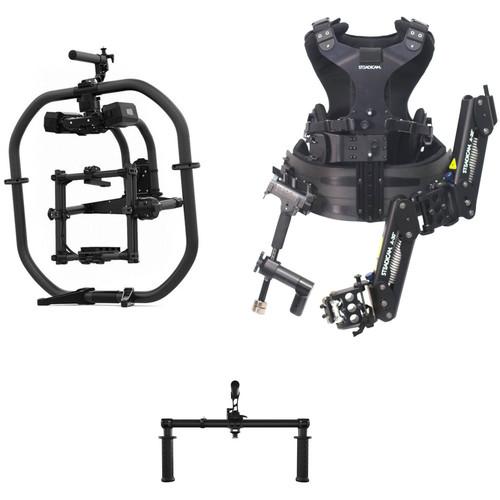
Product description Event videographers and camera operators that require stable shots can use the FREEFLY MōVI Pro Handheld Bundle from B&H to put the load on their shoulders. This kit consists of the MōVI Pro motorized gimbal stabilizer, the Classic Handle for the MōVI Pro, and the Steadicam Steadimate vest. Operating a handheld gimbal stabilizer can be physically taxing on the operator's arms, so combining the MōVI Pro with the Steadimate moves the gimbal setup's weight from the operator's arms to the shoulders and chest. The Steadimate does this without compromising the range of motion with the gimbal as well. By default, the MōVI Pro includes a Ring Pro handle. In order to mount the gimbal to the Steadimate, the Classic Handle is included. See below for more information on the items included in this kit. - FREEFLY MōVI Pro Handheld Bundle Get up and ready to shoot smooth handheld footage with FREEFLY's MōVI Pro Handheld Bundle. Consisting of the MōVI Pro motorized gimbal stabilizer, MōVI Ring Pro handle, and the MIMIC controller, this kit can perform in either single or dual-operator configurations.The MōVI Pro motorized gimbal stabilizer steadies cameras weighing up to 15 pounds, rendering it compatible with mirrorless cameras all the way up to smaller cinema cameras. With the included batteries, the camera and essential accessories can be powered without adding any bulk to the MōVI Pro. By offering a unified design, the MōVI Ring Pro lets the camera operator grip the attached MōVI Pro from nearly any angle. Since the design also goes above and below the stabilizer itself, high and low shots are easily accomplished with minimal stretching on the part of the camera operator. For dual-operator configurations, the MIMIC syncs with the MōVI Pro, allowing one operator to control the camera movements while a second operator moves the camera rig. The MIMIC has Bluetooth and 2.4 GHz radios built-in for device and accessory communication. Additional control can be achieved with the included Bush Pilot Auxiliary Control Knob. When connected to the MIMIC, the Bush Pilot can actuate focus, zoom, or iris, depending on how you have it set up.
MōVI Pro Digital 3-Axis Camera Stabilizer - Innovative structural design for ease of use, convenience, strength, and versatility
- Dual hot-swappable 22.5V 1.8Ah batteries with status indicators
- Integrated focus/iris/zoom controller
- Embedded screen for tuning/customization
- Increased motor torque over previous generation stabilizers
- D-Tap outputs for camera and accessory power
- Full stiffness and filter auto-tune in approximately 10 seconds
- Compatible with MōVI Pro applications for iOS and Android
- Dual GPS (top and bottom) for solid signal in Sky or GroundView
- Full RED RCP integration (focus, iris, ISO, start/stop, and more)
- Internal long range 2.4 GHz frequency hopping radio for connection to MIMIC
- Compatible with separately available Low Profile Handle and Classic Handle
MōVI Ring Pro - 30mm lightweight carbon fiber tubing
- Adjustable/removable handstops
- Fiber-reinforced molded plastic feet
- One-hand adjustable quick release monitor mount
MIMIC - Integrated battery with six-hour runtime
- Long-range wireless operation
- USB and Bluetooth connectivity
- Quick release and 1/4"-20 mounting options
Bush Pilot Auxiliary Control Knob - Controls focus, iris, or zoom through the MIMIC
- High-resolution encoder for precise adjustments
UPC: 742574248449 - Steadicam Steadimate 30 Support System for Motorized Gimbals Applying Steadicam's camera stabilizer experience to motorized gimbal stabilizers yields the Steadimate 30 Support System. Combining a classic arm and vest kit with the Steadimate gimbal mount allows you to mount a motorized gimbal, such as a Freefly MoVI or DJI Ronin, set up with a camera and ancillary gear weighing up to 30 pounds, and reap the benefits of linear-axis stabilization and better weight distribution. During setup, just remove one of your gimbal stabilizer's handles and replace it with the Steadimate gimbal mount, which in turn, secures to the Steadicam arm. The Steadimate incorporates a rotating joint which allows for tilt-axis manipulation while mounted. Balancing weights for fine-tuning and all necessary mounting hardware are included.
- Linear Axis Stabilization
- By themselves, 3-axis motorized gimbals can compensate for movement in the pan, tilt, and horizon axes. However, linear movement, especially vertical movement, remains unchecked. Implementing the spring-loaded isolation arm and vest from traditional Steadicam stabilizers absorbs any unwanted vertical motion brought about by walking/running or arm fatigue.
- Weight Distribution
- While the spring-loaded arm provides additional movement isolation, the vest reduces arm fatigue by distributing the weight of the gimbal setup over the operator's torso. Having the weight more evenly distributed allows for the operator to more easily accomplish long takes and complex maneuvers with fewer breaks before or after shots.
UPC: 884613031824 In the Box - MōVI Pro Handheld Bundle dyrauytx
- MōVI Pro Motorized Gimbal Stabilizer
- MōVI Ring Pro
- MIMIC
- Bush Pilot Auxiliary Control Knob
- 2 x MōVI Pro Battery Pack 1.8Ah
- 2 x MōVI Pro Battery Charger
- COM to FRX Cable
- MōVI Pro Accessory Bag
- MōVI Rod Mount Adapter
- Assembly Tools and Parts
- Limited 1-Year Warranty
- Classic Handle for MoVI Pro Gimbal
- Steadicam - Steadimate 30 Support System for Motorized Gimbals
Table of Contents
|
Upload User Manual
Have you got an user manual for the FREEFLY MōVI Pro Handheld Bundle in electronic form? Please send it to us and help us expand our library of instruction manuals.
Thank you, too, on behalf of other users.
To upload the product manual, we first need to check and make sure you are not a robot. After that, your "Submit Link" or "Upload File" will appear.
Download User ManualThe user manual for the FREEFLY MōVI Pro Handheld Bundle can be downloaded in PDF format at the link stated below.
Technical parameters - FREEFLY MōVI Pro Handheld Bundle
| Cage | Dimensions: 7.7 x 7.8 x 6.5" / 19.6 x 20 x 16.5 cm
Maximum Payload: 15 lb / 6.8 kg | | Power | 1 x 12-14 VDC, 6 A D-Tap
1 x 12 VDC, 2 A D-Tap | | Radio Frequency | 2.4 GHz Frequency-Hopping Radio | | Weight | 5.8 lb / 2.7 kg | | | | Box Dimensions (LxWxH) | 26.75 x 26.3 x 16.7" | - FREEFLY Classic Handle for MoVI Pro Gimbal
| | | Box Dimensions (LxWxH) | 22.1 x 10.7 x 3.4" | - Steadicam Steadimate 30 Support System for Motorized Gimbals
| Stabilizer Type | Vest System | | Load Capacity | 30 lb / 13.6 kg | | Counterweights | None | | | | Box Dimensions (LxWxH) | 30.0 x 24.5 x 10.5" |
Rating80% users recommend this product to others. And what about you?

This product has already been rated by 07 owners. Add your rating and experience with the product.
Discussion
 Ask our technicians if you have a problem with your settings,
or if anything is unclear in the user manual you have downloaded.
You can make use of our moderated discussion.
The discussion is public and helps other users of our website who may be encountering similar problems.
Ask our technicians if you have a problem with your settings,
or if anything is unclear in the user manual you have downloaded.
You can make use of our moderated discussion.
The discussion is public and helps other users of our website who may be encountering similar problems.
The discussion is empty - enter the first post
Post a new topic / query / comment:
|
|
|
| Request for user manual |
You can’t find the operation manual you are looking for? Let us know and we will try to add the missing manual:
I’m looking for a manual / Request for manual
Current requests for instruction manuals:
Call Of Duty World War Two For Xbox...
controller stratus XL...
stratus XL...
smart whatch serie S11 42mm...
Allen & Heath SQ-6 manual...
|
| Discussion |
Latest contributions to the discussion:
AEW R 4100
Name: MAURICIO ANGARITA
Audio-Technica AEW-R4100 UHF Diversity Receiver for
AEW R 4100 has the mute function blocked and does not allow audio to pass. I tried several times to turn off the mute from the transmitter but it does nothing, the mute stays on. Solution?
Thank you...
Instructions for assembling the 2015 Forecast Image Master Consoles GC3-A
Name: mike elam
Forecast Consoles GC3-A ImageMaster Editing Console
Looking for instructions for assembling this console. ...
EMPTY TONER ERROR MESSAGE AFTER REPLACING TONER
Name: LINDA BAD YELLOW EYES
Brother TN223BK Standard-Yield Toner
I HAD TO CHANGE OUT ALL THREE TONERS DUE TO LEAKS IN THE YELLOW AND CYAN. AFTER I REPLACED THEM, THE MACHINE KEEPS GIVING ME AN EMPTY TONER ERROR MESSAGE. HELP!!...
PS480D 20/24 pin Switching 480W Power Supply
Name: swkargo
Logisys 480W Power Supply
This item states in can run -5vdc .It is NOT listed on the board or I beleive is r4 is missing the resitior. Any body have thid issue. Shawn
...
Help needed
Name: Ann Carter
SanDisk 1TB Extreme Portable USB 3.1
When I click the link to download the user manual for my Sandisk Extreme external hard drive, it gives me the manual for the LG Cricket. Can you please change the link so I can download the Sandisk manual and begin using this drive? Thank you....
|
|



