|
User Manual for FREEFLY MōVI XL 3-Axis Motorized Gimbal Stabilizer Kit with Controller and Cable for Lens Motor Click to enlarge the picture
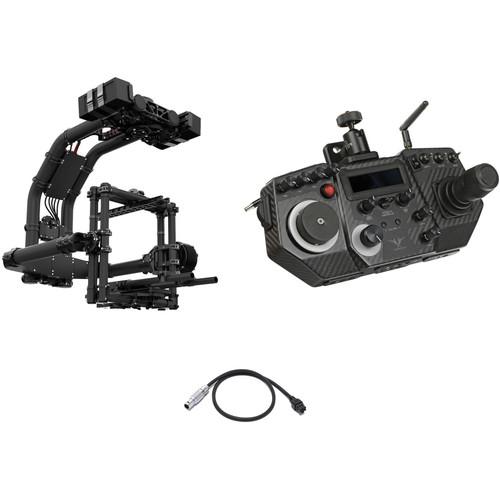 Contents of the user manual for the FREEFLY MōVI XL 3-Axis Motorized Gimbal
- Product category: See All Gimbal Stabilizers FREEFLY
- Brand: FREEFLY
- Description and content of package
- Technical information and basic settings
- Frequently asked questions – FAQ
- Troubleshooting (does not switch on, does not respond, error message, what do I do if...)
- Authorized service for FREEFLY See All Gimbal Stabilizers
|
User manual for the FREEFLY MōVI XL 3-Axis Motorized Gimbal contain basic instructions
that need to be followed during installation and operation.
Before starting your appliance, the user manual should be read through carefully.
Follow all the safety instructions and warnings, and be guided by the given recommendations.
User manual is an integral part of any FREEFLY product,
and if it is sold or transferred, they should be handed over jointly with the product.
Following the instructions for use is an essential prerequisite for protecting
health and property during use, as well as recognition of liability on the part of the manufacturer
for possible defects should you make a warranty claim. Download an official FREEFLY user manual in which you will find instructions on how to install, use, maintain and service your product.
And do not forget – unsuitable use of a FREEFLY product will considerably shorten its lifespan!
|
Product description The MōVI XL 3-Axis Motorized Gimbal Stabilizer Kit with Controller and Cable for Lens Motor is a B&H kit that has been assembled to provide you with a stabilizer suitable for jib arms or other moving supports, a controller with a range up to 600', and a lens motor control cable that powers and controls select lens motors (not included) directly from the gimbal stabilizer.
The MōVI XL supports camera packages up to 50 lb and can be mounted on a variety of supports to capture dynamic and exciting moving shots, without the visually jarring shake that all too often accompanies fast-moving footage. The MōVI controller provides you with remote control for panning and tilting the MōVI XL, so you can follow the action and create cinematic camera moves. - FREEFLY MōVI XL 3-Axis Motorized Gimbal Stabilizer The FREEFLY MōVI XL 3-Axis Motorized Gimbal Stabilizer supports cameras and accessories weighing up to 50 pounds, so it is designed to be mounted on a remote head, jib or other support gear to create smooth cinematic moving shots. It uses three motors and an IMU (inertial measurement unit) to detect and counteract unwanted movement along three axes: pan, tilt, and roll.
The FREEFLY MōVI XL is suitable for professional cinema cameras and lenses and compatible with both the Mimic and MōVI Controller systems (not included), as well as select Futaba and Spektrum transmitters. As with sled-style stabilizers, the camera should be balanced on the MōVI to ensure best performance. Once balanced, the MōVI pairs over Wi-Fi to an iOS, Android, or Windows app to finalize the configuration process. - Supported Cameras
- The MōVI XL is designed to support payloads up to 50 pounds, making it suitable for professional cinema cameras with cinema lenses.
- Remote Operation
- The MōVI XL can be operated remotely either with a dedicated controller or by using the Mimic controller (neither controller is included and must be sourced separately). The MōVI XL is compatible as well with most Spektrum and Futaba radios.
- App
- MōVI XL can be configured wirelessly via Bluetooth LE, from the MōVI XL app on a mobile device.
- Hot Swapping Batteries
- You can hot swap the batteries on the MōVI XL, but extreme care must be taken to avoid damage to the batteries, and to the operator.
- Three Control Modes
-
- Majestic Mode: For single-operator use. In this mode the gimbal provides stabilization without counteracting operator-directed camera movements. For example, you could set it in majestic to pan with a vehicle turning on streets or a jib with only one operator for example. This mode is especially useful when the MōVI XL is deployed on a moving vehicle.
- Stabilized Mode: Assumes no operator input, compensating for all movement it detects. Ideal scenarios for this mode include when the gimbal is mounted to a car or shots where the camera is moving, but the camera angle remains fixed.
- Slew Stabilized Mode: For dual-operator control. In this mode, an operator with a dedicated remote or RC transmitter controls pan, tilt, and roll independently of the support platform.
- Freefly Configurator
- The Freefly Configurator is a GUI that enables you to precisely adjust your MōVI XL via an iOS or Android device over Wi-Fi pairing.
- Silent Drive
- The motors driving the gimbal have been designed to operate as quietly as possible to ensure you will be able to record sound without picking up any unwanted noise.
- Translation Compensation
- Making hundreds of adjustments per second, the software works to counteract translation--the bobbing up and down effect while running--when tracking a moving subject moving at high speed.
- Shot Recorder
- Keeps a record of the camera position (where GPS is available), height, camera pan, tilt, and roll so that the shot can be recreated later or to help Visual Effects align the live action shot with other elements in a CG composite.
- Third-Party Mounting
- Using separately available mounting hardware, it is possible to mount the MōVI XL on cranes, jibs, ad remote heads.
- Remote Firmware Updatable
- You can upgrade the gimbal to new software features as they are released by Freefly yourself, without having to send the device in for a factory update.
- Custom Direct Drive Motors
- The MōVI XL system uses powerful motors that enable you to create smooth shots while on camera platforms moving at high speed.
- User Adjustable "Shakey Cam"
- Want an organic hand-held look? The MōVI provides variable noise filters that allow you to effectively dial in a custom amount of shake to help you achieve the effect you are after.
- Additional Features
-
- Custom designed, precisely calibrated sensors
- Fully tool-less balancing
- Second battery cage of holding a battery dedicated to powering accessories
- Handles can be switch from low to high modes with flip of a lever
- Quick release top handle
UPC: 742574248869 - FREEFLY MoVI Controller The MoVI Controller from Freefly is a professional grade remote system that allows an MoVI operator full control over pan, tilt, and roll. Compatible with the MoVI M5, M10, and M15 stabilizers, this controller uses telemetry from the MoVI and allows the user to access MoVI configuration menus to enable on-the-fly adjustment of key MoVI parameters. The MoVI controller also simplifies the remote control station by providing power for an LCD monitor and wireless video system. It is powered using a single V-Mount battery (not included), which can also power the controller, monitor, wireless video system, and additional 5 or 12 VDC accessories. An optional Follow Focus Upgrade Kit is available for use with Redrock and Hocus Products Axis1 systems. Note: Please note that firmware version 3.08 is required for the MoVI controller. UPC: 780742994507
- FREEFLY MōVI Pro / XL Lens Motor Cable (Long) The FREEFLY MōVI Pro / XL Lens Motor Cable is a lightweight flexible cable designed to handle the rigors of the production day. This 21.65" long cable enables controlling a lens control motor on your MōVI Pro / XL. UPC: 742574248746
In the Box - MōVI XL 3-Axis Motorized Gimbal Stabilizer busdxtccytfrxxstyyywfyebav
- Limited 1-Year Warranty on Gimbal Hardware (Batteries not Covered)
- MoVI Controller busdxtccytfrxxstyyywfyebav
- MōVI Pro / XL Lens Motor Cable (Long)
Table of Contents
|
Upload User Manual
Have you got an user manual for the FREEFLY MōVI XL 3-Axis Motorized Gimbal Stabilizer Kit with Controller and Cable for Lens Motor in electronic form? Please send it to us and help us expand our library of instruction manuals.
Thank you, too, on behalf of other users.
To upload the product manual, we first need to check and make sure you are not a robot. After that, your "Submit Link" or "Upload File" will appear.
Technical parameters - FREEFLY MōVI XL 3-Axis Motorized Gimbal Stabilizer
| | | Number of Axes | 3-Axis | | Load Capacity | 50 lb / 22.7 kg | | | | Ports | 1 x XT-90S (Power) Input | | Wireless Protocol | Wi-Fi (Unspecified Type) | | | | Battery Chemistry | Lithium-Ion Polymer (LiPo) | | Voltage | 9.0 to 18.0 VDC | | | | Weight | 25 lb / 11.3 kg
34 lb / 15.4 kg (with Battery) | | | | Box Dimensions (LxWxH) | 34.5 x 29.0 x 14.0" | - FREEFLY MoVI Controller
| Dimensions (W x D x H) | 11.5 x 5.5 x 5.0" (29.2 x 14.0 x 12.7 cm) | | Weight | 2.5 lb (1.1 kg) | | | | Box Dimensions (LxWxH) | 18.05 x 11.65 x 6.35" | - FREEFLY MōVI Pro / XL Lens Motor Cable (Long)
| Connectors | 1 x LEMO 1B 7-pin straight connector
1 x Molex Microfit | | Length | 21.65" / 55 cm | | | | Box Dimensions (LxWxH) | 3.8 x 3.6 x 0.4" |
Rating70% users recommend this product to others. And what about you?

This product has already been rated by 31 owners. Add your rating and experience with the product.
Discussion
 Ask our technicians if you have a problem with your settings,
or if anything is unclear in the user manual you have downloaded.
You can make use of our moderated discussion.
The discussion is public and helps other users of our website who may be encountering similar problems.
Ask our technicians if you have a problem with your settings,
or if anything is unclear in the user manual you have downloaded.
You can make use of our moderated discussion.
The discussion is public and helps other users of our website who may be encountering similar problems.
The discussion is empty - enter the first post
Post a new topic / query / comment:
|
|
|
| Request for user manual |
You can’t find the operation manual you are looking for? Let us know and we will try to add the missing manual:
I’m looking for a manual / Request for manual
Current requests for instruction manuals:
Call Of Duty World War Two For Xbox...
controller stratus XL...
stratus XL...
smart whatch serie S11 42mm...
Allen & Heath SQ-6 manual...
|
| Discussion |
Latest contributions to the discussion:
AEW R 4100
Name: MAURICIO ANGARITA
Audio-Technica AEW-R4100 UHF Diversity Receiver for
AEW R 4100 has the mute function blocked and does not allow audio to pass. I tried several times to turn off the mute from the transmitter but it does nothing, the mute stays on. Solution?
Thank you...
Instructions for assembling the 2015 Forecast Image Master Consoles GC3-A
Name: mike elam
Forecast Consoles GC3-A ImageMaster Editing Console
Looking for instructions for assembling this console. ...
EMPTY TONER ERROR MESSAGE AFTER REPLACING TONER
Name: LINDA BAD YELLOW EYES
Brother TN223BK Standard-Yield Toner
I HAD TO CHANGE OUT ALL THREE TONERS DUE TO LEAKS IN THE YELLOW AND CYAN. AFTER I REPLACED THEM, THE MACHINE KEEPS GIVING ME AN EMPTY TONER ERROR MESSAGE. HELP!!...
PS480D 20/24 pin Switching 480W Power Supply
Name: swkargo
Logisys 480W Power Supply
This item states in can run -5vdc .It is NOT listed on the board or I beleive is r4 is missing the resitior. Any body have thid issue. Shawn
...
Help needed
Name: Ann Carter
SanDisk 1TB Extreme Portable USB 3.1
When I click the link to download the user manual for my Sandisk Extreme external hard drive, it gives me the manual for the LG Cricket. Can you please change the link so I can download the Sandisk manual and begin using this drive? Thank you....
|
|


