User Manual for FUJIFILM X-T1 Mirrorless Digital Camera Body Basic Kit Click to enlarge the picture
 Contents of the user manual for the FUJIFILM X-T1 Mirrorless Digital Camera Body
- Product category: Mirrorless System Cameras FUJIFILM
- Brand: FUJIFILM
- Description and content of package
- Technical information and basic settings
- Frequently asked questions – FAQ
- Troubleshooting (does not switch on, does not respond, error message, what do I do if...)
- Authorized service for FUJIFILM Mirrorless System Cameras
|
User manual for the FUJIFILM X-T1 Mirrorless Digital Camera Body contain basic instructions
that need to be followed during installation and operation.
Before starting your appliance, the user manual should be read through carefully.
Follow all the safety instructions and warnings, and be guided by the given recommendations.
User manual is an integral part of any FUJIFILM product,
and if it is sold or transferred, they should be handed over jointly with the product.
Following the instructions for use is an essential prerequisite for protecting
health and property during use, as well as recognition of liability on the part of the manufacturer
for possible defects should you make a warranty claim. Download an official FUJIFILM user manual in which you will find instructions on how to install, use, maintain and service your product.
And do not forget – unsuitable use of a FUJIFILM product will considerably shorten its lifespan!
|
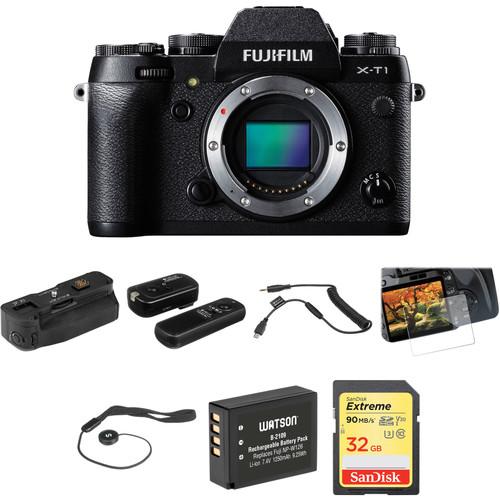
Product description Two NatGeo/Lindblad Instructors Test Fujifilm Mirrorless Camera in Asia Read More Comprising the essential components needed to begin shooting, the black Fujifilm X-T1 Mirrorless Digital Camera Body Basic Kit from bundles the versatile camera body with a battery grip, a wireless remote shutter release and compatible cable, an LCD screen protector, a lens cap holder, a spare rechargeable lithium-ion battery, and a 32GB SDHC memory card.
The X-T1 features a 16.3MP APS-C X-Trans CMOS II sensor and an EXR Processor II to produce high-resolution imagery and Full HD 1080p video with notable low-light sensitivity to an expandable ISO 51200. The EXR Processor II also contributes to a wealth of speed throughout the camera, including a continuous shooting rate of 8 fps as well as an apt Intelligent Hybrid AF system and enhanced manual focusing aids. For image monitoring, review, and menu navigation, both a 0.77x-magnification 2.36m-dot OLED electronic viewfinder and a 3.0" 1.04m-dot tilting LCD screen are available. The body design extends this versatility through the implementation of manual, physical control dials on the top plate of the camera as well as customizable buttons and a Q Menu button for expedited access to some of the most useful settings. This control scheme further enables an intuitive built-in Wi-Fi system for direct sharing of imagery to an Android or iOS mobile device for instant sharing online. - FUJIFILM X-T1 Mirrorless Digital Camera (Body Only)
- FUJIFILM X-T1 Promotional Video
The Fujifilm X-T1 Mirrorless Digital Camera features a 16.3 megapixel APS-C X-Trans CMOS II sensor and an EXR Processor II to produce high-resolution imagery with an expandable sensitivity range from ISO 100-51200 as well as a top continuous shooting rate of 8 fps. Fujifilm's proprietary X-Trans sensor uses a unique randomized pixel array in order to avoid the use of a resolution-reducing optical low-pass filter, therefore providing images with the utmost sharpness and clarity. This imaging system is benefitted by the Intelligent Hybrid AF system, which uses both contrast- and phase-detection methods to acquire focus quickly and accurately. Enhanced manual focusing capabilities are also a result of these technologies; Digital Split Image and Focus Highlight Peaking are two methods for quickly and precisely determining focus using intelligent focusing aids for improved control and optimized efficiency.
For image monitoring, review, and menu navigation, both a 2,360k-dot OLED electronic viewfinder and a 3.0" 1,040k-dot tilting LCD screen are available. The body design extends this versatility through the implementation of manual, physical control dials on the top plate of the camera as well as customizable buttons and a Q Menu button for expedited access to some of the most useful settings. This control scheme further enables an intuitive built-in Wi-Fi system for direct sharing of imagery to an Android or iOS mobile device for instant sharing online.
Full HD 1080p movie recording in multiple frame rates is possible and a 2.5mm microphone input permits the use of an optional external microphone for improved audio quality with recordings. Full-time continuous focusing is supported while taking video, also, as well as the use of Film Simulation modes. Film Simulation modes make use of Fujifilm's history of producing both negative and slide films, and allow you to apply those films' characteristics to your digital imagery to better suit your intended look. - 16.3MP APS-C X-Trans CMOS II Sensor
- A large 16.3MP APS-C CMOS image sensor is integrated into the X-T1 to provide high image quality and detail. Using Fujifilm's unique X-Trans bespoke pixel array, the sensor is designed with a randomized pixel pattern to eliminate the need of an optical low-pass filter for reducing moiré and aliasing. By removing this filter from the design, higher image sharpness is possible. Lens Modulation Optimizer (LMO) factors are also taken into account using the EXR Processor II, which helps to automatically compensate for aberrations and diffraction blur in order to produce images with the utmost inherent sharpness.
The X-Trans sensor also works to provide highly effective noise reduction and a clean signal-to-noise ratio. This enables smoother-looking imagery that becomes especially apparent when photographing in low-light situations with an expanded sensitivity range of ISO 100-51200. Additionally, a top continuous shooting rate of 8 fps is possible, for up to 47 consecutive frames, to benefit working with moving subject matter. - EXR Processor II
- Aside from benefitting low-light performance, the EXR Processor II also provides quick performance throughout the entire camera system. The camera start-up time is about 0.5 seconds, shutter lag is about 0.05 seconds, and the shooting interval time is about 0.5 seconds. A fast autofocus performance speed of 0.08 seconds is also enabled using the advanced Intelligent Hybrid AF system using both contrast- and phase-detection focusing methods.
- Intelligent Hybrid AF and Enhanced Manual Focus
- Intelligent Hybrid AF is a quick, responsive autofocus system that employs both contrast- and phase-detection methods to acquire focus quickly in a wide variety of lighting conditions and shooting situations. Clear focus can quickly be attained to aid in catching fast-paced movement more easily. Three focus modes are available (AF-S, AF-C, and M) for greater control over how the X-T1 achieves sharp focus. When working with autofocus, the AF area is divided into a 49-point matrix in order to gain clear focus of any type of subject matter. Additionally, a built-in AF assist lamp is available for aiding the focus system when photographing in low-light situations.
When working with manual focus, two additional features can be employed for enhanced critical focusing in a more controllable manner. By using the phase-detection pixels located on the imaging sensor, Digital Split Image technology is able to assist in acquiring precise focus through the implementation of four striped focusing aids; akin to a rangefinder focusing method, once these stripes have been lined up, sharp focus can be ensured. Also contributing to manual focus accuracy, Focus Peak Highlight has been integrated and enables a more objective system of focusing by way of highlighting sharp edges and lines of contrast, using one of three colors, once they are in focus. - Multi Mode Real Time Viewfinder
- An advanced electronic viewfinder has been incorporated into the X-T1's design to support clear eye-level monitoring along with a host of unique viewing features to better support a more efficient overall workflow. The Real Time Viewfinder is comprised of a 2,360k-dot OLED display and features an exceptionally high magnification of 0.77x, along with a 31° angle of view. This perspective is further complemented by the 0.005 sec. lag time, which smoothly and seamlessly renders scenes and moving subjects.
Beyond the technical aspects of the viewfinder, an adaptable graphical user interface has also been designed to increase efficiency during shooting. Four different viewing modes are available:
- FULL: This mode takes advantage of the high magnification ratio of the viewfinder and produces an image that fills the majority of the viewfinder in an unobstructed manner. Shooting information is presented at the top and bottom edges and does not interfere with the image frame itself.
- NORMAL: This mode enables you to focus on the composition at hand while still having an in-depth understanding of camera settings and shooting conditions.
- VERTICAL: When the camera is held in a vertical orientation, the information display automatically rotates so it is facing upright for easier reading of camera settings. When working in this mode, images can also be reviewed in the vertical orientation.
- DUAL: Serving to benefit those working with manual focus, this mode presents a split screen view of the scene where you see both a regular view as well as the Focus Assist View (Focus Highlight Peaking and Digital Split Image) at the same time, allowing you to concentrate on the image composition as well as critical focus accuracy.
In addition to the four viewing modes, the shooting information displayed within the viewfinder can also be customized to suit one's needs. 19 different settings can be toggled on or off depending on preference. - Classic Camera Design
- Featuring a body design reminiscent of SLR film cameras, the X-T1 exhibits a meshing of both analog exposure controls along with intelligent automated technologies. The clean and functional body design incorporates physical shutter speed, ISO, drive mode, AF mode, and +/- 3 EV exposure compensation double-deck precision-milled aluminum alloy dials that pair well with the manual aperture rings found on many of the XF lenses for intuitive exposure setting selection. Depending on individual needs, six customizable buttons, dual command dials, and an easily-accessible Q Menu provide an efficient solution for modifying some of the most frequently used camera settings, such as ISO, white balance, and file settings. For more extensive menu navigation, as well as live view monitoring and image review, a 3.0" 1,040k-dot LCD monitor is available and features a tilting design to better support working from high and low angles.
Furthermore, the magnesium alloy body also features approximately 80 points of weather sealing to protect itself from dust and moisture, as well as temperatures as low as 14°F, for confident use in trying conditions. - Full HD Movie Recording
- Full HD 1080p video recording is supported up to 60 fps, with other frame rates and formats also available. Full-time AF tracking is available during recording with subject tracking capabilities for ensured sharpness when either the subject is moving or if the camera is moving, panning, or zooming. +/- 2 EV exposure compensation is available during recording as well as the use of Film Simulation settings.
An HDMI port enables high definition playback of movies to an HDTV and the inclusion of a 2.5mm input supports the use of an optional external microphone for enhanced sound quality. - Built-In Wi-Fi Connectivity
- Wireless connectivity is built into the camera and allows for instant sharing of images directly to an Android or iOS mobile device. The Fujifilm Camera Remote app allows you to browse the image contents of your camera from your mobile device and transfer both videos and photos, and the entire sharing process is further expedited by simply pressing and holding the dedicated Wi-Fi button to begin transferring immediately. Remote camera control and monitoring is also supported through the use of the app, which enables Touch AF, shutter release, exposure settings adjustment, Film Simulation modes, white balance modes, macro, timer, and flash controls to all be adjusted from the linked mobile device. Location data can also be embedded into image file's metadata for geotagging.
- Film Simulation Mode and Advanced Filters
- Taking advantage of Fujifilm's vast history in traditional film-based photography, the X-T1 integrates several Film Simulation modes to mimic the look and feel of some Fujifilm's classic film types. Pulling from their line of transparency films, PROVIA offers natural-looking tones for everyday shooting, VELVIA produces a more dramatic and rich tonality with deeper color saturation, and ASTIA gives less contrast for a softer depiction of skin tones. Mimicking their negative films, PRO Neg. Std. gives smooth image tones that are suitable for accurate color renditions, while PRO Neg. Hi produces a more dramatic feel with the ability to draw color out of a variety of lighting conditions. In addition to the colorful benefits of these Film Simulation modes, there are also monochrome modes that simulate the look of traditional yellow, green, and red black and white contrast filters. A sepia mode is also available for producing an inherently nostalgic look.
Eight Advanced Filters are also available to creatively enhance the look of imagery, and include: High Key, Low Key, Soft Focus, Toy Camera, Miniature, Pop Color, Dynamic Tone, and Partial Color (Red, Orange, Yellow, Green, Blue, Purple). - Other Camera Features
-
- An in-camera RAW converter lets you record your images in 14-bit RAW and process them prior to computer-based editing procedures. This process enables you to modify the exposure, white balance, and other controls directly through the menu interface. Additionally, for more thorough processing of files, RAW File Converter software is included for RAW image processing on your computer.
- Interval shooting is possible with intervals of 1 second to 24 hours for up to 999 frames.
- Compatible with UHS-II memory cards for fast transfer speeds during shooting.
- Multiple exposure mode gives you the ability to overlay imagery in-camera. When working in this mode, subsequent exposures can be paired and the final appearance can be previewed on the LCD or in the EVF before making the final exposure.
- Motion panorama mode allows you to record expansive views up to 360° wide in a seamless, sweeping manner.
- The included EF-X8 shoe-mount flash has a guide number of 26.2' at ISO 100 and provides additional illumination to imagery for photographing in dark conditions. A sync terminal is also available for use of additional optional external flashes.
- Four different auto bracketing modes are available: Dynamic Range, Film Simulation, AE, and ISO Sensitivity.
- The included NP-W126 battery enables approximately 350 frames to be recorded per charge.
UPC: 074101024531 Vello BG-F1 Battery Grip for Fujifilm X-T1 - FUJIFILM X-T1 Promotional Video
The Battery Grip from Vello is made exclusively for the Fujifilm X-T1 mirrorless digital camera. It holds one NP-W126 lithium-ion battery, effectively doubling your shooting time, and provides a comfortable grip when shooting in portrait orientation.
The grip has an alternate shutter release button to facilitate shooting when held vertically with a lock to prevent accidental release. In addition, the grip has extra AE-L, AF-L, and FA buttons, as well as front and rear command dials. It is designed with an anti-slip rubber grip and firm curvature to further improve handling. A tripod socket is included as is a holder for the camera's contact cover. UPC: 847628589575 Vello FreeWave Plus Wireless Remote Shutter Release for Canon - FUJIFILM X-T1 Promotional Video
Trigger your camera's shutter wirelessly with the FreeWave Plus Wireless Remote Shutter Release from Vello, a lightweight remote control system that will help you avoid unwanted camera movement. This 2.4 GHz model is compatible with Canon cameras and will work both wired and wirelessly up to 320', depending on your own needs and setup. This makes it useful for photographing wildlife or for macro and long exposures where it is necessary to eliminate any chance of camera shake.
The FreeWave system also has access to 16 channels for triggering multiple receivers and has an internal antenna that will be protected from any accidental damage. Multiple features are available for shooting, such as a four-second delay as well as multi-exposure and long exposure modes. The device also has a dual function release, enabling focus on half press and triggering the shutter release on a full press. Additionally, it has LED indicators to confirm pre-focus and exposure while in wireless mode and the receiver and transmitter each run on two AAA batteries. - Compatible Cameras
- Canon EOS: 1DX Mark II, 1D X, 1D C, 1Ds Mark III, 1Ds Mark II, 1Ds, 1D Mark IV, 1D Mark III, 1D Mark II N, 1D Mark II, 1D, 5DS R, 5DS, 5D Mark IV, 5D Mark III, 5D Mark II, 5D, 6D Mark II, 6D, 50D, 40D, 30D, 20D, 10D 7D Mark II, 7D, 80D, 70D, 60D, 77D (9000D), T7i (800D), T7 (2000D), T6s (760D), T6i (750D), T6 (1300D), T5i (700D), T5 (1200D), T4i (650D), T3i (600D), T3 (1100D), T2i (550D), T1i (500D), XSi (450D), XTi (400D), XT (350D), XS (1000D), Digital Rebel (300D), SL2 (200D), SL1 (100D), and Elan series
EOS R, RP, M6, M5
PowerShot: G1 X Mark III, G1 X Mark II, G1 X, G5 X, G3 X, G16, G15, G12, G11, G10, SX70 HS, SX60 HS, SX50HS
Contax: N and 645
Fujifilm: X-T3, X-T1, X-T30, X-E2, X-E1, X100T, X30
Hasselblad: H series
Olympus: OM-D E-M1 Mark II
Pentax: K10D, K20D, K100D, K110D, K200D, K-3, K-5, K-5 II, K-7, K30, K-50, K-500, *istDS, DS2, DS, DL2, DL, and D
Samsung: NX10 & NX100; GX-1S, GX-1L, GX-10 & GX-20
Sigma: SD1, SD9, SD10, SD14 & SD15 UPC: 847628029507 Vello 2.5mm Remote Shutter Release Cable for Select Fujifilm Cameras - FUJIFILM X-T1 Promotional Video
This Vello 2.5mm Remote Shutter Release Cable is a coiled cable for connecting a Vello remote shutter release receiver or other remote receiver with a 2.5mm jack to select Fujifilm cameras. - Compatibility
- Fujifilm X-H1, X-PRO2, X-T2, X-T1, X-T20, XT10, X-T100, X-E3, X-E2s, X-E2, X-A5, X-A3, X-A10, X-A2, X-M1, X-100F, X-100T, X70, X30, XF10
UPC: 847628588196 Vello LCD Screen Protector Ultra for Fujifilm X-A3, X-A5, X-T1 & X-T2 Camera - FUJIFILM X-T1 Promotional Video
This LCD Screen Protector Ultra from Vello is a sheet of ultra-thin (0.02") optical glass used to safeguard the LCD monitor of the Fujifilm X-A3, X-A5, X-T1 & X-T2. It easily adheres to the screen via static, without trapping air bubbles, and if removed, won't leave a sticky residue behind. Multiple layers of protective material shield your display from dirt, scratches, sweat, smears, and light impact. The shatter-proof glass blocks UV rays while allowing visible light in. It can be easily cleaned using the supplied microfiber cloth and wet wipe. - Camera Compatibility
-
Fujifilm: - X-A3
- X-A5
- X-T1
- X-T2
UPC: 847628586949 Sensei Cap Keeper Plus Lens Cap Holder - FUJIFILM X-T1 Promotional Video
The Cap Keeper Plus Lens Cap Holder from Sensei prevents the loss of lens caps. An adhesive-backed disc secures the lens cap to the elastic leash which wraps around the lens barrel. With the lens cap removed from the lens while shooting, it hangs out of the way but secure and within reach for easy retrieval. The Cap Keeper Plus is made with tough and extremely secure elastic. UPC: 847628553064 Watson NP-W126 Lithium-Ion Battery Pack (7.4V, 1250mAh) - FUJIFILM X-T1 Promotional Video
The Watson NP-W126 Lithium-Ion Battery Pack works with the same cameras as the Fujifilm NP-W126. This replacement battery pack features a capacity of 1250mAh, 7.4V of output power and 9.25 watt-hours. Small and lightweight, lithium-ion batteries can be charged or discharged at any time without developing memory effect. - Compatible Cameras
-
Mirrorless:- X-A3
- X-E1
- X-Pro 1
- X-T2
- X-T3
- X-T20
- X-T30
FinePix:- HS30EXR
- HS35EXR
- HS50EXR
UPC: 847628560772 SanDisk 32GB Extreme UHS-I SDHC Memory Card - FUJIFILM X-T1 Promotional Video
Built to meet the demands of photographers and passionate shutterbugs who are using advanced cameras and HD camcorders, the 32GB Extreme UHS-I SDHC Memory Card from SanDisk allows users to take advantage of functions such as fast action shots, continuous burst mode, and multiple frames per second. It features a capacity of 32GB, is compatible with the UHS-I bus, and delivers maximum read speeds of up to 90 MB/s and maximum write speeds of up to 40 MB/s. This Extreme UHS-I SDHC card supports the V30 speed class, which guarantees minimum write speeds of 30 MB/s. If your device does not support the V30 speed class, this card also supports the U3 speed class, which likewise guarantees minimum write speeds of 30 MB/s. If your device only supports the Class 10 standard, minimum write speeds are guaranteed not to drop below 10 MB/s.
Built for extreme conditions, SanDisk's 32GB Extreme UHS-I SDHC Memory Card is water, shock, and x-ray proof, while also being able to withstand temperatures from -13 to 185°F, allowing for use in environments such as snow and deserts. A built-in write protect switch further helps to safeguard your content, while advanced Error Correction Code engine offers improved data integrity and card reliability during read and write operations. Downloadable RescuePRO data recovery software helps you restore accidentally deleted images. The card also has a writable label on its surface and the included jewel case makes for easy storage and organization. This card is backed by a limited lifetime warranty. General Features - Faster Performance and Downloads
- With write speeds up to 40 MB/s, this card unleashes the full shooting potential of your advanced camera or DSLR. Take advantage of advanced functions such as fast action shots, continuous burst mode, and multiple frames per second. Photos are written to your card almost instantly so you'll get your best shot, and you'll save time moving it all from your camera to your computer.
- Capacity for High-Resolution Photos and Videos
- With a capacity of 32GB to capture it all, this SanDisk Extreme UHS-I Card offers enough room for thousands of high-resolution photos. The card can accommodate high-volume image formats, such as RAW and JPEG, and also provides plenty of room for Full HD videos.
- 4K and Full HD Video Recording
- With Class 10, UHS Speed Class 3 (U3), and V30 video ratings, you'll be ready to capture 4K Ultra HD, cinema quality 3D, and Full HD video (1080p), which require more performance than ordinary cards can handle. This memory card's accelerated minimum sustained write speeds help ensure that video data isn't lost during recording, by reducing dropouts and stuttering.
- Error Correction for Enhanced Relability
- Thanks to its Advanced Error Correction Code engine, this SanDisk Extreme UHS-I SDHC card helps reduce the chance for errors during data storage and retrieval. It prevents potential data corruption, providing high data integrity.
- Fast Transfer Speeds Reduce Upload Times
- SanDisk Extreme UHS-I SDHC cards boast a read speed of up to 90 MB/s, so you can transfer photos and videos to your computer quickly. You'll spend less time uploading photos and more time editing, storing, and sharing.
- Durable Design
- Designed and tested to withstand the tough conditions, this card has a capacity of 32GB and is waterproof, shockproof, and X-ray proof. It can operate in temperatures ranging from -13 to 185°F, so you can work in almost any climate.
- RescuePRO Software
- SanDisk RescuePRO and RescuePRO Deluxe software are file and data recovery products for recovering deleted files from all types of digital media.
UPC: 619659147037 In the Box - X-T1 Mirrorless Digital Camera (Body Only) wvzsdrdzzzqwwyxzszzuzzzsvtyubxc
- NP-W126 Li-Ion Battery Pack
- BC-W126 Battery Charger
- EF-X8 Shoe-Mount Flash Unit
- Shoulder Strap
- Body Cap
- Metal Strap Clip
- Protective Cover
- Clip Attaching Tool
- Hot Shoe Cover
- Tall-Oriented Battery Grip Connector Cover
- Sync Terminal Cover
- Software CD-ROM
- Limited 1-Year Warranty
- Vello - BG-F1 Battery Grip for Fujifilm X-T1
- Vello - FreeWave Plus Wireless Remote Shutter Release for Canon
- Vello - 2.5mm Remote Shutter Release Cable for Select Fujifilm Cameras
- Vello - LCD Screen Protector Ultra for Fujifilm X-A3, X-A5, X-T1 & X-T2 Camera
- Sensei - Cap Keeper Plus Lens Cap Holder
- Watson - NP-W126 Lithium-Ion Battery Pack (7.4V, 1250mAh)
- SanDisk - 32GB Extreme UHS-I SDHC Memory Card
10 Recommended Cameras for Sports, Wildlife, and Action Photography Elizabeth Groeschen 02/18/2016 More from Manufacturer Table of Contents
|
Upload User Manual
Have you got an user manual for the FUJIFILM X-T1 Mirrorless Digital Camera Body Basic Kit in electronic form? Please send it to us and help us expand our library of instruction manuals.
Thank you, too, on behalf of other users.
To upload the product manual, we first need to check and make sure you are not a robot. After that, your "Submit Link" or "Upload File" will appear.
Technical parameters - FUJIFILM X-T1 Mirrorless Digital Camera (Body Only)
| | | Lens Mount | FUJIFILM X | | Camera Format | APS-C (1.5x Crop Factor) | | Pixels | Actual: 16.7 Megapixel
Effective: 16.3 Megapixel | | Maximum Resolution | 4896 x 3264 | | Aspect Ratio | 3:2 | | Sensor Type | CMOS | | Sensor Size | 23.6 x 15.6 mm | | Image File Format | JPEG, RAW | | Image Stabilization | None | | | | ISO Sensitivity | Auto, 200 to 6400 (Extended: 100 to 51200) | | Shutter Speed | Electronic Front Curtain Shutter
1/4000 to 30 Seconds
1/4000 to 1/4 Second in Program Mode
0 to 60 Minutes in Bulb Mode
1/2 to 30 Seconds in Time Mode | | Metering Method | Average, Multi-Zone, Spot | | Exposure Modes | Aperture Priority, Manual, Shutter Priority | | Exposure Compensation | -3 to +3 EV (1/3 EV Steps) | | White Balance | Automatic Scene Recognition, Color Temperature, Custom, Fine, Fluorescent (Cool White), Fluorescent (Daylight), Fluorescent (Warm White), Incandescent, Shade, Underwater | | Continuous Shooting | Up to 8 fps at 16.3 MP for up to 47 Exposures (JPEG Format) | | Interval Recording | Yes | | Self Timer | 2/10-Second Delay | | | | Recording Modes | MOV
Full HD (1920 x 1080) at 24p/25p/29.97p/50p/59.94p
HD (1280 x 720) at 24p/25p/29.97p/50p/59.94p | | Recording Limit | Up to 27 Minutes | | Audio Recording | Built-In Microphone (Stereo)
External Microphone Input | | Audio File Format | Linear PCM (Stereo) | | | | Focus Type | Auto and Manual Focus | | Focus Mode | Continuous-Servo AF (C), Manual Focus (M), Single-Servo AF (S) | | Autofocus Points | Contrast Detection: 49 | | | | Viewfinder Type | Electronic | | Viewfinder Size | 0.5" | | Viewfinder Resolution | 2,360,000 Dot | | Viewfinder Eye Point | 23 mm | | Viewfinder Coverage | 100% | | Viewfinder Magnification | Approx. 0.77x | | Diopter Adjustment | -4 to +2 m | | Monitor Size | 3" | | Monitor Resolution | 1,040,000 Dot | | Monitor Type | Tilting LCD | | | | Built-in Flash | None | | Flash Modes | Auto, Auto/Red-Eye Reduction, Commander, Commander/Red-Eye Reduction, Forced On, Forced On/Red-Eye Reduction, Rear Curtain Sync/Red-Eye Reduction, Rear Sync, Slow Sync, Slow Sync/Red-Eye Reduction, Suppressed Flash | | Maximum Sync Speed | 1/180 Second | | Dedicated Flash System | TTL | | External Flash Connection | Hot Shoe, PC Terminal | | | | Memory Card Slot | 1 x SD/SDHC/SDXC | | Connectivity | 2.5mm Sub-Mini, HDMI C (Mini), USB 2.0, X-Sync Socket | | Wireless | Wi-Fi | | GPS | None | | | | Battery | 1 x NP-W126 Rechargeable Lithium-Ion Battery Pack, 7.2 VDC, 1260 mAh | | Dimensions (W x H x D) | 5.1 x 3.5 x 1.3" / 129.5 x 88.9 x 33.4 mm (Excluding Protrusions) | | Weight | 15.52 oz / 439.99 g (Body with Battery and Memory) | | | | Box Dimensions (LxWxH) | 8.9 x 7.9 x 4.1" | - Vello BG-F1 Battery Grip for Fujifilm X-T1
| Battery Type | 1 x Battery Pack (NP-W126) | | Tripod Mounting Thread | 1/4"-20 Female | | Operating Temperature | 32 to 104°F / 0 to 40°C | | Dimensions (L x W x H) | 5.0 x 1.9 x 1.5" / 12.7 x 4.8 x 3.8 cm | | Weight | 5.6 oz / 158.7 g | | | | Box Dimensions (LxWxH) | 6.2 x 3.2 x 2.9" | - Vello FreeWave Plus Wireless Remote Shutter Release for Canon
| Release Type | Wireless: RF (Radio Frequency) | | Camera Connection | Canon 2.5mm Sub-mini, Canon 3-pin (N3) | | Channels | 16 | | Wireless Frequency | 2.4 GHz | | Interval Timer/Programmable | No | | Live View | No | | Mobile Device/App-enabled | No | | Shutter Modes | Bulb, Continuous, Single Shot, 4-Second Delay, 1-Second Continuous | | Wireless Range | 328' / 100 m | | Receiver Power Source | Battery | | Receiver Battery Requirements | 2 x AAA | | Transmitter Power Source | Battery | | Transmitter Battery Requirements | 2 x AAA | | | | Box Dimensions (LxWxH) | 8.5 x 3.9 x 1.5" | - Vello 2.5mm Remote Shutter Release Cable for Select Fujifilm Cameras
| Length | Coiled: Approximately 16" / 40.6 cm
Stretched: Approximately 36" / 91.4 cm | | Connections | 2.5 mm jack to select Fujifilm cameras | | | | Box Dimensions (LxWxH) | 5.0 x 3.0 x 0.4" | - Vello LCD Screen Protector Ultra for Fujifilm X-A3, X-A5, X-T1 & X-T2 Camera
| Material | Glass | | Thickness | 19.69 mil / 0.5 mm | | | | Box Dimensions (LxWxH) | 3.9 x 3.8 x 0.9" | - Sensei Cap Keeper Plus Lens Cap Holder
| | | Box Dimensions (LxWxH) | 4.0 x 2.5 x 0.01" | - Watson NP-W126 Lithium-Ion Battery Pack (7.4V, 1250mAh)
| | | Capacity (Wh) | 9.25 Wh | | Amp-Hours | 1250 mAh | | Chemistry | Lithium-Ion | | Output Voltage | 7.4 VDC | | Dimensions (W x H x D) | 1.9 x 1.4 x 0.6" / 4.7 x 3.6 x 1.5 cm | | Weight | 1.8 oz / 51 g | | | | Box Dimensions (LxWxH) | 5.4 x 3.1 x 1.0" | - SanDisk 32GB Extreme UHS-I SDHC Memory Card
| Card Type | SDHC | | Storage Capacity | 32 GB | | Bus Type | UHS-I | | Speed Class | 10 | | UHS Speed Class | U3 | | Video Speed Class | V30 | | Bus Interface Speed | UHS Class I | | Data Transfer | Read Speed: 90 MB/s Maximum (Burst)
Write Speed: 40 MB/s Maximum (Burst)
Write Speed: 30 MB/s Minimum | | Durability | Shockproof, Temperature Extremes, Waterproof, X-Ray Proof | | Operating Temperature | -13 to 185°F/ -25 to 85°C | | Storage Temperature | -40 to 185°F/ -40 to 85°C | | Error Correction | Yes | | Built-in Write-Protect Switch | Yes | | | | Box Dimensions (LxWxH) | 4.5 x 4.0 x 0.1" |
Rating100% users recommend this product to others. And what about you?

This product has already been rated by 54 owners. Add your rating and experience with the product.
Discussion
 Ask our technicians if you have a problem with your settings,
or if anything is unclear in the user manual you have downloaded.
You can make use of our moderated discussion.
The discussion is public and helps other users of our website who may be encountering similar problems.
Ask our technicians if you have a problem with your settings,
or if anything is unclear in the user manual you have downloaded.
You can make use of our moderated discussion.
The discussion is public and helps other users of our website who may be encountering similar problems.
The discussion is empty - enter the first post
Post a new topic / query / comment:
|
|


