User Manual for GARRITAN Harps - Virtual Instrument Click to enlarge the picture
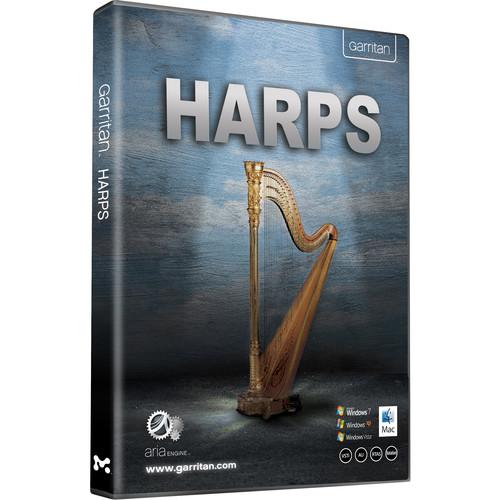 Contents of the user manual for the GARRITAN Harps - Virtual Instrument
- Product category: Virtual Instruments GARRITAN
- Brand: GARRITAN
- Description and content of package
- Technical information and basic settings
- Frequently asked questions – FAQ
- Troubleshooting (does not switch on, does not respond, error message, what do I do if...)
- Authorized service for GARRITAN Virtual Instruments
|
User manual for the GARRITAN Harps - Virtual Instrument contain basic instructions
that need to be followed during installation and operation.
Before starting your appliance, the user manual should be read through carefully.
Follow all the safety instructions and warnings, and be guided by the given recommendations.
User manual is an integral part of any GARRITAN product,
and if it is sold or transferred, they should be handed over jointly with the product.
Following the instructions for use is an essential prerequisite for protecting
health and property during use, as well as recognition of liability on the part of the manufacturer
for possible defects should you make a warranty claim. Download an official GARRITAN user manual in which you will find instructions on how to install, use, maintain and service your product.
And do not forget – unsuitable use of a GARRITAN product will considerably shorten its lifespan!
|
Product description Harps from Garritan features harps from three different manufacturers including Salvi Pedal, Venus Concert Grand, and Lyon & Healy, and utilizes recordings of each note while providing a full range of harp articulations. New technologies deliver advanced glissando emulation, sampled acoustic spaces, and much more. The sampled sound library integrates the high-performance ARIA Player. - Harps from Salvi Pedal, Venus Concert Grand, and Lyon & Heal
- Each string sampled for the entire life of its natural decay
- Minimum crosstalk between strings
- Full range of harp articulations
- Traditional angelic-sounding harp plucks (gentle, soft, medium, and loud)
- Special effects include harmonics, Pres de la table, and damping
- Perform chords, arpeggios, trills, tremolos, and bisbigliando
- Built-in keymapping emulates the pedals of a harp allowing for the real time playing of realistic harp glissandi and arpeggios, customized to your music
- Wide variety of preset glisses are provided so you do not have to individually set each pedal and are organized by the tonic note of the scale or chord
- Glisses are easily played by running a finger up and down the keyboard
- Six special scale presets (blues, enigmatic, Hungarian major, Persian, Romanian, unrealistic) and four whole tone scales
- Instrument Versions
-
- Salvi Pedal Harp 1 - keyswitch, sustain, picked, harmonics, pres de la table, damped
- Salvi Pedal Harp 2 - keyswitch, sustain, picked, harmonics, pres de la table, damped
- Venus Concert Grand 1 - keyswitch, sustain, picked, harmonics, pres de la table, damped
- Venus Concert Grand 2 - keyswitch, sustain, picked, harmonics, pres de la table, damped
- Lyon & Healy Harp - keyswitch, sustain, picked, harmonics
- Salvi Gliss Harp 1 - sustain, picked, pres de la table
- Salvi Gliss Harp 2 - sustain, pres de la table
- Venus Gliss Harp 1 - sustain
- Venus Gliss Harp 2 - sustain
- Lyon & Healy Gliss Harp 1 - sustain
Table of Contents
|
Upload User Manual
Have you got an user manual for the GARRITAN Harps - Virtual Instrument in electronic form? Please send it to us and help us expand our library of instruction manuals.
Thank you, too, on behalf of other users.
To upload the product manual, we first need to check and make sure you are not a robot. After that, your "Submit Link" or "Upload File" will appear.
Technical parametersGARRITAN 13-GHPDCO Specs | Mac System Requirements | OS X 10.6 through 10.9
Intel CPU (PowerPC not supported)
2 GB RAM recommended (there is a direct correlation between the amount of available RAM and the number of sounds that can be loaded)
4 GB free hard drive space
Hard drive speed of at least 7200 RPM recommended
Monitor with 1024 × 768 resolution or higher
Core Audio compatible sound card
Internet connection for download, updates and online registration | | Windows System Requirements | Windows XP SP3, Vista, Windows 7, Windows 8
Core 2 Duo CPU or later recommended
2 GB RAM recommended (there is a direct correlation between the amount of available RAM and the number of sounds that can be loaded)
4 GB free hard drive space
Hard drive speed of at least 7200 RPM recommended
Monitor with 1024 × 768 resolution or higher
ASIO compatible sound card
Internet connection for download, updates and online registration | | Recommended Requirements | MIDI interface may be required if using a MIDI keyboard (many keyboards now use USB)
Volume pedal and the ability to assign controllers within your keyboard, music program, or sequencer is recommended
High-quality speakers and amplifier, or high-quality headphones |
Rating100% users recommend this product to others. And what about you?

This product has already been rated by 74 owners. Add your rating and experience with the product.
Discussion
 Ask our technicians if you have a problem with your settings,
or if anything is unclear in the user manual you have downloaded.
You can make use of our moderated discussion.
The discussion is public and helps other users of our website who may be encountering similar problems.
Ask our technicians if you have a problem with your settings,
or if anything is unclear in the user manual you have downloaded.
You can make use of our moderated discussion.
The discussion is public and helps other users of our website who may be encountering similar problems.
The discussion is empty - enter the first post
Post a new topic / query / comment:
|
|


