User Manual for Gefen DVI KVM HDBaseT 2.0 Extender with USB & RS-232 Click to enlarge the picture
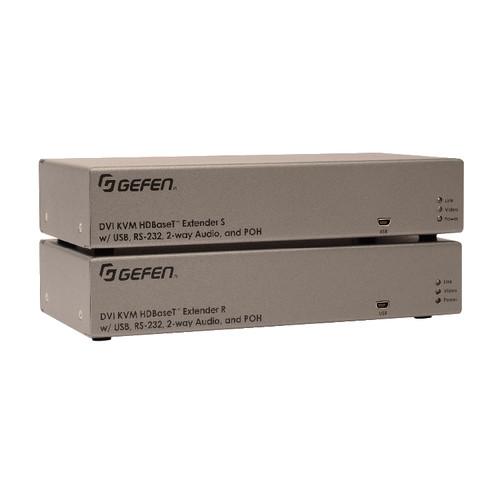 Contents of the user manual for the Gefen DVI KVM HDBaseT 2.0 Extender
- Product category: KVM Extenders Gefen
- Brand: Gefen
- Description and content of package
- Technical information and basic settings
- Frequently asked questions – FAQ
- Troubleshooting (does not switch on, does not respond, error message, what do I do if...)
- Authorized service for Gefen KVM Extenders
 |
User manual for the Gefen DVI KVM HDBaseT 2.0 Extender contain basic instructions
that need to be followed during installation and operation.
Before starting your appliance, the user manual should be read through carefully.
Follow all the safety instructions and warnings, and be guided by the given recommendations.
User manual is an integral part of any Gefen product,
and if it is sold or transferred, they should be handed over jointly with the product.
Following the instructions for use is an essential prerequisite for protecting
health and property during use, as well as recognition of liability on the part of the manufacturer
for possible defects should you make a warranty claim. Download an official Gefen user manual in which you will find instructions on how to install, use, maintain and service your product.
And do not forget – unsuitable use of a Gefen product will considerably shorten its lifespan!
|
Product description The Gefen DVI KVM HDBaseT 2.0 Extender uses the HDBaseT 2.0 technology to extend DVI over a single Cat 5e cable, up to 495'. The HDBaseT 2.0 Colligo platform provides additional features such as USB, two-way audio extension, and ensures an even more robust and resilient connection than the industry standard HDBaseT. Resolutions up to 1080p and 1920 x 1200 (WUXGA), HDMI resolutions up to 4K DCI-Cinema (4096 x 2160 @ 30 Hz 4:4:4) and 4K Ultra HD (3840 x 2160 @ 60 Hz 4:2:0), along with 7.1 channels of LPCM and HBR (High Bit Rate) lossless digital audio, are supported when using Gefen DVI to HDMI cables.Supported HBR formats include Dolby Atmos, Dolby TrueHD, DTS:X, and DTS-HD Master Audio. USB, RS-232, and two-way L/R analog audio can be extended between the Sender and the Receiver to accommodate a complete workstation including keyboard, mouse, select USB peripherals, microphone, headphones, and powered speakers. POH (Power over HDBaseT) technology provides power from the Receiver to the Sender unit, using the same Cat 5 cable that extends the DVI, audio, and control signals. Only the Receiver unit needs an external power supply. The POH standard ensures compatibility with other POH class-compliant devices.The Gefen Syner-G software, with its powerful EDID management capabilities, speeds up configuration, performs real-time performance audits via Link Monitoring, and simplifies in-field firmware updates. - Extends DVI, USB, RS-232, and two-way audio over a single Cat 5e
- 1080p Full HD (1920 x 1080, 60 Hz, 4:4:4, 12-bit), up to 330'
- 1080p Full HD (1920 x 1080, 60 Hz, 4:4:4, 8-bit), up to 495'
- WUXGA (1920 x 1200, 60 Hz, 8-bit), up to 495'
- Extends HDMI, USB, RS-232, and two-way audio over a single Cat 5e
- 4K Ultra HD (3840 x 2160, 60 Hz, 4:2:0, 8-bit), up to 330'
- 4K Ultra HD (3840 x 2160, 30 Hz, 4:4:4, 8-bit), up to 330'
- 4K DCI-Cinema (4096 x 2160, 30 Hz 4:4:4, 8-bit), up to 330'
- 1080p Full HD (1920 x 1080, 60 Hz, 4:4:4, 12-bit), up to 330'
- 1080p Full HD (1920 x 1080, 60 Hz, 4:4:4, 8-bit), up to 495'
- WUXGA (1920 x 1200, 60 Hz, 8-bit), up to 495'
- HDMI 2.0 up to 4K 60 Hz, 4:2:0, 8-bit color
- LPCM 7.1 audio, Dolby Atmos, Dolby TrueHD, DTS:X, and DTS-HD Master Audio pass-through
- Lip sync, CEC, and 3DTV pass-through
- Analog L/R stereo audio extension from sender to receiver and from receiver to sender
- Receiver audio input accommodates a microphone or a line level audio source
- POH (Power over HDBaseT) feature provides power to the sender unit over the link cable; only the receiver needs external power
- Advanced EDID management via Gefen Syner-G software
- Link Quality Monitoring via Gefen Syner-G software
- In-field firmware update via USB, using Gefen Syner-G software
- Surface-mountable enclosures
UPC: 888814983609 In the Box Gefen DVI KVM HDBaseT 2.0 Extender with USB & RS-232 Limited 3-Year Warranty Table of Contents
|
Upload User Manual
Have you got an user manual for the Gefen DVI KVM HDBaseT 2.0 Extender with USB & RS-232 in electronic form? Please send it to us and help us expand our library of instruction manuals.
Thank you, too, on behalf of other users.
To upload the product manual, we first need to check and make sure you are not a robot. After that, your "Submit Link" or "Upload File" will appear.
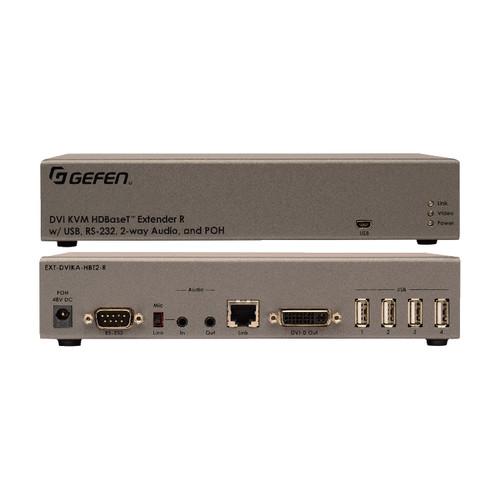
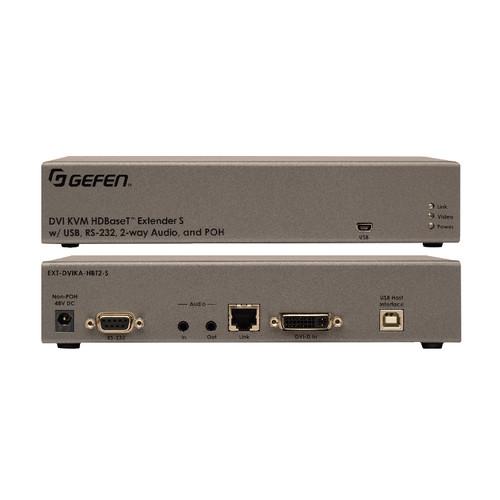
Technical parametersGefen EXT-DVIKA-HBT2 Specs | Maximum Pixel Clock | 300 MHz | | Connectors | Video Input (Sender): 1 x DVI 29-pin, female, digital only
Video Output (Receiver): 1 x DVI 29-pin, female, digital only
Link (Sender/Receiver): 1 x RJ45, shielded, female
USB Host Interface Port (Sender): 1 x USB Type-B, female
USB Device Ports (Receiver): 4 x USB Type-A, female
USB Port for Gefen Syner-G Interface (Sender/Receiver): 1 x Mini-B
RS-232 Port (Sender): 1 x DB-9, female
RS-232 Port (Receiver): 1 x DB-9, male
Analog L/R Line Audio Input (Sender): 1 x 3.5 mm mini-stereo jack
Analog L/R Mic/Line Audio Input (Receiver): 1 x 3.5 mm mini-stereo jack
Analog L/R Audio Output (Sender/Receiver): 1 x 3.5 mm mini-stereo jack
Mic/Line Selector Switch (Receiver): 1 x slide type
Power Supply (Sender/Receiver): 1 x 48 VDC, locking | | Indicator LEDs | Power/Video/Link (Sender/Receiver):
1 x Blue
1 x Amber
1 x Green | | Power Consumption | Sender and receiver combined 13 W | | Operating Temperature | 32 to 122°F (0 to 50°C) | | Operating Humidity | 5 to 90% RH, Non-condensing | | Storage Temperature | -4 to 185°F (-20 to 85°C) | | Storage Humidity | 0 to 95% RH, Non-condensing | | MTBF | 50,000 hours | | Dimensions (W x H x D) | 8.4 x 1.7 x 4.3" (21 x 4.3 x 11 cm) Sender/Receiver, not including connectors | | Weight | 1.1 lb (0.49 kg) Sender/Receiver | | | | Package Weight | 5.52 lb | | Box Dimensions (LxWxH) | 14.35 x 11.8 x 3.9" |
Rating90% users recommend this product to others. And what about you?

This product has already been rated by 36 owners. Add your rating and experience with the product.
Discussion
 Ask our technicians if you have a problem with your settings,
or if anything is unclear in the user manual you have downloaded.
You can make use of our moderated discussion.
The discussion is public and helps other users of our website who may be encountering similar problems.
Ask our technicians if you have a problem with your settings,
or if anything is unclear in the user manual you have downloaded.
You can make use of our moderated discussion.
The discussion is public and helps other users of our website who may be encountering similar problems.
The discussion is empty - enter the first post
Post a new topic / query / comment:
|
|


