|
User Manual for Genelec 8331 SAM Studio Monitor Click to enlarge the picture
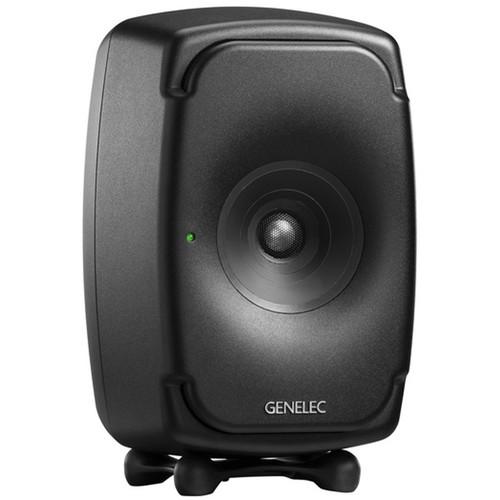 Contents of the user manual for the Genelec 8331 SAM Studio Monitor
- Product category: Studio Monitors Genelec
- Brand: Genelec
- Description and content of package
- Technical information and basic settings
- Frequently asked questions – FAQ
- Troubleshooting (does not switch on, does not respond, error message, what do I do if...)
- Authorized service for Genelec Studio Monitors
 |
User manual for the Genelec 8331 SAM Studio Monitor contain basic instructions
that need to be followed during installation and operation.
Before starting your appliance, the user manual should be read through carefully.
Follow all the safety instructions and warnings, and be guided by the given recommendations.
User manual is an integral part of any Genelec product,
and if it is sold or transferred, they should be handed over jointly with the product.
Following the instructions for use is an essential prerequisite for protecting
health and property during use, as well as recognition of liability on the part of the manufacturer
for possible defects should you make a warranty claim. Download an official Genelec user manual in which you will find instructions on how to install, use, maintain and service your product.
And do not forget – unsuitable use of a Genelec product will considerably shorten its lifespan!
|
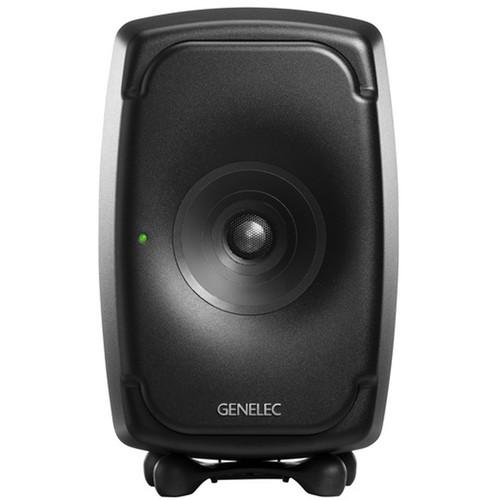
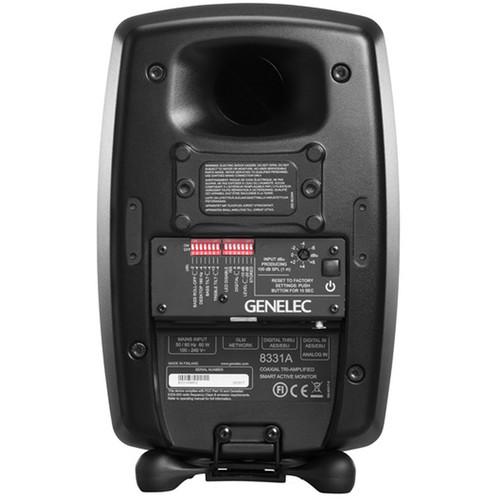
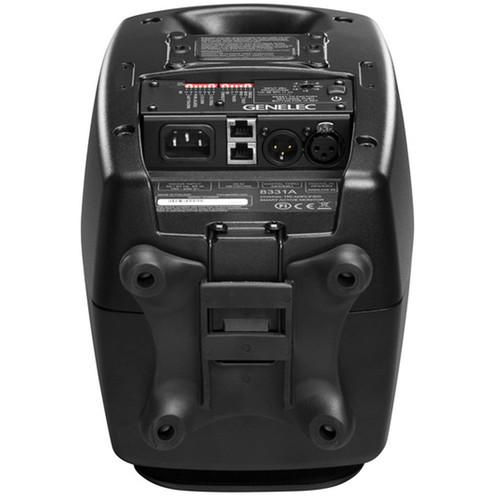
Product description Styled in a black finish, the Genelec 8331 is a point-source, near-field monitor for pro-audio applications. It features a coaxial design, which houses its midrange driver, treble tweeter, and dual 5.1” woofers in one location, thereby aligning their acoustical axes and ensuring an accurate point of sonic radiation. The monitor can accept both analog and digital AES/EBU signals from separate XLR jacks, using Intelligent Signal Sensing technology (ISS) to detect automatically what kind of audio is being fed into the monitor.To coordinate multiple 8331s, you can make use of Genelec’s GLM software to tune your monitor to your room, facilitate and coordinate the daisy-chaining of monitors, override the ISS function, and more. Routing is accomplished by means of a few Cat5 cables and a GLM adapter, which is available separately. You’ll note that two RJ45s are provided for GLM connectivity. An XLR output jack is also on hand for sending identical copies of incoming AES/EBU signals to other monitors.DIP switches and a rotary control for level are offered on the rear of the monitor for offline use. Here, you’ll also find a reflex port to better direct low-end energy. An Iso-Pod stand is included to facilitate isolation from aurally deleterious surfaces. Other assets, such as the 8331’s acoustically concealed woofers, minimum diffraction coaxial construction, and a proprietary waveguide, are further expounded upon in the features section. - Genelec Loudspeaker Manager (GLM) Compatible
- GLM, a proprietary software available free from Genelec, allows you to coordinate, equalize, and otherwise manage your 8331 to its fullest potential.
- Analog or AES/EBU
- The 8331's audio inputs are designed to integrate easily into all professional environments, supporting balanced, line-level analog and AES/EBU-format digital signals. Analog input is selected when the AES/EBU signal input is not connected. The AES/EBU-format digital audio input is selected automatically when a valid digital audio signal is present. Automatic audio signal input selection can be overridden, however, when the 8331 is controlled by a GLM network, enabling flexible selection of either input. On the output side, an XLR connector passes through an unaltered copy of the incoming AES/EBU signal, enabling daisy-chaining of up to four monitors. The proper digital channel can be selected using DIP switches, or via GLM.
- Minimum-Diffraction Coaxial Driver (MDC)
- The minimum-diffraction coaxial driver is comprised of a powerful midrange element combined with a tweeter that extends to ultrasonic frequencies. This arrangement minimizes or downright eliminates acoustic the diffraction sources typically found in coaxial drivers, engendering a flat frequency response both on the acoustical axis and at all off-axis points of listening. The 8331 may be oriented either horizontally or vertically, and is intended for near-field listening where the influences of the room can be minimized as much as possible. Typical distances can vary from approximately three to ten feet, depending on room size and SPL requirements.
- Directivity Control Waveguide (DCW)
- The 8331 has an uncharacteristically large directivity-control waveguide extending over the whole front face of the enclosure. The midrange driver cone also forms a part of the directivity-control waveguide for the tweeter. From behind the waveguide, two woofers radiate audio through two openings in the enclosure front. This design enables directivity control of all audio frequencies down to the low bass frequencies.
- Smart Active Monitor (SAM)
- SAM technology can improve the reliability and accuracy of these monitors, providing several parametric notch and shelving filters that can be tuned automatically in concert with GLM software, thus compensating for colorations generated by room acoustics. This enables SAM monitors to sound neutral and achieve accurate imaging in most acoustical environments.
In the Box Genelec 8331 SAM Studio Monitor (Black Finish) Mains Power Cable GLM Network Cable (16.4" / 5m) Limited 2-Year Warranty (Extendable to 3-Years upon Registration) Table of Contents
|
Upload User Manual
Have you got an user manual for the Genelec 8331 SAM Studio Monitor in electronic form? Please send it to us and help us expand our library of instruction manuals.
Thank you, too, on behalf of other users.
To upload the product manual, we first need to check and make sure you are not a robot. After that, your "Submit Link" or "Upload File" will appear.
Technical parametersGenelec 8331 Specs | | | Monitor Type | Active 3-Way | | Enclosure | Bass-Reflex, Shielded | | Drivers | HF Driver: 1 x 0.7" / 19 mm Metal Dome Tweeter
MF Driver: 1 x 3.5" / 90 mm Cone
LF Driver: 2 x 5.1" / 130 mm Oval Cone Oval LF Drivers Measure 5.1 x 2.6" / 130 x 65 mm | | Amplification | HF Amplifier: Rated at 36 W
MF Amplifier: Rated at 36 W
LF Amplifier: Rated at 72 W | | | | Frequency Response | 58 Hz to 20 kHz ± 1.5 dB | | Maximum Sound Pressure Level (SPL) | 110 dB | | Total Harmonic Distortion (THD) | 0.05% | | Maximum Input Level | +24 dBu | | Analog Input Sensitivity/Gain | +36 to -6 dBu (Continuously Variable) | | Self-Generated Noise | Less Than 0 dBA (at 3.28' / 1 m) | | Protections and Limiting | Driver Protection | | | | Crossover Frequency | Low-Pass Frequency: 500 Hz
High-Pass Frequency: 3 kHz | | | | I/O | 1 x 3-Pin XLR Female Analog Input (10 kOhms)
1 x 3-Pin XLR AES/EBU Female Digital Input (110 Ohms)
1 x 3-Pin XLR AES/EBU Male Digital Output/Thru (110 Ohms) | | Computer Interface | 2 x RJ45 (Controller, Network) | | | | Digital EQ & Crossover | GLM Software Adjustment
16 x Parametric Notch Filter
2 x Low Shelf EQ
2 x High Shelf EQ | | Max Sample Rate/Resolution | 192 kHz / 24-Bit | | | | AC Input Power | 100 to 240 VAC at 50/60 Hz | | Power Consumption | 0.5 W (Standby)
16 W (Idle)
250 W (Maximum) | | | | Dimensions (W x H x D) | 7.5 x 12.0 x 8.4" / 189.0 x 305.0 x 243.0 mm Height Excluding Iso-Pod: 11.3" / 287 mm | | Weight | 15.0 lb / 6.7 kg |
Rating100% users recommend this product to others. And what about you?

This product has already been rated by 94 owners. Add your rating and experience with the product.
Discussion
 Ask our technicians if you have a problem with your settings,
or if anything is unclear in the user manual you have downloaded.
You can make use of our moderated discussion.
The discussion is public and helps other users of our website who may be encountering similar problems.
Ask our technicians if you have a problem with your settings,
or if anything is unclear in the user manual you have downloaded.
You can make use of our moderated discussion.
The discussion is public and helps other users of our website who may be encountering similar problems.
The discussion is empty - enter the first post
Post a new topic / query / comment:
|
|
|
| Request for user manual |
You can’t find the operation manual you are looking for? Let us know and we will try to add the missing manual:
I’m looking for a manual / Request for manual
Current requests for instruction manuals:
Call Of Duty World War Two For Xbox...
controller stratus XL...
stratus XL...
smart whatch serie S11 42mm...
Allen & Heath SQ-6 manual...
|
| Discussion |
Latest contributions to the discussion:
AEW R 4100
Name: MAURICIO ANGARITA
Audio-Technica AEW-R4100 UHF Diversity Receiver for
AEW R 4100 has the mute function blocked and does not allow audio to pass. I tried several times to turn off the mute from the transmitter but it does nothing, the mute stays on. Solution?
Thank you...
Instructions for assembling the 2015 Forecast Image Master Consoles GC3-A
Name: mike elam
Forecast Consoles GC3-A ImageMaster Editing Console
Looking for instructions for assembling this console. ...
EMPTY TONER ERROR MESSAGE AFTER REPLACING TONER
Name: LINDA BAD YELLOW EYES
Brother TN223BK Standard-Yield Toner
I HAD TO CHANGE OUT ALL THREE TONERS DUE TO LEAKS IN THE YELLOW AND CYAN. AFTER I REPLACED THEM, THE MACHINE KEEPS GIVING ME AN EMPTY TONER ERROR MESSAGE. HELP!!...
PS480D 20/24 pin Switching 480W Power Supply
Name: swkargo
Logisys 480W Power Supply
This item states in can run -5vdc .It is NOT listed on the board or I beleive is r4 is missing the resitior. Any body have thid issue. Shawn
...
Help needed
Name: Ann Carter
SanDisk 1TB Extreme Portable USB 3.1
When I click the link to download the user manual for my Sandisk Extreme external hard drive, it gives me the manual for the LG Cricket. Can you please change the link so I can download the Sandisk manual and begin using this drive? Thank you....
|
|


