User Manual for GEOVISION GV-FER12203 12MP Outdoor Network Fisheye Camera with Night Vision Click to enlarge the picture
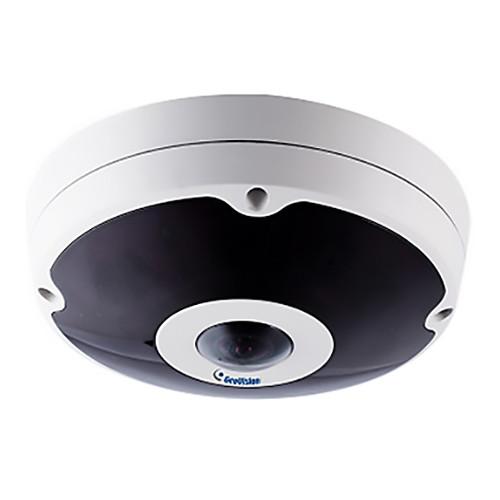 Contents of the user manual for the GEOVISION GV-FER12203 12MP Outdoor Network Fisheye
- Product category: Wired IP Cameras GEOVISION
- Brand: GEOVISION
- Description and content of package
- Technical information and basic settings
- Frequently asked questions – FAQ
- Troubleshooting (does not switch on, does not respond, error message, what do I do if...)
- Authorized service for GEOVISION Wired IP Cameras
|
User manual for the GEOVISION GV-FER12203 12MP Outdoor Network Fisheye contain basic instructions
that need to be followed during installation and operation.
Before starting your appliance, the user manual should be read through carefully.
Follow all the safety instructions and warnings, and be guided by the given recommendations.
User manual is an integral part of any GEOVISION product,
and if it is sold or transferred, they should be handed over jointly with the product.
Following the instructions for use is an essential prerequisite for protecting
health and property during use, as well as recognition of liability on the part of the manufacturer
for possible defects should you make a warranty claim. Download an official GEOVISION user manual in which you will find instructions on how to install, use, maintain and service your product.
And do not forget – unsuitable use of a GEOVISION product will considerably shorten its lifespan!
|
Product description Monitor an entire room with a 360° view with the GV-FER12203 12MP Outdoor Network Fisheye Camera with Night Vision from GeoVision. Its 1.83mm fisheye lens and 1/1.7" progressive scan CMOS sensor captures 4000 x 3000 resolution video at up to 15 fps. With the ability to mount to a wall, ceiling, corner, or pole with optional accessories (available separately), this camera can be positioned to fit your needs. To make surveillance easier, you can select from up to five different views including fisheye, single view, dual 180° view, 360° view, and quad view.
The camera features a removable IR cut filter and IR LEDs to produce images in complete darkness from up to 98' away for around the clock monitoring. Video can be stored onto an NVR, external NAS drive, or microSD card (all available separately) using H.264 and MJPEG compression codecs for recording and playback. This outdoor camera is housed in an IP67- and IK10+-rated enclosure for protection against dust, water, impact, and vandalism. - Digital object tracking feature
- Different users can select different viewing angles simultaneously
- 3D digital noise reduction
- Tampering alarm, virtual PTZ, auto pan, privacy masking, low-lux enhancement, and visual automation functions
- Sensor and alarm inputs/outputs
- ONVIF Profile S compliant
- IP67-rated for protection against dust and water
- IK10+-rated for impact and vandal resistance
In the Box GEOVISION GV-FER12203 12MP Outdoor Network Fisheye Camera with Night Vision Back Plate Torx Wrench RJ45 Connector Data Cable Terminal Block Ruler Power Adapter Installation Sticker GV-IPCAM H.264 Software DVD GV-NVR Software DVD Mounting Hardware Limited 2-Year Warranty Brochure PDF 606.2kb Table of Contents
|
Upload User Manual
Have you got an user manual for the GEOVISION GV-FER12203 12MP Outdoor Network Fisheye Camera with Night Vision in electronic form? Please send it to us and help us expand our library of instruction manuals.
Thank you, too, on behalf of other users.
To upload the product manual, we first need to check and make sure you are not a robot. After that, your "Submit Link" or "Upload File" will appear.
Technical parametersGEOVISION GV-FER12203 Specs | | | CPU | Intel Core i5‐4670, 3.40 GHz | | Memory (RAM) | DDR3 8 GB RAM | | Graphics | Intel HD Graphics 4600 (versions of driver from year 2014 or later required) | | | | Image Sensor | 12 MP 1/1.7" progressive scan CMOS sensor | | Effective Pixels | 4000 x 3000 | | Minimum Illumination | Color: 0.1 lux
B&W: 0.05 lux
IR On: 0 lux | | Shutter Speed | Automatic, manual
1/30 to 1/16000 s | | White Balance | Automatic, manual
2800 to 8500K | | Gain Control | Automatic gain control (AGC) | | S/N Ratio | 52 dB | | | | Type | Fixed | | Focal Length | 1.83mm | | Aperture | f/2.4 | | Mount | M12 | | Image Format | 1/1.7" (14.9 mm) | | Field of View | 360°, 180° | | Day/Night | Removable IR cut filter | | Focus | Fixed | | Zoom | Fixed | | Iris | Fixed | | Number of IR LEDs and Range | 6 x IR LEDs, up to 98' (30 m) | | | | Video Compression | H.264 and MJPEG | | Video Streaming | Dual streams for H.264 or MJPEG | | Resolution | Main Stream:
4:3: 4000 x 3000
20:19: 2896 x 2768
Sub Stream:
4:3: 640 x 480
20:19: 640 x 608 | | Frame Rate | 15 fps at 4000 x 3000, 25 fps at 2896 x 2768 (50/60 Hz) | | Image Settings | Brightness, contrast, saturation, sharpness, gamma, white balance, flickerless, image orientation, shutter speed, day/night, denoise, low-lux enhancement, metering | | Audio Support | Two-way audio | | Audio Compression | G.711, AAC (optional) | | Sensor In/Out | 1 x input (dry contact)
1 x digital output (200 mA, 5 VDC) | | Network Interface | 10/100/1000 Ethernet | | Network Protocol | DHCP, DynDNS, FTP, HTTP, HTTPS, NTP, ONVIF (Profile S), PSIA, QoS (DSCP), RTSP, SMTP, SNMP, TCP, UDP, UPnP, 3GPP/ISMA | | Wireless Protocols | IEEE 802.11 b/g/n | | Antenna Type | External | | Security | WEP, WPA‐PSK (TKIP), WPA‐PSK (AES), WPA2‐PSK (TKIP), WPA2‐PSK (AES) | | PoE Standard | PoE+ (IEEE 802.3at PoE/PD) | | PoE Power Supply Type | End-span | | PoE Power Output | Per Port: 48 VDC, 600 mA, 30 W maximum | | Installation & Management | Web-based configuration | | Maintenance | Firmware upgrade through web browser or utility | | Video Access From Web Browser | Camera live view, video recording, change video quality, bandwidth control, image snapshot, digital I/O control, audio, picture in picture, picture and picture, motion detection, privacy mask, visual automation, tampering alarm, auto pan function, virtual PTZ, wide angle lens dewarping, text overlay | | Language | Arabic, Bulgarian, Czech, Danish, Dutch, English, Finnish, French, German, Greek, Hebrew, Hungarian, Indonesian, Italian, Japanese, Lithuanian, Norwegian, Persian, Polish, Portuguese, Romanian, Russian, Serbian, Simplified Chinese, Slovakian, Slovenian, Spanish, Swedish, Thai, Traditional Chinese, Turkish | | | | Detectors | Temperature | | Power | 2-pin terminal block, PoE | | Ethernet | RJ45 | | Audio | 1 x in (built-in microphone or externally connecting a microphone)
1 x out (0.14" (3.5 mm) stereo jack) | | Digital I/O | 3‐pin terminal block, pitch 0.1" (2.5 mm) | | microSD Card Slot | Yes, SDHC/SDXC/UHS‐I, Class 10 (card available separately)
UHS‐II cards are not supported | | USB Port | GV-WiFi Adapter or USB drive (both available separately) | | Applications | Network Storage: GV‐System (GV‐DVR/NVR), GV‐Backup Center, GV‐Recording Server, GV‐VMS
Live Viewing: IE, mobile app
CMS Server Support: GV‐Control Center, GV‐Center V2, GV‐Vital Sign Monitor | | | | Maximum Power Consumption | 28 W | | Power Source | 12 VDC, 24 VAC, PoE+ (IEEE 802.3af) | | Certifications | CE, FCC, RCM, LVD, RoHS | | Operating Temperature | -40 to 122°F (-40 to 50°C) | | Humidity | 10 to 90%, non-condensing | | IP Rating | IP67 | | IK Code | IK10+ | | Dimensions | 6.32 x 2.33" (160.6 x 59.1 mm) | | Weight | 1.54 lb (0.7 kg) | | | | Package Weight | 3.5 lb | | Box Dimensions (LxWxH) | 8.3 x 8.1 x 6.2" |
Rating60% users recommend this product to others. And what about you?

This product has already been rated by 19 owners. Add your rating and experience with the product.
Discussion
 Ask our technicians if you have a problem with your settings,
or if anything is unclear in the user manual you have downloaded.
You can make use of our moderated discussion.
The discussion is public and helps other users of our website who may be encountering similar problems.
Ask our technicians if you have a problem with your settings,
or if anything is unclear in the user manual you have downloaded.
You can make use of our moderated discussion.
The discussion is public and helps other users of our website who may be encountering similar problems.
The discussion is empty - enter the first post
Post a new topic / query / comment:
|
|


