|
User Manual for Gigabyte GA-Z270X-Gaming 5 LGA 1151 ATX Motherboard Click to enlarge the picture
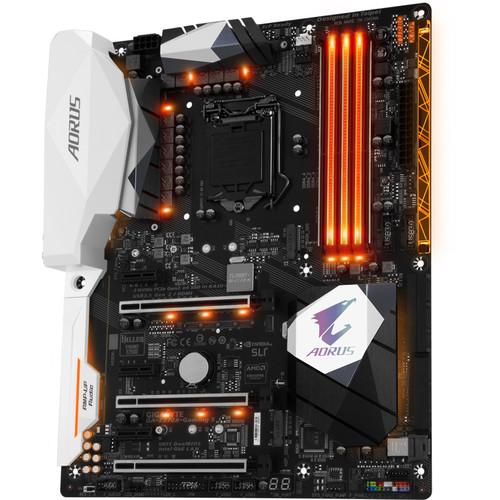 Contents of the user manual for the Gigabyte GA-Z270X-Gaming 5 LGA 1151 ATX
- Product category: Motherboards Gigabyte
- Brand: Gigabyte
- Description and content of package
- Technical information and basic settings
- Frequently asked questions – FAQ
- Troubleshooting (does not switch on, does not respond, error message, what do I do if...)
- Authorized service for Gigabyte Motherboards
 |
User manual for the Gigabyte GA-Z270X-Gaming 5 LGA 1151 ATX contain basic instructions
that need to be followed during installation and operation.
Before starting your appliance, the user manual should be read through carefully.
Follow all the safety instructions and warnings, and be guided by the given recommendations.
User manual is an integral part of any Gigabyte product,
and if it is sold or transferred, they should be handed over jointly with the product.
Following the instructions for use is an essential prerequisite for protecting
health and property during use, as well as recognition of liability on the part of the manufacturer
for possible defects should you make a warranty claim. Download an official Gigabyte user manual in which you will find instructions on how to install, use, maintain and service your product.
And do not forget – unsuitable use of a Gigabyte product will considerably shorten its lifespan!
|
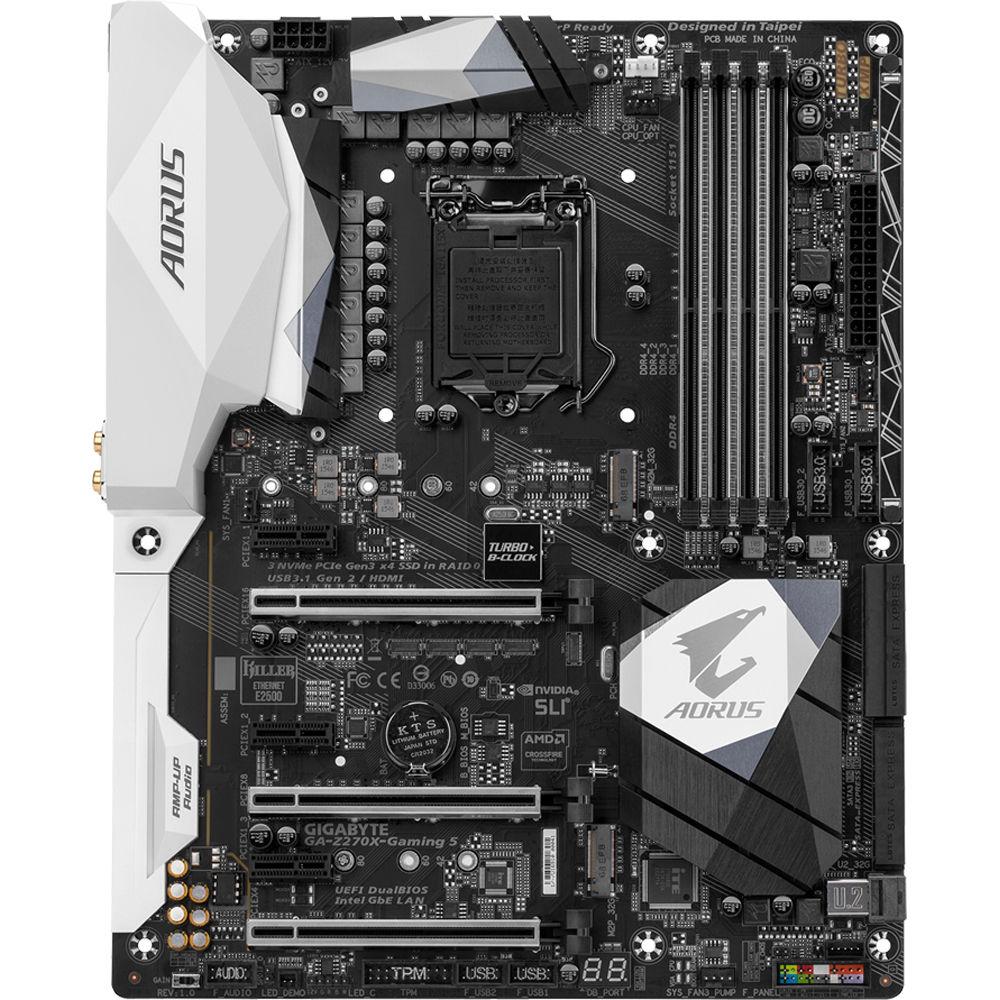
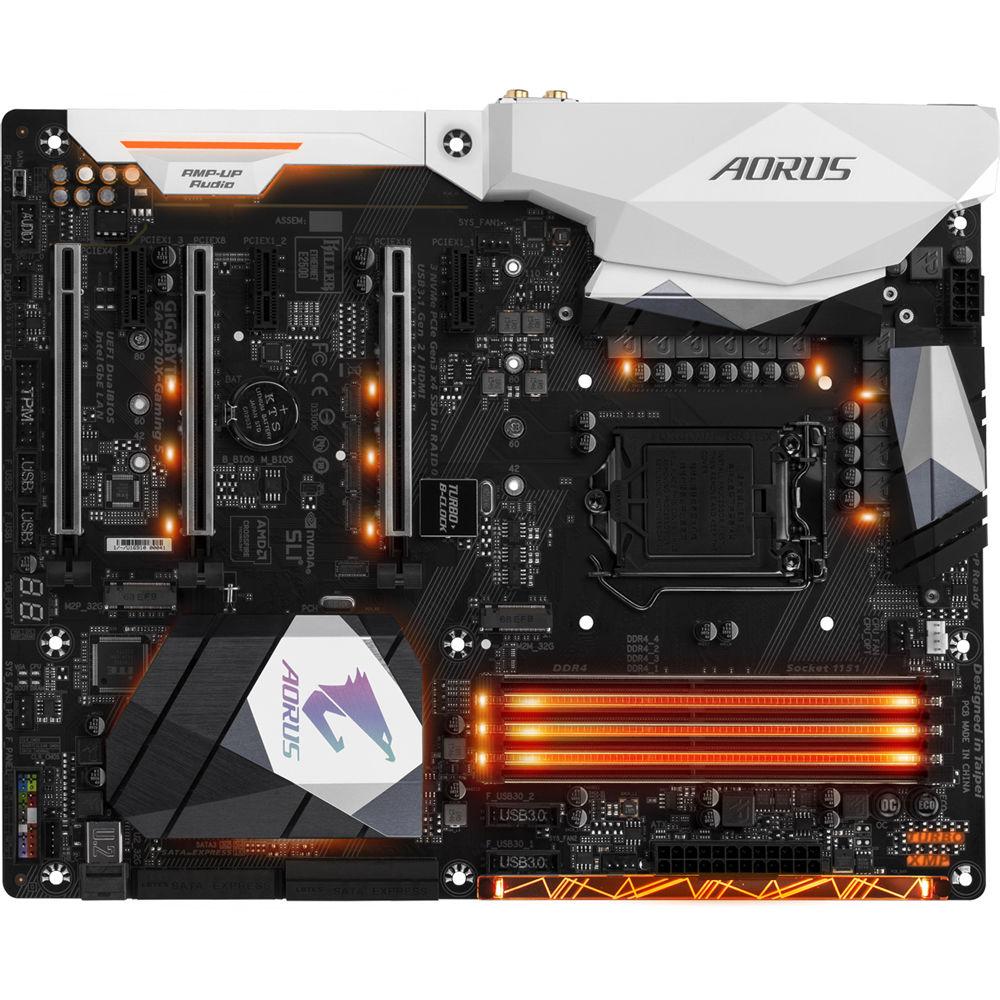
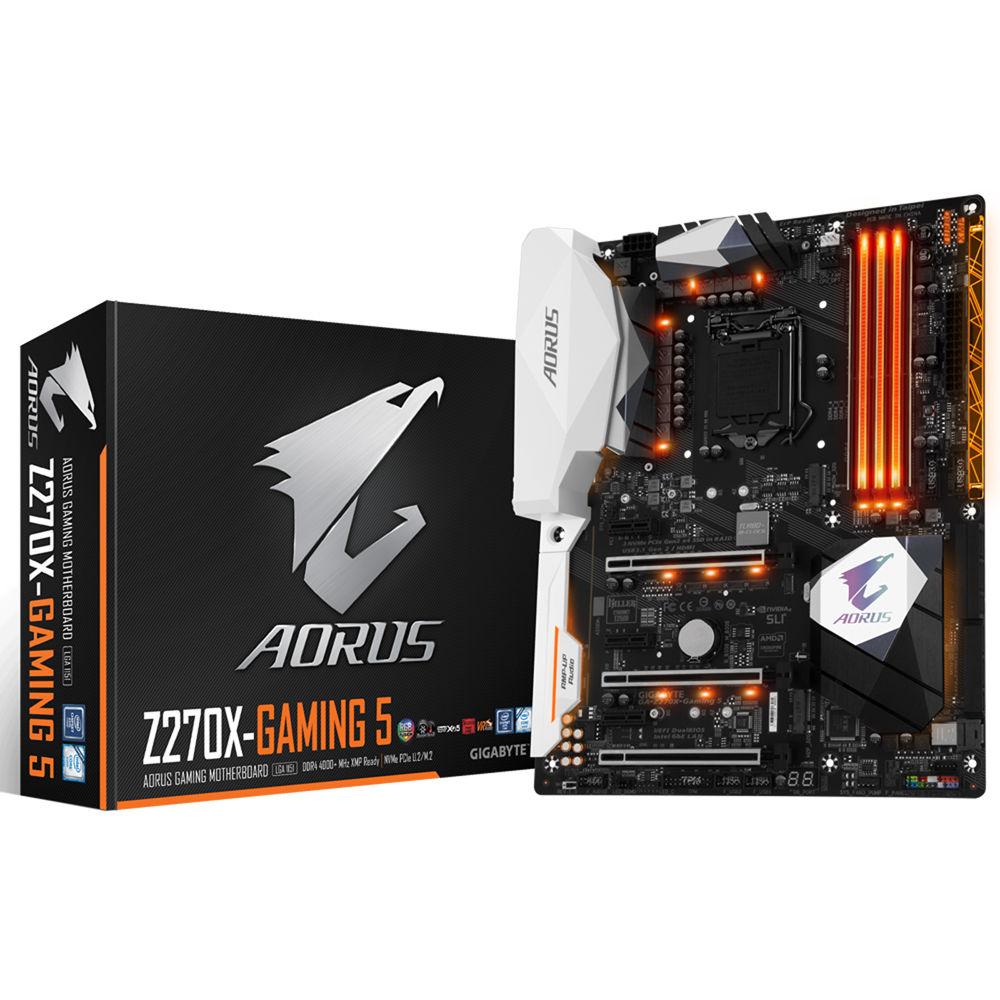
Product description Designed for 7th generation Kaby Lake processors, VR (virtual reality) applications, and gaming rigs, the GA-Z270X-Gaming 5 LGA 1151 ATX Motherboard from Gigabyte is designed to fit in cases that support the ATX form factor. It features RGB lighting, supports 6th and 7th generation Intel Core i7, i5, i3, Pentium, and Celeron processors in the LGA 1151 package and the Intel Z270 Express chipset. This motherboard supports Windows 10 (64-bit) with 7th generation processors and Windows 10 (64-bit), 8.1 (64-bit), and 7 (32/64-bit) with 6th generation processors.
The ATX form factor of the GA-Z270X-Gaming 5 has four DIMM slots that can support up to 64GB of DDR4 ECC and non-ECC UDIMM RAM, as well as dual-channel memory architecture and Extreme Memory Profile (XMP) memory modules. The supported memory speeds are DDR4 4133 (OC), 4000 (OC), 3866 (OC), 3800 (OC), 3733 (OC), 3666 (OC), 3600 (OC), 3466 (OC), 3400 (OC), 3333 (OC), 3300 (OC), 3200 (OC), 3000 (OC), 2800 (OC), 2666 (OC), 2400 (OC), and 2133 MHz memory modules.
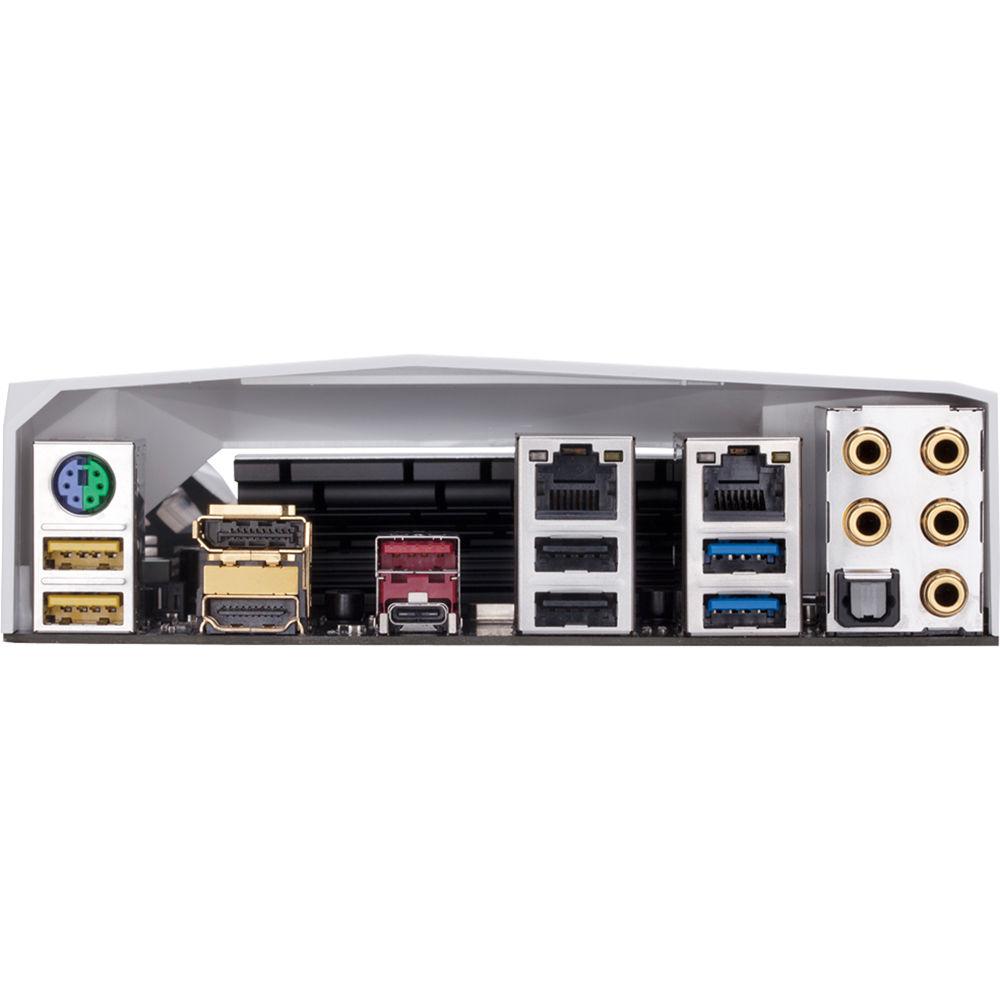
The GA-Z270X-Gaming 5 has a total of 6 x SATA III 6 Gb/s ports, 3 x SATA Express ports, 2 x M.2 Socket 3 ports (one that support type 2242, 2260, 2280, and 22110 SATA SSDs and PCIe 3.0 x4/x2 SSDs, and the other that supports 2242, 2260, and 2280 SATA SSDs and PCIe 3.0 x4/x2 SSDs), and 1 x U.2 connector. Internal expansion is accomplished using 1 x PCIe 3.0 x16 slot running at x16, 1 x PCIe 3.0 x16 slot running at x8, 1 x PCIe 3.0 x16 slot running at x4, and 3 x PCIe 3.0 x1 slots, while USB connectivity is achieved using 1 x USB 3.1 Type-C port, 1 x USB 3.1 Type-A port, 8 x USB 3.0 ports (4 on the back panel, 4 internal), and 6 x USB 2.0/1.1 ports (2 on the back panel, 4 internal). There is also 1 x PS/2 port (back panel). Using the Realtek ALC1220 codec, this motherboard can support 2-, 4-, 5.1-, and 7.1-channel HD audio using its 6 x 3.5mm audio jacks, and supports S/PDIF out, Sound Blaster X-Fi MB5, and the TI Ne5532 operational amplifier.
The GA-Z270X-Gaming 5 supports integrated Intel HD Graphics and is equipped with an HDMI 1.4 port that supports maximum resolutions of 4096 x 2160 @ 24 Hz and a DisplayPort 1.2 output that supports a maximum resolution of 4096 x 2160 @ 60 Hz. This motherboard has also been designed with Gigabyte's UEFI DualBIOS, NVIDIA Quad-GPU SLI and 2-Way SLI technologies, AMD Quad-GPU CrossFireX and 2-Way CrossFire technologies, dual Gigabit Ethernet ports, high quality audio capacitors, multi-zone RGB lighting, Smart Fan 5, and more. It is protected by a limited 3-year warranty. General Features - RGB Fusion
- AORUS' 200 series motherboards boast an LED system with more customizability and a convenient and intuitive UI thanks to the RGB Fusion App, allowing you to make AORUS your own. LED enthusiasts now have even more options with the ability to customize multiple zones independently. For a more functional use, the bright and vibrant LEDs can be configured to display the PC's temperature or load. RGBW strips are now supported for more true and vibrant whites.
- Multi-Zone Light Show Design
-
- 16.8 Million RGB Colors
- 2 Programmable Sections
- 7 Different Lighting Effects
- 1 RGBW Light Strip Pin Header
- Accent LED with Interchangeable Overlay
- Advanced Mode for Extreme Customizability
- Surround Lighting
- Now offering more LED customizations than ever, users can adapt their PC to represent their lifestyle. With full RGB support and a redesigned RGB Fusion application, the user has complete control over the LEDs which surround the motherboard.
- Swappable Overlay for Accent LED
- AORUS brings even more color and life to your system with an Accent LED Overlay. This overlay complements the RGB Fusion technology in AORUS Motherboards, adding more flare and style to your gaming machine. With the swappable overlay, users can utilize different patterns and designs to make their system their own.
- Supports RGBW Light Strips
- Not bright enough? You can install standard 12V external RGB or RGBW light strips on the RGBW pin header and control its color from the RGB Fusion software. With RGBW light strips that have a dedicated white color LED, you can have brighter and more vibrant colors.
There's no need to worry when choosing light strips, as the AORUS motherboards support a wide variety of RGBW light strips on the market thanks to the RGB Fusion software that allows users to redefine the pin location for the R/G/B Signal. - RGB Fusion (Advanced Mode)
- With RGB Fusion software, users have access to different preset LED lighting configurations with a choice of colors. You can even set the LEDs to synchronize with your favorite music or have them change colors to indicate the CPU temperature. An Advanced Mode can be fully customized by individual area with its own effects and color transitions, along with specific duration and transition times. Once done, it's simple to save and share your lighting profile with others.
- Smart Fan 5
- With Smart Fan 5, users can help ensure that their gaming PC can maintain its performance while staying cool. Smart Fan 5 allows users to interchange their fan headers to reflect different thermal sensors at different locations on the motherboard. Not only that, with Smart Fan 5, more hybrid fan headers that support both PWM and Voltage mode fans have been introduced to make the motherboard more liquid cooling friendly.
- Five fan/water pump connectors
- Six temperature sensors
- All fan pin headers upgraded to hybrid fan headers
- Supports high-current fans up to 24W (2A x 12V) with over-current protection
- UI for Fan Control
- Hybrid Fan Pin Headers
- Hybrid Fan Headers detect whether the cooling device uses PWM or Voltage mode and automatically switches settings accordingly. It supports up to 2A with built-in over-current protection.
- Smart Fan 5 Software
- Choose from different modes, Quiet to Full Speed, to match your system usage scenario. For each fan or pump, you can use the intuitive fan curve to define trigger thresholds and corresponding fan speeds.
- Interoperable Sensors and Fans
- Each fan can be customized to operate at different speeds according to any defined temperature source input (except the CPU fan).
- Fan Curve
- Customize fan curves based on specific temperatures with the intuitive graphical UI.
- Enhanced BIOS Interface
- The enhanced BIOS interface also has the advanced features seen in the Smart Fan 5 UI, such as: the ability to set triggers based on different temperature sensors on the board, fan curve definition, and the temperature interval setting, which can prevent fan rotation noise caused by sudden temperature change-all without having to load Windows.
- ALC 1220 120dB SNR HD Audio
- The ALC1220 is a high-performance multi-channel High Definition Audio Codec with up to 120 dB SNR for crystal clear audio and features such as Smart Headphone Amp, 108 dB SNR recording for precise voice chats and hardware decoding of DSD128, ensuring users get high audio quality from their PC.
- Smart Headphone Amp
- Automatically detects the impedance of your head-worn audio device, whether earbuds or high-end headphones to provide optimal audio dynamics that help prevent issues such as low volume and distortion.
- Sound Blaster X-Fi MB5 Software
- The Sound Blaster X-Fi MB5 provides you with everything you need to stretch your audio experience potential. It's a comprehensive suite of tools and technology that provides high audio quality, effects, and features to support your needs. Featuring the SBX Pro Studio suite of technologies, it gives you a rich audio experience.
- High-End Audio Capacitors
- AORUS Gaming motherboards use high-end Japanese Nichicon audio capacitors. These help deliver high resolution and high fidelity audio to provide realistic sound effects for gamers.
- AMP-UP Audio Technology with Upgradable OP-AMP
- Customizable
- Users can choose audio quality based on individual listening preferences
- Wide availability of additional OP-AMPs
Low Cost Way to Improve Audio Quality
- Improve audio dynamics and overall sound-quality with little cost
- No need for expensive speakers or high-end audio equipment - USB DAC-UP 2
- AORUS improves upon USB DAC-UP technologies with USB DAC-UP 2. USB DAC-UP 2 continues to provide clean, isolated, and low-noise power while adding the ability to compensate for voltage drop. Virtual reality pioneers and gamers alike can rest assured that their expensive accessories and peripherals will not encounter connectivity or power deficiency issues with the AORUS USB DAC-UP 2. With Gaming Gear drawing large amounts of power and having firm specification requirements, USB DAC-UP 2 is up for the challenge.
- VR Gaming Experience
- VR requires more performance than Full HD graphics for a steady 90 fps or greater. The recommended configuration for a VR Gaming PC is:
- Graphics Card: NVIDIA GTX 1050 / AMD R9 290 or greater, compatible HDMI 1.3 video output
- CPU: Intel i5-7600K equivalent or greater
- Memory: 8GB of RAM or greater
- USB Ports: 3 x USB 3.0 ports plus 1 x USB 2.0 port or greater
- OS: Windows 7 SP1 (64-bit) or newer
- XSplit Gamecaster + Broadcaster
- Now set up your stage and share the greatest gaming moments with XSplit Gamecaster + Broadcaster. Fully optimized social media integration is ready for real-time chats - keeping you notified yet focused in the game. It takes just one click to stream your gameplay to Twitch.
- Killer E2500 Gaming Network + Intel Gigabit LAN
- Killer E2500 is a high-performance, adaptive gigabit Ethernet controller that offers improved online gaming and media performance compared to standard solutions. Intel Gigabit LAN networking, a popular choice with gamers, delivers several performance-enhancing features such as advanced interrupt handling to help reduce CPU overhead and Jumbo Frame support for extra-large data packets.
- Triple NVMe PCIe Gen 3.0 x4 SSDs in RAID 0 Support
- AORUS' Z270 motherboards offers great compatibility with NVMe storage for users who demand high capacity and seek fast performance. AORUS' design supports up to three Intel 750 Series NVMe PCIe SSDs, which can be configured in RAID 0 for sequential read speeds of up to 3,525 MB/s, making AORUS the obvious choice for the ultimate PC.
- U.2 Onboard (NVMe PCIe Gen 3.0 x4)
- Intel 750 series SSDs offer an increase in performance over SATA drives. Using the NVMe protocol, which takes advantage of the fast bandwidth of PCIe Gen 3.0 x4 lanes (32 Gb/s), the drives are an advantage for users looking to boot their OS faster, load their games in a flash, and access large files without waiting. By implementing the U.2 port onboard to support the 2.5" Intel 750 Series drive, AORUS helps ensure that the users can benefit from the better performance.
- Dual Ultra-Fast NVMe PCIe Gen 3.0 x4 M.2
- With two NVMe PCIe Gen 3.0 x4 M.2 connectors onboard, AORUS brings to the user PCI Express connectivity for SSD devices. Delivering up to 32 Gb/s data transfer speed per connector, the dual M.2 connectors provide a storage solution that also supports RAID modes.
- Fast Onboard Storage with NVMe PCIe Gen 3.0 x4 110mm M.2 (Up to 32 Gb/s)
- AORUS' M.2 solution offers faster storage performance and support for both PCIe and SATA interfaces for M.2 SSD devices.
- AORUS Extreme USB 3.1 Motherboards
- The ASMEDIA 2142 USB 3.1 controller utilizes two PCIe Gen 3.0 lanes, offering a total of up to 16 Gb/s, which means you have extra bandwidth to take full control of the 10 Gb/s USB 3.1 ports. With twice the bandwidth compared to its previous generation and backwards compatibility with USB 2.0 and 3.0, the improved USB 3.1 protocol is available over the reversible USB Type-C and the traditional USB Type-A connector for better compatibility over a wider range of devices.
- USB Type-C
- The USB Type-C is a reversible connector that is loaded with useful features such as USB 3.1 support for 10 Gb/s transfer speeds.
- Turbo B-Clock
- A Turbo B-Clock Tuning IC lets overclockers set their BCLK frequency to a desired value. With the linear range adjustment option of the Tuning IC, ranges from 90 to 500 MHz are now possible, so that overclockers are not limited to the 5% ranges of traditional straps. Turbo B-Clock overclocking range may vary depending on CPU capabilities.
- Diagnostic LEDs
- Onboard LEDs controlled by the system BIOS indicate if a malfunction is occurring, allowing users to quickly diagnose which major component (CPU/DDR/VGA/HDD) is malfunctioning so they may take action promptly.
- Support for DDR4 XMP up to 4133 MHz and Beyond
- AORUS is offering a tested and proven platform that ensures proper compatibility with profiles up to 4133 MHz and beyond. All users need to do to attain this performance boost is to ensure that their memory module is XMP capable and that the XMP function is activated and enabled on their AORUS motherboard.
- What is XMP?
- DDR4 memory modules are available at a stock frequency of 2133 MHz, but as frequency tweaking requires a considerable amount of effort and knowledge, memory vendors encode XMP profiles which can automatically modify the timings of the supported memory modules to work with your CPU and to achieve increased performance.
- Durable PCIe Armor
- This one piece stainless steel shielding design from AORUS reinforces the PCIe connectors to provide extra strength required to support heavy graphics card.
- Dual Armor DIMM and PCIe Metal Shielding
- AORUS' proprietary Ultra Durable PCIe Metal Shielding reinforces the PCIe connector to help prevent slot damage due to heavy graphics cards. The DIMM and PCIe metal shield also provides extra strength for when you forget to release the lock while replacing your component, adding a foolproof option which can help save your PC's life. Memory armor also helps protect against PCB distortion and twist, as well as plate bending, in addition to helping prevent ESD interference.
- Anti-Sulfur Resistor Design
- Sulfur compounds in the air can penetrate tiny onboard resistors creating chemical change and causing these resistors to open or short. If either of these occurs the motherboard will fail to function. By equipping resistors with an anti-sulfur design, Gigabyte gives Ultra Durable Motherboards a whole new meaning.
- Refreshed BIOS: Easy, Smart, and Friendly
- The BIOS is essential for users during initial setup to allow for the most optimal settings. With a new GUI and easier to use functionalities, Gigabyte has been able to reinvent the BIOS to give users a better experience while setting up their new system.
- Gigabyte APP Center
- The Gigabyte APP Center gives you easy access to a wealth of Gigabyte apps that help you get the most from your Gigabyte motherboard. Using a simple, unified user interface, the Gigabyte APP Center allows you to easily launch all Gigabyte apps installed on your system, check related updates online, and download the latest apps, drivers, and BIOS.
- EasyTune
- Gigabyte's EasyTune is a simple and easy-to-use interface that allows users to fine-tune their system settings or adjust system and memory clocks and voltages in a Windows environment. With Smart Quick Boost, one click is all it takes to automatically overclock your system, giving an added performance boost when you need it the most.
- System Information Viewer
- Gigabyte System Information Viewer is a central location that gives you access to your current system status. Monitor components such as the clocks and processor, set your preferred fan speed profile, create alerts when temperatures get too high, or record your system's behavior.
- @BIOS
- The Gigabyte @BIOS app allows you to update your system's BIOS from within Windows using a simple graphical user interface. @BIOS can automatically download the latest version from the Gigabyte servers or you can update your BIOS from a file on your computer. @BIOS also allows you to save your current BIOS to a file, recover your previous BIOS from an image, and backup your BIOS to an image.
- 3D OSD
- 3D OSD automatically detects and displays your system information during games, allowing you to easily get a hold of your system information without switching between screens.
- Gigabyte Patented DualBIOS (UEFI) Design
- Gigabyte Ultra Durable motherboards feature Gigabyte DualBIOS, an exclusive technology from Gigabyte that protects arguably one of your PC's most crucial components, the BIOS. Gigabyte DualBIOS means that your motherboard has both a 'Main BIOS' and a 'Backup BIOS', protecting users from BIOS failure due to virus, hardware malfunction, improper OC settings, or power failure during the update process.
- Long Lifespan Durable Black Solid Caps
- AORUS motherboards integrate solid state capacitors that are rated to perform at high efficiency for extended periods, even in extreme performance configurations. With ultra-low ESR, this provides peace of mind for end users who want to push their system hard, yet demand reliability and stability. These capacitors also come in customized jet black, exclusively on AORUS motherboards.
- 15µ Gold Plated CPU Socket Design
- AORUS motherboards come equipped with a 15µ thick gold plated CPU socket, which means that enthusiasts can enjoy reliability and longevity for the CPU socket over time, without having concerns about corroded pins or bad contacts.
- "G-Connector" Design
- The tiny cables of the front panel connectors can be hard to manipulate as space is restricted and indicators being tiny. With the G-Connector, you can connect all the FP cables at once, simplifying the process of building your next PC and saving you some frustrations.
- TriDef SmartCam - Custom Stream Modding
- To facilitate being a full streaming solution, each Gigabyte motherboard includes TriDef SmartCam software, enabling you to remove backgrounds without the hassle of using a green screen. Through the SmartCam application, you can now apply live filters and fully control your background, not only while streaming, but also through other video applications such as Skype.
UPC: 889523007594 In the Box Gigabyte GA-Z270X-Gaming 5 LGA 1151 ATX Motherboard 4 x SATA Cables Motherboard Driver Disk I/O Shield G Connector RGB (RGBW) LED Strip Extension Cable Limited 3-Year Warranty Table of Contents
|
Upload User Manual
Have you got an user manual for the Gigabyte GA-Z270X-Gaming 5 LGA 1151 ATX Motherboard in electronic form? Please send it to us and help us expand our library of instruction manuals.
Thank you, too, on behalf of other users.
To upload the product manual, we first need to check and make sure you are not a robot. After that, your "Submit Link" or "Upload File" will appear.
Technical parametersGigabyte Z270X Specs | CPU | Support for 7th and 6th generation Intel Core i7, i5, Pentium, and Celeron processors in the LGA 1151 package | | Chipset | Intel Z270 Express Chipset | | Memory | 4 x DDR4 DIMM sockets supporting up to 64 GB of system memory
Dual channel memory architecture
Support for DDR4 4133 (OC), 4000 (OC), 3866 (OC), 3800 (OC), 3733 (OC), 3666 (OC), 3600 (OC), 3466 (OC), 3400 (OC), 3333 (OC), 3300 (OC), 3200 (OC), 3000 (OC), 2800 (OC), 2666 (OC), 2400 (OC), 2133 MHz memory modules
Support for ECC unbuffered DIMM 1Rx8/2Rx8 memory modules (operates in non-ECC mode)
Support for non-ECC unbuffered DIMM 1Rx8/2Rx8/1Rx16 memory modules
Support for Extreme Memory Profile (XMP) memory modules | | Onboard Graphics | 1 x DisplayPort 1.2, supporting a maximum resolution of 4096 x 2304 @ 60 Hz
1 x HDMI 1.4 port, supporting a maximum resolution of 4096 x 2160 @ 24 Hz
Maximum shared memory of 1 GB | | Audio | Realtek ALC1220 codec
Support for Sound Blaster X-Fi MB5
TI NE5532 operational amplifier
High Definition Audio
2/4/5.1/7.1-channel
Support for S/PDIF Out | | LAN | 1 x Intel GbE LAN chip (10/100/1000 Mb/s, LAN1)
1 x Killer E2500 LAN chip (10/100/1000 Mb/s, LAN2) | | Expansion Slots | 1 x PCI Express 3.0 x16 slot, running at x16
1 x PCI Express 3.0 x16 slot, running at x8
1 x PCI Express 3.0 x16 slot, running at x4
3 x PCI Express 3.0 x1 slots | | Multi-Graphics Technology | Support for NVIDIA Quad-GPU SLI and 2-Way NVIDIA SLI technologies
Support for AMD Quad-GPU CrossFireX and 3-Way/2-Way AMD CrossFire technologies | | Storage Interface | 1 x M.2 connector (Socket 3, M key, type 2242/2260/2280/22110 SATA and PCIe x4/x2 SSD support)
1 x M.2 connector (Socket 3, M key, type 2242/2260/2280 SATA and PCIe x4/x2 SSD support)
1 x U.2 connector
3 x SATA Express connectors
6 x SATA III 6 Gb/s connectors
Support for RAID 0, 1, 5, and 10 | | USB | Chipset+ASMedia ASM2142 USB 3.1 Controller:
1 x USB 3.1 Type-C port (back panel)
1 x USB 3.1 Type-A port (red, back panel)
Chipset
8 x USB 3.0 ports (4 ports on the back panel, 4 ports available through the internal USB headers)
6 x USB 2.0/1.1 ports (2 ports on the back panel, 4 available through the internal USB headers) | | Internal I/O Connectors | 1 x 24-pin ATX main power connector
1 x 8-pin ATX 12 V power connector
1 x CPU fan header
1 x Water cooling CPU fan header
2 x System fan headers
1 x System fan/water cooling pump header
1 x Front panel header
1 x Front panel audio header
1 x S/PDIF Out header
1 x Trusted Platform Module (TPM) header
1 x RGB (RGBW) LED strip extension cable header
1 x Thunderbolt add-in card connector
1 x Clear CMOS jumper
1 x ECO button
1 x OC button
1 x Audio gain control switch | | Back Panel Connectors | 1 x PS/2 keyboard/mouse port
1 x Optical S/PDIF Out connector
5 x Audio jacks (Center/Subwoofer Speaker Out, Rear Speaker Out, Line In, Line Out, Mic In) | | I/O Controller | iTE I/O Controller Chip | | H/W Monitoring | Voltage detection
Temperature detection
Fan speed detection
Overheating warning
Fan fail warning
Fan speed control | | BIOS | 2 x 128 Mbit flash
Use of licensed AMI UEFI BIOS
Support for DualBIOS
PnP 1.0a, DMI 2.7, WfM 2.0, SM BIOS 2.7, ACPI 5.0 | | Operating System | Windows 10 (64-bit) for 7th Generation Intel Processors
Windows 10 (64-bit, 8.1 (64-bit), and 7 (32/64-bit) for 6th Generation Intel Processors | | Form Factor | ATX Form Factor; 12.0 x 9.6" / 30.5 x 24.4 cm | | | | Package Weight | 3.45 lb | | Box Dimensions (LxWxH) | 13.5 x 10.7 x 3.3" |
Rating100% users recommend this product to others. And what about you?

This product has already been rated by 12 owners. Add your rating and experience with the product.
Discussion
 Ask our technicians if you have a problem with your settings,
or if anything is unclear in the user manual you have downloaded.
You can make use of our moderated discussion.
The discussion is public and helps other users of our website who may be encountering similar problems.
Ask our technicians if you have a problem with your settings,
or if anything is unclear in the user manual you have downloaded.
You can make use of our moderated discussion.
The discussion is public and helps other users of our website who may be encountering similar problems.
The discussion is empty - enter the first post
Post a new topic / query / comment:
|
|
|
| Request for user manual |
You can’t find the operation manual you are looking for? Let us know and we will try to add the missing manual:
I’m looking for a manual / Request for manual
Current requests for instruction manuals:
Call Of Duty World War Two For Xbox...
controller stratus XL...
stratus XL...
smart whatch serie S11 42mm...
Allen & Heath SQ-6 manual...
|
| Discussion |
Latest contributions to the discussion:
AEW R 4100
Name: MAURICIO ANGARITA
Audio-Technica AEW-R4100 UHF Diversity Receiver for
AEW R 4100 has the mute function blocked and does not allow audio to pass. I tried several times to turn off the mute from the transmitter but it does nothing, the mute stays on. Solution?
Thank you...
Instructions for assembling the 2015 Forecast Image Master Consoles GC3-A
Name: mike elam
Forecast Consoles GC3-A ImageMaster Editing Console
Looking for instructions for assembling this console. ...
EMPTY TONER ERROR MESSAGE AFTER REPLACING TONER
Name: LINDA BAD YELLOW EYES
Brother TN223BK Standard-Yield Toner
I HAD TO CHANGE OUT ALL THREE TONERS DUE TO LEAKS IN THE YELLOW AND CYAN. AFTER I REPLACED THEM, THE MACHINE KEEPS GIVING ME AN EMPTY TONER ERROR MESSAGE. HELP!!...
PS480D 20/24 pin Switching 480W Power Supply
Name: swkargo
Logisys 480W Power Supply
This item states in can run -5vdc .It is NOT listed on the board or I beleive is r4 is missing the resitior. Any body have thid issue. Shawn
...
Help needed
Name: Ann Carter
SanDisk 1TB Extreme Portable USB 3.1
When I click the link to download the user manual for my Sandisk Extreme external hard drive, it gives me the manual for the LG Cricket. Can you please change the link so I can download the Sandisk manual and begin using this drive? Thank you....
|
|


