User Manual for GigaPan EPIC Robotic Camera Mount Click to enlarge the picture
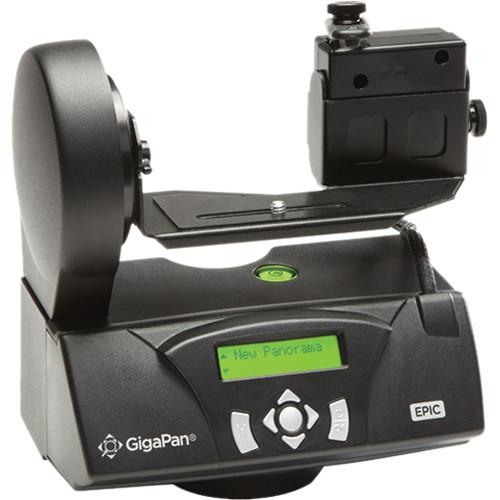 Contents of the user manual for the GigaPan EPIC Robotic Camera Mount
- Product category: Panoramic & Time Lapse Heads GigaPan
- Brand: GigaPan
- Description and content of package
- Technical information and basic settings
- Frequently asked questions – FAQ
- Troubleshooting (does not switch on, does not respond, error message, what do I do if...)
- Authorized service for GigaPan Panoramic & Time Lapse Heads
 |
User manual for the GigaPan EPIC Robotic Camera Mount contain basic instructions
that need to be followed during installation and operation.
Before starting your appliance, the user manual should be read through carefully.
Follow all the safety instructions and warnings, and be guided by the given recommendations.
User manual is an integral part of any GigaPan product,
and if it is sold or transferred, they should be handed over jointly with the product.
Following the instructions for use is an essential prerequisite for protecting
health and property during use, as well as recognition of liability on the part of the manufacturer
for possible defects should you make a warranty claim. Download an official GigaPan user manual in which you will find instructions on how to install, use, maintain and service your product.
And do not forget – unsuitable use of a GigaPan product will considerably shorten its lifespan!
|
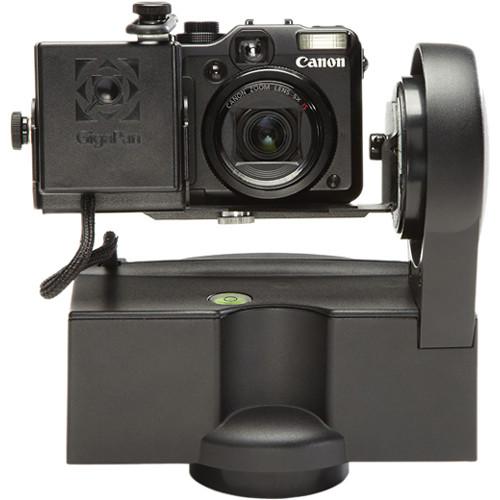
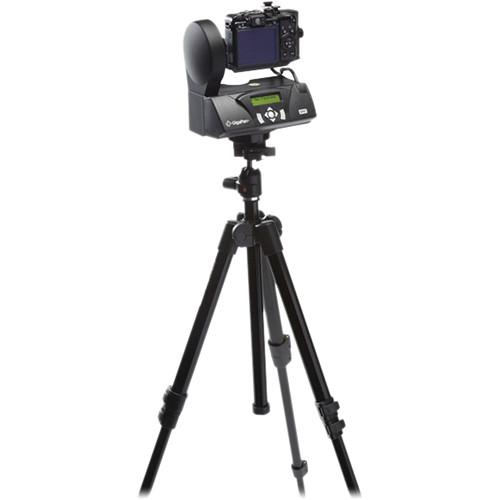
Product description Hands-on Review: The GigaPan EPIC Robotic Camera Mount Read More The EPIC Robotic Camera Mount from GigaPan is a unique robotic camera mount that lets you use your small digital camera to capture gigapixel panoramic images. It is easy to use and remarkably efficient. Simply set the corners of the panorama you want to capture using the EPIC's LCD interface. The embedded software works out how many photos your camera will need to take, hundreds or even thousands. Then the EPIC begins snapping the photos, automatically organizing them in overlapping rows and columns. After shooting, the included GigaPan Stitch software assembles, aligns and blends the individual images into one large panorama. The software then uploads your panorama to GigaPan.com for sharing. You also can upload your panorama onto any website. - The following equipment is needed for using the EPIC:
- A tripod capable of supporting the EPIC and your camera
- 6 x AA NiMH batteries (rechargeable ones are preferred)
- Your digital camera
- A memory card (minimum of 4GB is recommended)
1 Please Note: If using alkaline batteries, having a spare set is strongly recommended. close - The GigaPan EPIC comes with fully integrated software - GigaPan Stitch, which automatically combines the images captured by the GigaPan EPIC into a single brilliant panorama. Upload the images onto your computer and into the GigaPan Stitch software. GigaPan Stitch does the work for you, aligning and blending your individual pictures together for a single panorama.
- Share, store, and explore, by uploading your gigapixel panorama to GigaPan.com where the powerful technology of the GigaPan Viewer allows you to zoom in and out, seeing unbelievable detail.
- If you're taking a panorama with fixed focus and fast shutter, you can capture over 20 pictures per minute. Indoor or night-time shots require longer shutter times and can take longer. Using the 2-second camera delay allows the GigaPan Imager and tripod to settle before each picture.
- The GigaPan Imager can be used in snow, rain and wind. Keep the Imager and camera as dry as possible, and be sure to secure your tripod so it will not tip over if bumped or pushed by wind.
- The EPIC supports 360° panoramic and 60-90° tilt ranges-of-motion.
- The Pause and Scroll functions give you the ability to recapture a specific photo or photos in the sequence.
- The time between exposures is adjustable.
- The EPIC moves your camera with precise incremental movements of 0.36°.
- The device is compact, yet robust and durable.
- A stainless steel mounting arm minimizes flex and vibrations.
- It is easy to navigate the EPIC's menu with a highly visible LCD screen.
- The built-in bubble level lets you quickly position the EPIC for a perfect horizon.
- Scale and marking features enable repeatable adjustment.
- The anti-slip camera pad keeps your equipment from slipping out of position.
- It features a sleek design with strong cast-aluminum chassis.
- The EPIC has a battery tray that is easy to remove and refill.
- The controllable backlit screen can be set to "On" or "Auto" for low-light conditions, or "Off" for daylight conditions, minimizing battery drain.
- Camera Compatibility
- Canon:
Digital ELPH SD780, Digital ELPH SD1200, Digital IXUS 70, Digital IXUS 75, Digital IXUS 80, Digital IXUS 85 IS, Digital IXUS 90 IS, Digital IXUS 100 IS, Digital IXUS 110 IS, Digital IXUS 800 IS, Digital IXUS 850 IS, Digital IXUS 860 IS, Digital IXUS 870 IS, Digital IXUS 900 Ti, Digital IXUS 940 IS, Digital IXUS 950 IS, Digital IXUS 960 IS, Digital IXUS 970 IS, Digital IXUS 980, Digital IXUS 990, PowerShot A95, PowerShot A480, PowerShot A490, PowerShot A495, PowerShot A510, PowerShot A520, PowerShot A550, PowerShot A560, PowerShot A570 IS, PowerShot A580, PowerShot A590 IS, PowerShot A700, PowerShot A710 IS, PowerShot A720 IS, PowerShot A800, PowerShot A810, PowerShot A1000 IS, PowerShot A1100 IS, PowerShot A1200, PowerShot A1300, PowerShot A2200, PowerShot A2300, PowerShot A2000, PowerShot A2100, PowerShot A2400 IS, PowerShot A3300 IS, PowerShot A3400 IS, PowerShot A4000 IS, PowerShot ELPH 110 HS, PowerShot ELPH 300 HS, PowerShot ELPH 310 HS, PowerShot ELPH 320 HS, PowerShot ELPH 500 HS, PowerShot ELPH 510 HS, PowerShot ELPH 520 HS, PowerShot ELPH 530 HS, PowerShot ELPH 1100 HS, PowerShot G1, PowerShot G2, PowerShot G3, PowerShot G5, PowerShot G6, PowerShot G7, PowerShot G9, PowerShot G10, PowerShot G11, PowerShot G12, PowerShot G1 X, PowerShot G15, PowerShot S70, PowerShot S80, PowerShot S90, PowerShot S95, PowerShot S100, PowerShot S110, PowerShot SD500, IXUS 300 HS, Digital IXUS 700, PowerShot SD700 IS, PowerShot SD750, PowerShot SD770 IS, PowerShot SD780 IS, PowerShot SD790 IS, PowerShot SD800, PowerShot SD850, PowerShot SD870, PowerShot SD880, PowerShot SD890, PowerShot SD900, PowerShot SD940 IS, PowerShot SD950 IS, PowerShot SD960 IS, PowerShot SD970, PowerShot SD990 IS, PowerShot SD1000, PowerShot SD1100, PowerShot SD1200, PowerShot SX100 IS, PowerShot SX110 IS, PowerShot SX120 IS, PowerShot SX200 IS, PowerShot SX200 IS, PowerShot SX210 IS, PowerShot SX130 IS, PowerShot SX150 IS, PowerShot SX160 IS, PowerShot SX230 IS, PowerShot SX260 IS
Casio:
Exilim EX-P505, Exilim EX-P600, Exilim EX-P700, Exilim EX-Z700, Exilim EX-Z750
Fujifilm:
FinePix E500, FinePix E510, FinePix E550, FinePix E900, FinePix F660EXR, FinePix F750EXR, FinePix F800EXR, FinePix F810, FinePix JX500, FinePix JX580, FinePix JZ100, FinePix JZ250, FinePix S2000HD, FinePix T350, FinePix T400, FinePix XF1, FinePix XP100, FinePix XP170, FinePix XP50
GE:
C1440W, E1410SW, G100, J1458W
Kodak:
Easy Share Z1275
Leica:
D-LUX 3, D-LUX 4, D-LUX 6, V-LUX 40
Nikon:
1 J1, 1 J2, 1 V1, COOLPIX AW100, COOLPIX L25, COOLPIX L26, COOLPIX L610, COOLPIX P310, COOLPIX P6000, COOLPIX P7100, COOLPIX P7700, COOLPIX S01, COOLPIX S30, COOLPIX S100, COOLPIX S800c, COOLPIX S1200pj, COOLPIX S3200, COOLPIX S4200, COOLPIX S6200, COOLPIX S6300, COOLPIX S6400, COOLPIX S8200, COOLPIX S9050, COOLPIX S9200, COOLPIX S9300
Olympus:
E-PL3, E-PL5, E-PM1, E-PM2, Stylus XZ-2 iHS, SZ-12, SZ-31MR iHS, TG-320, TG-820 iHS, VG-160, VG-340
Panasonic:
Lumix DMC-LX2, Lumix DMC-LX3, Lumix DMC-LX5, Lumix DMC-LX7, Lumix DMC-SZ1, Lumix DMC-SZ5, Lumix DMC-TS4, Lumix DMC-ZS15, Lumix DMC-ZS20
Pentax:
Optio SV
Polaroid:
IF045, IS326, IS529, IS827 - Camera Compatibility (Cont.)
- Ricoh:
GR Digital IV, GS700, PX
Samsung:
DV300F, EX2, MV900F, NV7 OPS, NX1000, ST200F, ST76, TL350, WB150F, WB500, WB850F
Sigma:
DP1
Sony:
Cyber-shot DCS-H90, Cyber-shot DCS-HX10V, Cyber-shot DCS-HX20V, Cyber-shot DCS-HX30V, Cyber-shot DCS-RX100, Cyber-shot DCS-TX20, Cyber-shot DCS-TX200V, Cyber-shot DCS-TX66, Cyber-shot DCS-W200, Cyber-shot DCS-W610, Cyber-shot DCS-W620, Cyber-shot DCS-W650, Cyber-shot DCS-W690, Cyber-shot DCS-WX150, Cyber-shot DCS-WX50
Vivitar:
ViviCam S127, ViviCam S137, ViviCam 46, ViviCam 7122, ViviCam 9112, ViviCam F128, ViviCam i7, ViviCam iTwist F124, ViviCam S131, ViviCam S529, ViviCam S536, ViviCam S830, ViviCam T027, ViviCam T135 3D, ViviCam T324N, ViviCam V25, ViviCam X020, ViviCam X090, ViviCam X137, ViviCam X426 UPC: 851839002006 In the Box GigaPan EPIC Robotic Camera Mount GigaPan Stitch Software Limited 1-Year Warranty Time-Lapse Tips and Tools Shawn C. Steiner 07/24/2018 Table of Contents
|
Upload User Manual
Have you got an user manual for the GigaPan EPIC Robotic Camera Mount in electronic form? Please send it to us and help us expand our library of instruction manuals.
Thank you, too, on behalf of other users.
To upload the product manual, we first need to check and make sure you are not a robot. After that, your "Submit Link" or "Upload File" will appear.
Technical parametersGigaPan 600-0006 Specs | Display | 2-line monochrome LCD | | Bubble Level | Yes | | Load Capacity | 1.5 lb / 680.4 g | | Camera Mount | 1/4"-20 | | Range of Motion | 360° panning
-60° / +90° tilt
0.36° increments | | System Requirements | Intel-based Mac or PC with 1GB of RAM (2GB recommended)
Memory card reader or USB from camera
GigaPan Stitch software (included) | | Power Requirements | 6 x AA batteries (alkaline, rechargeable NiMH, Lithium-ion) | | Battery Capacity | More than 1000 images (on fully charged batteries) | | Dimensions | 7.75 x 7.5 x 4.9" (19.8 x 19 x 12.4cm) | | Weight | 3.1 lb (1.4 kg) | | | | Package Weight | 4.7 lb | | Box Dimensions (LxWxH) | 11.2 x 9.4 x 6.2" |
Rating94% users recommend this product to others. And what about you?

This product has already been rated by 32 owners. Add your rating and experience with the product.
Discussion
 Ask our technicians if you have a problem with your settings,
or if anything is unclear in the user manual you have downloaded.
You can make use of our moderated discussion.
The discussion is public and helps other users of our website who may be encountering similar problems.
Ask our technicians if you have a problem with your settings,
or if anything is unclear in the user manual you have downloaded.
You can make use of our moderated discussion.
The discussion is public and helps other users of our website who may be encountering similar problems.
The discussion is empty - enter the first post
Post a new topic / query / comment:
|
|


