User Manual for Google Home and Chromecast Ultra Kit Click to enlarge the picture
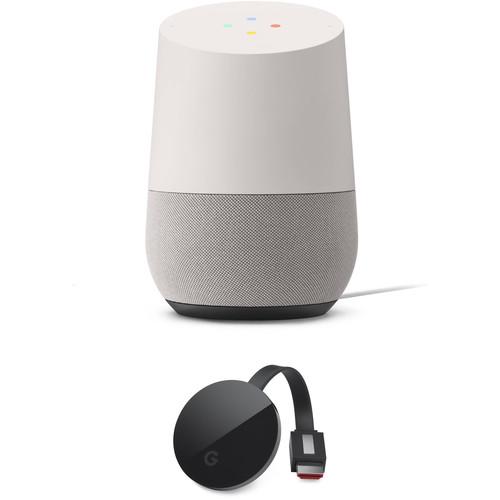 Contents of the user manual for the Google Home and Chromecast Ultra Kit
- Product category: Virtual Assistant Speakers & Displays Google
- Brand: Google
- Description and content of package
- Technical information and basic settings
- Frequently asked questions – FAQ
- Troubleshooting (does not switch on, does not respond, error message, what do I do if...)
- Authorized service for Google Virtual Assistant Speakers & Displays
|
User manual for the Google Home and Chromecast Ultra Kit contain basic instructions
that need to be followed during installation and operation.
Before starting your appliance, the user manual should be read through carefully.
Follow all the safety instructions and warnings, and be guided by the given recommendations.
User manual is an integral part of any Google product,
and if it is sold or transferred, they should be handed over jointly with the product.
Following the instructions for use is an essential prerequisite for protecting
health and property during use, as well as recognition of liability on the part of the manufacturer
for possible defects should you make a warranty claim. Download an official Google user manual in which you will find instructions on how to install, use, maintain and service your product.
And do not forget – unsuitable use of a Google product will considerably shorten its lifespan!
|
Product description Create or expand your Google Assistant ecosystem with this Kit of the white slate Google Home and a Chromecast Ultra. The Google Home features voice recognition technology powered by the Google Assistant that can integrate into your existing Google Assistant-enabled home or act as your gateway to virtual assistant devices. The Chromecast Ultra connects to your TV and enables Google Assistant and wireless streaming functionality with UHD and HDR support. Both devices connect to your network via dual-band Wi-Fi, and the Chromecast Ultra includes an Ethernet adapter for wired network connectivity. - Google Home (White Slate)
- HOME US LANDSCAPE LOOP FULLHD 45SEC 1920x1080px
With integrated Wi-Fi connectivity, voice recognition, and home automation support, the Google Home wireless speaker will connect to your wireless network to provide control of, and access to, virtually all of your smart devices. It can play music, check the weather and traffic, tell you sports scores, control your smart home equipment, and more. Using far-field voice recognition technology and the Google Assistant, the built-in microphone allows the Google Home to recognize your voice and perform the requested task in an instant.
You can control the Google Home by voice, with the Google Home app, or using the touch surface on top of the unit. Voice control can be disabled with the rear-mounted mute button. At only 3.79" wide and 5.62" tall, the Google Home is designed to fit nearly anywhere in most décors. To further blend into your home, the slate fabric base is interchangeable with six separately available colors. Note: The Google Home can only be set up with an Android or iOS device; it can't be set up via a computer. The Google Assistant on Google Home is not available in all languages. Not all functions are available in all areas. Please see the manufacturer's website for more info. - Command Your Audio
- A simple voice request triggers the Google Home to play music, podcasts, or radio from services like Google Play Music, Spotify, YouTube Music, Pandora, and TuneIn.
- Get Answers from Google
- Thanks to Google's history in search, the Google Home is ready for your questions. Get real-time answers, including the latest on weather, traffic, finance, sports, local businesses, and more.
- Plan to Do More
- With your permission, the Google Home will learn about you and get personal. It can retrieve your flight information, set alarms and timers, and tell you about the traffic on your way to work.
- Voice-Control Your Smart Devices
- The Google Home connects with smart devices like Chromecast, Nest, and Philips Hue, so you can use your voice to set the perfect temperature or turn down the lights.
- Far-Field Voice Recognition
- Far-field microphones and natural language processing help ensure that the Google Home hears you reliably.
- Multi-Room Capability
- Multiple Google Home devices can be grouped together to enjoy the same content in every room.
- Touch Controls
- The top touch surface gives you total control, and a mute button lets you put the Google Home's microphones on standby. Tap the top surface once to pause or stop audio, timers, alarms, and responses. Swipe clockwise to turn the volume up or counterclockwise to turn it down. Long-press the touch panel to trigger the Google Assistant. Press the mute button on the back to keep the Google Assistant from being triggered, even if you say "Ok Google."
- Hi-Fi Speaker
- The integrated high-excursion speaker is designed to deliver crystal-clear highs and rich bass.
- Style Your Home
- With bases separately available in seven colors, you can make the Google Home fit with nearly any space and décor. Just twist and pull off the one you don't want to replace it with the base of your chosen color.
- Set Up in Three Steps
- Plug the power cable into the Google Home, plug it into a wall socket, then download and run the Google Home app on your compatible phone or tablet.
- Basic Controls and Indicators
- Four colored lights indicate whether the unit is active. The entire top is a touch surface with a built-in microphone. The rear of the unit features a microphone on/off button and a power status light.
- Explore the Google Home App
- The Google Home app is your one-stop destination to discover all of the Google Home's content and features. It lets you find the latest features, tips, and offers; control settings like your default music provider or your location; and link compatible devices, such as smart lights, thermostats, and Chromecast devices.
- Decide When the Google Home Listens
- You have total control over when you want Google Home to respond to your voice commands. Its light states tell you the status of your device when you say, "Ok Google."
- No Lights: Waiting to hear the "Ok Google" hotword.
- Dots Animate: Listening for your request and ready to help.
- Four Red Dots: Voice control is deactivated.
- Multi-User Capable
- Up to six people can connect their account to one Google Home, so when you ask your Google Assistant for help, it can distinguish your voice from that of other family members, so you can hear your own personal playlists, commute times, schedule, and more.
- Additional Features
-
- Set, check, cancel, stop, and snooze multiple and/or recurring alarms.
- Perform complicated calculations with the built-in calculator.
- Ask about an event or get your schedule for the day from Google Calendar.
- Have fun with random questions.
- Get definitions and spellings for words with the built-in dictionary.
- Discover hidden surprises with Easter eggs.
- Get answers to your everyday questions.
- Ask about current individual stock prices or current points of an index, like the NASDAQ.
- Get status updates on your upcoming flight.
- Play games with the Assistant.
- Pick your favorite phrase to control countless online services and third-party smart devices with IFTTT.
- Turn on/off, dim, and check if lights are on with supported smart light bulbs.
- Search for local places and ask for additional information.
- Stream audio from your phone to Google Home from 100+ Chromecast-enabled audio apps or through phone mirroring.
- Group any combination of Google Home, Chromecast Audio, or Speakers with Chromecast built-in together for synchronous music throughout the home.
- Play music from popular music services by artist, song, genre, album, playlist, mood, or activity.
- Get a curated daily snippet about your day, which includes weather, calendar, commute, reminders, and news with My Day.
- Get the latest news.
- Get nutrition information for ingredients or food.
- Listen to your favorite podcasts.
- Listen to your favorite radio stations.
- Add items to your Shopping list and check what's already on it.
- Turn on/off devices around your home with supported smart switches and plugs.
- Stream audio to any speaker that has Chromecast Audio plugged in or Chromecast built-in. Then play, pause, skip, or turn up the volume.
- Ask for scores, live updates, or next game date, location and time.
- Stream video content to any TV that has Chromecast plugged in or built-in. Then play, pause, or turn up the volume.
- Control the temperature with supported smart thermostats.
- Set, pause, check, resume, and cancel timers.
- Ask for traffic and travel times for driving, walking, or biking.
- Get translations for words or phrases in supported languages.
- Ask for current weather or forecasts for the week for your home location or any other location.
UPC: 811571018420 - Google Chromecast Ultra (Black)
- HOME US LANDSCAPE LOOP FULLHD 45SEC 1920x1080px
Enjoy ultra-high-resolution content with the Chromecast Ultra from Google. This device plugs into your TV or home theater receiver's HDMI port, enabling you to stream media from your mobile device or the web. It supports video with 4K Ultra HD (3840 x 2160) resolution for use with compatible displays. It connects to your home network via 802.11ac Wi-Fi or the included Ethernet adapter. Set it up with the free Chromecast mobile app, then send your favorite online shows, movies, music, and more to your TV using your smartphone, tablet, or laptop. - 4K and HDR Support
- 4K UHD's high resolution enables improved clarity over 1080p Full HD while HDR provides deep, rich colors.
Note: To view content in 4K or HDR, a 4K- or HDR-capable display and reliable broadband internet connection are also required. - Remote Control from Your Device
- Just tap the Cast button in mobile apps and websites you already use to start casting right to your TV. Use your phone, tablet, or laptop to play, pause, and adjust the volume; all without draining your battery
- Entertainment Apps
- Chromecast Ultra works with popular apps you like Netflix, YouTube, Google Play, Pandora, and more, enabling you to choose your favorite movies, TV shows, songs, sporting events, and games.
Note: 4K not available on all apps. Some apps require subscriptions. - Mirror Your Android Phone or Chrome Browser
- See anything on your Android phone or tablet on your TV's larger screen, or use your laptop to cast any website from the Chrome browser. If it's online, you can cast it.
- Dual-Band Wi-Fi Connectivity
- Chromecast Ultra is designed to keep video resolution high and buffering low thanks to integrated 2.4 and 5 GHz Wi-Fi support and a built-in 1x2 SIMO antenna system. Because content is streamed straight from the cloud, movies and TV shows play without interruption, even if you and your phone leave the room.
- Ethernet
- For users with slow Wi-Fi connections, Chromecast Ultra comes with a power adapter with an integrated Ethernet port, so you can plug directly into your home network.
- Google on Board
- Built-in Google support allows you to easily cast content from Google Play Movies, Google Play Music, YouTube, and Chrome web browser.
- Google Assistant Support
- Google Assistant is a digital ecosystem that enables you to interact and control compatible devices simply by using your voice. Additionally, app control lets you use your smartphone to access functions on the go.
UPC: 811571018284 In the Box - Home (White Slate)
- Power Adapter
- Limited 1-Year Warranty
Table of Contents
|
Upload User Manual
Have you got an user manual for the Google Home and Chromecast Ultra Kit in electronic form? Please send it to us and help us expand our library of instruction manuals.
Thank you, too, on behalf of other users.
To upload the product manual, we first need to check and make sure you are not a robot. After that, your "Submit Link" or "Upload File" will appear.
Technical parameters - Google Home (White Slate)
| | | Virtual Assistant Support | Google Assistant | | OS Compatibility | Android 4.1 or Later
iOS 8.0 or Later | | Supported Audio Formats | FLAC, HE-AAC, LC-AAC+, MP3, Vorbis, WAV (LPCM) | | | | Drivers | 1 x 2" / 5.1 cm Woofer | | Passive Radiators | 2 | | | | Audio | None | | Ethernet | None | | USB | 1 x Micro-USB (Service) | | Wi-Fi Standards | Wi-Fi 5 (802.11ac) | | Wi-Fi Bands | 2.4 GHz, 5 GHz | | | | AC Input Power | 100 to 240 VAC, 50 / 60 Hz at 1.1 A | | DC Input Power | 16 VDC at 2 A | | | | Dimensions (W x H x D) | 5.6 x 3.8 x 3.8" / 142.8 x 96.4 x 96.4 mm | | Weight | 1.1 lb / 477 g | | | | Box Dimensions (LxWxH) | 9.4 x 5.2 x 5.1" | - Google Chromecast Ultra (Black)
| | | Video Output | 1 x HDMI Male | | USB Ports | 1 x USB (Power Only) Micro-B | | IR Receiver | No | | Media Card Reader | None | | | | Resolutions | 3840 x 2160p | | HDR Compatibility | HDR10 | | | | Wi-Fi Standards | Wi-Fi 5 (802.11ac) | | Ethernet | 1 x RJ45 | | Smart Antenna Support | 1x2 SIMO | | | | Power Cord Length | 6.6' / 2.0 m | | Dimensions (W x H x D) | 2.3 x 2.3 x 0.5" / 58.2 x 58.2 x 13.7 mm | | Weight | 1.7 oz / 47 g | | | | Box Dimensions (LxWxH) | 5.0 x 4.8 x 2.6" |
Rating100% users recommend this product to others. And what about you?

This product has already been rated by 35 owners. Add your rating and experience with the product.
Discussion
 Ask our technicians if you have a problem with your settings,
or if anything is unclear in the user manual you have downloaded.
You can make use of our moderated discussion.
The discussion is public and helps other users of our website who may be encountering similar problems.
Ask our technicians if you have a problem with your settings,
or if anything is unclear in the user manual you have downloaded.
You can make use of our moderated discussion.
The discussion is public and helps other users of our website who may be encountering similar problems.
The discussion is empty - enter the first post
Post a new topic / query / comment:
|
|


