|
User Manual for Grass Valley EDIUS Workgroup 8 Upgrade from EDIUS Elite 7 Click to enlarge the picture
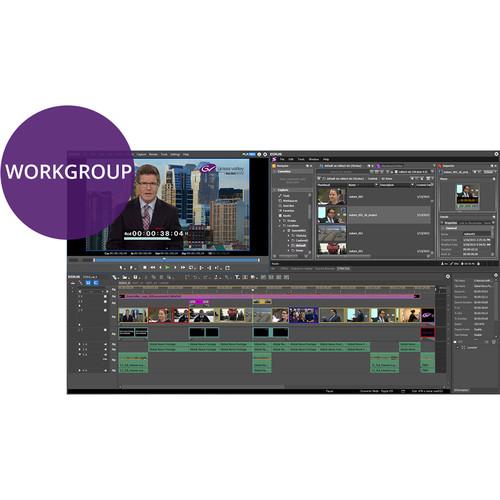 Contents of the user manual for the Grass Valley EDIUS Workgroup 8 Upgrade
- Product category: Video Editing Grass Valley
- Brand: Grass Valley
- Description and content of package
- Technical information and basic settings
- Frequently asked questions – FAQ
- Troubleshooting (does not switch on, does not respond, error message, what do I do if...)
- Authorized service for Grass Valley Video Editing
|
User manual for the Grass Valley EDIUS Workgroup 8 Upgrade contain basic instructions
that need to be followed during installation and operation.
Before starting your appliance, the user manual should be read through carefully.
Follow all the safety instructions and warnings, and be guided by the given recommendations.
User manual is an integral part of any Grass Valley product,
and if it is sold or transferred, they should be handed over jointly with the product.
Following the instructions for use is an essential prerequisite for protecting
health and property during use, as well as recognition of liability on the part of the manufacturer
for possible defects should you make a warranty claim. Download an official Grass Valley user manual in which you will find instructions on how to install, use, maintain and service your product.
And do not forget – unsuitable use of a Grass Valley product will considerably shorten its lifespan!
|
Product description When you need a video — or tons of video — edited fast to get it on the air, you need an NLE that will take everything you've got and work with it as quickly as possible. EDIUS Workgroup 8 from Grass Valley comes about as close as possible to letting you do just that.
Ideal as a finishing tool for broadcast news, news magazine content, and studio programs, EDIUS Workgroup 8 supports an extensive amount of formats and resolutions and allows you to edit pretty much all popular 4K, HD, and SD formats in real time with no rendering. Of course its feature set makes it no less suitable for more common editing projects, including documentary and film work. So it's a fit whether you're a stand-alone user at home or in the field, or connected to production infrastructure within a network, or if you switch between the two environments.
In addition to the format flexibility, the difference between EDIUS Workgroup 8 and EDIUS Pro 8 is that Workgroup offers system SDK support, native Avid DNxHD support, EDIUS XRE support, the ability to edit growing files, an EDIUS watch folder, Dolby E pass-through, ANC data (captioning) pass-through, audio monitoring mode, loudness monitoring, connection to external storage via FTP, a generic MXF exporter, integration with 3rd-party MAM systems from Square Box Systems, support for a Dolby Plus/Professional license option, and Grass Valley STORM 4K I/O Card support.
This version of EDIUS Workgroup 8 is a discounted upgrade from EDIUS Elite 7. - Key Features
-
- Interoperability with GV STRATUS (requires GV STRATUS Connect option): Launch from GV STRATUS settings or independently; export different formats to different destinations within the GV STRATUS environment
- K2 Clip/K2 Program import/export (requires K2 Connect option): K2 Clip capture; capture and edit a growing file on K2; K2 4K CMF import (beta)
- 4K workflow, including support for Blackmagic DeckLink 4K Extreme, Ultra Studio 4K, AJA KONA 3G (preview only), and EDL or AAF import/export with Grass Valley HQX with DaVinci Resolve 11
- Supports third-party I/O hardware from Blackmagic Design, Matrox, and AJA
- Edit media files with different resolutions -- from 24 x 24 to 4K x 2K
- Real-time conversion of frame rates on the same timeline delivers more efficient editing into the hands of editors
- Fast, flexible user interface, including unlimited video, audio, title, and graphics tracks
- Support for the latest file formats -- Sony XVAC (Intra/Long GOP)/XVAC S, Panasonic AVC-Ultra/AVC-Intra 4K 422 (import only), and Canon 1D C M-JPEG/4K MXF
- Work natively with many different video formats, such as Sony XDCAM, Panasonic P2, Ikegami GF, RED, Canon XF format and EOS movie format
- Fast AVCHD editing (up to 3+ streams in real time)
- Multicam editing of up to 16 different sources simultaneously, with video output support
- Improved MPEG encoder speed and quality
- Improved H.264/AVC decoder
- Accelerated 4K H.264 playback
- Optimized for fourth-generation Intel Core i architecture
- New GUI design for faster workflows
- 64-bit native processing with maximum memory access for streamlined real-time editing
- Proxy mode workflow for legacy computers helps extend their usability and increase ROI
- Supports Intel Quick Sync Video for extremely fast export and Blu-ray disc burning
- Fast handling of large quantities of still image files (JPG, TGA, DPX, and others)
- OFX support for Boris Continuum Complete, HitFilm, and Sapphire plug-ins
- Ability to save a current project as a template in order to re-use preferred track settings, screen layout, etc.
- 3D stereoscopic editing
- Built-in loudness meter
- Built-in image stabilization
- Direct to Blu-ray disc and DVD timeline export
- Native DNxHD import/export
- AAF workflow with Avid Media Composer
- Dolby Digital Professional/Plus import/export
- EDIUS Workgroup includes a Dolby consumer license as standard, which is applicable to corporate and consumer use of Dolby audio; for use in broadcast applications, the Dolby Professional/Plus license is available as an option for EDIUS Workgroup
- The K2 Connect option (sold separately) supports K2 Central TX, and an improved 4K workflow -- the ability to edit growing 4K files and to be able to export 4K CMF files back to the K2 server
Table of Contents
|
Upload User Manual
Have you got an user manual for the Grass Valley EDIUS Workgroup 8 Upgrade from EDIUS Elite 7 in electronic form? Please send it to us and help us expand our library of instruction manuals.
Thank you, too, on behalf of other users.
To upload the product manual, we first need to check and make sure you are not a robot. After that, your "Submit Link" or "Upload File" will appear.
Technical parametersGrass Valley 646795 Specs | | | Operating System | Windows 7 64-bit (Service Pack 1 or later)
Windows 8/8.1/10 64-bit
*See Memory spec below for physical memory limits of each OS | | CPU | Any Intel Core 2 or Core iX CPU
Intel or AMD single core CPU with a 3 GHz processor speed or faster (multiple CPUs and/or multicore CPUs are recommended)
SSSE3 (Supplementary SSE3) instruction set support required | | Memory | 2 GB RAM minimum (4 GB or more recommended)
Requirements for RAM and video memory vary depending on the project format
For SD/HD projects: 4 GB or more RAM recommended
For 4K projects: 16 GB or more RAM recommended
Maximum amount of RAM is based on the physical memory limits of each OS:
Windows 10, Enterprise, and Pro, 64-bit: 512 GB
Windows 8/8.1, Enterprise, and Pro, 64-bit: 512 GB
Windows 8/8.1, 64-bit: 128 GB
Windows 7, Ultimate, Enterprise, and Professional, 64-bit: 192 GB
Windows 7, Home Premium, 64-bit: 16 GB (not recommended for complex 4K projects)
Windows 7, Home Basic, 64-bit: 8 GB (not recommended for projects with more than HD resolution)
For projects in SD and below, in 8-bit: 1 GB RAM memory minimum / 2 GB recommended, 256 MB Video Memory minimum / 512 MB recommended
For projects in SD and below, in 10-bit: 2 GB RAM memory minimum / 4 GB recommended, 512 MB Video Memory minimum / 1 GB recommended
For projects in HD, in 8-bit: 2 GB RAM memory minimum / 4 GB recommended, 512 MB Video Memory minimum / 1 GB recommended
For projects in HD, in 10-bit: 4 GB RAM memory minimum / 4 GB recommended, 1 GB Video Memory minimum / 2 GB recommended
For projects in above HD (including 4K), in 8-bit: 8 GB RAM memory minimum / 12 GB (16 GB+ for 4K) recommended, 2 GB Video Memory minimum / 2 GB or more recommended
For projects in above HD (including 4K), in 10-bit: 8 GB RAM memory minimum / 12 GB (16 GB+ for 4K) recommended, 2 GB Video Memory minimum / 2 GB or more recommended | | Graphics Card | Supporting higher resolution than 1024 x 768 32-bit
Direct3D 9.0c or later and PixelShader Model 3.0 or later is required
Requirements for video memory size when using GPUfx will vary depending on the project format
For 10-bit SD projects: 1 GB or more recommended, for HD/4K projects 2 GB or more recommended
*Requirements for video memory vary depending on the project format. See Memory section above for details. | | Hard Disk | 6 GB of hard disk space is required for installation
Drive with SATA/7,200 rpm or faster is required for video storage:
Available hard drive disc space should be twice the size of the file to be edited
RAID-0 is recommended for HD and above resolution editing | | Hardware Support | EDIUS 8 supports the following Grass Valley hardware:
STORM 3G Elite
STORM 3G
STORM Pro
STORM Mobile
HDSPARK Pro
HDSPARK | | Optical Drive | Blu-ray disc writer is required when creating Blu-ray discs
DVD-R/RW or DVD+R/RW drive is required when creating DVDs | | Sound Card | Sound card with WDM driver support is required | | Network | Internet connection required for software license activation; thereafter Internet connection is required once per month to maintain usage | | Other | External video decks/cameras may require a USB 2.0 port for connectivity |
Rating50% users recommend this product to others. And what about you?

This product has already been rated by 50 owners. Add your rating and experience with the product.
Discussion
 Ask our technicians if you have a problem with your settings,
or if anything is unclear in the user manual you have downloaded.
You can make use of our moderated discussion.
The discussion is public and helps other users of our website who may be encountering similar problems.
Ask our technicians if you have a problem with your settings,
or if anything is unclear in the user manual you have downloaded.
You can make use of our moderated discussion.
The discussion is public and helps other users of our website who may be encountering similar problems.
The discussion is empty - enter the first post
Post a new topic / query / comment:
|
|
|
| Request for user manual |
You can’t find the operation manual you are looking for? Let us know and we will try to add the missing manual:
I’m looking for a manual / Request for manual
Current requests for instruction manuals:
Call Of Duty World War Two For Xbox...
controller stratus XL...
stratus XL...
smart whatch serie S11 42mm...
Allen & Heath SQ-6 manual...
|
| Discussion |
Latest contributions to the discussion:
AEW R 4100
Name: MAURICIO ANGARITA
Audio-Technica AEW-R4100 UHF Diversity Receiver for
AEW R 4100 has the mute function blocked and does not allow audio to pass. I tried several times to turn off the mute from the transmitter but it does nothing, the mute stays on. Solution?
Thank you...
Instructions for assembling the 2015 Forecast Image Master Consoles GC3-A
Name: mike elam
Forecast Consoles GC3-A ImageMaster Editing Console
Looking for instructions for assembling this console. ...
EMPTY TONER ERROR MESSAGE AFTER REPLACING TONER
Name: LINDA BAD YELLOW EYES
Brother TN223BK Standard-Yield Toner
I HAD TO CHANGE OUT ALL THREE TONERS DUE TO LEAKS IN THE YELLOW AND CYAN. AFTER I REPLACED THEM, THE MACHINE KEEPS GIVING ME AN EMPTY TONER ERROR MESSAGE. HELP!!...
PS480D 20/24 pin Switching 480W Power Supply
Name: swkargo
Logisys 480W Power Supply
This item states in can run -5vdc .It is NOT listed on the board or I beleive is r4 is missing the resitior. Any body have thid issue. Shawn
...
Help needed
Name: Ann Carter
SanDisk 1TB Extreme Portable USB 3.1
When I click the link to download the user manual for my Sandisk Extreme external hard drive, it gives me the manual for the LG Cricket. Can you please change the link so I can download the Sandisk manual and begin using this drive? Thank you....
|
|


