|
User Manual for Grass Valley Kaleido-XQUAD-Dual 8x2 Multi-Viewer Click to enlarge the picture
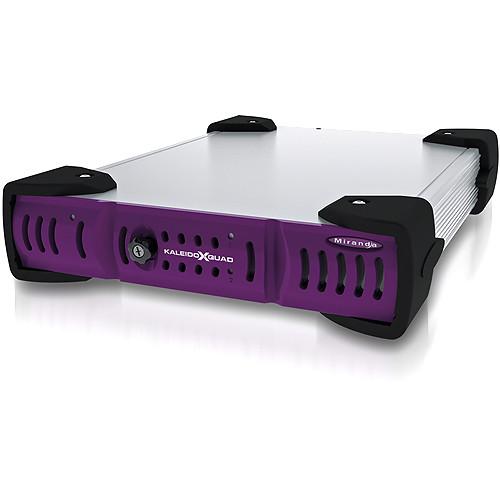 Contents of the user manual for the Grass Valley Kaleido-XQUAD-Dual 8x2 Multi-Viewer
- Product category: Multiviewer Processors Grass Valley
- Brand: Grass Valley
- Description and content of package
- Technical information and basic settings
- Frequently asked questions – FAQ
- Troubleshooting (does not switch on, does not respond, error message, what do I do if...)
- Authorized service for Grass Valley Multiviewer Processors
|
User manual for the Grass Valley Kaleido-XQUAD-Dual 8x2 Multi-Viewer contain basic instructions
that need to be followed during installation and operation.
Before starting your appliance, the user manual should be read through carefully.
Follow all the safety instructions and warnings, and be guided by the given recommendations.
User manual is an integral part of any Grass Valley product,
and if it is sold or transferred, they should be handed over jointly with the product.
Following the instructions for use is an essential prerequisite for protecting
health and property during use, as well as recognition of liability on the part of the manufacturer
for possible defects should you make a warranty claim. Download an official Grass Valley user manual in which you will find instructions on how to install, use, maintain and service your product.
And do not forget – unsuitable use of a Grass Valley product will considerably shorten its lifespan!
|
Product description The Miranda Kaleido-XQUAD-Dual 8x2 Multi-Viewer allows for eight video sources to be viewed on two monitors simultaneously, with each monitor showing all four sources in a split-screen configuration. Any embedded audio gets passed too. XQUAD is ready to go straight out of the box, featuring a 1RU half width frame with silent ventilation. XQUAD accepts video sources by eight SDI inputs, and for output to a monitor, XQUAD has two SDI outputs and two HDMI outputs. Only the SDI set or the HDMI set is required for output, and you can select either. Accordingly, any SDI monitor or any HDMI monitor can be connected, and the free output can be used to at the same time connect a router. All the SDIs support 3G, HD, and SD. Complementary to outputting video (and audio), XQUAD also outputs timecode, tallies, audio meters, safe area markers, time of day sync to NTP, database-updated or static labels, and timers that function by mouse or GPI control. XQUAD operates with less than a 1/2 frame delay. Award winning Kaleido-X scaling technology ensures that high resolution video will display properly in each screen (widget) of a split-screen layout.
Split-screen combinations/configurations are selectable via an included software called XEdit. You can split each screen in two and output only two of the inputs, for example, or you can select a full eight-way split. The splits get formed by outline bars. You can choose these bars to be of any color you want, and you can additionally upload a logo to display on the bars, although in most cases only a portion of the logo will be visible as the more expansive your split the thinner the bars will be. The bar-related adjustments are also done in the included software. An optional controller, the Keleido-RCP2, can be connected to alter by push-buttons many of the configurations made in the software.
XQUAD supports both 50 and 60Hz rates and consumes a maximum of 29W of power. - Key Features
-
- Award winning Kaleido-X scaling technology
- 1RU, half rack width frame with silent ventilation
- Auto-sensing 3G/HD/SD-SDI inputs; HD-SDI and HDMI outputs
- Integrates with NVISION and 3rd-party routers with source control and centralized mnemonic database access
- Fast mean time to repair with front loading module
- Tally support with direct serial interface or GPI control of popular production switchers and tally controllers (Image Video and TSL)
- Simplified Truck Monitoring
- Space and energy efficient, XQUAD is especially well suited to production monitoring in trucks. The multiviewer system integrates tightly with NVISION 8500 Hybrid routers with internal audio processing, and third party production switchers. An optional RCP-200 control panel simplifies control of a highly combined system. The panel can operate the XQUAD, a router, and Miranda's signal processing and distribution cards at the same time.
- Rich Integration with Routers Delivers Full Scalability
- For large monitoring facilities, XQUAD can be paired with NVISION and third party routers to provide expansion to up to 1152 video inputs and 288 multiviewer outputs. With the optional Kaleido Cluster feature, multiple multiviewers behave like a single virtual system from an operator's perspective, with full layout flexibility.
- Full Integration with Other Kaleido Multiviewers
- XQUAD uses the same advanced processing technology, control panels, and layout software as the top of the range Kaleido-X processor. The powerful XEdit layout software, which comes included, allows seamless creation of layouts for multiple Kaleido devices within a single room, providing a much better overview of an entire monitor wall during layout design. The optional Kaleido-RCP2 and RCP-200 control panels allow instant layout changes from a single button press, and the intuitive "Mouse on Wall" XEdit feature delivers easy interactivity with the monitor wall across multiple multiviewer processors.
In the Box Grass Valley Kaleido-XQUAD-Dual 8x2 Multi-Viewer Power Supply XEdit Layout Editor (Download) 2-Year Limited Warranty Table of Contents
|
Upload User Manual
Have you got an user manual for the Grass Valley Kaleido-XQUAD-Dual 8x2 Multi-Viewer in electronic form? Please send it to us and help us expand our library of instruction manuals.
Thank you, too, on behalf of other users.
To upload the product manual, we first need to check and make sure you are not a robot. After that, your "Submit Link" or "Upload File" will appear.
Technical parametersGrass Valley KALEIDO-XQUAD-DUAL Specs | Inputs | 8x 3G/HD/SD-SDI on BNC
3G:
Signal:SMPTE 424M-2006 (2.97, 2.97/1.001 Gbps) Level A
Formats:1920x1080p60, 1920x1080p59.94, 1920x1080p50
Cable length supported: 279 ft (85 m) via Belden 1694A
HD:
Signal:SMPTE 292M-C(1.485, 1.485/1.001 Gbps) SMPTE 272M-1994
Formats:720p59.94, 1080p23.98, 1080p23.98SF, 1080p24, 1080p24SF, 1080p25SF, 1080p 29.97, 1080i50, 1080i59.94
Return loss: >15 dB up to 1.5 GHz
Jitter:<0.2 UI
Cable length supported: 328 ft (100 m) via Belden 1694A
SD:
Signal:SMPTE-259M-C (270 Mbps), SMPTE 272M-1994
Formats:480i59.94 and 576i50
Return loss: >15 dB up to 270 MHz
Jitter:<0.2 UI
Cable length supported: 820 ft (250 m) via Belden 1694A | | Outputs | 2x 3G/HD/SD-SDI on BNC
Signal:3G/HD SDI SMPTE 424M and 292M compliant
Supports data rates of 1483.5, 1485, 2967, 2970 Mbps
Return loss: >15 dB up to 1.5 GHz, >10 dB from 1.5 GHz to 3 GHz
Jitter (wideband): HD: <0.2 UI, 3Gbps: <0.3 UI
2x HDMI 1.3
Format:1280x1024 up to 1920x1200p configurable
Refresh rate supported (50 Hz and 59.94 Hz)
Cable length supported: 15 ft (4.5 m)
Signal path: 8 bits output | | Graphic Conversion | Graphic converted to HD-SDI from optional KXI-DVI-bridge:
Signal:SMPTE 292M-C (1.485, 1.485/1.001 Gbps)
Resolutions: Mode A -- 1024x768, 1366x768, 1280x1024, 1680x1050, 1600x1200 @ 60Hz; Mode B -- 1280x720 and 1920x1080 @ 50/60 Hz
Cable length supported: 328 ft (100 m) via Belden 1694A | | GPI | 8x inputs on DB-26 terminal block PCB connectors
Contact closure: GND
Protection: up to 24 V
2x outputs on DB-26 terminal block PCB connector
Maximum voltage: 24 V
Maximum current at 12 V: 20mA (through 200 ohm series resistor)
Pulse minimum duration: 10 µs | | Communication | 1x RJ45 Ethernet, 10/100 BASE-T | | Serial Control | 1x RS-422 on DB-26 terminal block PCB connector
SMPTE 207M, EBU-3245 | | Video Processing | Signal path: 8-bit YCbCr to 24-bit RGB
Processing delay: ~1 field in genlock mode, 1-2 fields in non-genlock mode | | Audio Processing | Quantization: 20-24 bits
Sampling: 48 kHz
THD+N: 80 dB
SNR: 98 dB | | AC Voltage Input Range | 100-240 V, 50-60 Hz | | Power Consumption | 29 W max | | Dimensions | 1.7 x 8.4 x 12" (4.3 x 21.3 x 30.5 cm) | | Weight | 5.5 lb (2.5 kg) | | | | Package Weight | 8.0 lb | | Box Dimensions (LxWxH) | 27.0 x 13.0 x 8.0" |
Rating90% users recommend this product to others. And what about you?

This product has already been rated by 93 owners. Add your rating and experience with the product.
Discussion
 Ask our technicians if you have a problem with your settings,
or if anything is unclear in the user manual you have downloaded.
You can make use of our moderated discussion.
The discussion is public and helps other users of our website who may be encountering similar problems.
Ask our technicians if you have a problem with your settings,
or if anything is unclear in the user manual you have downloaded.
You can make use of our moderated discussion.
The discussion is public and helps other users of our website who may be encountering similar problems.
The discussion is empty - enter the first post
Post a new topic / query / comment:
|
|
|
| Request for user manual |
You can’t find the operation manual you are looking for? Let us know and we will try to add the missing manual:
I’m looking for a manual / Request for manual
Current requests for instruction manuals:
Call Of Duty World War Two For Xbox...
controller stratus XL...
stratus XL...
smart whatch serie S11 42mm...
Allen & Heath SQ-6 manual...
|
| Discussion |
Latest contributions to the discussion:
AEW R 4100
Name: MAURICIO ANGARITA
Audio-Technica AEW-R4100 UHF Diversity Receiver for
AEW R 4100 has the mute function blocked and does not allow audio to pass. I tried several times to turn off the mute from the transmitter but it does nothing, the mute stays on. Solution?
Thank you...
Instructions for assembling the 2015 Forecast Image Master Consoles GC3-A
Name: mike elam
Forecast Consoles GC3-A ImageMaster Editing Console
Looking for instructions for assembling this console. ...
EMPTY TONER ERROR MESSAGE AFTER REPLACING TONER
Name: LINDA BAD YELLOW EYES
Brother TN223BK Standard-Yield Toner
I HAD TO CHANGE OUT ALL THREE TONERS DUE TO LEAKS IN THE YELLOW AND CYAN. AFTER I REPLACED THEM, THE MACHINE KEEPS GIVING ME AN EMPTY TONER ERROR MESSAGE. HELP!!...
PS480D 20/24 pin Switching 480W Power Supply
Name: swkargo
Logisys 480W Power Supply
This item states in can run -5vdc .It is NOT listed on the board or I beleive is r4 is missing the resitior. Any body have thid issue. Shawn
...
Help needed
Name: Ann Carter
SanDisk 1TB Extreme Portable USB 3.1
When I click the link to download the user manual for my Sandisk Extreme external hard drive, it gives me the manual for the LG Cricket. Can you please change the link so I can download the Sandisk manual and begin using this drive? Thank you....
|
|


