User Manual for Grass Valley T2 Pro Intelligent Digital Disk Recorder Click to enlarge the picture
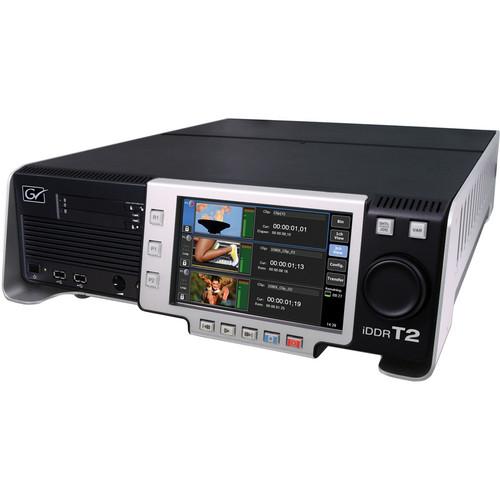 Contents of the user manual for the Grass Valley T2 Pro Intelligent Digital
- Product category: Recorders & Duplication Grass Valley
- Brand: Grass Valley
- Description and content of package
- Technical information and basic settings
- Frequently asked questions – FAQ
- Troubleshooting (does not switch on, does not respond, error message, what do I do if...)
- Authorized service for Grass Valley Recorders & Duplication
 |
User manual for the Grass Valley T2 Pro Intelligent Digital contain basic instructions
that need to be followed during installation and operation.
Before starting your appliance, the user manual should be read through carefully.
Follow all the safety instructions and warnings, and be guided by the given recommendations.
User manual is an integral part of any Grass Valley product,
and if it is sold or transferred, they should be handed over jointly with the product.
Following the instructions for use is an essential prerequisite for protecting
health and property during use, as well as recognition of liability on the part of the manufacturer
for possible defects should you make a warranty claim. Download an official Grass Valley user manual in which you will find instructions on how to install, use, maintain and service your product.
And do not forget – unsuitable use of a Grass Valley product will considerably shorten its lifespan!
|
Product description The T2 Pro Intelligent Digital Disk Recorder from Grass Valley comes with four 500GB HDDs and brings full high-definition capture and playback to the video professional. Additionally, it supports real-time HD cross conversion and faster than real-time playlist rendering.
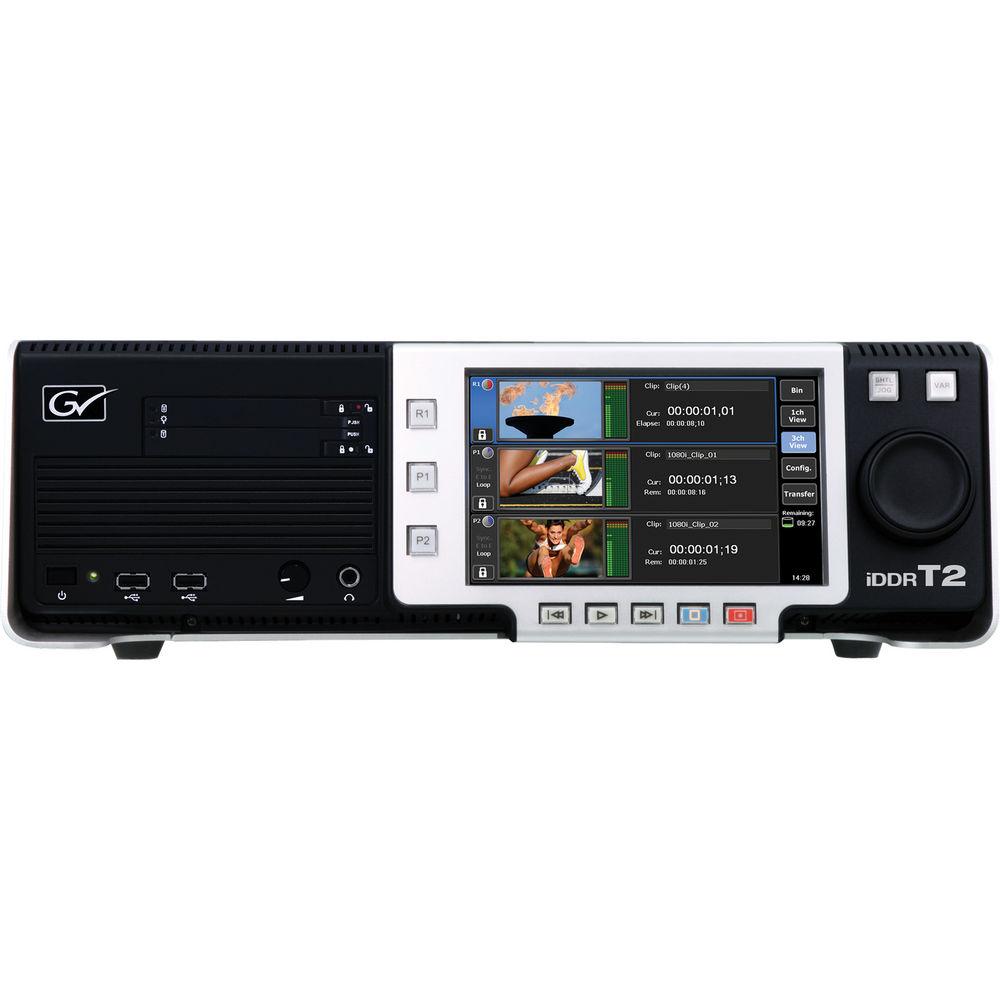
This recorder is a complete and self-contained SD and HD audio/video playout center. The front-panel transport controls have the look and feel of traditional VTRs, and its 2 output and 1 record channels support SD and HD content. The crisp and clear LCD front panel can display high-quality images and is complemented by a software application suite for managing and selecting media clips, clip editing, and trimming, and playout; including playlist creation.
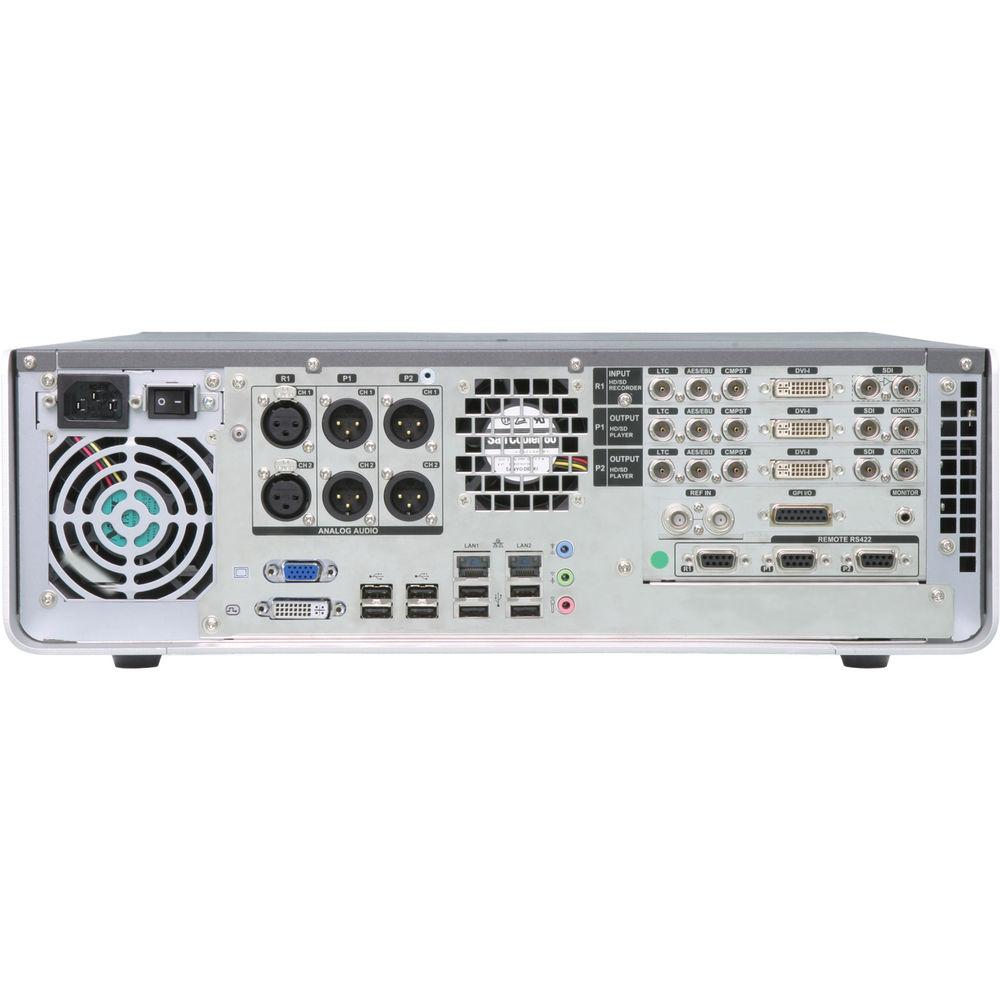
Featuring extensive rear-panel audio/video connectivity, it can also accept files via a USB 2.0 or by data transfer over a standard Gigabit Ethernet network. It also accepts media from other applications including HQ AVI, MPEG-2, QuickTime, Windows Media Video HD, JPEG, TIFF, TARGA, and BMP files. With the T2 iDDR (Intelligent Digital Disk Recorder), you can exchange content at high speed over a network or via removable media such as an SSD through a USB or the dedicated 2.5” (63.5mm) HDD slot.
Further, the T2 iDDR can be controlled by the Indigo A/V mixer, combining features normally found in video production switchers, presentation mixers, and audio mixers, to create a powerful presentation system. It has 2 playout channels for independent editing and previewing, or for delivering content to 2 different display systems simultaneously, including left-eye/right-eye 3D content. - 1TB data disk with 14 hours recording capacity (Grass Valley HQ: 150 Mb/s)
- True HD support; 720p, 1080i, and 1080p
- Up/down conversion for a wide range of resolutions and application support
- Native import/playback for standard formats
- Multiformat support (transcoding to Grass Valley HQ AVI) for standard and broadcast formats
- Three decks that include 1 record and 2 playback channels working independently and simultaneously
- 2-channel synchronized playback for key/fill rolls, edge blend displays, multi-screen, and 3D applications
- Embedded audio (8 channels per SDI connection)
- Easy-to-use front panel interface
- Workstation mode included as standard
- Simple on-the-fly editing, including trimming, mark in/out, basic transition effects, and insertion of placeholders for playlists
- Robust design, engineered to withstand punishing live event and mobile production environments
- Integration support for third-party control (BVW, GPIO, and AMP)
- Ingest management including MXF XDCAM format support with closed caption data, direct ingest to external media/storage, user-defined clip names, and scheduler
- Import from Final Cut Pro in QuickTime format using the free Grass Valley HQ codec for Mac onto an exFAT HDD
- Fast playlist rendering speed (up to 10 times real-time)
- Supports HD to HD real-time cross conversion
- Suitable for use in events and staging, auditoriums, corporate A/V centers, educational facilities, broadcast display support, regional sports companies, and switcher support for playback
- File-based operation enhancements include FTP transfer rate limit to maintain playback performance, NTP synchronization, and watch folder transfers
UPC: 631069608410 In the Box Grass Valley T2 Pro Intelligent Digital Disk Recorder (4 x 500GB HDD) Limited 15-Month Warranty on Parts & Labor User Manual PDF 9.9mb Table of Contents
|
Upload User Manual
Have you got an user manual for the Grass Valley T2 Pro Intelligent Digital Disk Recorder in electronic form? Please send it to us and help us expand our library of instruction manuals.
Thank you, too, on behalf of other users.
To upload the product manual, we first need to check and make sure you are not a robot. After that, your "Submit Link" or "Upload File" will appear.
Technical parametersGrass Valley T2 iDDR Specs | Configuration | T2 iDDR: 1 SD/HD input, 2 SD/HD outputs | | | | Format Support | Types: High-definition, standard-definition | | Connection | SD/HD SDI, analog component (Y-Pb-Pr), DVI-D, composite | | Recording Format | AVI-Grass Valley HQ, 4:2:2, XDCAM HD422 (50 Mb/s), HD (25 Mb/s), IMX, DVCAM
Beginning with SP1, T2 can record directly in XDCAM format | | Bit Rate | Up to 200 Mb/s | | Resolution | SD/Frame Rate: 720 x 576i50, 720 x 486i59.94
HD/Frame Rate: 1920 x 1080i59.94, 1920 x 1080i50, 1920 x 1080p24, 1920 x 1080PsF24, 1920 x 1080p23.98, 1920 x 1080PsF23.98, 1440 x 1080i59.94, 1440 x 1080i50, 1440 x 1080p24, 1440 x 1080PsF24, 1440 x 1080p23.98, 1440 x 1080PsF23.98, 1280 x 720p59.94, 1280 x 720p50 | | | | Format Support | Types: High-definition, standard-definition, computer | | Connection | SD/HD SDI (one for each playback channel), analog component, DVI-D (one for each playback channel, except RGB), composite | | Playback Format | Native Import/Playback:
AVCHD: H.264/AVC
AVI: Grass Valley HQ
GF: HD I-Frame only (100 Mb/s), HD Long GOP (50 Mb/s), DVCPRO 50, DVCPRO 25, DV, MPEG-2
MXF: Grass Valley HQ, AVC-Intra 100, AVC-Intra 50, DVCPRO HD, DVCPRO 50, DVCPRO 25, DV, D10, MPEG-2
P2: AVC-Intra 100, AVC-Intra 50, DVCPRO HD, DVCPRO 50, DVCPRO 25, DV
XDCAM: HD422 (50 Mb/s), HD (35, 25, and 18 Mb/s), IMX, DVCAM
XDCAM EX: HD (35 and 25 Mb/s) | | Bit Rate | Up to 200 Mb/s per channel | | Resolution | SD/Frame Rate: 720 x 576i50, 720 x 486i59.94
HD/Frame Rate: 1920 x 1080i59.94, 1920 x 1080i50, 1920 x 1080p24, 1920 x 1080PsF24, 1920 x 1080p23.98, 1920 x 1080PsF23.98, 1280 x 720p59.94, 1280 x 720p50, 1280 x 720p23.98 | | Computer Resolutions | 1280 x 1024, 1024 x 768, 800 x 600, 640 x 480 | | | | Analog Audio | 2 channels, XLR connections | | Digital | AES/EBU (2 channels), BNC connections
Embedded audio on SDI, HD, or SD (8 channels) | | Recording Format | 24-bit, PCM, 48 kHz sampling (20-bit PCM for SD-SDI) | | | | Analog Audio | 2 channels per output video, XLR connections | | Digital | AES/EBU (2 channels), BNC connections
Embedded audio on SDI, HD, or SD (8 channels) | | Recording Format | 24-bit, PCM, 48 kHz sampling (20-bit PCM for SD-SDI) | | | | Import | Import/Export File: Grass Valley HQ | | Export | Grass Valley HQ, MXF (XDCAM) HD422 (50 Mb/s), HD (25 Mb/s), IMX, DV) | | Import | Transcode:
Transcoding to Grass Valley HQ AVI:
AVCHD: H.264/AVC
AVI: Grass Valley Lossless, Grass Valley HQX, DVCPRO HD, DVCPRO 50, DVCPRO 25, DV, uncompressed
GF: DVCPRO 50, DVCPRO 25, DV, MPEG-2 GXF (AVC-Intra 100, AVC-Intra 50, D10, DVCPRO HD, DVCPRO 50, DVCPRO 25, DV, MPEG-2)
MPEG-2
MXF: Grass Valley HQX, Grass Valley HQ, AVC-Intra 100, AVC-Intra 50, D10, DVCPRO HD, DVCPRO 50, DVCPRO 25, DV, JPEG 2000, MPEG-2
P2: AVC-Intra 100, AVC-Intra 50, DVCPRO HD, DVCPRO 50, DVCPRO 25, DV
QuickTime: Grass Valley HQ, Grass Valley HQX, ProRes 422, ProRes 4444, Canon EOS movie (H.264/AVC), DVCPRO HD, DV, JPEG 2000, animation, MPEG-4, Photo JPEG, PNG, uncompressed
Sequenced Files: TGA ,BMP, JPG, TIFF, PNG, GIF
Windows Media: Windows Media Video
XDCAM: HD422 (50 Mb/s), HD (35, 25, and 18 Mb/s), IMX, DVCAM
XDCAM EX: HD (35 and 25 Mb/s) | | | | Protocol | BVW (pre-roll/post-roll, variable control in Sync mode, audio monitoring with variable speed), GPI, AMP (Advanced Media Protocol) for Indigo A/V Mixer and external control software | | Connection | RS-422 (9-pin D connections per channel), Ethernet | | | | Connections | Gigabit Ethernet, USB 2.0, VGA, DVI-D | | Storage Capacity | 1 TB (2 x RAID-0, 500 GB HDD)
Approximately 14 hours of HD @ Grass Valley HQ (150 Mb/s) | | Bit Rate | Up to 200 Mb/s per channel | | | | Operating Temperature | 41 to 95°F (5 to 35°C) | | Dimensions | 21.6 x 16.9 x 5.5" (550.0 x 430.0 x 140.0 mm) | | Weight | 33 lb (15 kg) | | | | Package Weight | 36.0 lb | | Box Dimensions (LxWxH) | 27.75 x 22.0 x 10.0" |
Rating90% users recommend this product to others. And what about you?

This product has already been rated by 53 owners. Add your rating and experience with the product.
Discussion
 Ask our technicians if you have a problem with your settings,
or if anything is unclear in the user manual you have downloaded.
You can make use of our moderated discussion.
The discussion is public and helps other users of our website who may be encountering similar problems.
Ask our technicians if you have a problem with your settings,
or if anything is unclear in the user manual you have downloaded.
You can make use of our moderated discussion.
The discussion is public and helps other users of our website who may be encountering similar problems.
The discussion is empty - enter the first post
Post a new topic / query / comment:
|
|


