User Manual for hahnel Giga T Pro II 2.4 GHz Wireless Timer Remote for Olympus Panasonic Cameras Click to enlarge the picture
 Contents of the user manual for the hahnel Giga T Pro II 2.4
- Product category: Shutter Releases hahnel
- Brand: hahnel
- Description and content of package
- Technical information and basic settings
- Frequently asked questions – FAQ
- Troubleshooting (does not switch on, does not respond, error message, what do I do if...)
- Authorized service for hahnel Shutter Releases
|
User manual for the hahnel Giga T Pro II 2.4 contain basic instructions
that need to be followed during installation and operation.
Before starting your appliance, the user manual should be read through carefully.
Follow all the safety instructions and warnings, and be guided by the given recommendations.
User manual is an integral part of any hahnel product,
and if it is sold or transferred, they should be handed over jointly with the product.
Following the instructions for use is an essential prerequisite for protecting
health and property during use, as well as recognition of liability on the part of the manufacturer
for possible defects should you make a warranty claim. Download an official hahnel user manual in which you will find instructions on how to install, use, maintain and service your product.
And do not forget – unsuitable use of a hahnel product will considerably shorten its lifespan!
|
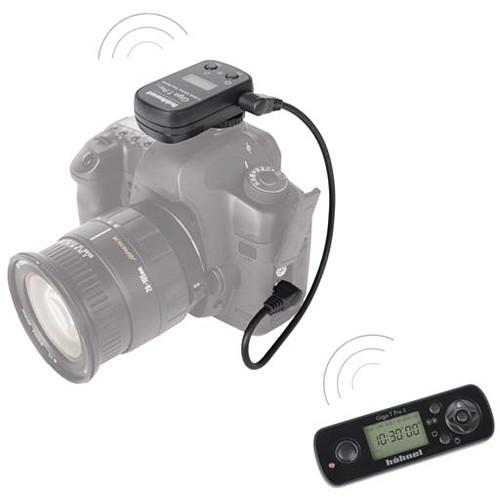
Product description Time-Lapse Tips and Tools Read More The hahnel Giga T Pro II 2.4 GHz Wireless Timer Remote for Olympus/Panasonic combines the functions of a wireless remote shutter release and a remote timer into a single very useful accessory operating at 2.4 GHz with a range of 328'. Using the small, lightweight receiver and transmitter (batteries included) you have access to programmable features such as a self timer, interval timer, long exposure setting, and exposure count--all of which may be used in any combination, making the possibilities nearly limitless. There is no limit to the possible number of exposures, and an exposure as long as 99 hours, 59 minutes and 59 seconds can be programmed. The Giga T Pro II has a Transmitter On/Off button to save battery power. It also has two timing loops, one embedded in the other. This allows you to repeat the original timed program as many times as required. You can also use the original program feature to create a timed 10-minute series of astral shots. You can then set this program to repeat at hourly intervals. In addition, you can set up a basic program which allows you to set up a timed shooting sequence, defining the delay, number of shots, interval shots and so on. This is a necessary addition to your kit bag for time-lapse or other long exposure photography, including astral photography, wildlife photography and studio photography. The Giga T Pro II is not compatible with the Giga T Pro. - Channel selector for individual control of multiple cameras
- Interchangeable connectors for different camera models
- Receiver takes a CR2 lithium battery; transmitter takes CR2032 battery. Batteries included.
- Timed sequence fully programmable including self-timer, delay, interval timer, exposure count and exposure length setting
- Shutter release button with autofocus, single & continuous shooting, bulb mode and self timer
- The Giga T Pro II has a Transmitter On/Off button to save battery power.
- It has two timing loops, one embedded in the other. This allows you to repeat the original timed program as many times as required.
- You can use the original program feature to create a timed 10-minute series of astral shots. You can then set this program to repeat at hourly intervals.
- You can set up a basic program which allows you to set up a timed shooting sequence, defining the delay, number of shots, interval shots and so on.
- 328' range for wireless control
- Can also be used as cable shutter release
- Through-wall transmission
- LCD display with back lighting
- High-tech, reliable wireless FSK 2.4GHz frequency, license free transmission worldwide
- This remote is compatible with the following cameras:
Olympus C5061, C-8080, E-1, E-10, E100, E-20, E-3, E-30, E-300, E-400, E-410, E450, E-5, E-510, E-520, E-550, E-600, E-620, E-PL2, E-PM2, OM-D E-M10, OM-D E-M5, PEN E-PL, PEN E-P3, PEN E-P5, SP-510 UZ, SP-550 UZ, SP-560 UZ, SP-565 UZ, SP-570 UZ, SP-590UZ, XZ-1, XZ-2 IHS, PEN-F, and OM-D EM-10 Mark II
Panasonic DMC-FZ100, DMC-FZ150, DMC-FZ20, DMC-FZ30, DMC-FZ50, DMC-FZ60, DMC-G1, DMC-G10, DMC-G2, DMC-G3, DMC-G5, DMC-GF1, DMC-GH4, DMC-GH1, DMC-GH3, DMC-L1, DMZ-FZ200, DMC-G6, DMC-G7, DMC-G70, DMC-FZ300, DMC-FZ330 In the Box hahnel Giga T Pro II 2.4 GHz Wireless Timer Remote for Olympus/Panasonic Cameras CR2 Battery Table of Contents
|
Upload User Manual
Have you got an user manual for the hahnel Giga T Pro II 2.4 GHz Wireless Timer Remote for Olympus Panasonic Cameras in electronic form? Please send it to us and help us expand our library of instruction manuals.
Thank you, too, on behalf of other users.
To upload the product manual, we first need to check and make sure you are not a robot. After that, your "Submit Link" or "Upload File" will appear.
Technical parametershahnel HL-HWGIGA OP Specs | Release Type | Wireless: RF (Radio Frequency) | | Camera Connection | Olympus, Panasonic | | Wireless Frequency | 2.4 GHz | | Interval Timer/Programmable | Yes | | Live View | No | | Maximum Exposure | 99 h, 59 min, 59 sec | | Mobile Device/App-enabled | No | | Wireless Range | 328'; / 100 m | | | | Package Weight | 0.45 lb | | Box Dimensions (LxWxH) | 10.3 x 4.2 x 1.4" |
Rating70% users recommend this product to others. And what about you?

This product has already been rated by 18 owners. Add your rating and experience with the product.
Discussion
 Ask our technicians if you have a problem with your settings,
or if anything is unclear in the user manual you have downloaded.
You can make use of our moderated discussion.
The discussion is public and helps other users of our website who may be encountering similar problems.
Ask our technicians if you have a problem with your settings,
or if anything is unclear in the user manual you have downloaded.
You can make use of our moderated discussion.
The discussion is public and helps other users of our website who may be encountering similar problems.
The discussion is empty - enter the first post
Post a new topic / query / comment:
|
|


