User Manual for Hanwha Techwin PNP-9200RH 8MP Outdoor PTZ Network Dome Camera with Night Vision Click to enlarge the picture
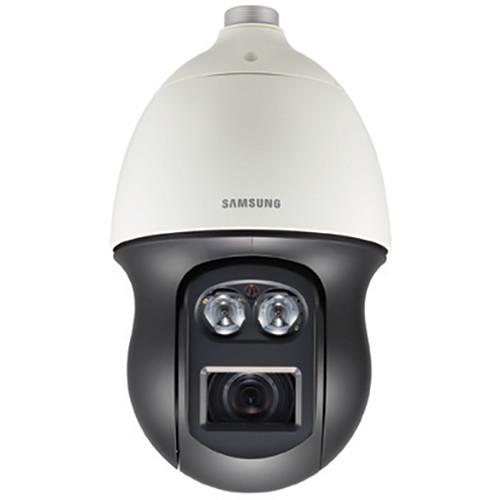 Contents of the user manual for the Hanwha Techwin PNP-9200RH 8MP Outdoor PTZ
- Product category: Wired IP Cameras Hanwha Techwin
- Brand: Hanwha Techwin
- Description and content of package
- Technical information and basic settings
- Frequently asked questions – FAQ
- Troubleshooting (does not switch on, does not respond, error message, what do I do if...)
- Authorized service for Hanwha Techwin Wired IP Cameras
|
User manual for the Hanwha Techwin PNP-9200RH 8MP Outdoor PTZ contain basic instructions
that need to be followed during installation and operation.
Before starting your appliance, the user manual should be read through carefully.
Follow all the safety instructions and warnings, and be guided by the given recommendations.
User manual is an integral part of any Hanwha Techwin product,
and if it is sold or transferred, they should be handed over jointly with the product.
Following the instructions for use is an essential prerequisite for protecting
health and property during use, as well as recognition of liability on the part of the manufacturer
for possible defects should you make a warranty claim. Download an official Hanwha Techwin user manual in which you will find instructions on how to install, use, maintain and service your product.
And do not forget – unsuitable use of a Hanwha Techwin product will considerably shorten its lifespan!
|
Product description The ivory PNP-9200RH 8MP Outdoor PTZ Network Dome Camera from Hanwha comes equipped with a 1/2.5" 8MP CMOS sensor and 4.8-96mm varifocal lens. It supports H.265, H.264, and MJPEG compression formats with support for simultaneous multiple streaming. For capturing images under varied light conditions, the camera features 120 dB WDR. With an IP66-rated weatherproof housing, this camera can be used for outdoor applications as well. -
- Maximum 8MP (3840 x 2160) resolution
- 20x IR corrected optical zoom and 16x digital zoom
- Maximum frame rate of 30 fps at all resolutions (H.265/H.264 compression)
- Supports auto tracking and intelligent video analytics
- Maximum IR range of up to 656'
- SD/SDHC/SDXC memory slot with support for up to 128GB cards
- Integrated WiseStream technology and ICR filter
- Bidirectional audio support
In the Box Hanwha Techwin PNP-9200RH 8MP Outdoor PTZ Network Dome Camera with Night Vision Limited 3-Year Warranty Table of Contents
|
Upload User Manual
Have you got an user manual for the Hanwha Techwin PNP-9200RH 8MP Outdoor PTZ Network Dome Camera with Night Vision in electronic form? Please send it to us and help us expand our library of instruction manuals.
Thank you, too, on behalf of other users.
To upload the product manual, we first need to check and make sure you are not a robot. After that, your "Submit Link" or "Upload File" will appear.
Technical parametersHanwha Techwin PNP-9200RH Specs | | | Imaging Device | 1/2.5" 8MP CMOS | | Total Pixels | 3864 x 2202 / 3840 x 2160 | | Effective Pixels | 3840 x 2160 | | Scanning System | Progressive | | Minimum Illumination | Color: 0.3 lux at f/1.6 (1/30 sec, f/1.8, 50 IRE), 0.005 lux (2 sec, f/1.8, 50 IRE)
0.1 lux at f/1.6 (1/30 sec, f/1.8, 30 IRE), 0.0005 lux (2 sec, f/1.8, 30 IRE)
B&W: 0 lux (IR LED on) | | S/N Ratio | 50 dB | | Video Output | CVBS: 1.0 V p-p / 75 Ohms composite, 720 x 480, 720 x 576, for installation | | | | Focal Length (Zoom Ratio) | 4.8-96mm | | Zoom Ratio | Optical: 20x
Digital: 16x, area zoom function support digital zoom 2x | | Maximum Aperture Ratio | f/1.8 (Wide) / f/3.6 (Tele) | | Angular Field of View | Horizontal: 65.1 (wide) to 3.8 °(tele)
Vertical: 38.4 (wide) to 2.2 °(tele) | | Minimum Object Distance | 4.92' / 1.5 m | | Focus Control | AF / One-shot AF / Manual | | Mount Type | DC auto iris (IR corrected) / board-in type | | Pan Range | 360° Endless / Preset: 400 0176 /sec, Manual: 0.024°/sec to 250° /sec | | Tilt Range | 190° / -5 to 185°
Preset: 300°/sec
Manual: 0.024 to 250°/sec | | Preset Accuracy | Preset (300), swing, group (6ea), trace, tour, auto run, schedule /±0.2° | | Azimuth | Yes (E/W/S/N/NE/SE/NW/SW OSD) | | Auto Tracking | Off/On | | | | Viewable Area | 656.17' / 200 m | | Camera Title | Off/On (Displayed up to 60 characters)
English/Numeric/Special characters
Common: Multi-line (maximum 5), color (gray/green/red/blue/black/white), transparency, auto scale by resolution | | Day & Night | Auto (ICR) / color / B&W | | Wide Dynamic Range | 120 dB | | Backlight Compensation | Off/BLC/WDR | | Contrast Enhancement | SSDR (Off/On) | | Digital Noise Reduction | SSNR (2D+3D noise filter) (Off/On) | | Defog | Off/auto/manual | | Motion Detection | Off/On (4 x polygonal zones) | | Privacy Masking | Off/On (16 x Rectanglular zones)
Color: Gray/green/red/blue/black/white, (Zoom ratio option for mask mode) | | Gain Control | Off/low/middle/high | | White Balance | ATW/AWC/Manual/Indoor/Outdoor/Mercury/Sodium | | Electronic Shutter Speed | Minimum/maximum/anti-flicker to 1/12,000 sec) | | Flip/Mirror | Off/On | | Intelligent Video Analytics | Tampering, virtual line, enter/exit, (Dis)appear, audio detection - with metadata | | Alarm I/O | 4 x inputs / 2 x outputs (Relay type) | | Remote Control Interface | RS-485/422 | | RS-485 Protocol | Samsung-T/E, Pelco P/D, Panasonic, Honeywell, AD, Vicon, Bosch, GE | | Alarm Triggers | Alarm input, motion detection, tampering (scene change), virtual line, enter/exit, appear/disappear, audio detection, defocus detection | | Alarm Events | File upload via FTP and e-mail, notification via email, local storage (SD/SDHC/SDXC) or NAS recording at event triggers, external output, PTZ preset | | Pixel Counter | Support (plugin viewer only) | | | | Ethernet | RJ45 (10/100Base-T ), SFP (only using SBP-302HF) | | Video Compression Format | H.265/H.264 (MPEG-4 part 10 / AVC): Main/baseline/high, MJPEG | | Resolution | 3840 x 2160, 2592 x 1944, 2592 x 1464, 1920 x 1080, 1280 x 1024, 1280 x 960, 1280 x 720, 1024 x 768, 800 x 600, 800 x 450, 720 x 576, 640 x 480, 640 x 360, 320 x 240, 320 x 180 | | Frame Rate | H.265/H.264: 30 fps at all resolutions
MJPEG: 15 fps at all resolutions | | Smart Codec | Manual mode (5 x area-based) / Support | | Video Quality Adjustment | H.265/H.264: Target bit rate level control
MJPEG: Quality level control | | Bit Rate Control | H.265/H.264: CBR or VBR
MJPEG: VBR | | Streaming Capability | Multiple streaming (up to 3 profiles) | | Audio In | Selectable (Mic in / Line in) Supply Voltage: 2.5 VDC (4 mA)
Input Impedance: Approximately 2 kOhms | | Audio Out | Line out (3.5 mm stereo mini jack)
Max output level: 1 Vrms | | Audio Compression Format | G.711 u-law/G.726 selectable, G.726 (ADPCM) 8 kHz, G.711 8 kHz
G.726: 16, 24, 32, 40 kb/s
AAC-LC : 48 kb/s at 16 kHz | | Audio Communication | Bidirectional (2-way) | | IP | IPv4, IPv6 | | Protocol | TCP/IP, UDP/IP, RTP(UDP), RTP(TCP), RTCP, RTSP, NTP, HTTP, HTTPS, SSL/TLS, DHCP, PPPoE, FTP, SMTP, ICMP, IGMP, SNMPv1/v2c/v3(MIB-2), ARP, DNS, DDNS, QoS, PIM-SM, UPnP, Bonjour | | Security | HTTPS (SSL) login authentication, digest login authentication
IP address filtering, user access log, 802.1x authentication (EAP-TLS, EAP-LEAP) | | Streaming Method | Unicast/Multicast | | Maximum User Access | 15 users at unicast mode | | Edge Storage | SD/SDHC/SDXC (128GB)
Motion images recorded in the SD/SDHC/SDXC memory card can be downloaded
Camera can detect automatically when the memory is connected, memory status display (normal/error/active/formatting/lock), NAS (Network Attached Storage), local PC for instant recording (Plugin viewer only | | Application Programming Interface | ONVIF Profile S/G SUNAPI (HTTP API), SVNP, WiseNet open platform | | Webpage Language | English, French, German, Spanish, Italian, Chinese, Korean, Russian, Japanese, Swedish, Danish, Portuguese, Turkish, Polish, Czech, Romanian, Serbian, Dutch, Croatian, Hungarian, Greek, Norse, Finnish | | Web Viewer | Supported OS: Windows 7, 8.1, 10, Mac OS X 10.9, 10.10, 10.11
Plugin-free Webviewer
Supported Browser: Google Chrome 47, MS Edge 20, Mozilla Firefox 43, Apple Safari 9 (Mac OS X only)
Plugin Webviewer
Supported Browser: MS Explore 11, Mozilla Firefox 43, Apple Safari 9 (Mac OS X only) | | Central Management | SmartViewer, SSM | | | | Operating Temperature | -58 to 131°F / -50 to 55°C | | Operating Humidity | Less than 90% RH | | Storage Temperature | -58 to 140°F / -50 to 60°C | | Storage Humidity | Less than 90% RH | | Ingress Protection | IP66 | | Vandal Resistance | IK10 | | | | Input Voltage | 24 VAC | | Power Consumption | Maximum 60/90 W (Heater off/on, IR on) | | | | Material | Aluminum, plastic | | Dimensions | 9.33 x 16.05" / 236.9 x 407.7 mm | | Weight | 15.65 lb / 1 kg |
Rating90% users recommend this product to others. And what about you?

This product has already been rated by 06 owners. Add your rating and experience with the product.
Discussion
 Ask our technicians if you have a problem with your settings,
or if anything is unclear in the user manual you have downloaded.
You can make use of our moderated discussion.
The discussion is public and helps other users of our website who may be encountering similar problems.
Ask our technicians if you have a problem with your settings,
or if anything is unclear in the user manual you have downloaded.
You can make use of our moderated discussion.
The discussion is public and helps other users of our website who may be encountering similar problems.
The discussion is empty - enter the first post
Post a new topic / query / comment:
|
|


