|
User Manual for Hanwha Techwin SNF-8010 Network Fisheye Dome Camera Click to enlarge the picture
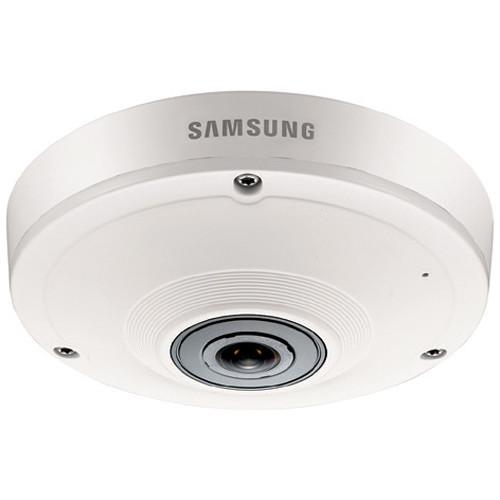 Contents of the user manual for the Hanwha Techwin SNF-8010 Network Fisheye Dome
- Product category: Wired IP Cameras Hanwha Techwin
- Brand: Hanwha Techwin
- Description and content of package
- Technical information and basic settings
- Frequently asked questions – FAQ
- Troubleshooting (does not switch on, does not respond, error message, what do I do if...)
- Authorized service for Hanwha Techwin Wired IP Cameras
|
User manual for the Hanwha Techwin SNF-8010 Network Fisheye Dome contain basic instructions
that need to be followed during installation and operation.
Before starting your appliance, the user manual should be read through carefully.
Follow all the safety instructions and warnings, and be guided by the given recommendations.
User manual is an integral part of any Hanwha Techwin product,
and if it is sold or transferred, they should be handed over jointly with the product.
Following the instructions for use is an essential prerequisite for protecting
health and property during use, as well as recognition of liability on the part of the manufacturer
for possible defects should you make a warranty claim. Download an official Hanwha Techwin user manual in which you will find instructions on how to install, use, maintain and service your product.
And do not forget – unsuitable use of a Hanwha Techwin product will considerably shorten its lifespan!
|
Product description Capture 360° panoramic views of your home or business and speed up security response times with the SNF-8010 Network Fisheye Dome Camera from Samsung. Well-suited for video monitoring applications that require high-resolution images, this camera relies upon a 1.8" progressive scan CMOS sensor that can capture images up to 5MP. The camera's fixed 1.14mm lens allows you capture video at a wide range at a maximum f/2.5 aperture ratio. This camera also offers an ultra-wide, 187° field of view as well as a full range of preset digital PTZ controls and 16x zoom capacity for maximum monitoring flexibility. Furthermore, the camera's built-in intelligent video analytics offer panoramic fisheye views and multiple dewarped views of a scene. You can choose from a single rectangular frame, quad view, double panorama or single panorama dewarped viewing formats at a wide range of display resolutions.
Designed to accommodate your evolving security monitoring needs, this camera offers several configurable video features like image enhancement, multiple display modes, 32-zone configurable privacy masking, 4-zone motion detection as well as adjustable frame rates and resolutions. This camera also has an onboard microSD card slot that can support a card up to 64GB in the event that the camera loses connection to its external recording device. This camera has the additional benefit of tamper detection, and will send alerts via email when its ability to capture video has been impeded. For instance, if a vandal physically attempts to damage or remove the camera or spray paints the lens, you will be notified.
Additionally, this camera is ONVIF S compliant, which not only minimizes your surveillance system's bandwidth and storage requirements, but also gives you the flexibility to integrate it into an ONVIF-compatible security video monitoring system. To streamline storage of video files, this camera encodes in one of two formats: H.264 and MJPEG. The first format provides nearly lossless coding and greatly reduced bit rates, and is optimal for video that doesn't have to be transferred at its highest quality. The second independently compresses frames for higher quality images, and takes up slightly more bandwidth. However, in comparison to other video codecs, both of these compression types significantly reduce video file size, contributing to faster uploads and saved bandwidth and storage. - General Overview
-
- 1.8" progressive scan CMOS imaging sensor
- 1.14mm fixed focal length
- f/2.5 aperture
- 187° angular field of view
- 60 dB Wide Dynamic Range
- 2D/3D Digital Noise Reduction
- 4-zone motion detection
- 32-zone privacy masking
- Gain Control Settings: Low, Middle, High
- Electronic Shutter Speed: 2 to 1/12,000 sec
- 16x digital zoom
- Preset and group digital PTZ functions
- Audio and Tamper Detection
- 1 alarm input and 1 alarm output
- Alarm Triggers: Motion detection, tampering, audio detection, alarm input, and network disconnection
- File upload via FTP and email, email notifications, TCP, and HTTP
- Unicast and multicast streaming supported
- Supports up to 10 users in unicast mode
- Display Resolutions
-
- 2560 x 2048
- 1920 x 1080
- 1600 x 1200
- 1280 x 1024
- 1280 x 960
- 1280 x 720
- 1024 x 768
- 800 x 600
- 720 x 480
- 640 x 480
- 320 x 240
- Dewarped View Resolutions
-
- Single Rectangle: 800 x 600, 640 x 480, 320 x 240
- Quad View: 1600 x 1200, 1280 x 960, 1024 x 768, 800 x 600, 640 x 480, 320 x 240
- Double Panorama: 2048 x 1536, 1600 x 1200, 1280 x 960, 1024 x 768, 800 x 600, 640 x 480, 320 x 240
- Single Panorama: 2048 x 768, 1600 x 600, 1280 x 480, 1024 x 384, 800 x 300, 640 x 240, 320 x 120
- SmartViewer Software
- Samsung's SmartViewer software is a centralized video monitoring and management tool that allows you to control your fisheye camera locally from a web browser on your desktop and remotely from the convenience of your Android/iOS smart devices.
- Tamper and Audio Detection
-
- Tamper Detection: Receive email alerts if the viewing field darkens suddenly
- Audio Detection: This camera has bidirectional audio communication and an I/O alarm output, which allows you to connect your camera to external alarms such as glass break detectors and PIR sensors or interface with an intercom or a PA system to facilitate surveillance monitoring and management. You can receive email alerts or onscreen notifications if audio is picked up by the camera's built-in microphone.
- Motion Detection
- There are four motion detection regions that can be enabled or disabled individually. You have the ability to move the motion detection region anywhere on the field of view, and even opt to overlap regions. This feature also allows you to set sensitivity parameters. The motion sensitivity control feature allows you to set camera's sensitivity so it can better distinguish between the actual movements of people, vehicles, or animals and slight movements of leaves on trees swaying in the wind. By controlling the sensitivity level, you can better avoid false alarms, and conserve valuable storage space by recording what really matters.
- Privacy Masking
- Privacy zone masking can be applied to a monitor to protect privacy. Create up to 32 privacy masks to conceal private objects and areas such as windows of domestic properties or car number plates which are within the camera's range of vision, but not privy to surveillance.
In the Box Hanwha Techwin SNF-8010 Network Fisheye Dome Camera Limited 3-Year Warranty Guides & Manuals Table of Contents
|
Upload User Manual
Have you got an user manual for the Hanwha Techwin SNF-8010 Network Fisheye Dome Camera in electronic form? Please send it to us and help us expand our library of instruction manuals.
Thank you, too, on behalf of other users.
To upload the product manual, we first need to check and make sure you are not a robot. After that, your "Submit Link" or "Upload File" will appear.
Download User ManualThe user manual for the Hanwha Techwin SNF-8010 Network Fisheye Dome Camera can be downloaded in PDF format at the link stated below.
Technical parametersHanwha Techwin SNF-8010 Specs | Imaging Sensor | 1.8" 6 MP IMX178 CMOS | | Total Pixels | 6 MP | | Effective Pixels | 5.2 MP, 2560 x 2048 | | Scanning System | Progressive | | Lens Type | Fixed | | Lens Mount | M12 board | | Focus Control | Manual | | Focal Length | 1.14mm | | Minimum Object Distance | 0.3 m to ∞ | | Maximum Aperture Ratio | f/2.5 | | Angular Field of View (D/V/H) | 187° | | Minimum Illumination | Color: 0.5 lux (f/2.5, 50 IRE), 0.2 lux at (f/2.5, 50 IRE)
B&W: 0.05 lux (f/2.5, 50 IRE), 0.02 lux at (f/2.5, 50 IRE) | | Memory Card Slot | microSD/SDHC/SDXC cards up to 64 GB | | Compatible Operating Systems | Windows 7, 8, Vista, XP
Mac OS X 10.7 | | ONVIF Conformance | ONVIF profile S | | Housing Material | Aluminum | | Dimensions (ØxH) | 5.74 x 1.95" (145.9 x 49.6 mm) | | Weight | 800 g (1.72 lb) | | | | Package Weight | 3.97 lb | | Box Dimensions (LxWxH) | 11.9 x 9.4 x 5.9" |
Rating100% users recommend this product to others. And what about you?

This product has already been rated by 69 owners. Add your rating and experience with the product.
Discussion
 Ask our technicians if you have a problem with your settings,
or if anything is unclear in the user manual you have downloaded.
You can make use of our moderated discussion.
The discussion is public and helps other users of our website who may be encountering similar problems.
Ask our technicians if you have a problem with your settings,
or if anything is unclear in the user manual you have downloaded.
You can make use of our moderated discussion.
The discussion is public and helps other users of our website who may be encountering similar problems.
The discussion is empty - enter the first post
Post a new topic / query / comment:
|
|
|
| Request for user manual |
You can’t find the operation manual you are looking for? Let us know and we will try to add the missing manual:
I’m looking for a manual / Request for manual
Current requests for instruction manuals:
Call Of Duty World War Two For Xbox...
controller stratus XL...
stratus XL...
smart whatch serie S11 42mm...
Allen & Heath SQ-6 manual...
|
| Discussion |
Latest contributions to the discussion:
AEW R 4100
Name: MAURICIO ANGARITA
Audio-Technica AEW-R4100 UHF Diversity Receiver for
AEW R 4100 has the mute function blocked and does not allow audio to pass. I tried several times to turn off the mute from the transmitter but it does nothing, the mute stays on. Solution?
Thank you...
Instructions for assembling the 2015 Forecast Image Master Consoles GC3-A
Name: mike elam
Forecast Consoles GC3-A ImageMaster Editing Console
Looking for instructions for assembling this console. ...
EMPTY TONER ERROR MESSAGE AFTER REPLACING TONER
Name: LINDA BAD YELLOW EYES
Brother TN223BK Standard-Yield Toner
I HAD TO CHANGE OUT ALL THREE TONERS DUE TO LEAKS IN THE YELLOW AND CYAN. AFTER I REPLACED THEM, THE MACHINE KEEPS GIVING ME AN EMPTY TONER ERROR MESSAGE. HELP!!...
PS480D 20/24 pin Switching 480W Power Supply
Name: swkargo
Logisys 480W Power Supply
This item states in can run -5vdc .It is NOT listed on the board or I beleive is r4 is missing the resitior. Any body have thid issue. Shawn
...
Help needed
Name: Ann Carter
SanDisk 1TB Extreme Portable USB 3.1
When I click the link to download the user manual for my Sandisk Extreme external hard drive, it gives me the manual for the LG Cricket. Can you please change the link so I can download the Sandisk manual and begin using this drive? Thank you....
|
|



