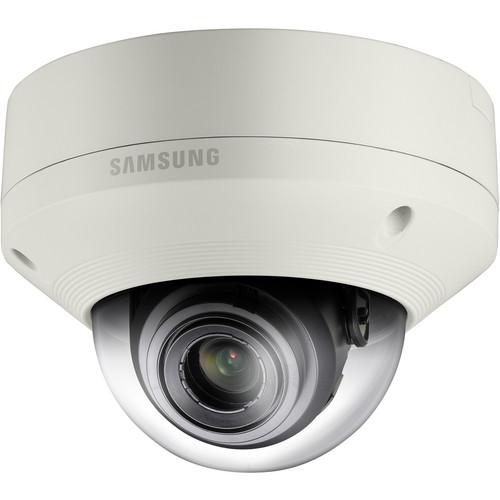
User Manual for Hanwha Techwin SNV-5084 1.3 Mp 720p HD Vandal-Resistant Network Dome Camera with Built-In Motorized Varifocal Lens Click to enlarge the picture
 Contents of the user manual for the Hanwha Techwin SNV-5084 1.3 Mp 720p
- Product category: Wired IP Cameras Hanwha Techwin
- Brand: Hanwha Techwin
- Description and content of package
- Technical information and basic settings
- Frequently asked questions – FAQ
- Troubleshooting (does not switch on, does not respond, error message, what do I do if...)
- Authorized service for Hanwha Techwin Wired IP Cameras
|
User manual for the Hanwha Techwin SNV-5084 1.3 Mp 720p contain basic instructions
that need to be followed during installation and operation.
Before starting your appliance, the user manual should be read through carefully.
Follow all the safety instructions and warnings, and be guided by the given recommendations.
User manual is an integral part of any Hanwha Techwin product,
and if it is sold or transferred, they should be handed over jointly with the product.
Following the instructions for use is an essential prerequisite for protecting
health and property during use, as well as recognition of liability on the part of the manufacturer
for possible defects should you make a warranty claim. Download an official Hanwha Techwin user manual in which you will find instructions on how to install, use, maintain and service your product.
And do not forget – unsuitable use of a Hanwha Techwin product will considerably shorten its lifespan!
|
Product description The SNV-5084 1.3 Mp 720p HD Vandal-Resistant Network Dome Camera with Built-In Motorized Varifocal Lens from Samsung features the WiseNetIII chipset for capturing enhanced high-definition images in both NTSC and PAL formats. It features a WDR of 130 and captures 1.3 Mp, 720p high-definition images. It is also capable of delivering low-light performance down to 0.05 lux (F1.2, 50 IRE, color), creating clear images under low-light conditions. Its P-iris support allows capture of images with better contrast, clarity, resolution, and depth of field. With enhanced features and technologies that combat the challenges of tough environmental conditions, this camera meets the needs of the professional security market. Tested and rated to IP66 / IK10, it can work effectively in environments prone to severe weather conditions, and resists physical attack. The camera comes in ivory color to match your decor. - SSLE (Samsung Super Light Enhancer)
- This camera incorporates SSLE, Samsung Super Light Enhancer technology, which produces good-quality color images in low light conditions. With SSLE, even under low light conditions such as at night, you can monitor the scene in 2 Mp, so that there is little chance of any movement in dark areas being missed.
- 2 Mp 100 dB WDR (Wide Dynamic Range)
- The WDR function provides 30 fps of 2 Mp enhanced picture quality by reducing motion blur and processing clearer images. While working with a contrast ratio of approximately 100 dB, the WDR feature accurately reproduces the detail of the images in scenes that simultaneously contain very bright and very dark areas.
- Defog
- Defog can be used to help improve the captured image in poor weather conditions such as smog, fog, or smoke. The visibility of the cameras can be enhanced in any weather condition.
- Enhanced DIS (Digital Image Stabilization)
- Previously only seen in analog CCDs, the WiseNetIII CMOS sensor incorporates Digital Image Stabilization (DIS) technology. This technology negates the effects of a camera shaking due to high wind or building vibration. DIS also greatly reduces the rolling shutter effect such as image wobble or skew that can often be seen in high-quality images. With enhanced DIS technology, the problems of monitoring using a camera installed on a pole or in windy conditions can be reduced. This also assists in the capture/detection of fast moving car number plates.
- P-Iris
- The camera supports the P-Iris system, which optimizes the iris function when multiple lighting conditions exist in a single scene; this results in images with better contrast, clarity, resolution, and depth of field. The optimization of the resolution at both the center and corner of the image, as well as the depth of field and shutter speed, provides increased image sharpness especially effective in megapixel cameras.
- 30 fps @ 2 Mp Resolution
- The camera has a frame rate of 30 fps at 2 Mp 1080p resolution; this results in latency-free, clear images. It is possible to utilize this frame rate in multiple ways. For example, using 30 fps at 2 Mp 1080p resolution, can be particularly beneficial when viewing moving objects to ensure that any edges are kept sharp and clear. By dividing the frame rate between NVR and PC monitoring, you can both record and monitor the scene in real-time.
- Improved Bandwidth Utilization
- The camera can process data streaming using 30% of the network bandwidth of cameras. Because of this improved bandwidth technology, seamless image transfer is possible even when there is limited network bandwidth available with the additional benefit of improved storage efficiency.
- Multi-Crop Streaming
- Multi-crop streaming allows users to highlight/crop areas of the scene so that only defined areas of interest will be transmitted from the camera in a predetermined resolution and frame rate. This flexibility in the video's resolution and frame rate allows a much smarter and efficient use of the network's bandwidth, resulting in reduced data size and storage capacity.
- Simple Focus
- Automatic focus technology allows the camera to move the image sensor's position for accurate image capture.
- Motion/Audio/Face Detection
- Motion detection technology reduces the false alarm rate and greatly improves the efficiency of the operators by learning what is the normal motion of the scene the camera can ignore, such as waves in the sea or the leaf movement of trees. This technology has also been adopted for audio detection, so the camera will only recognize abnormal noise levels. Face detection is also available and will detect up to 35 faces in the scene; these will be listed on an NVR as separate events for quick recall.
- Multi-Browser Support
- This camera utilizes NPAPI (Netscape Plugin Application Programming Interface) plug-in architecture that removes the limitation on supporting resolution and Web browser type. NPAPI is designed to satisfy the operating system and serve as a solution for adopting Samsung Techwin's optimized security system codec. Utilizing NPAPI, Google Chrome, Safari, Firefox, and IE can be used to monitor the WiseNetIII camera.
- Samsung Network Products Solution
- The WiseNetIII camera has been designed to be compatible with existing Samsung mobile, storage, and camera monitoring software. It can be used for small applications that include using the camera as edge storage as a recording solution, SmartViewer CMS for management, and iPOLiS mobile for Smartphone monitoring. For mid/large applications the camera can be used with hardware/software NVRs as a recording solution while Samsung Security Manager (SSM) can be used as the monitoring/management software.
In the Box Hanwha Techwin SNV-5084 1.3 Mp 720p HD Vandal-Resistant Network Dome Camera with Built-In Motorized Varifocal Lens Limited 3-Year Warranty Table of Contents
|
Upload User Manual
Have you got an user manual for the Hanwha Techwin SNV-5084 1.3 Mp 720p HD Vandal-Resistant Network Dome Camera with Built-In Motorized Varifocal Lens in electronic form? Please send it to us and help us expand our library of instruction manuals.
Thank you, too, on behalf of other users.
To upload the product manual, we first need to check and make sure you are not a robot. After that, your "Submit Link" or "Upload File" will appear.
Technical parametersHanwha Techwin SNV-5084 Specs | | | Imaging Device | 1/3" 1.3 M PS CMOS | | Total Pixels | 1384 (H) x 1076 (V) | | Effective Pixels | 1329 (H) x 1049 (V) | | Scanning System | Progressive | | Minimum Illumination | Color: 0.05 lux (1/30 sec, F1.2, 50 IRE), 0.0008 lux (2 sec, 50 IRE)
B/W: 0.005 lux (1/30 sec, F1.2, 50 IRE) | | Signal to Noise Ratio | 50 dB | | Video Output | CVBS: 1 Vpp / 75 Ω composite, 704 x 480 (NTSC), 704 x 576 (PAL), for installation, DIP connector type | | | | Focal Length (Zoom Ratio) | 3 to 8.5 mm (2.8x) motorized varifocal | | Maximum Aperture Ratio | F1.2 | | Angular Field of View | H: 93.3° (Wide) to 33.2° (Tele)
V: 73.7° (Wide) to 26.6°(Tele) | | Minimum Object Distance | 1.64' (0.50 m) | | Focus Control | Simple focus (motorized V/F)/Manual
Remote control via network, Button control (Manual, Simple focus) | | Lens Type | DC auto iris | | Mount Type | Board-in type | | | | Camera Control | Pan: 0 to 354°
Tilt: 0 to 67°
Rotate: 0 to 355° | | | | Camera Title | Off / On (Displayed up to 40 characters) | | Day & Night | Auto (ICR) / Color / B/W / External / Schedule | | Backlight Compensation | Off / BLC | | Wide Dynamic Range | 130 dB | | Contrast Enhancement | SSDR (Samsung Super Dynamic Range) (Off / On) | | Digital Noise Reduction (DNR) | SSNRIII (2D + 3D noise filter) (Off / On) | | Image Stabilization | Digital: Off / On | | Defog | Off / Auto / Manual | | Motion Detection | Off / On (4 x 4-point polygonal zones) | | Privacy Masking | Off / On (32 zones with 4-points polygonal zones) | | Gain Control | Off / Low / Middle / High | | White Balance | ATW / AWC / Manual / Indoor / Outdoor | | Electronic Shutter Speed | Minimum / Maximum / Anti flicker (2 to 1/12,000 sec) | | Flip / Mirror | Off / On | | Intelligent Video Analytics | Tampering, Virtual line, Enter/Exit, Appear / Disappear, Audio detection, Face detection | | Alarm I/O | 1 x input and 1 x output | | Alarm Triggers | Motion detection, tempering, audio detection, face detection, video analytics, network disconnection, alarm input | | Alarm Events | File upload via FTP and email, notification via email, TCP and HTTP
Local storage (SD/SDHC/SDXC) recording at network disconnected & event (alarm triggers), external output | | | | Ethernet | RJ-45 (10/100BASE-T) | | Video Compression Format | H.264 (MPEG-4 part 10/AVC), MJPEG | | Resolution | 1280 x 1024, 1280 x 720P (HD), 1024 x 768, 800 x 600, 640 x 480, 320 x 240 | | Frame Rate | H.264: Maximum 60 fps at all resolutions
MJPEG: 1280 x 1024, 1280 x 720, 1024 x 768 (maximum 15 fps) and 800 x 600, 640 x 480, 320 x 240 (maximum 30 fps) | | Video Quality Adjustment | H.264: Compression level, Target bitrate level control
MJPEG: Quality level control | | Bitrate Control Method | H.264: CBR or VBR, MJPEG: VBR | | Streaming Capability | Multiple streaming (Up to 10 profiles) | | IP | IPv4, IPv6 | | Audio | Audio In: Selectable (Mic in / Line in), Max output level: 1 Vrms
Supply Voltage: 2.5 VDC (4 mA), Input Impedance: approximately 2 kΩ
Audio Out: Line out (3.5 mm stereo mini jack)
Audio Compression Format: G.711 u-law /G.726 selectable, G.726 (ADPCM) 8 kHz, G.711 8 kHz
G.726: 16 kb/s, 24 kb/s, 32 kb/s, 40 kb/s
Audio Communication: Bi-directional audio | | Protocol | TCP/IP, UDP/IP, RTP(UDP), RTP(TCP), RTCP,RTSP, NTP, HTTP, HTTPS, SSL, DHCP, PPPoE, FTP, SMTP, ICMP, IGMP, SNMPv1/v2c/v3(MIB-2), ARP, DNS, DDNS, QoS, PIM-SM, UPnP, Bonjour | | Security | HTTPS(SSL) login authentication, Digest login authentication
IP address filtering, User access log, 802.1x authentication | | Streaming Method | Unicast / Multicast | | Maximum User Access | 15 users at unicast mode | | Memory Slots | microSD/SDHC/SDXC
Motion images recorded in the SDXC/SDHC/SD memory card can be downloaded Data on an SD memory card may be lost or damaged by data access during power-off, mechanical shock, memory card detachment, or other factors. No guarantee is given against damage. | | Application Programming Interface | ONVIF Profile S, HTTP API v2.0, SVNP 1.2 | | Webpage Language | English, French, German, Spanish, Italian, Chinese, Korean, Russian, Japanese, Swedish, Danish, Portuguese, Turkish, Polish, Czech, Rumanian, Serbian, Dutch, Croatian, Hungarian, Greek, Norwegian, Finnish, Norwegian | | Web Viewer | Supported OS: Windows XP / VISTA / 7 / 8, MAC OS X 10.7
Supported Browser: Microsoft Internet Explorer (Ver. 10, 9, 8, 7), Mozilla Firefox (Version 19, 18, 17, 16, 15, 14, 13, 12, 11, 10, 9), Google Chrome (Version 25, 24, 23, 22, 21, 20, 19, 18, 17,16, 15), Apple Safari (Version 6.0.2 (Mac OS X 10.8, 10.7 only), 5.1.7) Mac OS X only Windows 8 is supported only in the Desktop mode. | | Central Management | Central Management Software: SmartViewer 4.0 | | | | Operating Temperature | 40 to 131°F (-40 to 55°C) Start up should be done at above --31°F (-35°C) | | Operating Humidity | Less than 90% RH | | Storage Temperature | -22 to 140°F (-30 to 60°C) | | Storage Humidity | Less than 90% RH | | Ingress Protection Rating | IP66 | | Vandal Resistant | IK10-rated | | | | Input Voltage/Current | 12 VDC, 24 VAC, PoE (IEEE802.3af, Class3) | | Power Consumption | Maximum 12.95 W (PoE - Heater on), Maximum 14 W (12 VDC, 24 VAC - Heater off) | | | | Material | Aluminum | | Dimensions (Ø x H) | 6.30 x 4.67" (160.00 x 118.50 mm) | | Weight | 2.17 lb (985.00 g) |
Rating80% users recommend this product to others. And what about you?

This product has already been rated by 32 owners. Add your rating and experience with the product.
Discussion
 Ask our technicians if you have a problem with your settings,
or if anything is unclear in the user manual you have downloaded.
You can make use of our moderated discussion.
The discussion is public and helps other users of our website who may be encountering similar problems.
Ask our technicians if you have a problem with your settings,
or if anything is unclear in the user manual you have downloaded.
You can make use of our moderated discussion.
The discussion is public and helps other users of our website who may be encountering similar problems.
The discussion is empty - enter the first post
Post a new topic / query / comment:
|
|


