User Manual for Hanwha Techwin Wisenet P Series 12MP Outdoor Network Fisheye Dome Camera with Night Vision Click to enlarge the picture
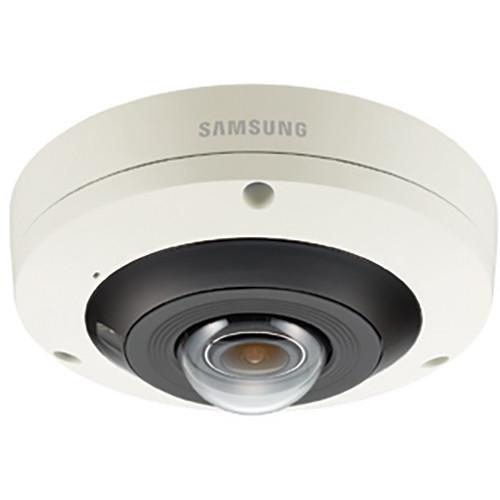 Contents of the user manual for the Hanwha Techwin Wisenet P Series 12MP
- Product category: Wired IP Cameras Hanwha Techwin
- Brand: Hanwha Techwin
- Description and content of package
- Technical information and basic settings
- Frequently asked questions – FAQ
- Troubleshooting (does not switch on, does not respond, error message, what do I do if...)
- Authorized service for Hanwha Techwin Wired IP Cameras
|
User manual for the Hanwha Techwin Wisenet P Series 12MP contain basic instructions
that need to be followed during installation and operation.
Before starting your appliance, the user manual should be read through carefully.
Follow all the safety instructions and warnings, and be guided by the given recommendations.
User manual is an integral part of any Hanwha Techwin product,
and if it is sold or transferred, they should be handed over jointly with the product.
Following the instructions for use is an essential prerequisite for protecting
health and property during use, as well as recognition of liability on the part of the manufacturer
for possible defects should you make a warranty claim. Download an official Hanwha Techwin user manual in which you will find instructions on how to install, use, maintain and service your product.
And do not forget – unsuitable use of a Hanwha Techwin product will considerably shorten its lifespan!
|
Product description The Wisenet P Series 12MP Outdoor Network Fisheye Dome Camera from Samsung features 12MP resolution, H.265 codec transmission, WiseStream technology, PTZ hand-over, and advanced video analytics. The camera supports Triple Codec H.265/H.264/MJPEG compression and features True WDR (120 dB). It is weather- and vandal-resistant with IP66 and IK10 ratings. The camera is suitable for retail, transportation, banking, corporate facilities, and educational applications. - Enhanced Streaming Performance with WiseStream Technology
-
- WiseStream significantly reduces bandwidth consumption when used with Dynamic GoV control technology
- WiseStream and H.265 are used together for further reductions in bandwidth consumption compared with H.264 video compression
- 120 dB True Wide Dynamic Range and P-Iris
-
- True Wide Dynamic Range improves images in high-contrast environments while P-Iris control sets the optimal iris position to reduce optical errors and to maximize image quality
- PTZ Hand-Over
-
- PTZ hand-over feature allows the camera to receive an alarm trigger from a fixed camera on the same IP video surveillance system
- Once the notification is received, the PTZ camera will zoom into the assigned camera pre-set location
- This feature improves the efficiency of the surveillance system by decreasing the reliance on the system operator to track events, and by increasing the likelihood that critical events in a surveillance area will be captured and recorded
- Defocus Detection
-
- If a camera goes out of focus, an alarm notification will be sent to users, allowing them to adjust camera focus
- People Counting and Heatmap Function
-
- Camera supports license-free People Counting business analytics
- Supports data search, report, and graph function
- Simple Focus
-
- Manual focus is not necessary, just a simple click of the icon is needed to focus the camera
- Other Features
-
- Built-in mic
- On-board dewarping
- Hallway view (rotate 90°/270°)
- Defog, motion detection, tampering detection
- True WDR (120 dB)
- Video analytics (enter/exit, appear/disappear, virtual line)
In the Box Hanwha Techwin Wisenet P Series 12MP Outdoor Network Fisheye Dome Camera with Night Vision Limited 3-Year Warranty Table of Contents
|
Upload User Manual
Have you got an user manual for the Hanwha Techwin Wisenet P Series 12MP Outdoor Network Fisheye Dome Camera with Night Vision in electronic form? Please send it to us and help us expand our library of instruction manuals.
Thank you, too, on behalf of other users.
To upload the product manual, we first need to check and make sure you are not a robot. After that, your "Submit Link" or "Upload File" will appear.
Technical parametersHanwha Techwin PNF-9010RV Specs | | | Imaging Device | 1/1.7" 12.4 MP CMOS | | Video Compression Format | H.265, H.264, MJPEG | | Maximum Frame Rate | H.265/H.264: 4000 x 3000 at 20 fps, 2992 x 2992 at 25 fps
MJPEG Max 15 fps | | Streaming Capability | Multiple (Up to 3 profiles) | | Max. User Access | 20 (Unicast) | | Min. Illumination | 30 IRE:
Color: 0.3 lux
B&W: 0 lux (IR LED on) | | Lens | 2.1mm fixed, f/2.2 | | Field of View (H x V x D) | 180° / 180° / 180° | | Focus Control | Simple focus / Manual | | | | IR Range | 49' (15 m) | | Day & Night | Auto (ICR) / Color / B&W / External / Schedule | | Backlight Compensation | Off / BLC / WDR | | Wide Dynamic Range | 120 dB | | Digital Noise Reduction | SSNR | | Intelligent Video Analytics | Tampering, Virtual line, Enter / Exit, (Dis)Appear, Audio detection, Defocus detection | | | | Application Programming Interface | ONVIF profile S&G, SUNAPI v2.0, Wisenet Open Platform | | Protocol | TCP/IP, UDP/IP, RTP(UDP), RTP(TCP), RTCP, RTSP, NTP, HTTP, HTTPS, SSL/TLS, DHCP, PPPoE, FTP, SMTP, ICMP, IGMP, SNMPv1/v2c/v3(MIB-2), ARP, DNS, DDNS, QoS, PIM-SM, UPnP, Bonjour, SIP | | Alarm I/O | 1 / 1 | | Alarm Triggers | Alarm input, Motion detection, Video analytics, Audio detection, Network disconnect, SD card error, NAS error | | Alarm Events | File upload via FTP and email, Notification via email, local storage (microSD/SDHC/ SDXC, max 128 GB available separately) or NAS recording at event triggers, External output | | Composition | Camera Side: Fisheye, Single panorama, Double panorama, Fisheye + 4 PTZ Quad view, Fisheye + 8 PTZ | | Audio | Bi-directional | | Audio In | Mic in / Line in / Built-in mic
Supply: 2.5 VDC (4 mA), approx. 2kOhms | | Audio Out | 3.5 mm jack, max output 1 Vrms | | Protection | IK10, IP66 | | Operating Temperature | -40 to 131°F (-40 to 55°C) | | Power | 12 VDC (Maximum 12 W)
PoE (Maximum 12.95 W) | | Weight | 28.6 oz (810 g) | | Dimensions | Ø 146.0 x 63.4 mm (Ø 5.7 x 2.5") |
Rating70% users recommend this product to others. And what about you?

This product has already been rated by 88 owners. Add your rating and experience with the product.
Discussion
 Ask our technicians if you have a problem with your settings,
or if anything is unclear in the user manual you have downloaded.
You can make use of our moderated discussion.
The discussion is public and helps other users of our website who may be encountering similar problems.
Ask our technicians if you have a problem with your settings,
or if anything is unclear in the user manual you have downloaded.
You can make use of our moderated discussion.
The discussion is public and helps other users of our website who may be encountering similar problems.
The discussion is empty - enter the first post
Post a new topic / query / comment:
|
|


