User Manual for HDfury Vertex 4K60 4:4:4 600 MHz UHD HDR Splitter, Switcher, and Scaler Click to enlarge the picture
 Contents of the user manual for the HDfury Vertex 4K60 4:4:4 600 MHz
- Product category: Routers & Switchers HDfury
- Brand: HDfury
- Description and content of package
- Technical information and basic settings
- Frequently asked questions – FAQ
- Troubleshooting (does not switch on, does not respond, error message, what do I do if...)
- Authorized service for HDfury Routers & Switchers
 |
User manual for the HDfury Vertex 4K60 4:4:4 600 MHz contain basic instructions
that need to be followed during installation and operation.
Before starting your appliance, the user manual should be read through carefully.
Follow all the safety instructions and warnings, and be guided by the given recommendations.
User manual is an integral part of any HDfury product,
and if it is sold or transferred, they should be handed over jointly with the product.
Following the instructions for use is an essential prerequisite for protecting
health and property during use, as well as recognition of liability on the part of the manufacturer
for possible defects should you make a warranty claim. Download an official HDfury user manual in which you will find instructions on how to install, use, maintain and service your product.
And do not forget – unsuitable use of a HDfury product will considerably shorten its lifespan!
|
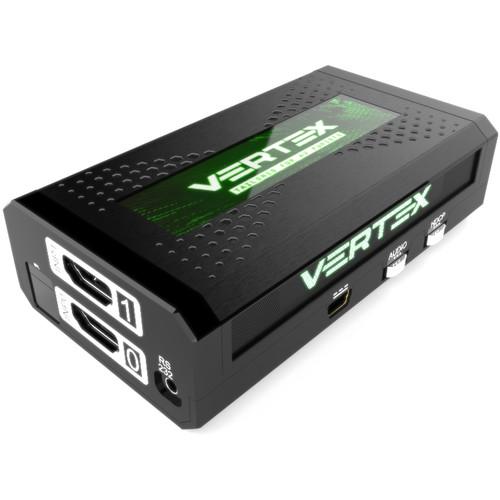
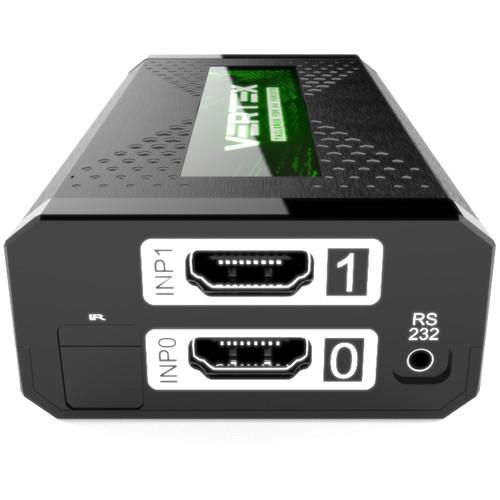
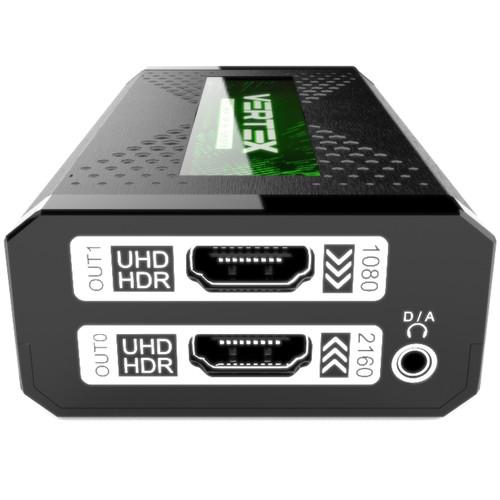
Product description HDfury Vertex is an advanced, multi-function video processor designed for content creators, hobbyists, calibrators, and integrators. Featuring dual HDMI inputs and dual HDMI outputs, Vertex works as a 2x2 splitter, 2x1 switcher, 2x2 matrix, and 1080p to DCI scaler. It supports nearly any video and audio signal, including HDR10+, HLG, and Dolby Vision HDR video. Video formats are supported in up to DCI 4K60, 4:4:4, 600 MHz, 18 Gbps on input and output. On top of it all, Vertex offers advanced HDCP and EDID features, including the ability to display HDCP 2.2 4K content on non-compliant devices.
Vertex can be controlled via IR, USB GUI utility for Windows, RS232, push buttons, or an iOS/Android mobile app via an optional HDfury GoBlue Bluetooth dongle. It has an OLED screen and PVC/metal design. - Six HDCP Engines
- Providing a total of six HDCP 1.4 and 2.2 engines for decryption/encryption, the HDfury Vertex offers a bidirectional HDCP workaround solution, including HDCP 2.2 > HDCP 1.4 and HDCP 1.4 > HDCP 2.2. It is capable of connecting any HDCP1.x or HDCP2.x source devices to any HDCP1.x or HDCP 2.x sink devices. Each RX block decrypts the input first whether it's 1.x or 2.x. Then each output port can individually encrypt it to 1.4 (both) or 2.2 (only top port) or not encrypt it at all if it was not encrypted initially. Dual conversion can be operated on both channels simultaneously.
- Display HDCP 2.2 on Non-Compliant Devices
- Source devices, including media servers and head-ends like Netflix, encode their 4K content in the HDCP 2.2 copy-protection scheme. TVs must be HDCP 2.2-enabled to play it, and everything in the video chain, including switchers and receivers, must be compliant as well, or the display will go dark and/or display an HDCP error message. With Vertex as part of your setup, high-bandwidth switchers, receivers, and displays will all be able to accommodate HDCP 2.2 copy-protected 4K content.
- 2x2 Splitter
- The HDfury Vertex allows you to split any signal up to 4K60, 4:4:4, 600 MHz. Switch between two inputs that will be replicated to two outputs. HDCP conversion can be configured and applied on the fly in order to always output the type of HDCP signal encryption that your display or sink device is expecting.
- 2x1 Switcher
- Vertex is capable of switching between two inputs up to 4K60, 4:4:4, 600 MHz and scaling them to one or more outputs. HDCP conversion can be configured and applied on the fly in order to always output the type of HDCP signal encryption that your display or sink device is expecting.
- 2x2 Matrix
- A matrix solution is available for HDMI streams up to 4K60, 4:4:4 8b; 4K60, 4:2:2 12b; 4K120, 4:2:0 8b; or 8K30, 4:2:0 8b.
- Ultra-Scaling up to 4K60 4:4:4 600 MHz
- Vertex offers advanced scaling modes to ensure that any HDMI/HDCP revision sink device get fed at its max capabilities. It features upscale, downscale, passthru, and bypass modes and allows chroma conversion as well as color space and color depth modification on the fly at 8-/10-/12-/16-bit for FHD, UHD, and DCI (4096 X 2160p) resolutions. Each output can be set with individual scaling rules.
- Comprehensive Control
- Vertex can be controlled via IR, USB GUI utility for Windows, RS232, push buttons, or an iOS/Android mobile app via the optional GoBlue Bluetooth dongle.
- HDR and Infoframe Metadata
- Vertex is capable of injecting and extracting live Infoframe and HDR metadata at any resolution and also in real time. Incoming metadata and self-generated metadata can be built and deciphered in real time. Additionally, Vertex also support AVI infoframe, VSIF, and other infoframe manipulation.
- HDMI Audio Extracting
- HDfury Vertex can extract HDMI audio up to 5.1 and pass through any sound format, including Atmos and DD+ via HDMI while downscaling the video for older AVRs.
- RS232 Control for Mac/Windows/Linux
- All Vertex GUI controls are available via RS232 commands in order to ensure a total control from any serial based computer.
- Advanced EDID Management
- Vertex offers a selected EDID bank, custom uploaded EDID, a self-generated Automix EDID, or fixed basic EDID. Sniff EDID from connected sink devices and save/edit/load any custom EDID table at any time. Select and pick any EDID of your choice from a preloaded list of 100 EDID tables. It loads and resets HPD to present your chosen one automatically. The AutoMix EDID feature will create a custom EDID by mixing both sink EDID connected to the output ports. Mixing rules in AutoMix mode can be selected through four different algorithms. Some EDID flags can be forced in Automix such as: 2.0 Stereo, 5.1 Multi, 7.1 Full Sound, Native, BT.2020/xvYcc, HDR10+, HLG, Dolby Vision, 3D Remove, YCbCr Remove. Vertex also offers the possibility to have a specific/individual EDID per input. Vertex automatically sniffs DV mandatory string from a connected capable DV sink.
- HDMI/CEC Total Commander
- HDfury Vertex offers a unique CEC command manager, with CEC compatible equipment. CEC commands allow an HDMI source to send commands to connected HDMI devices.
- Signal Info Display
- Your setup info is always available at first sight whether you're looking at the OLED screen, OSD, Windows GUI, or mobile app.
UPC: 686603105191 In the Box HDfury Vertex 4K60 4:4:4 600 MHz UHD / HDR Splitter, Switcher, and Scaler USB Power Supply Unit (US, 120V/60 Hz) USB to Mini-USB Cable Limited 1-Year Warranty Table of Contents
|
Upload User Manual
Have you got an user manual for the HDfury Vertex 4K60 4:4:4 600 MHz UHD HDR Splitter, Switcher, and Scaler in electronic form? Please send it to us and help us expand our library of instruction manuals.
Thank you, too, on behalf of other users.
To upload the product manual, we first need to check and make sure you are not a robot. After that, your "Submit Link" or "Upload File" will appear.
Technical parametersHDfury VERTEX Specs | Inputs/Outputs | 2 x HDMI inputs
2 x HDMI outputs
1 x RS232
1 x 3.5 mm switchable stereo analog / digital optical S/PDIF output
1 x USB (power from USB power unit / firmware upgrades)
IR | | HDMI Specification | HDMI 2.0b (Level A) 600 Mcsc - 18 Gbps | | Supported Signals | Input/Output of Any Signal up to DCI 4K/60, 4:4:4, 600 MHz, 18 Gbps, Including:
4096 x 2160p60
3840 x 2160p60/50/30/25/24
2560 x 1440p60/50
1920 x 1080p96/75/72/60/50/48/30/25/24
1920 x 1080i30/25
1280 x 720p120/100/60/50
576p60/50
480p60/50
480i60/60
Support for All UHD/BR and HDR Standard Resolutions: 4K60, 4:2:2, 12-bit, BT2020 HDR; 4K60, 4:2:0, 10-bit, BT2020 HDR; 4K60, 4:2:0, 12-bit; 4K30, 4:4:4, 12-bit
Support for all VESA mode video formats (PC resolutions) up to high resolutions such as WQSXGA, QUXGA, QFHD, WQUXGA, 4K
Support for any audio format at up to 192 kHz, including PCM, compressed audio (IEC61937), DSD, DST,DTS, DTS-HD, Dolby True HD, DTS-MA, HBR, DD+, DTS:X, and Dolby Atmos | | Video Bandwidth | 18 Gbps | | Scaling | Upscale HDMI Port:
1080p to UHD 3840 x 2160 or DCI 4096 x 2160
Downscale HDMI Port:
UHD or DCI to 1080p | | HDR Support | HDR10+/Dolby Vision support | | Supported Color Depth | 10-/12-/16-bit support | | Signal Conversion | Resolution, chroma subsampling, color space, color depth, HDCP | | HDCP Conversion | Any HDCP to any HDCP with CST1 support | | Operating Modes | 18 Gbps Scaler, Splitter, and Matrix with CEC, ARC, and EDID Management
Special Modes: CEC Command, HTPC, Disable HDR, HDMI Doctor and Booster | | EDID Modes | 10 EDID flags, 100 EDID banks (10 custom) | | Infoframe Modes | Capture, edit, block or replace HDR metadata, AVI, VSIF. Read SPD, Audio, HDMI Vendor, HDMI Forum | | Control Modes | IR, USB Windows GUI, RS232 for Mac/Windows/Linux, iOS/Android app with optional GoBlue Bluetooth dongle | | OSD | Editable with custom text and mask (Cover TV channel logo) | | Display | 3.1" (7.8 cm) (diagonal) 256 x 64 OLED screen with 32 green colors | | Audio | PCM at up to 192 kHz, compressed audio (IEC61937), DSD, DST, DTS, DTS-HD, Dolby True HD, DTS-MA, and HBR | | DDC Signal Voltage | 5 V p-p (TTL) | | Power Supply | External 5 V, 2 A USB unit (120 VAC / 60 Hz) | | Power Consumption | <2 W | | Enclosure | Black PVC/silver metal | | Regulation | CE, FCC, RoHS, WEEE | | Dimensions | 3.9 x 2.4 x 0.8" (10 x 6 x 2 cm) | | Weight | 0.3 lb (130 g) | | | | Package Weight | 0.85 lb | | Box Dimensions (LxWxH) | 7.9 x 6.4 x 2.2" |
Rating100% users recommend this product to others. And what about you?

This product has already been rated by 55 owners. Add your rating and experience with the product.
Discussion
 Ask our technicians if you have a problem with your settings,
or if anything is unclear in the user manual you have downloaded.
You can make use of our moderated discussion.
The discussion is public and helps other users of our website who may be encountering similar problems.
Ask our technicians if you have a problem with your settings,
or if anything is unclear in the user manual you have downloaded.
You can make use of our moderated discussion.
The discussion is public and helps other users of our website who may be encountering similar problems.
The discussion is empty - enter the first post
Post a new topic / query / comment:
|
|


