User Manual for Hikvision DS-2CD4585F-IZH 4K Outdoor Network Dome Camera with Night Vision Click to enlarge the picture
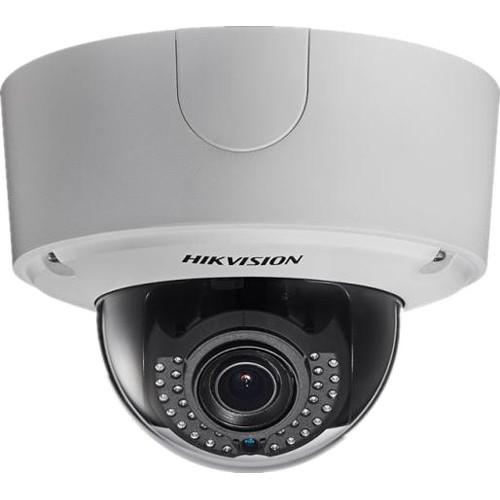 Contents of the user manual for the Hikvision DS-2CD4585F-IZH 4K Outdoor Network Dome
- Product category: Wired IP Cameras Hikvision
- Brand: Hikvision
- Description and content of package
- Technical information and basic settings
- Frequently asked questions – FAQ
- Troubleshooting (does not switch on, does not respond, error message, what do I do if...)
- Authorized service for Hikvision Wired IP Cameras
|
User manual for the Hikvision DS-2CD4585F-IZH 4K Outdoor Network Dome contain basic instructions
that need to be followed during installation and operation.
Before starting your appliance, the user manual should be read through carefully.
Follow all the safety instructions and warnings, and be guided by the given recommendations.
User manual is an integral part of any Hikvision product,
and if it is sold or transferred, they should be handed over jointly with the product.
Following the instructions for use is an essential prerequisite for protecting
health and property during use, as well as recognition of liability on the part of the manufacturer
for possible defects should you make a warranty claim. Download an official Hikvision user manual in which you will find instructions on how to install, use, maintain and service your product.
And do not forget – unsuitable use of a Hikvision product will considerably shorten its lifespan!
|
Product description The DS-2CD4585F-IZH 4K Outdoor Network Dome Camera from Hikvision features a 1/1.7" progressive-scan CMOS sensor for up to 4096 x 2160 high-definition resolution at 30 fps. Equipped with a 2.8-12mm varifocal lens, the camera can capture a 96° to 32.6° horizontal field of view for a wide to tele-coverage area. The camera's lens is surrounded by IR LEDs, providing up to 131' of night vision in complete darkness for use at all times. Additionally, image enhancements such as WDR, backlight compensation, and 3D-DNR allow you to capture clear images in ambient light for use in a variety of environments. There is a line input and output for 2-way audio capability, and there is an alarm input and output for expanding your surveillance setup. The camera also features smart analytics such as line crossing, intrusion detection, region entrance / exit, unattended baggage, and object removal. These analytics are beneficial when monitoring retail stores, doorways, public spaces, and similar applications. PoE technology enables you to run just one wire for both data and power, for a simple and easy setup, and H.264 video compression conserves bandwidth usage for fast transmissions. A built-in microSD slot supports up to 128GB of on-site recording, however, the camera also supports NAS storage for saving large amounts of information. This device is ONVIF-compliant for compatibility with a wide range of surveillance devices, and it is IP66- and IK10-rated for weatherproof and impact-resistant protection. - 1/1.7" progressive-scan CMOS sensor for up to 4096 x 2160 video resolution
- Three video streams maximize bandwidth usage
- 2.8-12mm varifocal lens provides an 96° to 32.6° field of view
- Pan, tilt, and rotation angle adjustment
- Line input and output for 2-way audio and alarm I/O
- microSD slot supports up to 128GB of on-site storage for edge recording
- Wide dynamic range allows you to capture clear images in ambient lighting
- 3D DNR effectively filters noise from the image, even in low-light scenarios
- Backlight compensation and saturation, brightness, contrast, and sharpness image settings
- IR LEDs provide up to 131' of night vision for use at all times
- Motion detection, line crossing, intrusion detection, and object removal analytics
- Can be powered via 24 VAC, 12 VDC, or standard PoE for convenience
- ONVIF-compliant for compatibility with a wide range of surveillance devices
- IP66- and IK10-rated weatherproof and impact-resistant for use outdoors and in high-risk areas
UPC: 813908021301 In the Box Hikvision DS-2CD4585F-IZH 4K Outdoor Network Dome Camera with Night Vision Limited 3-Year Warranty Brochure PDF 878.7kb Table of Contents
|
Upload User Manual
Have you got an user manual for the Hikvision DS-2CD4585F-IZH 4K Outdoor Network Dome Camera with Night Vision in electronic form? Please send it to us and help us expand our library of instruction manuals.
Thank you, too, on behalf of other users.
To upload the product manual, we first need to check and make sure you are not a robot. After that, your "Submit Link" or "Upload File" will appear.
Technical parametersHikvision DS-2CD4585F-IZH Specs | | | Image Sensor | 1/1.7" progressive-scan CMOS | | Minimum Illumination | 0.01 lux @ f/1.2 (AGC On)
0.014 lux @ f/1.4 (AGC On)
0 lux with IR | | Shutter Speed | 1 to 1/100,000 seconds | | Slow Shutter | Supported | | Lens | 2.8-12mm @ f/1.4 | | Angle of View | 96 to 32.6° | | Lens Mount | Φ14 | | Angle Adjustment | Pan: 0 to 355°
Tilt: 0; to 75°
Rotation: 0 to 355° | | Iris | Auto Iris: DC drive | | Day & Night | IR cut filter with auto switch | | IR Distance | 131' (40 m) | | Wide Dynamic Range | Digital | | | | Video | H.264 / MJPEG | | H.264 Profile | Baseline / Main / High | | Video Bit Rate | 32 Kbps to 16 Mbps | | Audio | G.711 / G.722.1 / G.726 / MP2L2 | | Audio Bit Rate | 64 kbps (G.711) / 16 kbps (G.722.1) / 16 kbps (G.726) / 32 to 128 kbps (MP2L2) | | | | Maximum Resolution | 4096 x 2160 | | Frame Rate | 50 Hz: 25 fps @ 4096 x 2160, 3840 x 2160, 1920 x 1080, 1280 x 720
60 Hz: 30 fps @ 4096 x 2160, 3840 x 2160, 1920 x 1080, 1280 x 720 | | Streaming | Third Stream: Independent with main stream and sub stream
Up to 50 Hz: 25 fps @ 1280 x 720; 60 Hz: 30 fps @ 1280 x 720 | | Image Enhancement | BLC / 3D DNR / ROI / Defog | | Image Settings | Rotate mode, Saturation, Brightness, Contrast, Sharpness adjustable by client software or web browser | | Cropping | Supports regional cropping | | Distortion | Supports distortion correction | | Day/Night Switching | Auto / Schedule / Triggered by alarm in | | Overlay | LOGO picture can be overlaid on video with 128 x 128 24-bit bmp format | | | | Storage | NAS (supports NFS, SMB/CIFS), ANR | | Alarm Trigger | Motion detection, Tampering alarm, Network disconnect, IP address conflict, Storage exception | | Protocols | TCP/IP, UDP, ICMP, HTTP, HTTPS, FTP, DHCP, DNS, DDNS, RTP, RTSP, RTCP, PPPoE, NTP, UPnP, SMTP, SNMP, IGMP, 802.1X, QoS, IPv6, Bonjour | | Security | User authentication, watermark, IP address filtering, anonymous access | | Standard | ONVIF (Profile S, Profile G), PSIA, CGI, ISAPI | | | | Audio | 1 x 1/8" / 3.5 mm audio in (Mic in/Line in) / out interface | | Communication Interface | 1 x RJ45 10M/100M Ethernet port
1 x RS-485 interface | | Alarm | 1 x input, 1 x output (up to 24 VDC, 1 A or 110 VAC, 500 mA) | | Video Output | 1 x V p-p composite output (75 Ohms/BNC) | | On-board Storage | Built-in microSD/SDHC/SDXC slot; up to 128 GB | | Reset Button | Yes | | | | Filtering | Supports environment noise filtering | | Audio I/O | Supports dual audio track, stereo | | Audio Sampling Rate | 16 / 32 / 44.1 / 48 kHz | | | | Behavior Analysis | Line crossing detection, Intrusion detection, Region entrance, Region exiting, Unattended baggage, Object removal | | Line Crossing Detection | Cross a pre-defined virtual line | | Intrusion Detection | Enter and loiter in a pre-defined virtual region | | Region Entrance | Enter a pre-defined virtual region from the outside place | | Region Exiting | Exit from a pre-defined virtual region | | Unattended Baggage | Objects left over in the pre-defined region | | Object Removal | Objects removed from the pre-defined region | | Exception Detections | Scene change detection, Sudden audio increase / decrease detection, audio loss detection, defocus detection | | Recognition | Face detection recognition | | Statistics | Object counting (entrance and exit object number is accounted and showed on screen in real time) | | | | Ratings | IP66 weatherproof
IK10 impact protection | | Operating Conditions | Temperature: -40 to 140°F (-40 to 60°C)
Humidity: 95% or less (non-condensing) | | Power Supply | 24 VAC ±10%, 12 VDC ±10%, PoE (802.3at) | | Power Consumption | 17 W | | Dimensions | 6.5 × 5.0" (16.5 × 12.7 cm) | | Weight | 4.63 lb (2.10 kg) | | | | Package Weight | 4.01 lb | | Box Dimensions (LxWxH) | 10.0 x 8.7 x 7.7" |
Rating40% users recommend this product to others. And what about you?

This product has already been rated by 17 owners. Add your rating and experience with the product.
Discussion
 Ask our technicians if you have a problem with your settings,
or if anything is unclear in the user manual you have downloaded.
You can make use of our moderated discussion.
The discussion is public and helps other users of our website who may be encountering similar problems.
Ask our technicians if you have a problem with your settings,
or if anything is unclear in the user manual you have downloaded.
You can make use of our moderated discussion.
The discussion is public and helps other users of our website who may be encountering similar problems.
The discussion is empty - enter the first post
Post a new topic / query / comment:
|
|


