User Manual for Hikvision DS-2DF5220S-DE4 W smart PTZ Dome Camera with 4.7-94mm Lens Click to enlarge the picture
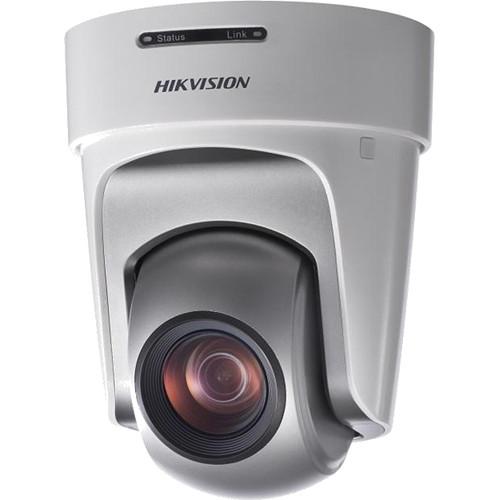 Contents of the user manual for the Hikvision DS-2DF5220S-DE4 W smart PTZ Dome
- Product category: Wireless Cameras Hikvision
- Brand: Hikvision
- Description and content of package
- Technical information and basic settings
- Frequently asked questions – FAQ
- Troubleshooting (does not switch on, does not respond, error message, what do I do if...)
- Authorized service for Hikvision Wireless Cameras
|
User manual for the Hikvision DS-2DF5220S-DE4 W smart PTZ Dome contain basic instructions
that need to be followed during installation and operation.
Before starting your appliance, the user manual should be read through carefully.
Follow all the safety instructions and warnings, and be guided by the given recommendations.
User manual is an integral part of any Hikvision product,
and if it is sold or transferred, they should be handed over jointly with the product.
Following the instructions for use is an essential prerequisite for protecting
health and property during use, as well as recognition of liability on the part of the manufacturer
for possible defects should you make a warranty claim. Download an official Hikvision user manual in which you will find instructions on how to install, use, maintain and service your product.
And do not forget – unsuitable use of a Hikvision product will considerably shorten its lifespan!
|
Product description Capture high quality surveillance footage indoors with the DS-2DF5220S-DE4/W 2MP 20X Network PTZ Dome Camera from Hikvision. It will work in a variety of situations due to its pan, tilt, and zoom capabilities combined with its 4.7-94mm f/1.6-3.5 20x zoom lens, which provides a varying viewing angle of 58.3-3.2°. Along with this, it has a 1/3" progressive scan CMOS sensor that can record Full HD 1080p video at up to 60 fps. Also, by using H.264, MJPEG, and MPEG-4 compression, the camera can conserve bandwidth and create three different streams.
Along with all of these basic capabilities, which include two-way audio support, the Wi-Fi capable camera has a range of smart features, including face detection, intrusion detection, line crossing detection, and more. It can also be set up to track subjects. Electronic image stabilization is also available to boost image quality and it has two alarm inputs and an output for notifying users of specific events. Additionally, it supports PoE and can be set up as a wired camera, in addition to its Wi-Fi abilities. - Camera's Functions
-
- Features auto iris, auto focus, auto white balance, backlight compensation and auto day & night switch
- Minimum illumination of 0.02 lux for color capture and 0.002 lux for B/W capture
- Supports privacy mask with multiple colors and mosaics on polygonal areas
- PTZ Functions
-
- 360° Endless pan range and -30° to 90° tilt range
- 270°/s Pan preset speed and 200°/s tilt preset speed
- Manual pan speed of 0.1° to 150°/s and manual tilt speed of 0.1° to 120°/s
- 300 Presets programmable; preset image freezing capability
- 8 Patrols, up to 32 presets per patrol
- 4 Patterns, with the recording time not less than 10 minutes per pattern
- Park Action: Auto call up of PTZ movement, after a defined time of inactivity
- Two alarm inputs and one alarm outputs
- Basic Functions
-
- CMOS sensor which allows the camera to capture images of up to 1920 x 1080
- Supports linkage with fisheye camera
- Supports heat mapping
- HDMI output
- G-sensor for automatically mirror
- Can be controlled via IR remote control
- ±0.1° Preset accuracy
- ONVIF(Open Network Video Interface Forum), CGI(Common Gateway Interface), PSIA(Physical Security Interoperability Alliance) compliant to ensure greater interoperability between different platforms and compatibility
- 3D intelligent positioning function
- 3D DNR
- Power-off memory function: restore PTZ & lens status after reboot
- Scheduled PTZ movement
- Supports WiFi
- Supports HD-SDI output
- Supports YPbPr
- Supports PoE+
- Smart Functions
-
- Supports various smart tracking modes like manual, panorama, intrusion trigger, line crossing trigger, and region entering/exiting trigger
- Supports face detection, intrusion detection, line crossing detection, audio exception detection, region entrance, region exiting
- Supports edge recording and smart search in smart NVR
- Supports defogging, HLC, and EIS
- Network Functions
-
- Supports H.264/MJPEG/MPEG4 video compression
- Features DaVinci processing chip and platform
- Supports H.264 encoding with Baseline/Main/High profile
- ROI(Region of Interest) encoding (supports 24 areas with adjustable levels)
- Built-in Web server
- microSD/SDHC/SDXC card local storage
- Supports up to 8 NAS storage; Edge recording(transmit the videos from SD card to the NAS after network resumed)
- HTTPS encryption and IEEE 802.1X port-based network access control
- Supports three-stream; Basic and advanced video configuration; Real time video at 1080P/960P/720P
- Multiple network protocols supported: IPv4/Ipv6, HTTP, HTTPS, 802.1X, QoS, FTP, SMTP, UPnP, SNMP, DNS, DDNS, NTP, RTSP, RTP, TCP, UDP, IGMP, ICMP, DHCP, PPPoE
- Supports 1 audio input and 1 audio output
UPC: 813908020113 In the Box Hikvision DS-2DF5220S-DE4/W smart PTZ Dome Camera with 4.7-94mm Lens Limited 3-Year Warranty Brochure PDF 793.9kbvzczwdeqsecdszttcarcdsyyq Table of Contents
|
Upload User Manual
Have you got an user manual for the Hikvision DS-2DF5220S-DE4 W smart PTZ Dome Camera with 4.7-94mm Lens in electronic form? Please send it to us and help us expand our library of instruction manuals.
Thank you, too, on behalf of other users.
To upload the product manual, we first need to check and make sure you are not a robot. After that, your "Submit Link" or "Upload File" will appear.
Technical parametersHikvision DS-2DF5220S-DE4/W Specs | | | Image Sensor | 1/3" Progressive scan CMOS | | Minimum Illumination | f/1.6, 1/1 sec, 50 IRE, AGC On
Color: 0.02 lux
B/W: 0.002 lux
f/1.6, 1/30 sec, 50 IRE, AGC On
Color: 0.3 lux
B/W: 0.02 lux | | Maximum Image Resolution | 1920 x 1080 | | Focal Length | 4.7 to 94 mm, 20x | | Digital Zoom | 16x | | Zoom Speed | 2.7 sec | | Angle of View | Wide: 58.3°
Tele: 3.2° | | Minimum Working Distance | Wide: 0.4" / 1 cm
Tele: 59.1" / 150 cm | | Aperture Range | f/1.6 to 3.5 | | Focus Modes | Auto / Semi-automatic / Manual | | WDR Control | Digital WDR | | S/N Ratio | ≥55 dB | | Shutter Time | 50 Hz: 1 to 1/30,000 sec
60 Hz: 1 to 1/30,000 sec | | AGC | Auto / Manual | | White Balance | Auto/Manual/ATW/Indoor/Outdoor/Daylight lamp/Sodium lamp | | Day & Night | IR cut filter | | Privacy Masking | 24 Privacy masks programmable; optional multiple colors and mosaics | | Enhancements | 3D DNR, EIS, Defog, HLC/BLC, SVC | | | | Range | Pan: 360° endless
Tilt: -30° to 90°(auto-flip) | | Speed | Pan Manual Speed: 0.1° to 150°/sec
Pan Preset Speed: 270°/sec
Tilt Manual Speed: 0.1° to 120°/sec
Tilt Preset Speed: 200°/sec | | Number of Presets | 300 | | Patrol | 8 Patrols, up to 32 presets per patrol | | Pattern | 4 Patterns, with the recording time not less than 10 minutes per pattern | | Action Type | Park Action: Preset, Patrol, Pattern, Auto scan, Tilt scan, Random scan, Frame scan, Panorama scan | | Task | Scheduled: Preset, Patrol, Pattern, Auto scan, Tilt scan, Random scan, Frame scan, Panorama scan, Dome reboot, Dome adjust, Aux output | | | | Tracking Ability | Smart Tracking: Manual, Panorama, Intrusion trigger, Line crossing trigger, Region entrance trigger, Region exiting trigger | | Detection Method | Smart Detection: Face detection, intrusion detection, line crossing detection, audio exception detection, region entrance, region exiting | | ROI | Support 24 areas with adjustable levels | | | | Alarm I/O | 2/1 | | Triggers | Face detection, intrusion detection, line crossing detection, region entrance, region exiting, audio exception detection, motion detection, dynamic analysis, tampering alarm, network disconnect, IP address conflict, storage exception | | Action Type | Preset, patrol, pattern, microSD/SDHC card recording, relay output, notification on client, smart snapshot, upload FTP, email linkage | | | | Monitor Output | 1 Vpp / 75 ohms, NTSC (or PAL) composite, BNC | | Audio Input | 1 x Mic in/line in interface,
Line input: 2 to 2.4 Vpp
Output Impedance: 1 kOhm, ±10% | | Audio Output | 1 x Audio output interface, line level, impedance: 600 ohms | | HD-SDI Output | 1 x HD-SDI interface
Video Output: 720p at 25 / 30 / 50 / 60 fps; 1080p at 25 / 30 / 50 / 60 fps, 1080i at 50 / 60 fps | | YPbPr Interface | 1 x Output
Video Output: 720p at 50 / 60 fps; 1080p at 50 / 60 fps, 1080i at 50 / 60 fps | | HDMI Output | 1 x HDMI interface
Video Output: 720p at 50 / 60 fps; 1080p at 50 / 60 fps, 1080i at 50 / 60 fps | | | | Standards | IEEE802.11b, 802.11g, 802.11n | | Frequency Range | 2.4 to 2.4835 GHz | | Channel Bandwidth | Supports 20/40 MHz | | Protocols | 802.11b: CCK, QPSK, BPSK
802.11g/n: OFDM | | Security | 64/128-bit WEP, WPA/WPA2, WPA-PSK/WPA2-PSK, WPS | | Transfer Rates | 11b: 11 Mbps
11g: 54 Mbps
11n: Up to 150 Mbps | | Wireless Range | 98' / 30 m | | | | Ethernet | 10Base-T / 100Base-TX, RJ45 connector | | Streaming | Main
50 Hz: 25 fps at 1920 × 1080, 1280 × 960, 1280 × 720; 60 Hz: 30 fps at 1920 × 1080, 1280 × 960, 1280 × 720
Sub
50 Hz: 25 fps at 704 × 576, 352 × 288, 176 × 144; 60 Hz: 30 fps at 704 × 480, 352 × 240, 176 × 120
Third
50 Hz: 25 fps at 1920 × 1080, 1280 × 960, 1280 × 720, 704 × 576, 352 × 288, 176 × 144
60 Hz: 30 fps at 1920 × 1080, 1280 × 960, 1280 × 720, 704 × 480, 352 × 240, 176 × 120 | | Image Compression | H.264/MJPEG/MPEG4, H.264 encoding with Baseline/Main/High profile | | Audio Compression | G.711 μ-law / G.711 a-law / G.726 / MP2L2 / G.722 | | Protocols | IPv4/IPv6, HTTP, HTTPS, 802.1X, QoS, FTP, SMTP, UPnP, SNMP, DNS, DDNS, NTP, RTSP, RTP, TCP, UDP, IGMP, ICMP, DHCP, PPPoE | | Live View | Up to 20 users simultaneously | | Memory Card | Support up to 64 GB microSD/SDHC/SDXC card; support edge recording | | User/Host Level | Up to 32 users
3 Levels: Administrator, operator, and user | | Security | User authentication (ID and PW); host authentication (MAC address); IP address filtering | | | | Application Programming Interface | Open-ended API, support ONVIF, PSIA, CGI and Genetec | | Web Browser | IE 7+, Chrome 18+, Firefox 5.0+, Safari 5.02+, support multi-language | | RS-485 | HIKVISION, Pelco-P, Pelco-D, self-adaptive | | RS-232 | Visca, Pelco-P, Pelco-D | | | | Mounting Options | Pendent Mount: DS-1691ZJ
Wall Mount: DS-1692ZJ | | Certification | FCC, CE, UL, RoHS, IEC/EN 61000, IEC/EN 55022, IEC/EN 55024, IEC /EN60950-1 | | Power | Supply: 12 VDC, PoE+
Consumption: Maximum 24 W | | Working Temperature | -14 to 122°F / -10 to 50°C | | Humidity | 90% or less | | Dimensions | 6.9 x 7.9" / 17.7 x 20.3 cm | | Weight | 3.9 lb / 1.8 kg | | | | Package Weight | 7.9 lb | | Box Dimensions (LxWxH) | 12.2 x 10.2 x 9.4" |
Rating100% users recommend this product to others. And what about you?

This product has already been rated by 89 owners. Add your rating and experience with the product.
Discussion
 Ask our technicians if you have a problem with your settings,
or if anything is unclear in the user manual you have downloaded.
You can make use of our moderated discussion.
The discussion is public and helps other users of our website who may be encountering similar problems.
Ask our technicians if you have a problem with your settings,
or if anything is unclear in the user manual you have downloaded.
You can make use of our moderated discussion.
The discussion is public and helps other users of our website who may be encountering similar problems.
The discussion is empty - enter the first post
Post a new topic / query / comment:
|
|


