User Manual for Hikvision DS-2TD2136 Outdoor Thermal Network Bullet Camera with 15mm Lens Click to enlarge the picture
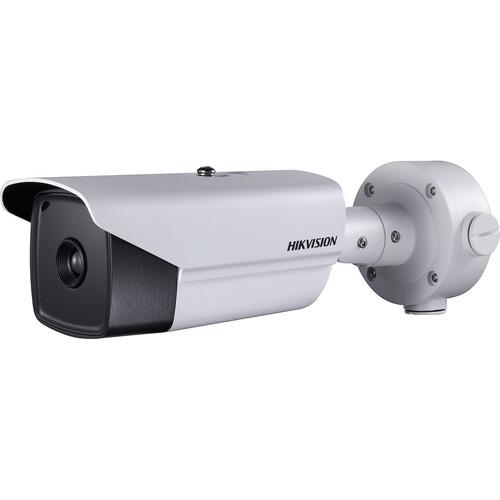 Contents of the user manual for the Hikvision DS-2TD2136 Outdoor Thermal Network Bullet
- Product category: Security Cameras Hikvision
- Brand: Hikvision
- Description and content of package
- Technical information and basic settings
- Frequently asked questions – FAQ
- Troubleshooting (does not switch on, does not respond, error message, what do I do if...)
- Authorized service for Hikvision Security Cameras
|
User manual for the Hikvision DS-2TD2136 Outdoor Thermal Network Bullet contain basic instructions
that need to be followed during installation and operation.
Before starting your appliance, the user manual should be read through carefully.
Follow all the safety instructions and warnings, and be guided by the given recommendations.
User manual is an integral part of any Hikvision product,
and if it is sold or transferred, they should be handed over jointly with the product.
Following the instructions for use is an essential prerequisite for protecting
health and property during use, as well as recognition of liability on the part of the manufacturer
for possible defects should you make a warranty claim. Download an official Hikvision user manual in which you will find instructions on how to install, use, maintain and service your product.
And do not forget – unsuitable use of a Hikvision product will considerably shorten its lifespan!
|
Product description The DS-2TD2136 Outdoor Thermal Network Bullet Camera from Hikvision uses a vanadium oxide uncooled focal plane sensor and 15mm fixed lens to capture thermal video at a maximum resolution of 384 x 288. It comes with AGC (Automatic Gain Control), 3D-DNR (Dynamic Noise Reduction), and Dynamic Detail Enhancement for improving overall image quality. The thermal camera features a fire detection algorithm and a wide range of smart functions, such as alerts for temperature exceptions, line crossing, intrusion, and region entrance/exit. Enclosed in an IP66-rated housing, the camera can be used for indoor and outdoor applications. It can be powered via PoE+, simplifying installation and minimizing cable runs. - Adaptive AGC, DDE, 3D DNR, and NETD <40mK
- Up to 384 x 288 resolution
- Dynamic Detail enhancement
- Smart Functions: Line crossing, intrusion, region entrance/exit, temperature exception, and fire detection
- 15 palettes of color, adjustable
- IP66-rated weather-resistant housing
- Can be powered via PoE+ connection or 24 VAC / 12 VDC power supply
- 15mm fixed lens with 24.55 x 18.54° FOV
UPC: 842571100709 In the Box Hikvision DS-2TD2136 Outdoor Thermal Network Bullet Camera with 15mm Lens Conduit Base Limited 3-Year Warranty Table of Contents
|
Upload User Manual
Have you got an user manual for the Hikvision DS-2TD2136 Outdoor Thermal Network Bullet Camera with 15mm Lens in electronic form? Please send it to us and help us expand our library of instruction manuals.
Thank you, too, on behalf of other users.
To upload the product manual, we first need to check and make sure you are not a robot. After that, your "Submit Link" or "Upload File" will appear.
Technical parametersHikvision DS-2TD2136-15 Specs | | | Image Sensor | Vanadium oxide uncooled focal plane arrays | | Maximum Resolution | 384 x 288 | | Response | Response Waveband: 8 to 14 μm | | Thermal Sensitivity (NETD) | <50mk at 32°f > | | Range Performance | Johnson Criteria
Detection
Human: 1447' (441 m), Vehicle: 4439' (1353 m)
Recognition
Human: 361' (110 m), Vehicle: 1109' (338 m)
Identification
Human: 180' (55 m), Vehicle: 554' (169 m) | | Smart Functions Range | VCA
Human: 361' (110 m), Vehicle: 1011' (308 m)
Temperature Measurement
2 x 2 m: 1152' (351 m), 1 x 1 m: 581' (177 m)
Fire Detection
2 x 2 m: 2894' (882 m), 1 x 1 m: 1447' (441 m) | | Lens | 15mm | | IFOV (Instaneous Field-of-View) | 1.13 mrad | | Field of View | 24.55 x 18.54° | | Focusing Distance | Minimum: 8.2' (2.5 m) | | Aperture | f/1.0 | | | | Streams | Main/Sub/Third: 50 fps (384 x 288) | | Video Compression | H.265, H.264, MJPEG, H.265+, H.264+ encoding with Baseline/Main/High Profile | | Audio Compression | G.711u/G.711a/G.722.1/MP2L2/G.726/PCM | | Protocols | IPv4/IPv6, HTTP, HTTPS, 802.1x, QoS, FTP, SMTP, UPnP, SNMP, DNS, DDNS, NTP, RTSP, RTCP, RTP, TCP, UDP, IGMP, ICMP, DHCP, PPPoE, Bonjour | | Live View | Simultaneous: Up to 20 | | User/Host Level | Up to 32 users
3 Levels: Administrator, operator, user | | Security | User authentication (ID and PW), MAC address binding, HTTPS encryption, IEEE 802.1x access control, IP address filtering | | Alarm Input | 2 channel inputs (0 to 5 VDC) | | Alarm Output | 2 channel relay outputs, support alarm linkage | | Alarm Actions | Preset, patrol scan, pattern scan, SD card record, relay output, smart capture, FTP upload, email linkage | | Audio Input | 1 x 3.5 mm microphone input / line input
Line Input: 2 to 2.4 V p-p
Output Impedance: 1 kOhm ±10% | | Audio Output | Line level
Impedance: 600 Ohms | | Ethernet | 1 x RJ45 10M/100M self-adaptive Ethernet interface | | Storage | Built-in microSD card slot supports microSD/SDHC/SDXC cards up to 64 GB
Supports manual/alarm recording | | Analog Video Output | 1 V p-p / 75 Ohms, PAL/NTSC, BNC | | Application Programming Interface | Open-ended API, supports ONVIF, PSIA, CGI, Hikvision SDK and third-party management platform | | Client | iVMS-4200 | | Web Browser | IE7+, Chrome 18+, Firefox 5.0+, Safari 5.02+ | | | | Menu Language | English | | Power | PoE+ (802.3at), 24 VAC, 12 VDC / 3 A, 8 W (20 W with separately available de-icing heater on) | | Operating Temperature | -40 to 149°F (-40 to 65°C) | | Humidity | 90% or less | | Protection Level | IP66
TVS 6000 V lightning protection, surge protection, voltage transient protection | | Dimensions | 12.36 x 4.09 x 11.52" (31.4 x 10.4 x 29.3 cm) | | Weight | 4.41 lb (2 kg) |
Rating80% users recommend this product to others. And what about you?

This product has already been rated by 12 owners. Add your rating and experience with the product.
Discussion
 Ask our technicians if you have a problem with your settings,
or if anything is unclear in the user manual you have downloaded.
You can make use of our moderated discussion.
The discussion is public and helps other users of our website who may be encountering similar problems.
Ask our technicians if you have a problem with your settings,
or if anything is unclear in the user manual you have downloaded.
You can make use of our moderated discussion.
The discussion is public and helps other users of our website who may be encountering similar problems.
The discussion is empty - enter the first post
Post a new topic / query / comment:
|
|


