User Manual for Hikvision Dual-Lens 640 x 960 People Counting Network Camera Click to enlarge the picture
 Contents of the user manual for the Hikvision Dual-Lens 640 x 960 People
- Product category: Wired IP Cameras Hikvision
- Brand: Hikvision
- Description and content of package
- Technical information and basic settings
- Frequently asked questions – FAQ
- Troubleshooting (does not switch on, does not respond, error message, what do I do if...)
- Authorized service for Hikvision Wired IP Cameras
|
User manual for the Hikvision Dual-Lens 640 x 960 People contain basic instructions
that need to be followed during installation and operation.
Before starting your appliance, the user manual should be read through carefully.
Follow all the safety instructions and warnings, and be guided by the given recommendations.
User manual is an integral part of any Hikvision product,
and if it is sold or transferred, they should be handed over jointly with the product.
Following the instructions for use is an essential prerequisite for protecting
health and property during use, as well as recognition of liability on the part of the manufacturer
for possible defects should you make a warranty claim. Download an official Hikvision user manual in which you will find instructions on how to install, use, maintain and service your product.
And do not forget – unsuitable use of a Hikvision product will considerably shorten its lifespan!
|
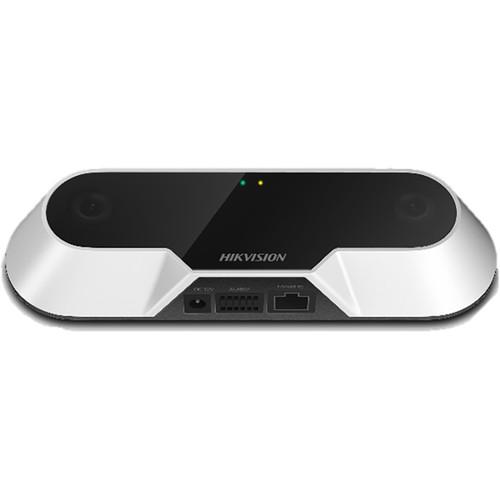
Product description The Dual-Lens 640 x 960 People Counting Network Camera from Hikvision has a 1/3" progressive scan CMOS sensor to capture video at up to 25 fps. It's equipped with a 2.8mm fixed lens to deliver a 83° horizontal field of view. This indoor camera specializes in counting people entering, exiting, and passing by an establishment. It offers 3D people detection and tracking, as well as height filtering to ensure that it counts accurately. Additionally, you'll be able to review daily, weekly, monthly, and annual reports of data the camera documents. H.264 compression keeps files sizes manageable while maintaining the best quality possible. Integrated PoE technology allows data and power to be transmitted over one cable.
Note: Mounting height for this camera should be no higher than 16'. - Uses PoE and 12 VDC power
- Flash memory for storing people counting data
- Dual lens enables binocular stereo vision
- General functions include one-key reset, anti-flicker, heartbeat, password protection, and watermark
- Alarm triggers include video tampering, alarm input, alarm output, network disconnected, IP address conflict, and illegal login
- Up to 6 channels of simultaneous live view
- 32 kb/s to 8 Mb/s video bit rate
- 1 alarm input, and 1 alarm output
- Image settings for brightness and sharpness are adjustable by client software or web browser
- 3 host levels include administrator, operator, and user
- Compatible with Internet Explorer 8 and above, Chrome 31-44, and Firefox 30.0-51
- Compatible with iVMS-4200 video management system
- People Counting Features
-
- Separate counting of people entering, exiting, and passing by
- Real-time data uploading and uploading by statistical cycle
- Support for daily, weekly, monthly, and annual reports
- Support for height filters
UPC: 842571102222 In the Box Hikvision Dual-Lens 640 x 960 People Counting Network Camera Limited 3-Year Warranty Table of Contents
|
Upload User Manual
Have you got an user manual for the Hikvision Dual-Lens 640 x 960 People Counting Network Camera in electronic form? Please send it to us and help us expand our library of instruction manuals.
Thank you, too, on behalf of other users.
To upload the product manual, we first need to check and make sure you are not a robot. After that, your "Submit Link" or "Upload File" will appear.
Technical parametersHikvision IDS-2CD6810F/C Specs | | | Sensor | 0.6 MP 1/3" CMOS | | Lens Mount | M12 | | Focal Length | 2.8mm | | Maximum Aperture | f/2 | | Lens Field of View | Horizontal: 83°
Vertical: 68° | | Shutter Speed | 1/10000 to 1/25 Seconds | | | | Streaming Resolution | 640 x 960 at 24/25 fps
640 x 480 at 24/25 fps | | Supported Video Compression | H.264 | | Multi-View Streaming | Yes, 2 Streams | | | | Security | HTTPS, IEEE 802.1X, Password Protection, Watermark | | Supported Protocols | Bonjour, DDNS, DHCP, DNS, FTP, HTTP, , ICMP, IGMP, IPv4/v6, NTP, QoS Layer 3 DiffServ, RTCP, RTP, RTSP, SMTP, SNMP v1/v2c/v3 (MIB-II), TCP, UDP, UPnP | | | | Application Programming Interface (API) | ISAPI, HTTP | | Analytics | People counting | | Event Trigger | Yes | | Event Action | Recording, Alarm | | | | Recording Media | None | | Pan/Tilt | None | | Alarm I/O | 1 / 1 | | I/O Connections | 1 x RJ45
1 x Power
1 x 9-Pin Serial (RS-485) | | IR Illuminators | None | | Video Management Software | iVMS-4200 | | Internal Storage | None | | Power Source | DC, PoE 802.3af (15 W) | | Power Consumption | 5 W
7 W 12 VDC: Max. 5 W, 0.42 A
PoE: 7 W, 0.2-0.13 A | | Material of Construction | Plastic, Metal (Unspecified Type) | | Operating Temperature | 14 to 104°F / -10 to 40°C | | Operating Humidity | 0 to 95% | | Dimensions | H: 1.4 x W: 7.7 x L: 2.8" / H: 35.6 x W: 195.6 x L: 71.1 mm | | Weight | 0.7 lb / 317.5 g | | | | Package Weight | 1.075 lb | | Box Dimensions (LxWxH) | 9.1 x 5.15 x 3.05" |
Rating90% users recommend this product to others. And what about you?

This product has already been rated by 56 owners. Add your rating and experience with the product.
Discussion
 Ask our technicians if you have a problem with your settings,
or if anything is unclear in the user manual you have downloaded.
You can make use of our moderated discussion.
The discussion is public and helps other users of our website who may be encountering similar problems.
Ask our technicians if you have a problem with your settings,
or if anything is unclear in the user manual you have downloaded.
You can make use of our moderated discussion.
The discussion is public and helps other users of our website who may be encountering similar problems.
The discussion is empty - enter the first post
Post a new topic / query / comment:
|
|


