User Manual for Hikvision Performance Series 4-Channel 5MP NVR with 1TB HDD and 4 4MP Outdoor Turret Cameras Kit Click to enlarge the picture
 Contents of the user manual for the Hikvision Performance Series 4-Channel 5MP NVR
- Product category: Surveillance Systems Hikvision
- Brand: Hikvision
- Description and content of package
- Technical information and basic settings
- Frequently asked questions – FAQ
- Troubleshooting (does not switch on, does not respond, error message, what do I do if...)
- Authorized service for Hikvision Surveillance Systems
|
User manual for the Hikvision Performance Series 4-Channel 5MP NVR contain basic instructions
that need to be followed during installation and operation.
Before starting your appliance, the user manual should be read through carefully.
Follow all the safety instructions and warnings, and be guided by the given recommendations.
User manual is an integral part of any Hikvision product,
and if it is sold or transferred, they should be handed over jointly with the product.
Following the instructions for use is an essential prerequisite for protecting
health and property during use, as well as recognition of liability on the part of the manufacturer
for possible defects should you make a warranty claim. Download an official Hikvision user manual in which you will find instructions on how to install, use, maintain and service your product.
And do not forget – unsuitable use of a Hikvision product will considerably shorten its lifespan!
|
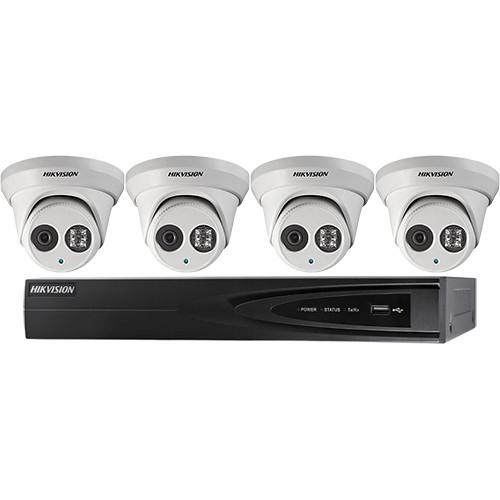
Product description Monitor up to four outdoor areas with the Performance Series 4-Channel 5MP NVR with 1TB HDD and 4 4MP Outdoor Turret Cameras Kit from Hikvision. This kit comes with a 5MP NVR and four 4MP turret cameras to help keep your home or business secure. The NVR comes with a 1TB HDD preinstalled to store video from all four cameras. Simply download the free iVMS-4500 app for iOS and Android to gain access to a live feed on the go.
Each of the four turret cameras can capture 4MP video with their 2.8mm lens and wide-angle 106° field of view. The cameras can monitor during the day and at night thanks to IR LEDs with a night vision range of up to 98'. Housed in an IP67-rated enclosure, the included cameras are protected against dust and water, making them suitable for outdoor use. - 4-channel NVR with 1TB HDD
- Four 4MP IP67-rated turret cameras included
- Night vision range up to 98' in complete darkness
- Adjustable motion detection to select specific areas of interest
- Remote access via iVMS-4500 app for iOS and Android
UPC: 842571101171 In the Box Hikvision Performance Series 4-Channel 5MP NVR with 1TB HDD and 4 4MP Outdoor Turret Cameras Kit 4-Channel NVR with 1TB HDD 4 x 4MP Indoor/Outdoor EXIR Turret Network Camera with 2.8mm Lens Limited 3-Year Warranty Table of Contents
|
Upload User Manual
Have you got an user manual for the Hikvision Performance Series 4-Channel 5MP NVR with 1TB HDD and 4 4MP Outdoor Turret Cameras Kit in electronic form? Please send it to us and help us expand our library of instruction manuals.
Thank you, too, on behalf of other users.
To upload the product manual, we first need to check and make sure you are not a robot. After that, your "Submit Link" or "Upload File" will appear.
Technical parametersHikvision I7604N1TP Specs | | | Video Inputs | 4 x RJ45 Ethernet ports with built-in PoE 802.3af/at | | Video Compression | H.264+, H.264 | | Audio | 1 x line in, 1 x line out | | Alarm | 4 x inputs, 1 x output | | Video Outputs | HDMI and VGA: 1920 x 1080, synchronized output | | Recording Resolution | Up to 5 MP | | USB Ports | 1 x USB 2.0, 1 x USB 3.0 | | Storage | 1 TB HDD preinstalled, supports up to 6 TB | | Maximum Bandwidth | Incoming: 40 Mb/s
Outgoing: 60 Mb/s | | Interoperability | ONVIF Profile S and G, CGI, ASAPI | | Remote Connections | 128 | | Power Requirements | 48 VDC, <10W without HDD | | PoE Budget | 50 W | | Certifications | UL, cUL | | | | Image Sensor | 4 MP 1/3" progressive scan CMOS sensor | | Minimum Illumination | 0.028 lux at f/2.0 (AGC on)
0 lux with IR LEDs on | | Shutter Time | 1/3 to 1/10,000 sec | | Lens | 2.8mm | | Field of View | 106° | | Lens Mount | M12 | | Day/Night | IR cut filter with auto-switch | | Digital Noise Reduction | 3D-DNR | | Wide Dynamic Range | Up to 120 dB | | Angle Adjustment | Pan: 0 to 360°
Tilt: 0 to 75°
Rotation: 0 to 360° | | Video Compression | H.264+, H.264, MJPEG | | H.264 Profile | Main | | Video Bit Rate | 32 kb/s to 16 Mb/s | | Streaming | Dual | | Resolution | 2688 x 1520 | | Frame Rates | 20 fps at 2688 x 1520, 30 fps at 1920 x 1080 and 1280 x 720 | | Image Settings | Compression, color, saturation, brightness, contrast, sharpness, rotate mode, privacy mask | | Backlight Compensation | Yes, zone configured | | Region of Interest | Supported | | Smart Features | Line crossing detection, intrusion detection | | Network Storage | NAS (supports NFS, SMB/CIFS, ANR) (available separately) | | Alarm Triggers | Motion detection, line crossing detection, intrusion detection, tamper alarm, network disconnect, IP address conflict, storage exception | | Protocols | TCP/IP, UDP, ICMP, HTTP, HTTPS, FTP, DHCP, DNS, DDNS, RTP, RTSP, RTCP, PPPoE, NTP, UPnP, SMTP, SNMP, IGMP, 802.1X, QoS, IPv6, Bonjour | | Security | 3-level user authentication, password authorization, HTTPS and SSH certificate, IEEE802.1X, basic and digest authentication, watermark, IP address filtering, log-in lockout | | Standards | ONVIF Profile S and G, PSIA, CGI, ISAPI | | Network Interface | RJ45 10/100M Ethernet | | Operating Temperature | -22 to 140°F / -30 to 60°C | | Operating Humidity | ≤95%, non-condensing | | IR LED Range | Up to 98' / 30 m | | Power Supply | 12 VDC ±10%, PoE (802.3af) | | Power Consumption | 7.5 W maximum with IR cut filter on | | IP Rating | IP67 | | Dimensions | 5 x 3.8" / 127 x 97.5 mm | | Weight | 1.5 lb / 0.67 kg | | | | Package Weight | 16.7 lb | | Box Dimensions (LxWxH) | 19.8 x 13.4 x 10.3" |
Rating100% users recommend this product to others. And what about you?

This product has already been rated by 92 owners. Add your rating and experience with the product.
Discussion
 Ask our technicians if you have a problem with your settings,
or if anything is unclear in the user manual you have downloaded.
You can make use of our moderated discussion.
The discussion is public and helps other users of our website who may be encountering similar problems.
Ask our technicians if you have a problem with your settings,
or if anything is unclear in the user manual you have downloaded.
You can make use of our moderated discussion.
The discussion is public and helps other users of our website who may be encountering similar problems.
The discussion is empty - enter the first post
Post a new topic / query / comment:
|
|


