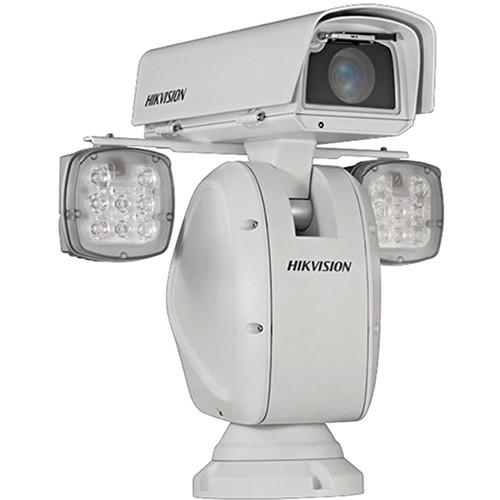
User Manual for Hikvision Smart Pro Series 2MP 36x Network Box Camera with Ultra-Low Illumination Positioning System & Night Vision Click to enlarge the picture
 Contents of the user manual for the Hikvision Smart Pro Series 2MP 36x
- Product category: Wired IP Cameras Hikvision
- Brand: Hikvision
- Description and content of package
- Technical information and basic settings
- Frequently asked questions – FAQ
- Troubleshooting (does not switch on, does not respond, error message, what do I do if...)
- Authorized service for Hikvision Wired IP Cameras
|
User manual for the Hikvision Smart Pro Series 2MP 36x contain basic instructions
that need to be followed during installation and operation.
Before starting your appliance, the user manual should be read through carefully.
Follow all the safety instructions and warnings, and be guided by the given recommendations.
User manual is an integral part of any Hikvision product,
and if it is sold or transferred, they should be handed over jointly with the product.
Following the instructions for use is an essential prerequisite for protecting
health and property during use, as well as recognition of liability on the part of the manufacturer
for possible defects should you make a warranty claim. Download an official Hikvision user manual in which you will find instructions on how to install, use, maintain and service your product.
And do not forget – unsuitable use of a Hikvision product will considerably shorten its lifespan!
|
Product description The Smart Pro Series 2MP 36x Network Box Camera with Ultra-Low Illumination Positioning System from Hikvision features a 1/1.9" progressive scan CMOS sensor and 5.7-205.2mm varifocal lens to capture images at a maximum resolution of 1920 x 1080. The lens offers 36x optical zoom for capturing details over expansive areas. The system also features Smart Defog, EIS (Electronic Image Stabilization), True Day/Night, True WDR (Wide Dynamic Range), and 3D-DNR functions. In addition, the position system also supports Smart and PTZ functions.
This system can be used for 24-hour surveillance thanks to the removable IR-cut filter and built-in IR LEDs with a range of up to 656’. IR Emitters - Minimum illumination of 0 lux
- IR LEDs offer a range of up to 656'
- IR light MTBF reaching up to 30,000 hours
Basic Functions - Progressive scan CMOS sensor offers up to 1920 x 1080 resolution
- 36x optical zoom and 16x digital zoom
- 3D intelligent positioning
- ONVIF (Open Network Video Interface Forum), CGI (Common Gateway Interface), and PSIA (Physical Security Interoperability Alliance) to ensure interoperability between different platforms and compatibility
- 7 alarm inputs and 2 alarm outputs
UPC: 813908027648 In the Box Hikvision Smart Pro Series 2MP 36x Network Box Camera with Ultra-Low Illumination Positioning System & Night Vision Limited 3-Year Warranty Table of Contents
|
Upload User Manual
Have you got an user manual for the Hikvision Smart Pro Series 2MP 36x Network Box Camera with Ultra-Low Illumination Positioning System & Night Vision in electronic form? Please send it to us and help us expand our library of instruction manuals.
Thank you, too, on behalf of other users.
To upload the product manual, we first need to check and make sure you are not a robot. After that, your "Submit Link" or "Upload File" will appear.
Technical parametersHikvision DS-2DY9188-AI2 Specs | Image Sensor | 1/1.9" progressive scan CMOS | | Image Resolution | 1920 x 1080 | | Minimum Illumination | Color: 0.002 lux at f/1.5, AGC on
B/W: 0.0002 lux at f/1.5, AGC on | | Day & Night | ICR | | Focus Modes | Auto / Semiautomatic / Manual | | Shutter Time | 50 Hz: 1/1 to 1/30,000 sec
60 Hz: 1/1 to 1/30,000 sec | | S / N Ratio | >52 dB | | Digital Zoom | 16x | | White Balance | Auto / Manual / ATW / Indoor / Outdoor/ Daylight lamp / Sodium lamp | | AGC | Auto / Manual | | Focal Length | 5.7-205.2mm | | Optical Zoom | 36x | | Angle of View | 58.7-2° (Wide-Tele) | | Minimum Working Distance | 0.39 to 59" (10 to 1500 mm) (Wide-Tele) | | Aperture Range | f/1.5-f/3.4 | | Streams | Main Stream
50 Hz at 25 fps: 1920 x 1080, 1280 x 960, 1280 x 720
60 Hz at 30 fps: 1920 x 1080, 1280 x 960, 1280 x 720
Sub Stream
50 Hz at 25 fps: 704 x 576, 352 x 288, 176 x 144
60 Hz at 30 fps: 704 x 480, 352 x 240, 176 x 120
Third Stream
50 Hz at 25 fps: 1920 x 1080, 1280 x 960, 1280 x 720, 704 x 576, 352 x 288, 176 x 144
60 Hz at 30 fps: 1920 x 1080, 1280 x 960, 1280 x 720, 704 x 480, 352 x 240, 176 x 120 | | Image Compression | H.264 (Baseline, Main, High Profile) /MJPEG/MPEG4 | | Audio Compression | G722/G.711ulaw/G.711alaw/MP2L2/G.726/PCM | | Protocols | IPv4/IPv6, HTTP, HTTPS, 802.1x, QoS, FTP, SMTP, UPnP, SNMP, DNS, DDNS, NTP, RTSP, RTP, TCP, UDP, IGMP, ICMP, DHCP, PPPoE | | Standard | ONVIF, PSIA, CGI, Genetec | | Smart Features | Face detection, intrusion detection, line crossing detection, audio exception detection, region entrance detection, region exiting detection
ROI Encoding: Support 24 areas with adjustable levels | | Infrared | IR Range: 656' (200 m)
IR Intensity: Automatically adjusted, depending on the zoom ratio
Smart IR support | | PTZ | Movement Range: Pan: 360° endless, Tilt: +40 to -90°
Movement Speed: Pan: 0.1 to 100°/s, Tilt: 0.1 to 40°/s
Number of Presets: 300
Patrol: 8 patrols, up to 32 presets per patrol
Pattern: 4 patterns, with the recording time not less than 10 minutes per pattern
PTZ Position Display: On / off | | Menu Language | English | | Alarm I/O | 7 x alarm inputs
2 x alarm outputs
Alarm linkage | | Alarm Actions | Preset / Patrol / Pattern / SD card recording/ Aux output/ E-map on Client | | Audio I/O | 1/1 | | Ethernet | 10Base-T/100Base-TX, RJ45 connector | | Output | CVBS: 1 V p-p / 75 Ohms
NTSC (or PAL) composite, BNC | | RS485 | Half duplex, HIKVISION, Pelco P, Pelco D, self-adaptive | | Onboard Storage | Built-in microSD/SDXC card slot
Supports up to 128 GB
Supports edge recording | | Live View | Up to 20 simultaneous | | User/Host Level | Up to 32 users
3 Levels: Administrator, Operator, and User | | Power | 24 VAC | | Power Consumption | Maximum 60 W | | Working Temperature | -40 to 149°F (-40 to 65°C) | | Humidity | 90% or less | | Dimensions | 7 x 19.3 x 15.3" (180 x 491 x 390 mm) | | Weight | 33.07 lb (15 kg) |
Rating90% users recommend this product to others. And what about you?

This product has already been rated by 96 owners. Add your rating and experience with the product.
Discussion
 Ask our technicians if you have a problem with your settings,
or if anything is unclear in the user manual you have downloaded.
You can make use of our moderated discussion.
The discussion is public and helps other users of our website who may be encountering similar problems.
Ask our technicians if you have a problem with your settings,
or if anything is unclear in the user manual you have downloaded.
You can make use of our moderated discussion.
The discussion is public and helps other users of our website who may be encountering similar problems.
The discussion is empty - enter the first post
Post a new topic / query / comment:
|
|


