User Manual for Honeywell HVE1 1-Channel H.264 Video Audio Encoder Click to enlarge the picture
 Contents of the user manual for the Honeywell HVE1 1-Channel H.264 Video Audio
- Product category: Video Encoders & Decoders Honeywell
- Brand: Honeywell
- Description and content of package
- Technical information and basic settings
- Frequently asked questions – FAQ
- Troubleshooting (does not switch on, does not respond, error message, what do I do if...)
- Authorized service for Honeywell Video Encoders & Decoders
|
User manual for the Honeywell HVE1 1-Channel H.264 Video Audio contain basic instructions
that need to be followed during installation and operation.
Before starting your appliance, the user manual should be read through carefully.
Follow all the safety instructions and warnings, and be guided by the given recommendations.
User manual is an integral part of any Honeywell product,
and if it is sold or transferred, they should be handed over jointly with the product.
Following the instructions for use is an essential prerequisite for protecting
health and property during use, as well as recognition of liability on the part of the manufacturer
for possible defects should you make a warranty claim. Download an official Honeywell user manual in which you will find instructions on how to install, use, maintain and service your product.
And do not forget – unsuitable use of a Honeywell product will considerably shorten its lifespan!
|
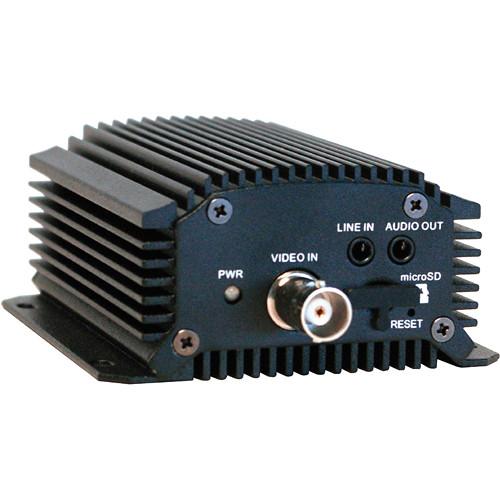
Product description The HVE1 1-Channel H.264 Video/Audio Encoder from Honeywell allows you to connect an analog camera into an IP network. This encoder supports H.264, MPEG4, MPEG2, and MJPEG video compression formats for reduced bandwidth and storage requirements. It is capable of encoding up to 30 fps at 4CIF resolution, with the capability of dual streaming. This encoder can also record audio and features an audio output to perform bidirectional audio communication.
The encoder can control PTZ cameras through the RS-485 port and supports third party PTZ protocols. Alarm inputs and relay outputs are available to trigger events on an NVR and to control external devices. These alarms and events can be reported to the NVR, and can also be sent either by email or by FTP uploads directly from the encoder along with a captured JPEG image.
The 1-channel encoder supports local storage via a microSD card (not included) for storing of alarm-triggered, continuous, and scheduled recorded footage. Recorded or live video can be viewed remotely through an intuitive web browser (IE, Firefox, Chrome, or Safari) that supports HTTPS to ensure high security. - Supports H.264, MPEG4, MPEG2, and MJPEG encoding
- Dual streaming capabilities
- 12VDC or Power over Ethernet operation
- Local storage via microSD memory card (not included)
- Embedded motion detection and privacy zone
- Customizable text overlay
- Alarm input and relay output
- Supports RS-485 PTZ and multiple third party PTZ protocols
- Exception and system logging
- Embedded web browser, supporting IE, Firefox, Chrome, and Safari
UPC: 886618181627 In the Box Honeywell HVE1 1-Channel H.264 Video/Audio Encoder AC Plug Adapter CD with IP Utility Table of Contents
|
Upload User Manual
Have you got an user manual for the Honeywell HVE1 1-Channel H.264 Video Audio Encoder in electronic form? Please send it to us and help us expand our library of instruction manuals.
Thank you, too, on behalf of other users.
To upload the product manual, we first need to check and make sure you are not a robot. After that, your "Submit Link" or "Upload File" will appear.
Technical parametersHoneywell HVE1 Specs | | | Video Compression | H.264, MPEG4, MPEG2, MJPEG | | Video Input | 1-channel | | Audio Compression | G.711u | | Audio Input | 1-channel | | 2-Way Audio | 1-channel | | Audio Output | 1-channel | | Recording Resolution | 4CIF, 2CIF, CIF, QCIF | | Frame Rate | H.264, MPEG4, MPEG2 Encoding: 25 fps (P) / 30 fps (N) | | Video Bit Rate | 32 to 3072 kb/s, or user defined (maximum 8192 Mb/s) | | Audio Bit Rate | 64 kb/s | | Dual Streaming | Supported | | Stream Type | Video/Video + Audio | | Data Storage | Type: NAS, microSD
Capacity: 4 GB up to 32 GB, Class 6 and above microS | | Network Protocols | IPv4/v6, HTTP, HTTPS, QoS layer3 DiffServ, FTP, SMTP, Bonjour, UPnP, SNMPv1/v2c/v3(MIB-II), DNS, DynDNS, NTP, RTSP, RTP/RTCP, TCP, UDP, IGMP, ICMP, DHCP, ARP, SOCKSv4/v5, PSIA, ONVIF, HIKCGI, netFilter, HVE | | | | Power Supply | 12 VDC, PoE | | Power Consumption | ≤ 8 W | | | | Power | Screw terminal block | | Video Input | BNC (1.0 Vpp, 75 Ω) | | Audio Input | 3.5 mm interface (2.0 Vpp, 1 kΩ) (Line Input) | | Audio Output | 3.5 mm interface (Linear, 600 Ω) | | 2-Way Audio | 3.5 mm interface (2.0 Vpp, 1 kΩ) (Line Input) | | Network Interface | 1 x RJ-45 10 M/100 Mb/s adaptive Ethernet interface (PoE) | | Serial Interface | 1 x Half-duplex RS-485 interface spring terminal block (20 to 28 AWG) | | Alarm Input | 1 x Spring terminal block (20 to 28 AWG) | | Alarm Output | 1 x Spring terminal block (20 to 28 AWG) | | Data Storage | 1 x microSD interface Available Separately | | | | Compatible with | MAXPRO NVR 2.5 SP1 and greater | | Operating Temperature | 14 to 131°F (-10 to 55°C) | | Storage Temperature | -4 to 149°F (-20 to 65°C) | | Relative Humidity | 10 to 90%, non-condensing | | | | Emissions | FCC, EN 55022 | | Immunity | EN 50130-4 | | Safety | EN 60950-1
North America UL listed to UL/CSA 60950-1 | | | | Construction | Die-cast aluminum | | Dimensions (W x H x D) | 3.1 x 1.5 x 3.5" (78.7 x 38.1 x 88.9 mm) | | Weight | ≤ 1.1 lb (≤ 0.4 kg) | | | | Package Weight | 1.5 lb | | Box Dimensions (LxWxH) | 13.7 x 8.6 x 2.8" |
Rating20% users recommend this product to others. And what about you?

This product has already been rated by 25 owners. Add your rating and experience with the product.
Discussion
 Ask our technicians if you have a problem with your settings,
or if anything is unclear in the user manual you have downloaded.
You can make use of our moderated discussion.
The discussion is public and helps other users of our website who may be encountering similar problems.
Ask our technicians if you have a problem with your settings,
or if anything is unclear in the user manual you have downloaded.
You can make use of our moderated discussion.
The discussion is public and helps other users of our website who may be encountering similar problems.
The discussion is empty - enter the first post
Post a new topic / query / comment:
|
|


