|
User Manual for Honeywell MAXPRO 32-Channel Hybrid Network Video Recorder Click to enlarge the picture
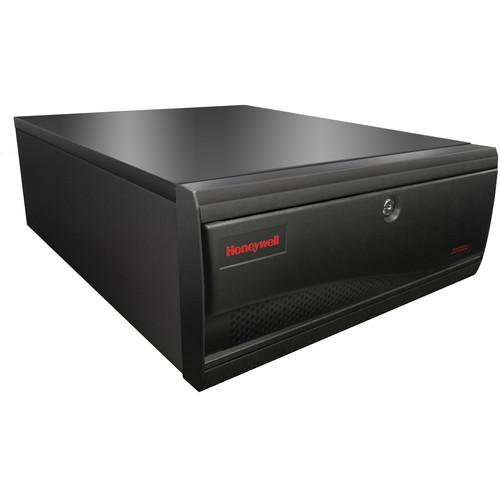 Contents of the user manual for the Honeywell MAXPRO 32-Channel Hybrid Network Video
- Product category: Network Video Recorders (NVRs) Honeywell
- Brand: Honeywell
- Description and content of package
- Technical information and basic settings
- Frequently asked questions – FAQ
- Troubleshooting (does not switch on, does not respond, error message, what do I do if...)
- Authorized service for Honeywell Network Video Recorders (NVRs)
|
User manual for the Honeywell MAXPRO 32-Channel Hybrid Network Video contain basic instructions
that need to be followed during installation and operation.
Before starting your appliance, the user manual should be read through carefully.
Follow all the safety instructions and warnings, and be guided by the given recommendations.
User manual is an integral part of any Honeywell product,
and if it is sold or transferred, they should be handed over jointly with the product.
Following the instructions for use is an essential prerequisite for protecting
health and property during use, as well as recognition of liability on the part of the manufacturer
for possible defects should you make a warranty claim. Download an official Honeywell user manual in which you will find instructions on how to install, use, maintain and service your product.
And do not forget – unsuitable use of a Honeywell product will considerably shorten its lifespan!
|
Product description The 2TB MAXPRO 32-Channel Hybrid Network Video Recorder (Standard Edition) from Honeywell is an open, flexible, and scalable hybrid (IP and analog) video surveillance system. This NVR utilizes Honeywell's HD cameras to offer a powerful high-definition IP recording and security monitoring system for small to medium-sized installations. It also supports analog cameras, enabling a smooth transition by keeping existing analog investments while transitioning to IP.
MAXPRO Hybrid NVR is an open platform and supports broad third-party device integrations with support for PSIA and ONVIF (including Profile S devices) standards, real-time streaming protocol (RTSP) standard, and native device integrations including 360° camera support.
The NVR also provides support for easy-to-use desktop clients, Web client, and mobile apps-MAXPRO Mobile. The Web client is supported from any standard Mac or PC browser and requires no additional installation. It provides reduced setup and maintenance requirements and improved compatibility. The interface is simple and intuitive with all the functionality and features that users need for daily surveillance operations, such as live view and playback of recorded video.
MAXPRO Hybrid NVR comes pre-installed with all required software and is also pre-licensed for 32 channels. This, along with an easy 3-Click wizard (with default settings and in a LAN) to live video for auto configuration, makes installing an IP system quick and efficient without requiring any IT expertise. Simple and logical configuration pages make setup easy, even for the novice installer. The MAXPRO NVR Hybrid SE user interface is based on Honeywell's MAXPRO VMS user interface which offers a feature rich user experience and is common across the MAXPRO NVR family.
The Hybrid NVR supports simultaneous recording, search, and system management for 32 channels-any combination of IP (including HD formats) and analog cameras (maximum 16 analog cameras supported). Multiple MAXPRO Hybrid NVRs and NVRs can be deployed for system expansion using a distributed architecture and integrated with the MAXPRO Viewer multi-site software or MAXPRO VMS enterprise video management system (both available separately).
Utilizing powerful processor and memory technology, the MAXPRO Hybrid NVR supports multiple simultaneous operations such as video recording and video viewing or alarm monitoring on the unit itself, without the need for an additional workstation. It also supports remote monitoring, meaning you can view live video while simultaneously performing searches.
Honeywell's proprietary Video Surround feature allows for tracking subjects of interest as they move between areas covered by adjacent cameras by simply double-clicking on the panel where the subject is currently visible. Features such as the powerful calendar, preview search options, and film strip view allow for rapidly searching video for scenes of interest, and then a quick export method transfers video to an authenticated video clip playable through Windows Media Player.
MAXPRO NVR Hybrid SE provides a solution to address the needs of a wide variety of applications including education, commercial, retail, healthcare, and many other applications. Software - MAXPRO NVR Hybrid SE allows local or remote operations including live and recorded video monitoring, configuration, and system management in a single desktop client interface
- Support for Web client on Windows PC (Internet Explorer, Chrome, and Firefox browsers) and Mac (Safari browser)
- Supports live, playback/search of recorded video for up to 1080p resolution on all cameras, taking snapshots and viewing presets for PTZ cameras
- Support for mobile monitoring clients on iOS and Android with MAXPRO Mobile apps
- Broad Device Integration: Honeywell cameras and encoders, third-party devices with support for PSIA and ONVIF (including Profile S devices), RTSP standard, and native device integration including 360° camera support
- Multi-featured, user-friendly Windows-based interface to view HD and analog video and configure system settings
- Easy 3-click wizard to set up the system with auto-configuration and auto-discovery of IP cameras, recording and monitoring configuration
- Multi-Zoom Views on HD Video: For example, lets you zoom on a cash register in one view of the HD camera while at the same time monitoring the cash operator in the zoom out view of the HD camera
- Ability to investigate events and alarms by simultaneously viewing alarm videos at various stages; so, for every alarm, users can view the video captured during pre-alarm, on-alarm, and post-alarm, and also view live video from the camera which triggered the alarm
- Enriched video viewing experience through the intuitive video rendering engine that optimizes CPU utilization by altering the video frame rate
- Honeywell's patented video surround feature simplifies the process of tracking subjects through a set of surrounding cameras
- Create, save, and name salvos under My Salvos or Shared Salvos
- IP and analog PTZ control and digital zoom on fixed cameras
- 360° immersive viewing experience providing heightened situational awareness and increased video surveillance coverage
- Fast search by date/time, time line, time jump, bookmarks, calendar, preview, film strip view, and events to increase productivity with more efficient search/investigation that allows you to get to the relevant video in few clicks without having to review hours of recording
- Event history and operator log reporting with export in .pdf, Crystal Reports, MS Excel, or MS Word
- Capture and export clips and still images in simple .wmv and .bmp formats
- Clips are signed with digital signature for authentication
- Supports multiple client connection to NVR Hybrid Server
- Separate event video and general recorded video retention times
- Email notification on camera, system, and operator events
- Role-based operator privileges supporting Windows and local users
- Flexible Video Motion detection (VMD) options with Server (Smart VMD) or camera based motion events support
- Reduced false alarms with object based motion detection analytics with Smart VMD
- Advanced security features with encryption support for communication between desktop client to NVR and secure https login for Web Client
- Keyboard control with UltraKey Plus and UltraKey Lite over Ethernet
- Local and multi-language support
- Multi-site support with MAXPRO Viewer
- Integration with MAXPRO VMS
- Integration with WIN-PAK and Pro-Watch Access Control systems
Hardware - Record and monitor up to 32 channels
- Choose from a combination of 16 analog channels with 480 fps @ CIF NTSC (400 fps @ CIF PAL) or 120 fps @ 4CIF NTSC (100 fps @ CIF PAL) and 16 IP channels with 320 fps @ 1080p HD or all 32 IP channels with 960 fps @ 720p HD or 640 fps @ 1080p HD
- Total network bandwidth/throughput supported per Hybrid NVR is 240 Mb/s (with incoming at 120 Mb/s and outgoing at 120 Mb/s)
- Supports one-way audio (for specific IP cameras) with live and playback on desktop clients for up to 32 IP channels
- Analog cameras support with 16 looping inputs, 16 I/Os, and 1 analog PTZ control port on the unit
- Includes HDMI, DVI-I/VGA ports for single monitor support for local client and RCA for spot monitor support for analog cameras
- MAXPRO NVR Hybrid SE supports displaying 16 cameras at one time; greater numbers of cameras can be displayed by adding additional client workstations
- 4 removable bays with 1 operating system & storage hard drive and 3 storage-only hard drives (supports 1, 2, or 3TB drives)
- Supports a total internal storage capacity of 1 to 12 TB (2TB included)
- Includes dual 1 Gigabit network ports optimized to separate record and viewing data to ensure 100% recording and smooth playback even with multiple client connections
- 4U rack mount form factor with locking front bezel
- Rack ears included for use with four post racking systems
- Black matte finish steel chassis
UPC: 886618184956 In the Box Honeywell MAXPRO 32-Channel Hybrid Network Video Recorder (Standard Edition, 2TB) Limited 3-Year Warranty on Parts and Labor Table of Contents
|
Upload User Manual
Have you got an user manual for the Honeywell MAXPRO 32-Channel Hybrid Network Video Recorder in electronic form? Please send it to us and help us expand our library of instruction manuals.
Thank you, too, on behalf of other users.
To upload the product manual, we first need to check and make sure you are not a robot. After that, your "Submit Link" or "Upload File" will appear.
Technical parametersHoneywell HHSE32C1602T Specs | | | Database | Microsoft SQL Express 2008 R2 | | Operating System | Windows Embedded Standard 7 SP1, 64-bit | | Image Compression | MPEG-4, H.264 | | Supported IP Cameras/Encoders | Supports Honeywell Performance Series IP, EQUIP Series cameras including high-definition
3rd party IP cameras and encoders also supported | | Audio Support | 1-way audio for specific IP camera models | | PTZ Protocols | Analog: MAXPRO, VCL, Pelco P, Pelco D, GE / Kalatel | | Number of Clients | 18 remote per unit from 9 remote workstations + 1 local on NVR Hybrid server | | Layouts | Desktop Client: Full, 2 x 2, 1 x 5, 3 x 3, 2 x 8, 1 x 12, 4 x 4
Web Client: 2 x 2, 1 x 1, 1 x 2, 1 x 3 | | Picture Controls | Sharpness, blur, brightness, contrast, hue, saturation, maintain aspect ratio, stretched, original size, and picture mirror | | OSD | Concealed text option | | Playback Control | FWD/REV Play x (1, 2, 4, 8, 16)
Slow FWD/REV Play x (1/2, 1/4, 1/8) | | Search | Time/date timeline, time jump FWD / REV, bookmarks, calendar, preview, film strip, and event search | | Recording Schedule | Constant and event based with H / M / D and holiday and exception days | | Recording Method | Constant, event based, and user activated | | Setting | Live Settings per Camera: Compression format, resolution, and frame rate
Record Settings per Camera: Same as live or reduced frame rate | | Clip | Format: WMV with digital certificate for authentication playable with Windows Media Player | | Video Clip | Digital signature, verification tool provided | | Motion Detection | Camera-based for supported models or server-based (Smart VMD) for all analog and IP models (except 360° fisheye / panomorph views | | Event Recording | Pre and post duration setting | | Reporting | Operator Reporting: Per user, configurator, session, and viewer | | Event | Per camera or recorder events | | Users | 1,024 | | | | Processor | Intel Core i7-3770 3.4 GHz | | Memory | 8 GB | | Power Supply | Single 465 W | | Partitioning | 100 GB partition in storage drive 1 | | Storage Capacity | Supported: 1 to 12 TB
Included: 1 x 2 TB HDDs with a total capacity of 2 TB | | Hard Drive | 4 Bays: 1 operating system & storage drive, 3 field-upgradable
Supports 1, 2, or 3 TB SATA hard drives | | Optical | 22x DVD-RW | | Network | Two 1 GB Ethernet included (10 / 100 / 1000 NIC Onboard + 2nd PCIe 10 / 100 / 1000 NIC included) | | Chassis | 4U 4 bay with locking bezel | | | | Performance | Recording & Monitoring:
16 analog with 480 fps @ CIF NTSC (400 fps @ CIF PAL) or 120 fps @ 4CIF NTSC (100 fps @ 4CIF PAL) and 16 IP with 320 fps @ 1080p HD
OR
All 32 IP with 960 fps @ 720p HD or 640 fps @ 1080p HD
1-way audio for up to 32 IP channels | | Network | Bandwidth/Throughput
Incoming: 120 Mb/s, Outgoing: 120 Mb/s, Total: 240 Mb/s | | Video Streaming Support | Web Client:
Total Streams Limit: 32 (live + playback)
Desktop Client:
Live: 160 streams
Playback/Video Retrieval Sessions: 32
Sync Playback: 9 streams
Note: Live streams consumed are per camera being viewed live and duplicate live views of the same camera in multiple or same Web client instance are allowed without consuming additional streams. Playback streams consumed are per playback stream being viewed and each playback stream being viewed consumes 1 additional stream. | | Supported Channels/Tracks | Server Based VMD (Smart VMD) Performance:
Channels at Maximum fps: 32-channel IP at 960 fps @ 4CIF / VGA or 32-channel IP at 960 fps @ 720p or 16-channel IP at 640 fps @ 1080p
16-channel analog at 480 fps @ CIF / 96 fps @ 4CIF and 16-channel IP at 320 fps @ 1080p
All Channels at fps: 32-channel at 960 fps @ 4CIF / VGA or 960 fps @ 720p or 320 fps @ 1080p
16-channel analog at 480 fps @ CIF / 96 fps @ 4CIF and 16-channel IP at 320 fps @ 1080p
Local client 2 x 2 view for 1080p and 4 x 4 view for all other lower resolutions. | | | | Video Input | 16 x Looping, BNC 1 Vpp @ 75 Ω | | Video Output | Main Out: DVI-I / VGA adapter and HDMI
Spot Out: RCA | | Sensor Input | General Purpose: 16, NO / NC selectable | | Control Output | 16, Relay output | | Serial Port | 8 x USB 2.0, 2 x USB 3.0, 1 x RS-485 | | Network | 2 x RJ45 | | | | Processor | Intel Core 2 Duo Processor E6750 2.66 GHz or Quad Core Intel Xeon E5405 2.0 GHz | | System Memory | Minimum 4 GB or higher | | Partitioning | Minimum 100 GB partition drive or separate hard drive | | Graphics Adapter Compatibility | 512 MB or higher Display Card for Dual Monitor - Directx 9 Compatible | | Network Interface | Minimum 1 Gigabit network interface card | | Optical Drive | DVD-RW | | Monitor Resolution | Video resolution 1280 x 1024 pixels, 32-bit | | Keyboard/Mouse | 102-key keyboard and mouse | | Operating System Support | Microsoft Windows 7 Professional SP1 (32-bit and 64-bit), Microsoft Windows Server 2008 R2 SP1
Note: The minimum specifications are recommended for systems with fixed or PTZ cameras only. For systems with multiple 360° cameras using full immersive experience with dewarping and playback requires superior workstation specifications. | | | | Input Voltage | 115 to 230 VAC, 50 to 60 Hz, 10 / 7A | | Power Consumption | Up to 480 W | | | | Temperature | Operating: 40 to 104°F (5 to 40°C)
Storage: 14 to 150°F (-10 to 65°C) | | Relative Humidity | 0 to 90%, non-condensing | | | | Emission | FCC Part 15, Subpart B, Class B; EN55022:2010 | | Safety | ANSI/UL 60950-1; CAN/CSA C22.2 60950-1; EN60950 1:2006+A11:2009+A12:2011 +A1:2010 | | Immunity | EN50130-4:2011 | | | | Construction | Housing: Steel chassis | | Dimensions (L x W x H) | 17.3 x 21.7 x 7.0" (44.0 x 55.2 x 18.0 cm) | | Weight | 64 lb (29 kg) |
Rating90% users recommend this product to others. And what about you?

This product has already been rated by 93 owners. Add your rating and experience with the product.
Discussion
 Ask our technicians if you have a problem with your settings,
or if anything is unclear in the user manual you have downloaded.
You can make use of our moderated discussion.
The discussion is public and helps other users of our website who may be encountering similar problems.
Ask our technicians if you have a problem with your settings,
or if anything is unclear in the user manual you have downloaded.
You can make use of our moderated discussion.
The discussion is public and helps other users of our website who may be encountering similar problems.
The discussion is empty - enter the first post
Post a new topic / query / comment:
|
|
|
| Request for user manual |
You can’t find the operation manual you are looking for? Let us know and we will try to add the missing manual:
I’m looking for a manual / Request for manual
Current requests for instruction manuals:
Call Of Duty World War Two For Xbox...
controller stratus XL...
stratus XL...
smart whatch serie S11 42mm...
Allen & Heath SQ-6 manual...
|
| Discussion |
Latest contributions to the discussion:
AEW R 4100
Name: MAURICIO ANGARITA
Audio-Technica AEW-R4100 UHF Diversity Receiver for
AEW R 4100 has the mute function blocked and does not allow audio to pass. I tried several times to turn off the mute from the transmitter but it does nothing, the mute stays on. Solution?
Thank you...
Instructions for assembling the 2015 Forecast Image Master Consoles GC3-A
Name: mike elam
Forecast Consoles GC3-A ImageMaster Editing Console
Looking for instructions for assembling this console. ...
EMPTY TONER ERROR MESSAGE AFTER REPLACING TONER
Name: LINDA BAD YELLOW EYES
Brother TN223BK Standard-Yield Toner
I HAD TO CHANGE OUT ALL THREE TONERS DUE TO LEAKS IN THE YELLOW AND CYAN. AFTER I REPLACED THEM, THE MACHINE KEEPS GIVING ME AN EMPTY TONER ERROR MESSAGE. HELP!!...
PS480D 20/24 pin Switching 480W Power Supply
Name: swkargo
Logisys 480W Power Supply
This item states in can run -5vdc .It is NOT listed on the board or I beleive is r4 is missing the resitior. Any body have thid issue. Shawn
...
Help needed
Name: Ann Carter
SanDisk 1TB Extreme Portable USB 3.1
When I click the link to download the user manual for my Sandisk Extreme external hard drive, it gives me the manual for the LG Cricket. Can you please change the link so I can download the Sandisk manual and begin using this drive? Thank you....
|
|


