User Manual for Honeywell MAXPRO 64-Channel NVR with 3TB Click to enlarge the picture
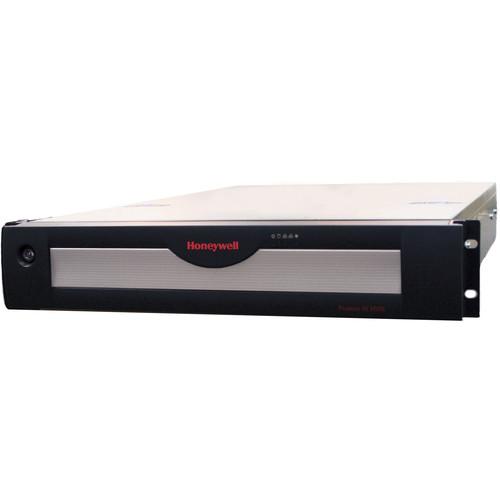 Contents of the user manual for the Honeywell MAXPRO 64-Channel NVR with 3TB
- Product category: Network Video Recorders (NVRs) Honeywell
- Brand: Honeywell
- Description and content of package
- Technical information and basic settings
- Frequently asked questions – FAQ
- Troubleshooting (does not switch on, does not respond, error message, what do I do if...)
- Authorized service for Honeywell Network Video Recorders (NVRs)
|
User manual for the Honeywell MAXPRO 64-Channel NVR with 3TB contain basic instructions
that need to be followed during installation and operation.
Before starting your appliance, the user manual should be read through carefully.
Follow all the safety instructions and warnings, and be guided by the given recommendations.
User manual is an integral part of any Honeywell product,
and if it is sold or transferred, they should be handed over jointly with the product.
Following the instructions for use is an essential prerequisite for protecting
health and property during use, as well as recognition of liability on the part of the manufacturer
for possible defects should you make a warranty claim. Download an official Honeywell user manual in which you will find instructions on how to install, use, maintain and service your product.
And do not forget – unsuitable use of a Honeywell product will considerably shorten its lifespan!
|
Product description The MAXPRO 64-Channel NVR (Standard Edition) from Honeywell is an open, flexible, and scalable IP video surveillance system. It integrates with the full line of Honeywell IP cameras and HVE encoders, comes with all required software, and IS pre-licensed for 64 channels. It supports simultaneous recording, live monitoring, search, and system management for up to 64 IP cameras, including high-definition formats with easy to use clients.
The NVR has an internal storage capacity of 3TB (1 x 3TB) with 5x spare HD slots. It provides a processor and storage enclosure in one chassis, resulting in both space and cost savings. The NVR is rack-mountable with 6 removable drives, SATA hard drives used for OS partitioning and video storage. Includes rack rails for use with four-post racking systems. - Broad Device Integrations
-
- Integrates with the full line of Honeywell IP cameras and HVE encoders
- Support for ONVIF Profile S, PSIA, and real-time streaming protocol (RTSP) standards
- Native device integrations include 360° camera support
- Turnkey Solution
-
- 3-click wizard to live video for auto configuration - quick and efficient IP system install
- Simple and logical configuration pages
- Supports simultaneous recording, live monitoring, search and system management for up to 64 IP cameras
- Desktop clients, web client, and mobile apps
- MAXPRO NVR Family and MAXPRO VMS/Viewer provide familiarity across a broad range of Honeywell products, saving training costs
- Scalable Integrated Security Solution
-
- Integrated MAXPRO Viewer multi-site software or MAXPRO VMS enterprise video management system
- Integration with Honeywell WIN-PAK and Pro-Watch Access Control Systems providing an integrated access control, intrusion, and video solution
- Flexible Hardware
-
- Provides the processor and storage enclosure in one chassis, resulting in both space and cost savings
- Rack-mountable with 6 removable drives, SATA hard drives used for operating system partition and video storage
- Dual 1GB NICs are optimized to separate record and viewing data to ensure 100% recording and smooth playback even with multiple client connections
- Enhanced Monitoring with Desktop Clients
-
- Cost-effective enhanced HD video rendering on remote desktop clients with support for up to 18 1080p cameras in real time 30/540 fps with no time lapse. Up to four 1080p HD at 20 fps/80 fps on local client
- React Fast and Protect your Assets
-
- Search by date/time, enhanced time line, time jump, bookmarks, SMART Motion search, calendar, preview, filmstrip view, and events.
- SMART Motion search – Fast and efficient forensic search and investigation for objects/motion on recorded video using Honeywell SMART motion detection analytics algorithms on the client PC without impacting the NVR server load
- Capture and export clips and still images in WMV, ASF, MPVC, and BMP formats. Clips (WMV) signed with digital signature for authentication
- MAXPRO Video Container (MPVC) format support - only playable in MAXPRO desktop clients and standalone Clip Player
- Recording and Remote Monitoring Performance
- 1920 fps at 4CIF/VGA or 1920 fps at 720p HD or 1280 fps at 1080p (4 Mb/s bit rate) HD. 1-way audio for up to 64 IP channels.
Incoming network bandwidth/throughput: 160 Mb/s, Outgoing: 350 Mb/s, Total: 510 Mbps.
Rendering performance using GPU of up to 4 1080p HD at 20/80 fps on local client. - Server Based VMD (SMART VMD) Performance - Channels Supported
- Channels at max fps: 64 channels at 1920 fps at 4CIF/VGA, 64 channels at 1920 fps at 720p, 50 channels at 1280 fps at 1080p; total 100MP. All channels at fps: 64 channels at 1920 fps at 4CIF/VGA, 1920 fps at 720p, 640 fps at 1080p; total 128MP.
- Archival Performance
- 16 channels at 4 Mb/s bit rate each / 64 Mb/s total archival throughput capacity. Outgoing archival storage throughput of 200 Mb/s.
- Multi-Stream Performance
- Support for maximum 128 streams. Support for configuring 1 preferred stream for continuous recording and 1 preferred stream for live video / motion based recording per camera.
In the Box Honeywell MAXPRO 64-Channel NVR with 3TB (1 x 3TB) (Standard Edition) Limited 3-Year Warranty Table of Contents
|
Upload User Manual
Have you got an user manual for the Honeywell MAXPRO 64-Channel NVR with 3TB in electronic form? Please send it to us and help us expand our library of instruction manuals.
Thank you, too, on behalf of other users.
To upload the product manual, we first need to check and make sure you are not a robot. After that, your "Submit Link" or "Upload File" will appear.
Technical parametersHoneywell HNMSE64BP03T Specs | | | Processor | Intel Core i7-4790, 3.6 GHz, Intel HD Graphics 4600 | | Memory | 8 GB | | Power Supply | Single 400 W | | OS | 100 GB partition in storage drive 1 | | Storage Capacity | 3 TB (1 x 3 TB)
6 Bays: 1 operating system & storage drive, 5 field upgradable | | Optical | 22x DVD-RW | | Network | Two 1 GB Ethernet included | | Chassis | With Locking Bezel: 2U 6 bay including rackmount kit | | Rear Panel Connectors | Mouse & Keyboard: 2 x USB
USB: 1 x front, 6 x back
Network: 2 x RJ45
Monitor Output: 1 x HDMI, 1 x VGA, 1 x DVI-D, 1 x display port | | Input Voltage | 110 to 240 V, 50/60 Hz, 7 A | | Power Dissipation | Average BTU Rating: 570 BTU/hour Peak BTU Rating: 1370 BTU/hour | | Operating Temperature | 40 to 104°F / 5 to 40°C | | Storage Temperature | 14 to 150°F / -10 to 65°C | | Relative Humidity | 0 to 90%, non-condensing | | Emissions | FCC Part 15, Subpart B, Class B | | Safety | ANSI/UL 60950-1; CAN/CSA C22.2 No 60950-1 | | Construction | Housing: Steel chassis
Finish: Black matte paint | | Dimensions | 27 x 19 x 3.5" / 686 x 483 x 89 mm | | Weight | 35 lb / 15.9 kg | | | | Database | Microsoft SQL Server 2012 Express | | Operating System | Windows 10 IoT Enterprise | | Image Compression | Supported MJPEG, MPEG-4, H.264, H.265 | | Supported IP Cameras/Encoders | Supports Performance Series IP, equIP Series cameras
Third Party Cameras/Encoders: Refer to the MAXPRO NVR compatibility for a comprehensive list of compatible products to which this device is integrated | | Audio Support | 1-way audio for specific IP camera models | | Maximum Number of Clients | Desktop Client: 38 per unit from 19 remote workstations + 2 local on NVR | | Layouts | Salvo:
Desktop Client: Full, 2 x 2, 1 x 5, 3 x 3, 2 x 8, 1 x 12, 4 x 4
Web Client: 2 x 2, 1 x 1, 1 x 2, 1 x 3
Mobile App (Phone): 2 x 2, 2 x 4,1 x 2, 1 x 1
Mobile App (Tablet): 3 x 3, 2 x 2, 1 x 1 | | Picture Controls | Sharpness, blur, brightness, contrast, hue, saturation, maintain aspect ratio, stretched, original size and picture mirror | | OSD | Concealed text option | | Playback Control | FWD/REV Play x (1, 2, 4, 8, 16)
Slow FWD/REV Play x (1/2, 1/4, 1/8) | | Search | Type: Time/date timeline, time jump FWD/REV, bookmarks, calendar, preview, film strip, event search and SMART Motion Search | | Recording Schedule | Constant and event based with H/M/D and holiday and exception days | | Recording Method | Constant, event based, and user activated | | Live | Setting per Camera: Compression format, resolution, and frame rate | | Recording System | Same as live or reduced frame rate | | Clip | Honeywell MPVC playable with standalone MAXPRO Clip Player for faster and secure exports. WMV with digital certificate for authentication playable with Windows media player. ASF for faster exporting of longer than an hour backup clips in native compression format. | | Video Clip | Digital signature, verification tool provided | | Motion Detection | Camera based for supported models or Server based (SMART VMD) for all models (except 360 fisheye/panomorph views) | | Event Recording | Pre and post duration setting | | Reporting | Per user, configurator, session and viewer | | Event | Report: Per camera or recorder events | | Operators | 1024 |
Rating80% users recommend this product to others. And what about you?

This product has already been rated by 17 owners. Add your rating and experience with the product.
Discussion
 Ask our technicians if you have a problem with your settings,
or if anything is unclear in the user manual you have downloaded.
You can make use of our moderated discussion.
The discussion is public and helps other users of our website who may be encountering similar problems.
Ask our technicians if you have a problem with your settings,
or if anything is unclear in the user manual you have downloaded.
You can make use of our moderated discussion.
The discussion is public and helps other users of our website who may be encountering similar problems.
The discussion is empty - enter the first post
Post a new topic / query / comment:
|
|


