|
User Manual for HP 15.6" ZBook Studio G3 Custom Mobile Workstation Click to enlarge the picture
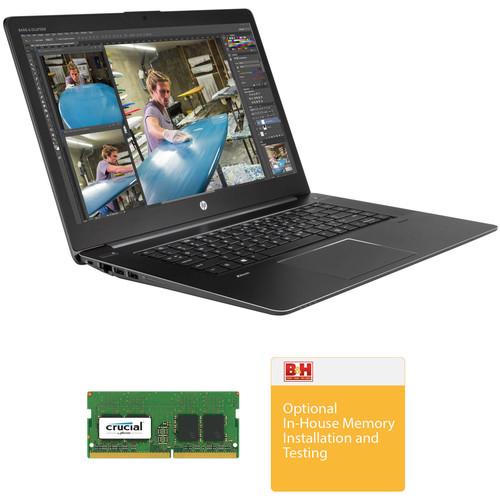 Contents of the user manual for the HP 15.6" ZBook Studio G3 Custom
- Product category: Notebooks HP
- Brand: HP
- Description and content of package
- Technical information and basic settings
- Frequently asked questions – FAQ
- Troubleshooting (does not switch on, does not respond, error message, what do I do if...)
- Authorized service for HP Notebooks
|
User manual for the HP 15.6" ZBook Studio G3 Custom contain basic instructions
that need to be followed during installation and operation.
Before starting your appliance, the user manual should be read through carefully.
Follow all the safety instructions and warnings, and be guided by the given recommendations.
User manual is an integral part of any HP product,
and if it is sold or transferred, they should be handed over jointly with the product.
Following the instructions for use is an essential prerequisite for protecting
health and property during use, as well as recognition of liability on the part of the manufacturer
for possible defects should you make a warranty claim. Download an official HP user manual in which you will find instructions on how to install, use, maintain and service your product.
And do not forget – unsuitable use of a HP product will considerably shorten its lifespan!
|
Product description Work Laptops This Custom Mobile Workstation combines the HP 15.6" ZBook Studio G3 Mobile Workstation with 16GB of 2133 MHz PC4-17000 DDR4 RAM and installation services.
Please Note: During the building process, certain components from the base machine may have been removed to accommodate the updated parts. In these cases, these original components will be included in the box as a courtesy and are not needed for the system to function as intended. The product description above refers only to the parts installed in the final system. - HP 15.6" ZBook Studio G3 Mobile Workstation Thin at 0.71" and weighing 4.4 pounds, the 15.6" ZBook Studio G3 Mobile Workstation from HP is designed for mobile professionals who require a versatile system with powerful processing and graphics, as well as simple scalability that can handle a wide variety of functions. The ZBook Studio G3 will help users stay productive, whether they are at home, at the office, or in the field and is powered by a 2.3 GHz Intel Core i5-6300HQ Quad-Core processor which allows you to run multiple applications simultaneously. If you need more power, the system can be overclocked to 3.2 GHz using Intel Turbo Boost 2.0 technology. The 8B of 2133 MHz DDR4 RAM helps to ensure smooth multitasking and also allows the computer to quickly access frequently-used files and programs. While the current memory configuration is 1 x 8GB module, the system supports up to 32GB when using a 16GB module in each of its 260-pin SO-DIMM slots.
The 15.6" eDP anti-glare display features a Full HD 1920 x 1080 native resolution, IPS technology, LED-backlighting, an ultra-wide viewing angle (UWVA), a 16:9 aspect ratio, and Panel Self Refresh (PSR), as well as a 600:1 contrast ratio, a refresh rate of 60 Hz, a brightness of 300 cd/m2, viewing angles of 85°, and 141 ppi. Integrated Intel HD Graphics delivers a sharp, clear picture, and you'll also be able to output video to an external display at resolutions up to 5120 x 2880 using the system's HDMI and dual Thunderbolt 3 ports, the latter of which supports DisplayPort 1.2.
For long term storage of your files, this ZBook Studio G3 is equipped with a 128GB M.2 SATA III SSD, which offers quick access to your data. While the SSD may not have the larger storage capacity of a traditional spinning hard drive, it contains no moving parts which helps it to be more resistant against bumps, drops, and other kinds of damage. SSDs also receive less wear and tear than traditional hard drives, as they don't have any read and write heads. Additionally, as this SSD connects via PCIe as compared to SATA, it is able to operate with even greater data transfer speeds. It provides sequential reads up to 540 MB/s and sequential writes up to 300 MB/s.
If you want to add external storage, optical drives, memory card readers, and more, the ZBook Studio G3 offers two USB Type-C connectors that support 40 Gb/s Thunderbolt 3 and 10 Gb/s USB 3.1. There are also two 5 Gb/s USB 3.0 Type-A ports and one USB 3.0 Type-A charging port. Gigabit Ethernet and 802.11ac Wi-Fi are also built-in for wired and wireless networking and Bluetooth 4.2 technology will also allow you to connect additional compatible peripherals. So that content from memory cards may be accessed, a built-in SD/SDHC/SDXC card reader supports UHS-II flash media and lets users download content from their digital camera. Other integrated features include a 720p webcam, dual-array microphones, and stereo speakers with Bang & Olufsen HD audio.
The ZBook Studio G3 includes a 150W Slim Smart AC adapter that operates using 100-240 VAC at 47-63 Hz and an HP Long Life 4-cell / 64Wh Lithium-ion prismatic battery that can typically be recharged in 3-5 hours and lasts for up to 9.5 hours. While the installed operating system is Windows 7 Professional (64-bit), a Windows 10 Professional (64-bit) license is included at no additional cost. Also included is recovery media for both Windows 7 Pro (64-bit) and Windows 10 Pro (64-bit).
Photo is an authorized HP reseller with professional in-house technicians available for upgrades & installations on these workstations and laptops. Built with power and speed in mind, the Z Series is designed to enhance audio and video post-production workflows and more. Each HP Z series workstation or laptop features a range of top-tier processors and large RAM loadouts. The workstations are built with graphics flexibility in mind as well so that the end consumer can configure the graphics options to their needs, and each unit includes a 3/3/3 warranty - 3 years limited warranty for parts, 3 years limited warranty for labor, and 3 years of repairs performed at customer site for those parts not eligible for Customer Self Repair (CSR). For 24/7 customer service, please call 1-866-625-1175. General Features - Thunderbolt 3
- The two USB Type-C ports of the ZBook Studio G3 support Thunderbolt 3 connectivity, which features bi-directional transfer speeds of up to 40 Gb/s. Thunderbolt 3 also supports DisplayPort 1.2, 10 Gb/s USB 3.1, and PCIe Gen 3 devices, all using the USB Type-C connectors
- DisplayPort 1.2 Protocol Features Supported via Thunderbolt 3
-
- Legacy displays (HDMI, DVI, VGA) may be attached to a Thunderbolt port with the use of a certified dongle
- DisplayPort monitors capable of supporting DisplayPort 1.2 may be directly attached to the Thunderbolt port to achieve HBR2 with the use of a dongle
- Thunderbolt 3 enabled monitors may be directly attached to the Thunderbolt port to achieve HBR2 and MST
- The DisplayPort 1.2 MST feature ("daisy-chain" feature) is supported through the Thunderbolt 3 port on Thunderbolt 3 enabled devices or DisplayPort 1.2 monitors (requires a monitor with DisplayPort 1.2 MST capability) with the use of a dongle
- Up to two streams (eight lanes) of DisplayPort 1.2 are supported over a single Thunderbolt 3 port. Up to two 4K displays with 24/30-bit color depth at 60 Hz or one 5K display are supported over a single Thunderbolt 3 port using an Intel certified Thunderbolt cable
- DisplayPort 1.2 w/MST (Multi-stream Transport): Supports resolutions up to Full 4K (4096 x 2160), 24/30-bit color depth at 60 Hz, and WUXGA (1920 x 1200) monitors with 24/30-bit color depth at 120 Hz
- Multi-Display Support Using the ZBook Dock with Thunderbolt 3
- The separately sold ZBook Dock with Thunderbolt 3 has a Thunderbolt 3 port, VGA port, and two DisplayPort 1.2 ports. When used together with the HP ZBook Studio configuration with hybrid graphics, a maximum of 5 independent displays are supported. These five displays are the internal panel plus four external displays connected to the ZBook dock's Thunderbolt 3, VGA, and two DisplayPort ports. When used together with the HP ZBook Studio configuration with Intel integrated graphics, a maximum of three independent displays are supported
- Multi-Display Support Without the ZBook Dock with Thunderbolt 3
- The HP ZBook Studio with hybrid graphics and without the use of the separately sold ZBook dock supports up to a maximum of three independent displays. These three displays are the internal panel plus two external displays connected to two of the three following ports: HDMI, Thunderbolt 3, and Thunderbolt 3.
The HP ZBook Studio configuration with Intel integrated graphics and without the use of the ZBook dock supports up to a maximum of three independent displays. These three displays are the internal panel plus two external displays connected to two of the three following ports: HDMI, Thunderbolt 3, and Thunderbolt 3 - Multi-Display Support Without the ZBook Dock with Thunderbolt 3 (using DP 1.2 MST)
- Multi-stream Transport (MST) is a DP 1.2 feature that allows daisy chaining of DP 1.2 monitors (requires the built-in support of DP 1.2 MST in the monitor), or the use of DP 1.2 hubs with MST to achieve five active displays without a docking station on configurations with hybrid graphics enabled
- Panel Self Refresh (PSR)
- PSR helps to save system power and further extend battery life in portable PC systems. PSR mode allows the GPU to enter a power saving state in between frame updates by including frame buffer memory in the display panel controller
- Gigabit Ethernet & 802.11ac Wi-Fi
- The system uses a Gigabit Ethernet controller for Internet access when connected to a router, modem, or network switch. It also features Intel Dual Band Wireless-AC 8260 which is compatible with 802.11a/b/g/n/ac Wi-Fi so that users may access network connectivity using wireless technology
- Bluetooth 4.2
- Additional compatible peripherals, such as mice, keyboards, headsets, and more may be paired using Bluetooth 4.2 technology
- Security Features
- TPM
Fingerprint Reader
Security Lock Slot - Environmental
- US ENERGY STAR
IT ECO declaration
EPEAT - Windows 7 Pro (64-bit) + Windows 10 Pro (64-bit) License
- This system is pre-installed with Windows 7 Professional software and also comes with a license and media for Windows 10 Pro software. You may use only one version of the Windows software at a time. Switching between versions will require you to uninstall one version and install the other version. You must back up all data (files, photos, etc.) before uninstalling and installing operating systems to avoid loss of your data.
UPC: 190780767870 - Crucial 8GB DDR4 2400 MHz SO-DIMM Memory Module Upgrade the memory in your compatible system using the 8GB DDR4 2400 MHz SO-DIMM Memory Module from Crucial. This single memory module features a capacity of 8GB, a clock speed of 2400 MHz (PC4-19200), a 260-pin SO-DIMM form factor, operates using 1.2V, and has a CAS latency of 17. Additionally, this RAM is not buffered and does not support ECC technology. Adding more memory to your system will help boost its capabilities, including improving system performance and application responsiveness. Start-up times will be improved with fewer delays during routine operations, and more programs will be able to run simultaneously with easier switching between them. This memory is protected by a limited lifetime warranty.
General Features - Helps increase bandwidth, reduce power consumption, and extend battery life
- Faster burst access speeds for improved sequential data throughput
UPC: 649528776334 - Photo Video In-house Memory Installation & Testing Service Select In-house Additional Computer Memory Installation and Testing when you want B&H to do the installation of additional memory - when purchased on the same order of the computer. The Additional Memory Installation and Testing is done by a certified technician in our Computer Service Center, so that it is assured that the original manufacturer's warranty on the computer continues on throughout the warranty period.This item doesn't include software installation. If you also need software installation use B&H item code # BHWEBPCC. Note: The only warranty on the additional memory is the warranty provided by the manufacturer of the additional memory.
- Certified Technician
- The install is done by a certified technician who knows the do's and don'ts of installation, so that the manufacturer's original warranty on the computer continues on and doesn't get voided by unwanted moves.
- Expert Testing
- Testing is done on the computer to check if the system recognizes and allocates the additional memory.
- Get to Work Immediately
- The Installation and Testing will allow you to start working on your new computer as soon as you get it.
In the Box 15.6" ZBook Studio G3 Mobile Workstation aaexcrerfadcrsadcaurvubcqeuayef 150W Slim Smart AC Adapter Power Cord 4-Cell / 64Wh Long Life Lithium-ion Prismatic Battery Windows 10 Professional (64-bit) License Windows 10 Professional (64-bit) Recovery Media Windows 7 Professional (64-bit) Recovery Media Limited 1-Year Warranty for Parts Limited 1-Year Warranty for Labor 1 Year of Repairs Performed at Customer Site for Those Parts Not Eligible for Customer Self Repair (CSR) For 24/7 Customer Service, Please Call 1-866-625-1175 - Crucial - 8GB DDR4 2400 MHz SO-DIMM Memory Module
- B&H Photo Video - In-house Memory Installation & Testing Service
More from Manufacturer Table of Contents
|
Upload User Manual
Have you got an user manual for the HP 15.6" ZBook Studio G3 Custom Mobile Workstation in electronic form? Please send it to us and help us expand our library of instruction manuals.
Thank you, too, on behalf of other users.
To upload the product manual, we first need to check and make sure you are not a robot. After that, your "Submit Link" or "Upload File" will appear.
Technical parameters - HP 15.6" ZBook Studio G3 Mobile Workstation
| Operating System | Windows 7 Professional (64-Bit) | | | | CPU | 2.3 GHz Intel Core i5-6300HQ Quad-Core | | Maximum Boost Speed | 3.2 GHz | | Memory Type | 2133 MHz DDR4 | | Total Installed Memory | 8 GB | | Maximum Memory Capacity | 32 GB | | Memory Slot Type | 260-Pin SO-DIMM | | Available Memory Slots | 2 | | Graphics Type | Integrated | | GPU | Intel HD Graphics 530 | | | | Panel Type | IPS | | Size | 15.6" | | Aspect Ratio | 16:9 | | Resolution | 1920 x 1080 | | Finish | Matte | | Maximum Brightness | 300 cd/m2 | | Refresh Rate | 60 Hz | | Adaptive Sync Technology | None | | Viewing Angle (H x V) | 85 x 85° | | | | Total Installed Capacity | 128 GB | | Solid State Storage | 1 x 128 GB M.2 SATA | | Optical Drive | None | | | | Ports | 3 x USB Type-A (USB 3.1 Gen 1) | | USB Type-C Ports | 2 x Thunderbolt 3 (Supports DisplayPort) | | Display | 1 x HDMI | | Audio | 1 x 1/8" / 3.5 mm Headphone/Microphone Input/Output | | Built-In Speakers | 2 | | Built-In Microphones | 2 | | Media Card Slots | 1 x SDXC | | | | Ethernet | 1 x RJ45 (Gigabit) | | Wi-Fi | Wi-Fi 5 (802.11ac); Dual-Band (2.4 & 5 GHz) | | Bluetooth | 4.2 | | Webcam | User-Facing: 720p | | | | Battery Chemistry | Lithium-Ion | | Watt Hours / Type | 64 Wh Removable | | Cells | 4 | | Maximum Runtime | 9.5 Hours | | | | Keyboard | Notebook Keyboard with Backlight | | Pointing Device | TouchPad | | | | Security | Kensington Lock Slot, Accepts 3rd Party Security Lock Devices, Infineon TPM Software Professional Package, Fingerprint Reader | | Power Supply | 150 W | | AC Input Power | 100 to 240 VAC, 50 / 60 Hz | | Dimensions | 14.8 x 0.7 x 10" / 375.9 x 17.8 x 254 mm | | Weight | 4.4 lb / 2 kg | | | | Box Dimensions (LxWxH) | 22.0 x 12.0 x 3.2" | - Crucial 8GB DDR4 2400 MHz SO-DIMM Memory Module
| Capacity | 8 GB | | Kit Configuration | 1 x 8 GB | | Speed | PC4-19200 (2400 MHz) | | Memory Type | DDR4 | | DIMM Type | 260-Pin SO-DIMM | | Buffered/Registered | No | | Error Correction (ECC) | Non-ECC | | Voltage | 1.2 V | | CAS Latency | CL17 | | Memory Rank | Single Rank | | | | Box Dimensions (LxWxH) | 6.4 x 1.7 x 0.5" | - Photo Video In-house Memory Installation & Testing Service
| | | Box Dimensions (LxWxH) | 1.0 x 1.0 x 1.0" |
Rating100% users recommend this product to others. And what about you?

This product has already been rated by 25 owners. Add your rating and experience with the product.
Discussion
 Ask our technicians if you have a problem with your settings,
or if anything is unclear in the user manual you have downloaded.
You can make use of our moderated discussion.
The discussion is public and helps other users of our website who may be encountering similar problems.
Ask our technicians if you have a problem with your settings,
or if anything is unclear in the user manual you have downloaded.
You can make use of our moderated discussion.
The discussion is public and helps other users of our website who may be encountering similar problems.
The discussion is empty - enter the first post
Post a new topic / query / comment:
|
|
|
| Request for user manual |
You can’t find the operation manual you are looking for? Let us know and we will try to add the missing manual:
I’m looking for a manual / Request for manual
Current requests for instruction manuals:
Call Of Duty World War Two For Xbox...
controller stratus XL...
stratus XL...
smart whatch serie S11 42mm...
Allen & Heath SQ-6 manual...
|
| Discussion |
Latest contributions to the discussion:
AEW R 4100
Name: MAURICIO ANGARITA
Audio-Technica AEW-R4100 UHF Diversity Receiver for
AEW R 4100 has the mute function blocked and does not allow audio to pass. I tried several times to turn off the mute from the transmitter but it does nothing, the mute stays on. Solution?
Thank you...
Instructions for assembling the 2015 Forecast Image Master Consoles GC3-A
Name: mike elam
Forecast Consoles GC3-A ImageMaster Editing Console
Looking for instructions for assembling this console. ...
EMPTY TONER ERROR MESSAGE AFTER REPLACING TONER
Name: LINDA BAD YELLOW EYES
Brother TN223BK Standard-Yield Toner
I HAD TO CHANGE OUT ALL THREE TONERS DUE TO LEAKS IN THE YELLOW AND CYAN. AFTER I REPLACED THEM, THE MACHINE KEEPS GIVING ME AN EMPTY TONER ERROR MESSAGE. HELP!!...
PS480D 20/24 pin Switching 480W Power Supply
Name: swkargo
Logisys 480W Power Supply
This item states in can run -5vdc .It is NOT listed on the board or I beleive is r4 is missing the resitior. Any body have thid issue. Shawn
...
Help needed
Name: Ann Carter
SanDisk 1TB Extreme Portable USB 3.1
When I click the link to download the user manual for my Sandisk Extreme external hard drive, it gives me the manual for the LG Cricket. Can you please change the link so I can download the Sandisk manual and begin using this drive? Thank you....
|
|


