|
User Manual for HP 310 Series Instant IAP-315 Indoor Dual-Radio Wireless Access Point with Integrated Antennas Click to enlarge the picture
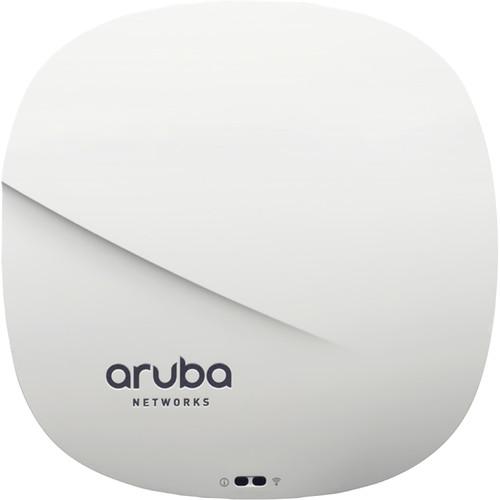 Contents of the user manual for the HP 310 Series Instant IAP-315 Indoor
- Product category: Wireless Access Points HP
- Brand: HP
- Description and content of package
- Technical information and basic settings
- Frequently asked questions – FAQ
- Troubleshooting (does not switch on, does not respond, error message, what do I do if...)
- Authorized service for HP Wireless Access Points
|
User manual for the HP 310 Series Instant IAP-315 Indoor contain basic instructions
that need to be followed during installation and operation.
Before starting your appliance, the user manual should be read through carefully.
Follow all the safety instructions and warnings, and be guided by the given recommendations.
User manual is an integral part of any HP product,
and if it is sold or transferred, they should be handed over jointly with the product.
Following the instructions for use is an essential prerequisite for protecting
health and property during use, as well as recognition of liability on the part of the manufacturer
for possible defects should you make a warranty claim. Download an official HP user manual in which you will find instructions on how to install, use, maintain and service your product.
And do not forget – unsuitable use of a HP product will considerably shorten its lifespan!
|
Product description The Aruba 310 Series Instant IAP-315 Indoor Dual-Radio Wireless Access Point from HP offers maximum data rates of up to 1733 Mb/s in the 5 GHz band (802.11ac) and 300 Mb/s in the 2.4 GHz band for an aggregated data rate of 2.0 Gb/s. Each radio supports multi-user MIMO (MU-MIMO) and four spatial Access Point streams (4SS). It provides simultaneous data transmission to multiple devices, maximizing data throughput and improving network efficiency. The unit has four integrated omnidirectional down-tilt antennas that are optimized for horizontal ceiling-mounted orientation of the access point.This dual-radio access point (AP) includes enhanced ClientMatch technology that extends the client steering technology with MU-MIMO client awareness. It automatically identifies MU-MIMO capable mobile devices and steers those devices to the closest MU-MIMO capable Aruba access point. By grouping MU-MIMO capable mobile devices together, the network starts taking advantage of the simultaneous transmission to these devices, increasing its overall capacity. These roaming policies that are based on device types, help customers achieve optimum WLAN performance in a mixed device environment during the technology transition period.The unit features an integrated Bluetooth Aruba Beacon that simplifies the remote management of a network of large scale battery-powered Aruba beacons while also providing advanced location and indoor way finding, and proximity-based push notification capabilities. It enables businesses to leverage mobility context to develop applications that will deliver an enhanced user experience and increase the value of the wireless network for organizations. - General Features
-
- Dual-radio 4x4 802.11ac access point with multi-user MIMO
- Supports up to 1733 Mb/s in the 5 GHz band (with 4SS/VHT80 clients) and 300 Mb/s in the 2.4 GHz band (with 4SS/VHT40 clients)
- Built-in BLE (Bluetooth Low-Energy) radio enables location-based services with BLE-enabled mobile devices receiving signals from multiple Aruba Beacons at the same time. It also simplifies battery-powered Aruba beacon management
- ACC (Advanced Cellular Coexistence) minimizes interference from 3G/4G cellular networks, distributed antenna systems, and commercial small cell / femtocell equipment
- It supports priority handling and policy enforcement for unified communication apps, including Microsoft Skype for Business with encrypted videoconferencing, voice, chat, and desktop sharing
- For large installations across multiple sites, the Aruba Activate service significantly reduces deployment time by automating device provisioning, firmware upgrades, and inventory management
- Adaptive Radio Management (ARM) technology automatically assigns channel and power settings, provides airtime fairness, and ensures that the access point stays clear from all sources of RF interference to deliver reliable, high-performance WLANs
- Access Point can be configured to provide part-time or dedicated air-monitoring for spectrum analysis and wireless intrusion protection, VPN tunnels to extend remote locations to corporate resources, and wireless mesh connections where Ethernet drops are not available
- AppRF technology leverages deep packet inspection to classify and block, prioritize or limit bandwidth for over 1500 enterprise apps or groups of apps
- Integrated wireless intrusion protection offers threat protection and mitigation, eliminating the need for separate RF sensors and security appliances
- IP reputation and security services identify, classify, and block malicious files, URLs, and IPs, providing comprehensive protection against advanced online threats
- Integrated TPM (Trusted Platform Module) provides secure storage of credentials and keys and SecureJack ensures secure tunneling of wired Ethernet traffic
- IPM (Intelligent Power Monitoring) enables the AP to continuously monitor and report its actual power consumption and optionally make autonomous decisions to disable certain capabilities
- Operating Modes
-
- Offers a choice of operating modes to meet your management and deployment requirements
- Controller-Managed Mode - When managed by Aruba Mobility Controllers, this access point offers centralized configuration, data encryption, policy enforcement, and network services, as well as distributed and centralized traffic forwarding
- Aruba Instant mode to distribute the network configuration to other Instant APs in the WLAN
- RAP (Remote Access Point) for branch deployments
- AM (Air Monitor) for wireless IDS, rogue detection, and containment
- Spectrum Analyzer (dedicated or hybrid) for identifying sources of RF interference
- Secure Enterprise Mesh
- Radio Features
-
- Software-configurable dual radio supports 5 GHz (Radio 0) and 2.4 GHz (Radio 1)
- Four spatial stream SU-MIMO for up to 1733 Mb/s wireless data rate to individual 4x4 VHT80 or 2x2 VHT160 client devices
- Two spatial stream SU (Single User) MIMO for up to 300 Mb/s wireless data rate to individual 2x2 HT40 client devices
- Four spatial stream MU (Multi User) MIMO for up to 1733 Mb/s wireless data rate to up to three MU-MIMO capable client devices simultaneously
- Supports up to 256 associated client devices per radio, and up to 16 BSSIDs per radio
- DFS (Dynamic frequency selection) optimizes the use of available RF spectrum
- ACC (Advanced Cellular Coexistence) feature to effectively deal with interference from cellular systems
- MRC (Maximum Ratio Combining) for improved receiver performance
- CDD / CSD (Cyclic Delay / Shift Diversity) for improved downlink RF performance
- Short guard interval for 20-, 40-, 80-, and 160-MHz channels
- STBC (Space-Time Block Coding) for increased range and improved reception
- LDPC (Low-Density Parity Check) for high-efficiency error correction and increased throughput
- TxBF (Transmit Beam-Forming) for increased reliability in signal delivery
UPC: 190017041445 In the Box HP 310 Series Instant IAP-315 Indoor Dual-Radio Wireless Access Point with Integrated Antennas 2 x Mounting Clips Limited Lifetime Warranty Table of Contents
|
Upload User Manual
Have you got an user manual for the HP 310 Series Instant IAP-315 Indoor Dual-Radio Wireless Access Point with Integrated Antennas in electronic form? Please send it to us and help us expand our library of instruction manuals.
Thank you, too, on behalf of other users.
To upload the product manual, we first need to check and make sure you are not a robot. After that, your "Submit Link" or "Upload File" will appear.
Technical parametersHP Aruba Instant IAP-315 Specs | Type | Indoor, dual radio, 5 GHz 802.11ac and 2.4 GHz 802.11n | | Software | ArubaOS 6.5.0.0, 8.0.1.0
Aruba InstantOS 4.3.0.0 | | | | Type | Software-configurable dual radio supports 5 GHz (Radio 0) and 2.4 GHz (Radio 1) | | MIMO | 4 x spatial stream SU-MIMO for up to 1,733 Mb/s wireless data rate to individual 4x4 VHT80 or 2x2 VHT160 client devices
2 x spatial stream Single User (SU) MIMO for up to 300 Mb/s wireless data rate to individual 2x2 HT40 client devices | | Frequency Bands | 2.4000 to 2.4835 GHz
5.150 to 5.250 GHz
5.250 to 5.350 GHz
5.470 to 5.725 GHz
5.725 to 5.850 GHz Country-specific restrictions apply. | | Available Channels | Dependent on configured regulatory domain | | Frequency Selection | DFS (Dynamic Frequency Selection): Optimizes the use of available RF spectrum | | Supported Radio Technologies | 802.11b: Direct-Sequence Spread-Spectrum (DSSS)
802.11a/g/n/ac: Orthogonal Frequency-Division Multiplexing (OFDM) | | Supported Modulation Types | 802.11b: BPSK, QPSK, CCK
802.11a/g/n/ac: BPSK, QPSK, 16-QAM, 64-QAM, 256-QAM | | Transmit Power | Configurable in increments of 0.5 dBm
Maximum (Aggregate, Conducted Total):
2.4-GHz Band: +18 dBm, +21 dBm aggregate (2x2)
5-GHz Band: +18 dBm per chain, +24 dBm aggregate (4x4)
Note: The maximum transmit power is limited by local regulatory requirements. Also, the conducted transmit power levels exclude antenna gain. For total (EIRP) transmit power, add antenna gain. | | Data Rates | - 802.11b: 1, 2, 5.5, 11 Mb/s
- 802.11a/g: 6, 9, 12, 18, 24, 36, 48, 54 Mb/s
- 802.11n (2.4 GHz): 6.5 to 300 (MCS0 to MCS15)
- 802.11n (5 GHz): 6.5 to 600 (MCS0 to MCS31)
- 802.11ac: 6.5 to 1,733 (MCS0 to MCS9, NSS = 1 to 4 for VHT20/40/80, NSS = 1 to 2 for VHT160)
- 802.11n high-throughput (HT) support HT 20/40
- 802.11ac very high throughput (VHT) support VHT 20/40/80/160
- 802.11n/ac packet aggregation: A-MPDU, A-MSDU
| | | | Number | 4 integrated down-tilt omnidirectional antennas for 4x4 MIMO | | Maximum Gain | 3.1 dBi in 2.4 GHz
5 dBi in 5 GHz | | Angle Adjustment | Down-tilt Angle: 30° for maximum gain | | | | Network | 2 x 10/100/1000BASE-T Ethernet network interface (RJ45):
Auto-sensing link speed and MDI/MDX
Load balancing support to achieve platform throughput greater than 1 Gb/s
802.3az Energy Efficient Ethernet (EEE) | | USB | USB 2.0 port (Type A connector) | | Bluetooth | Bluetooth Low Energy (BLE) Radio:
Up to 4 dBm transmit power (class 2) and -91 dBm receive sensitivity
Integrated antenna, 1.5 dBi gain (30° down-tilt) | | LEDs | Mmulti-color LEDs for system and radio status | | Button | Reset Button: Factory reset (during device power up) | | Additional | Serial console interface
Kensington security slot | | | | External DC Source | 12 VDC nominal, ±5% | | DC Power Input | Accepts 0.08 / 0.22" / 2.1 / 5.5 mm center-positive circular plug with 0.37" / 9.5 mm length | | Maximum Power Consumption | 14.4 W (802.3at PoE)
13.6 W (802.3af PoE)
12.7 W (DC)
Idle Mode:
6.4 W (PoE)
5.9 W (DC)
Note: These maximum consumption values exclude power consumed by an external USB device (and internal overhead); this could add up to 6.3 W (POE) or 5.9 W (DC) for 5 W / 1 A USB device. | | Power Over Ethernet (PoE) | 48 VDC (nominal) 802.3af/802.3at compliant source
Unrestricted functionality with 802.3at PoE
Power-save mode with reduced functionality from 802.3af PoE
USB port disabled | | | | Operating Temperature | 32 to 122°F / 0 to 50°C | | Humidity | 5 to 93% non-condensing | | Storage and Transportation | Temperature: -40 to 158°F / -40 to 70°C | | | | Mounting | 2 x mounting bracket for attaching to 9/16" or 15/16" T-bar drop-tile ceiling | | Regulatory | FCC/Industry of Canada
CE Marked
R&TTE Directive 1995/5/EC
Low Voltage Directive 72/23/EEC
EN 300 328
EN 301 489
EN 301 893
UL/IEC/EN 60950
EN 60601-1-1 and EN 60601-1-2 | | Reliability | MTBF: 916,373 hours at 77°F / 25°C operating temperature | | Certifications | CB Scheme Safety, cTUVus
UL2043 plenum rating
Wi-Fi Alliance (WFA) certified 802.11a/b/g/n/ac | | Dimensions (W x H x D) | 7.16 x 7 x 1.8" / 182 x 180 x 48 mm without mounting brackets | | Weight | 23 oz / 650 g | | | | Package Weight | 1.85 lb | | Box Dimensions (LxWxH) | 8.8 x 8.5 x 2.2" |
Rating80% users recommend this product to others. And what about you?

This product has already been rated by 12 owners. Add your rating and experience with the product.
Discussion
 Ask our technicians if you have a problem with your settings,
or if anything is unclear in the user manual you have downloaded.
You can make use of our moderated discussion.
The discussion is public and helps other users of our website who may be encountering similar problems.
Ask our technicians if you have a problem with your settings,
or if anything is unclear in the user manual you have downloaded.
You can make use of our moderated discussion.
The discussion is public and helps other users of our website who may be encountering similar problems.
The discussion is empty - enter the first post
Post a new topic / query / comment:
|
|
|
| Request for user manual |
You can’t find the operation manual you are looking for? Let us know and we will try to add the missing manual:
I’m looking for a manual / Request for manual
Current requests for instruction manuals:
Call Of Duty World War Two For Xbox...
controller stratus XL...
stratus XL...
smart whatch serie S11 42mm...
Allen & Heath SQ-6 manual...
|
| Discussion |
Latest contributions to the discussion:
AEW R 4100
Name: MAURICIO ANGARITA
Audio-Technica AEW-R4100 UHF Diversity Receiver for
AEW R 4100 has the mute function blocked and does not allow audio to pass. I tried several times to turn off the mute from the transmitter but it does nothing, the mute stays on. Solution?
Thank you...
Instructions for assembling the 2015 Forecast Image Master Consoles GC3-A
Name: mike elam
Forecast Consoles GC3-A ImageMaster Editing Console
Looking for instructions for assembling this console. ...
EMPTY TONER ERROR MESSAGE AFTER REPLACING TONER
Name: LINDA BAD YELLOW EYES
Brother TN223BK Standard-Yield Toner
I HAD TO CHANGE OUT ALL THREE TONERS DUE TO LEAKS IN THE YELLOW AND CYAN. AFTER I REPLACED THEM, THE MACHINE KEEPS GIVING ME AN EMPTY TONER ERROR MESSAGE. HELP!!...
PS480D 20/24 pin Switching 480W Power Supply
Name: swkargo
Logisys 480W Power Supply
This item states in can run -5vdc .It is NOT listed on the board or I beleive is r4 is missing the resitior. Any body have thid issue. Shawn
...
Help needed
Name: Ann Carter
SanDisk 1TB Extreme Portable USB 3.1
When I click the link to download the user manual for my Sandisk Extreme external hard drive, it gives me the manual for the LG Cricket. Can you please change the link so I can download the Sandisk manual and begin using this drive? Thank you....
|
|


