User Manual for HP Aruba 2930F 48-Port Gigabit Ethernet Switch with Four 1 Gb s SFP Ports Click to enlarge the picture
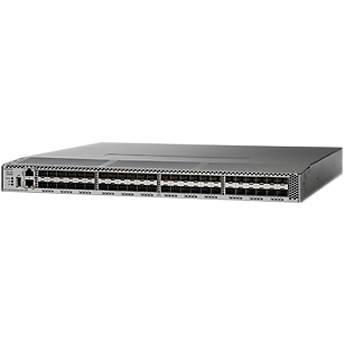 Contents of the user manual for the HP Aruba 2930F 48-Port Gigabit Ethernet
- Product category: Network Switches, Bridges & Hubs HP
- Brand: HP
- Description and content of package
- Technical information and basic settings
- Frequently asked questions – FAQ
- Troubleshooting (does not switch on, does not respond, error message, what do I do if...)
- Authorized service for HP Network Switches, Bridges & Hubs
|
User manual for the HP Aruba 2930F 48-Port Gigabit Ethernet contain basic instructions
that need to be followed during installation and operation.
Before starting your appliance, the user manual should be read through carefully.
Follow all the safety instructions and warnings, and be guided by the given recommendations.
User manual is an integral part of any HP product,
and if it is sold or transferred, they should be handed over jointly with the product.
Following the instructions for use is an essential prerequisite for protecting
health and property during use, as well as recognition of liability on the part of the manufacturer
for possible defects should you make a warranty claim. Download an official HP user manual in which you will find instructions on how to install, use, maintain and service your product.
And do not forget – unsuitable use of a HP product will considerably shorten its lifespan!
|
Product description Ideal for administrators looking to quickly deploy, manage, and maintain networks geared toward both wired and wireless users, the Aruba 2930F 48-Port Gigabit Ethernet Switch with 1 Gb/s SFP Ports from HP is an easy-to-install Layer-3 access switch equipped with 48 Gigabit Ethernet ports, four 1 Gb/s SFP uplink ports, and up to 77.4 Mpps total throughput. Boasting OpenFlow 1.0 and 1.3 functionality, which allows for intelligent traffic routing by enabling network controllers to remotely manage the path of data packets, the Aruba 2930F supports RIP (Routing Information Protocol) and Access OSPF (Open Shortest Path First) Routing, access control lists (ACLs), and Quality of Service (QoS) features such as IEEE 802.1p traffic prioritization and ingress rate limiting. Installation is simple thanks to the 2930F's Zero Touch Provisioning support, while the Aruba ClearPass Policy Manager allows for unified wired and wireless policies. - Software-Defined Networking
- Supports OpenFlow 1.0 and 1.3 specifications to enable SDN (Software-Defined Networking) by allowing separation of the data (packet forwarding) and control (routing decision) paths.
- Unified Wired and Wireless
-
- Supports unified wired and wireless policies using Aruba ClearPass Policy Manager.
- Switch auto-configuration automatically configures switch for different settings such as VLAN, CoS (Class of Service), and PoE (for switches with PoE support) when an Aruba access point is detected.
- Local user role defines a set of switch-based policies in areas such as security, authentication, and QoS. A user role can be assigned to a group of users or devices, using switch configuration or ClearPass.
- Per-port tunneled node provides a secured tunnel to transport network traffic on a per-port basis to an Aruba Controller. Authentication and network policies can be applied and enforced at the controller.
- HTTP redirect function supports HPE Intelligent Management Center (IMC) "bring your own device" (BYOD) solution.
- Quality of Service (QoS)
-
- Traffic prioritization (IEEE 802.1p) allows real-time traffic classification into eight priority levels mapped to eight queues.
- Layer 4 prioritization enables prioritization based on TCP/UDP port numbers.
- Class of Service (CoS) sets the IEEE 802.1p priority tag based on IP address, IP Type of Service (ToS), Layer 3 protocol, TCP/UDP port number, source port, and DiffServ.
- Rate limiting sets per-port ingress-enforced maximums and per-port, per-queue minimums
- Large buffers provide smooth congestion management.
- Connectivity
-
- Auto-MDIX provides automatic adjustments for straight-through or crossover cables on all 10/100/1000 Mb/s ports.
- .
- IPv6 Support
-
- IPv6 host enables switches to be managed in an IPv6 network.
- Dual-stack (IPv4 and IPv6) transitions from IPv4 to IPv6, supporting connectivity for both protocols.
- MLD (Multicast Listener Discovery) snooping forwards IPv6 multicast traffic to the appropriate interface.
- IPv6 ACL/QoS supports ACL (Access Control List) and QoS (Quality of Service) for IPv6 network traffic.
- IPv6 routing supports static and RIPng (Router Information Protocol next generation) protocols.
- Security provides RA (Router Advertisement) guard, DHCPv6 protection, dynamic IPv6 lockdown, and ND (Neighbor Discovery) snooping.
- Performance
-
- Energy-efficient Ethernet (EEE) support reduces power consumption in accordance with IEEE 802.3az.
- HPE/Aruba ASIC (Application-Specific Integrated Circuit) architecture is designed with HPE/Aruba ASIC for low latency, increased packet buffering, and adaptive power consumption.
- Selectable queue configurations allows for increased performance by selecting the number of queues and associated memory buffering that best meet the requirements of the network applications.
- Convergence
-
- IP multicast snooping and data-driven IGMP (Internet Group Management Protocol) automatically prevents flooding of IP multicast traffic.
- LLDP-MED (Media Endpoint Discovery) defines a standard extension of LLDP (Link Layer Discovery Protocol) that stores values for parameters such as QoS and VLAN to automatically configure network devices such as IP phones.
- IEEE 802.1AB Link Layer Discovery Protocol (LLDP) facilitates easy mapping using network management applications with LLDP automated device discovery protocol.
- For 2930F switches with PoE functionality, PoE and PoE+ allocations support multiple methods (automatic, IEEE 802.3at dynamic, LLDP-MED fine grain, IEEE 802.3af device class, or user-specified) to allocate and manage PoE/PoE+ power for more efficient energy savings.
- Local MAC Authentication assigns attributes such as VLAN and QoS using locally configured profile that can be a list of MAC prefixes.
- Resiliency and High Availability
-
- IEEE 802.1s Multiple Spanning Tree provides high link availability in multiple VLAN environments by allowing Multiple Spanning Trees; provides legacy support for IEEE 802.1d and IEEE 802.1w.
- IEEE 802.3ad link aggregation control protocol (LACP) and port trunking support up to 128 static, dynamic, or distributed trunks active across a stack, with each trunk having up to eight links (ports) per static trunk, while also offering support for trunking across stack members.
- SmartLink provides easy-to-configure link redundancy of active and standby links.
- Management
-
- SNMPv1, v2, and v3 provide complete support of SNMP; provide full support of industry-standard Management Information Base (MIB) plus private extensions; SNMPv3 supports increased security using encryption.
- Zero Touch Provisioning (ZTP) simplifies installation of the switch infrastructure using the Aruba Activate-based or a DHCP-based process with AirWave Network Management.
- Manageability
-
- Dual flash images provide independent primary and secondary operating system files for backup while upgrading.
- Friendly port names allow assignment of descriptive names to ports.
- Find-Fix-Inform finds and fixes common network problems automatically, then informs administrator
- Multiple configuration files allow multiple configuration files to be stored to a flash image.
- Free downloadable software updates from the Web.
- RMON (Remote Network Monitoring), XRMON (Extended RMON), and sFlow provide advanced monitoring and reporting capabilities for statistics, history, alarms, and events.
- Troubleshooting ingress and egress port monitoring enable network problem solving.
- Unidirectional link detection (UDLD) monitors the link between two switches and blocks the ports on both ends of the link if the link goes down at any point between the two devices.
- Layer 2 Switching
-
- VLAN support and tagging support IEEE 802.1Q (4,094 VLAN IDs) and 2K VLANs simultaneously.
- Jumbo packet support improves the performance of large data transfers; supports frame size of up to 9,220 bytes.
- IEEE 802.1v protocol VLANs isolate select non-IPv4 protocols automatically into their own VLANs.
- Rapid Per-VLAN Spanning Tree (RPVST+) allows each VLAN to build a separate spanning tree to improve link bandwidth usage; is compatible with PVST+.
- GVRP (GARP VLAN Registration Protocol) and MVRP (the successor to GVRP) allow for automatic learning and dynamic assignment of VLANs.
- VxLAN encapsulation (tunneling) protocol for overlay network that enables a more scalable virtual network deployment.
- Layer 3 Services and Routing
-
- DHCP (Dynamic Host Configuration Protocol) server designed to centralize and reduce the cost of IPv4 address management.
- Static IP routing provides manually configured routing; includes ECMP (Equal-Cost Multi-Path Routing) capability.
- Routing Information Protocol (RIP) provides RIPv1, RIPv2, and RIPng routing.
- 256 static and 10,000 RIP routes facilitate segregation of user data, without adding external hardware.
- OSPF (Open Shortest Path First) access provides OSPFv2 and OSPFv3 protocols for routing between access and the next layer on the LAN. Only one OSPF area and up to 8 interfaces are supported.
- Policy-based routing uses a classifier to select traffic that can be forwarded based on policy set by the network administrator (limited to 16 next hop routes).
- Security Features
-
- Control Plane Policing sets rate limit on control protocols to protect CPU overload from DOS attacks.
- IEEE 802.1X uses an IEEE 802.1X supplicant on the client in conjunction with a RADIUS server to authenticate in accordance with industry standards.
- Web-based authentication provides a browser-based environment, similar to IEEE 802.1X, to authenticate clients that do not support the IEEE 802.1X supplicant.
- MAC-based authentication authenticates the client with the RADIUS server based on the client's MAC address.
- Multiple IEEE 802.1X users per port provides authentication of multiple IEEE 802.1X users per port; prevents a user from piggybacking on another user's IEEE 802.1X authentication.
- Concurrent IEEE 802.1X, Web, and MAC authentication schemes per port switch port will accept up to 32 sessions of IEEE 802.1X, Web, and MAC authentications.
- Access control lists (ACLs) provide IP Layer 3 filtering based on source/destination IP address/subnet and source/destination TCP/UDP port number.
- Source-port filtering allows only specified ports to communicate with each other.
- RADIUS/TACACS+ eases switch management security administration by using a password authentication server.
- Secure shell encrypts all transmitted data for secure remote command-line access over IP networks.
- Secure Sockets Layer (SSL) encrypts all HTTP traffic, allowing secure access to the browser-based management graphical interface in the switch.
- Port security allows access only to specified MAC addresses, which can be learned or specified by the administrator.
- MAC address lockout prevents particular configured MAC addresses from connecting to the network.
- Secure FTP allows secure file transfer to and from the switch; protects against unwanted file downloads or unauthorized copying of a switch configuration file.
- Switch management logon security helps secure switch command-line logon by optionally requiring either RADIUS or TACACS+ authentication.
- Custom banner displays security policy when users log in to the switch.
- STP BPDU port protection blocks Bridge Protocol Data Units (BPDUs) on ports that do not require BPDUs, preventing forged BPDU attacks.
- DHCP protection blocks DHCP packets from unauthorized DHCP servers, preventing denial-of-service attacks.
- Dynamic ARP protection blocks ARP (Address Resolution Protocol) broadcasts from unauthorized hosts, preventing eavesdropping or theft of network data.
- STP (Spanning Tree Protocol) root guard protects the root bridge from malicious attacks or configuration mistakes.
- Identity-driven ACL enables implementation of a highly granular and flexible access security policy and VLAN assignment specific to each authenticated network user.
- Per-port broadcast throttling configures broadcast control selectively on heavy traffic port uplinks.
- Private VLAN provides network security by restricting peer-to-peer communication to prevent a variety of malicious attacks; typically a switch port can only communicate with other ports in the same community and/or an uplink port, regardless of VLAN ID or destination MAC address.
- Open Authentication Role simplifies first-time deployment of AAA (network Authentication, Authorization, and Accounting) in brownfield deployments by allowing full network access for failed clients and provides instant connectivity as soon as a client is plugged in.
- Critical Authentication Role ensures that important infrastructure devices such as IP phones are allowed network access even in the absence of a RADIUS server.
- MAC Pinning allows non-chatty legacy devices to stay authenticated by pinning client MAC addresses to the port until the clients log off or get disconnected.
- Monitor and Diagnostics
- Digital optical monitoring of SFP+ and 1000BASE-T transceivers allows detailed monitoring of the transceiver settings and parameters.
In the Box HP Aruba 2930F 48-Port Gigabit Ethernet Switch with Four 1 Gb/s SFP Ports Limited Lifetime Warranty Table of Contents
|
Upload User Manual
Have you got an user manual for the HP Aruba 2930F 48-Port Gigabit Ethernet Switch with Four 1 Gb s SFP Ports in electronic form? Please send it to us and help us expand our library of instruction manuals.
Thank you, too, on behalf of other users.
To upload the product manual, we first need to check and make sure you are not a robot. After that, your "Submit Link" or "Upload File" will appear.
Technical parametersHP JL254A Specs | | | Ports | 48 x 10/100/1000 Mb/s Gigabit Ethernet (RJ45)
4 x 10/100/1000 Mb/s Gigabit SFP
1 x Ethernet (RJ45) (Console)
1 x Micro-USB (Console) | | | | Layer Services Supported | Layer 2 Support, Layer 3 Support | | Supported Protocols | Auto-MDIX/MDI
IGMP Snooping
IPv4
IPv6
Link Aggregation
SNMPv1
SNMPv2c
SNMPv3 | | Transmission Method | Store-and-Forward | | Jumbo Frames Support | 9220 Bytes | | VLAN Groups | 2000 | | VLAN IDs | 4094 | | | | Security Features | DoS Attack Prevention
RADIUS Authentication | | SNMP Support | 1, 2, 3 | | | | Supported IEEE Standards | 802.1ax, 802.1d, 802.1p, 802.1q, 802.1s, 802.3ad, 802.3af, 802.3at, 802.3az, 802.3x | | | | Latency | 3.8
Rating70% users recommend this product to others. And what about you?

This product has already been rated by 71 owners. Add your rating and experience with the product.
Discussion
 Ask our technicians if you have a problem with your settings,
or if anything is unclear in the user manual you have downloaded.
You can make use of our moderated discussion.
The discussion is public and helps other users of our website who may be encountering similar problems.
Ask our technicians if you have a problem with your settings,
or if anything is unclear in the user manual you have downloaded.
You can make use of our moderated discussion.
The discussion is public and helps other users of our website who may be encountering similar problems.
The discussion is empty - enter the first post
Post a new topic / query / comment:
|
|
|
| Request for user manual |
You can’t find the operation manual you are looking for? Let us know and we will try to add the missing manual:
I’m looking for a manual / Request for manual
Current requests for instruction manuals:
Call Of Duty World War Two For Xbox...
controller stratus XL...
stratus XL...
smart whatch serie S11 42mm...
Allen & Heath SQ-6 manual...
|
| Discussion |
Latest contributions to the discussion:
AEW R 4100
Name: MAURICIO ANGARITA
Audio-Technica AEW-R4100 UHF Diversity Receiver for
AEW R 4100 has the mute function blocked and does not allow audio to pass. I tried several times to turn off the mute from the transmitter but it does nothing, the mute stays on. Solution?
Thank you...
Instructions for assembling the 2015 Forecast Image Master Consoles GC3-A
Name: mike elam
Forecast Consoles GC3-A ImageMaster Editing Console
Looking for instructions for assembling this console. ...
EMPTY TONER ERROR MESSAGE AFTER REPLACING TONER
Name: LINDA BAD YELLOW EYES
Brother TN223BK Standard-Yield Toner
I HAD TO CHANGE OUT ALL THREE TONERS DUE TO LEAKS IN THE YELLOW AND CYAN. AFTER I REPLACED THEM, THE MACHINE KEEPS GIVING ME AN EMPTY TONER ERROR MESSAGE. HELP!!...
PS480D 20/24 pin Switching 480W Power Supply
Name: swkargo
Logisys 480W Power Supply
This item states in can run -5vdc .It is NOT listed on the board or I beleive is r4 is missing the resitior. Any body have thid issue. Shawn
...
Help needed
Name: Ann Carter
SanDisk 1TB Extreme Portable USB 3.1
When I click the link to download the user manual for my Sandisk Extreme external hard drive, it gives me the manual for the LG Cricket. Can you please change the link so I can download the Sandisk manual and begin using this drive? Thank you....
|
|


