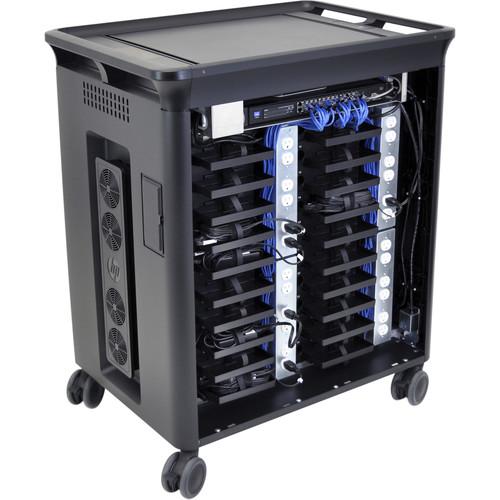
User Manual for HP Charging Cart for 20 Notebooks Click to enlarge the picture
 Contents of the user manual for the HP Charging Cart for 20 Notebooks
- Product category: Mobile Charging Stations HP
- Brand: HP
- Description and content of package
- Technical information and basic settings
- Frequently asked questions – FAQ
- Troubleshooting (does not switch on, does not respond, error message, what do I do if...)
- Authorized service for HP Mobile Charging Stations
|
User manual for the HP Charging Cart for 20 Notebooks contain basic instructions
that need to be followed during installation and operation.
Before starting your appliance, the user manual should be read through carefully.
Follow all the safety instructions and warnings, and be guided by the given recommendations.
User manual is an integral part of any HP product,
and if it is sold or transferred, they should be handed over jointly with the product.
Following the instructions for use is an essential prerequisite for protecting
health and property during use, as well as recognition of liability on the part of the manufacturer
for possible defects should you make a warranty claim. Download an official HP user manual in which you will find instructions on how to install, use, maintain and service your product.
And do not forget – unsuitable use of a HP product will considerably shorten its lifespan!
|
Product description Provided by third party: Keep your fleet of up to 20 notebooks and tablets ready to go in range of environments such as education, hospitality, and more with the HP 20 Charging Cart V2, a sturdy, lockable rolling cart that securely houses and charges your devices.
- Key Features
-
- Find the perfect fit for all of your mobile devices with an open architecture and removable, smooth-edged shelves that accept notebooks and tablets up to 15.6 inches diagonal. Cable management clips keep device power cords tidy and out of the way.
- Move the cart between offices, classrooms, and more with integrated hand grips and four swiveling, lockable casters. Then simply park the cart, fold the retractable doors back into the unit, and load and unload your devices as needed.
- Recharge PCs with Power Shuttle 2.0, which scans and distributes power to charge your devices. LED indicators deliver easy-to-read status, and built-in venting keeps devices cool. Charge extra devices outside the cart with two auxiliary outlets.
- Secure your notebooks and tablets in the main compartment behind lockable doors and covers, and IT equipment and power adapters in a second, separate, lockable compartment.
- Charge up in a flash
- Recharge PCs with Power Shuttle 2.0, which scans and distributes power to charge your devices. LED indicators deliver easy-to-read status, and built-in venting keeps devices cool. Charge extra devices outside the cart with two auxiliary outlets.
- Easy to customize
- Find the perfect fit for all of your mobile devices with an open architecture and removable, smooth-edged shelves that accept notebooks and tablets up to 15.6 inches diagonal. Cable management clips keep device power cords tidy and out of the way.
- Lock it up
- Secure your notebooks and tablets in the main compartment behind lockable doors and covers, and IT equipment and power adapters in a second, separate, lockable compartment.
- Use it anywhere
- Move the cart between offices, classrooms, and more with integrated hand grips and four swiveling, lockable casters. Then simply park the cart, fold the retractable doors back into the unit, and load and unload your devices as needed.
UPC: 889894751300 In the Box HP Charging Cart for 20 Notebooks (Up to 15.6", V2) Charging Cart Documentation Table of Contents
|
Upload User Manual
Have you got an user manual for the HP Charging Cart for 20 Notebooks in electronic form? Please send it to us and help us expand our library of instruction manuals.
Thank you, too, on behalf of other users.
To upload the product manual, we first need to check and make sure you are not a robot. After that, your "Submit Link" or "Upload File" will appear.
Technical parametersHP T9E84UT#ABA Specs | | | Width | 35.2 in | | Depth | 24.8 in | | Height | 41.7 in | | Weight | 162.04 lbs | | Color | HP black | | Localization | English / United States | | Manufacturer Selling Program | HP Smart Buy | | | | Type | Cart | | Design | Open architecture | | Recommended Use | 20 notebooks | | Cart Functionality | Charge | | Integrated Devices | Ventilation system | | Cable Management | Internal cable management, external cable management | | Lockable | Yes | | Recommended Display Size | 10.1"-15.6" | | Wheels Qty | 4 | | | | Service & Support | Limited warranty - mechanical components - 3 years
Limited warranty - electrical components - 1 year | | | | Designed for | HP 240 G6, 245 G6, 250 G4, 250 G6, 255 G4, 255 G6, 350 G2
HP Chromebook 11 G4, 11 G5, 11 G6, 11A G6, 14 G4, 14 G5
HP Chromebook x360 11 G1
HP Elite x2 1013 G3
HP EliteBook 1030 G1, 1040 G3, 1040 G4, 1050 G1, 725 G3, 725 G4, 735 G5, 745 G3, 745 G4, 745 G5, 755 G3, 755 G4, 755 G5, 820 G3, 820 G4, 840 G3, 840 G4, 840 G5, 840r G4, 850 G3, 850 G4, 850 G5
HP EliteBook Revolve 810 G3 Tablet
HP EliteBook x360 1012 G2, 1020 G2, 1030 G3, 1040 G5
HP ProBook 11 G1, 430 G3, 430 G4, 430 G5, 430 G6, 440 G3, 440 G4, 440 G5, 440 G6, 445 G6, 450 G3, 450 G4, 450 G5, 450 G6, 455 G3, 470 G3, 470 G4, 640 G2, 640 G3, 640 G4, 645 G2, 645 G3, 645 G4, 650 G2, 650 G3, 650 G4, 655 G2, 655 G3
HP ProBook x360 11 G2, 11 G3, 440 G1
HP Spectre Pro 13 G1, x360 G1, x360 G2
HP Spectre x360 15-ch006tx
HP Stream Pro 11 G4
HP x360 310 G2
HP ZBook 14u G4 Mobile Workstation, 14u G5 Mobile Workstation, 15 G4 Mobile Workstation, 15u G5 Mobile Workstation, 15v G5 Mobile Workstation, Studio G4 Mobile Workstation, Studio G5 Mobile Workstation, Studio x360 G5 Mobile Workstation
HP ZBook x2 G4 Detachable Workstation | | | | Box Dimensions (LxWxH) | 50.0 x 40.0 x 40.0" |
Rating80% users recommend this product to others. And what about you?

This product has already been rated by 32 owners. Add your rating and experience with the product.
Discussion
 Ask our technicians if you have a problem with your settings,
or if anything is unclear in the user manual you have downloaded.
You can make use of our moderated discussion.
The discussion is public and helps other users of our website who may be encountering similar problems.
Ask our technicians if you have a problem with your settings,
or if anything is unclear in the user manual you have downloaded.
You can make use of our moderated discussion.
The discussion is public and helps other users of our website who may be encountering similar problems.
The discussion is empty - enter the first post
Post a new topic / query / comment:
|
|


