User Manual for HP JG963A 48-Port Gigabit PoE Managed Switch Click to enlarge the picture
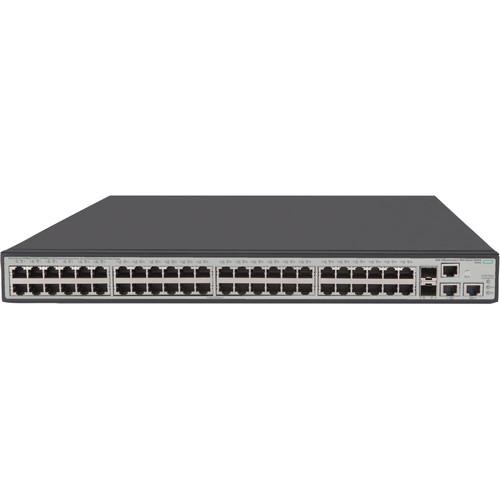 Contents of the user manual for the HP JG963A 48-Port Gigabit PoE Managed
- Product category: Network Switches, Bridges & Hubs HP
- Brand: HP
- Description and content of package
- Technical information and basic settings
- Frequently asked questions – FAQ
- Troubleshooting (does not switch on, does not respond, error message, what do I do if...)
- Authorized service for HP Network Switches, Bridges & Hubs
|
User manual for the HP JG963A 48-Port Gigabit PoE Managed contain basic instructions
that need to be followed during installation and operation.
Before starting your appliance, the user manual should be read through carefully.
Follow all the safety instructions and warnings, and be guided by the given recommendations.
User manual is an integral part of any HP product,
and if it is sold or transferred, they should be handed over jointly with the product.
Following the instructions for use is an essential prerequisite for protecting
health and property during use, as well as recognition of liability on the part of the manufacturer
for possible defects should you make a warranty claim. Download an official HP user manual in which you will find instructions on how to install, use, maintain and service your product.
And do not forget – unsuitable use of a HP product will considerably shorten its lifespan!
|
Product description Provided by third party: The HPE 1950 Switch Series is a family of smart web-managed Gigabit switches with 10GbE uplinks for small business customers needing advanced high-performance connections. The series has 2 standard and 2 PoE+ models, 24- and 48-GbE ports, each with 2 10GBASE-T and 2 10G SFP+ high-bandwidth ports. True stacking of as many as 4 devices allows them to be logically administered as a single entity. The switches support Layer 3 static routing on IPv4 and IPv6. Other advanced features include ACLs, 802.1X, STP, RSTP, and MSTP. Limited lifetime warranty covers unit, fans and power supplies.
- Key Features
-
- Each model of the HPE 1950 Switch Series includes four 10GbE connections to connect to servers, network storage devices, or to other switches.
- Logically group or "stack" as many as four units of the HPE 1950 Switch Series and manage this as a single entity, greatly simplifying network administration. Interconnect stacked units using 10GbE connections, with as much as 40GbE total stacking bandwidth connecting the units.
- The HPE 1950 Switch Series lets you use Virtual LANs and access control lists to set bounds on what data can be seen by which users.
- The HPE 1950 Switch Series supports Spanning Tree Protocol, Rapid Spanning Tree Protocol, and Multiple Spanning Tree Protocol standards for creating hot-standby recovery links.
- High-level Gigabit with 10GbE Networking for Advanced Small Businesses
- Each model of the HPE 1950 Switch Series includes four 10GbE connections to connect to servers, network storage devices, or to other switches.
Two connections of 10GBASE-T deliver 10GbE over copper Category 6a cabling for simple, affordable, high-bandwidth connections to a maximum distance of 100 meters.
Two SFP+ ports allow for fiber connectivity at various distances, at 1/10GbE speeds, using optional SFP+ 10GbE or SFP Gigabit transceivers.
Aggregate 10GbE connections for even higher bandwidth using Link Aggregation Control Protocol. - Simplified Network Administration
- Logically group or "stack" as many as four units of the HPE 1950 Switch Series and manage this as a single entity, greatly simplifying network administration. Interconnect stacked units using 10GbE connections, with as much as 40GbE total stacking bandwidth connecting the units.
Use the intuitive web-browser based interface to configure and administer these smart-managed devices.
These devices support SNMP versions 1, 2c and 3, allowing administration of these devices from a remote SNMP-based management platform.
Network Time Protocol facilitates timekeeping across your network so time-based actions and trouble-shooting logs are kept synchronized.
Units will automatically retrieve an IP Address from a DHCP server, allowing for near plug-and-play deployments. - Robust Security to Protect Your Network
- The HPE 1950 Switch Series lets you use Virtual LANs and access control lists to set bounds on what data can be seen by which users.
Leverage 802.1X with a RADIUS server to ensure only known and authorized users can access your network.
Multiple features guard your network from user or server spoofing and from malicious network-based attacks.
Help secure management traffic using supported SSL/HTTPS encryption and SNMPv3 capabilities. - Resiliency Features to Keep Your Network Running
- The HPE 1950 Switch Series supports Spanning Tree Protocol, Rapid Spanning Tree Protocol, and Multiple Spanning Tree Protocol standards for creating hot-standby recovery links.
Distribute important links across multiple units in a logical stack for added resiliency. Units can even be in different buildings and still be logically stacked.
Devices support two independent primary and secondary operating system flash images for backup and recovery during unit upgrades.
Power over Ethernet (PoE) models can be paired with an optional Redundant Power System which can maintain power even if the unit's power supply fails, as well as supplement available PoE power up to 780 Watts. UPC: 888182695395 In the Box HP JG963A 48-Port Gigabit PoE+ Managed Switch (1) HPE OfficeConnect 1950-48G-2SFP+-2XGT-PoE+(370W) Switch, power cord, rack-mount kit, console cable, documentation set Table of Contents
|
Upload User Manual
Have you got an user manual for the HP JG963A 48-Port Gigabit PoE Managed Switch in electronic form? Please send it to us and help us expand our library of instruction manuals.
Thank you, too, on behalf of other users.
To upload the product manual, we first need to check and make sure you are not a robot. After that, your "Submit Link" or "Upload File" will appear.
Technical parametersHP OfficeConnect 1950-48G Specs | | | Device Type | Switch - 48 ports - L3 - managed - stackable | | Enclosure Type | Rack-mountable 1U | | Subtype | Gigabit Ethernet | | Ports | 48 x 10/100/1000 (PoE+) + 2 x 10 Gigabit Ethernet / 1 Gigabit Ethernet SFP+ + 2 x 10Gb Ethernet | | Power Over Ethernet (PoE) | PoE+ | | PoE Budget | 370 W | | Performance | Throughput (64-byte packet size): 130.9 Mpps
Routing/switching capacity: 176 Gbps | | Capacity | IPv4 routing table entries: 32
IPv6 routing table entries: 32 | | MAC Address Table Size | 16384 entries | | Jumbo Frame Support | Yes | | Routing Protocol | IGMP, static IPv4 routing, static IPv6 routing | | Remote Management Protocol | SNMP 1, RMON 2, SNMP 3, SNMP 2c, HTTP, HTTPS | | Authentication Method | RADIUS | | Features | ARP support, port mirroring, half duplex mode, full duplex mode, Spanning Tree Protocol (STP) support, Virtual Route Redundancy Protocol (VRRP) support, Access Control List (ACL) support, Quality of Service (QoS), MLD snooping, Equal-Cost Multipath (ECMP), STP Root Guard, LLDP support, Link Aggregation Control Protocol (LACP), packet storm protection, Class of Service (CoS) | | Compliant Standards | IEEE 802.3, IEEE 802.3u, IEEE 802.3i, IEEE 802.3z, IEEE 802.1D, IEEE 802.1Q, IEEE 802.3ab, IEEE 802.1p, IEEE 802.3af, IEEE 802.3x, IEEE 802.3ad (LACP), IEEE 802.1w, IEEE 802.1x, IEEE 802.1s, IEEE 802.1ab (LLDP), IEEE 802.3at | | RAM | 1 GB SDRAM | | Flash Memory | 128 MB | | | | Interfaces | 1 x 1000Base-T RJ-45 PoE+
2 x Gigabit / 10Gbit LAN SFP+
2 x 10GBase-T RJ-45
1 x console RJ-45 management | | | | Power Device | Internal power supply | | Voltage Required | AC 120/230 V (50/60 Hz) | | | | MTBF | 26.8 years | | Compliant Standards | CISPR 22 Class A, EN 61000-3-3, EN55024, EN55022 Class A, UL 60950, ICES-003 Class A, RoHS, IEC 60950-1, WEEE, FCC Part 15 A, VCCI Class A, EN 61000-3-2:2000, GB 4943.1 | | Localization | English / United States | | | | Width | 17.3 in | | Depth | 16.5 in | | Height | 1.7 in | | Weight | 15.43 lbs | | | | Service & Support | Limited warranty - advance parts replacement - lifetime - response time: next business day | | | | Min Operating Temperature | 32
Rating80% users recommend this product to others. And what about you?

This product has already been rated by 27 owners. Add your rating and experience with the product.
Discussion
 Ask our technicians if you have a problem with your settings,
or if anything is unclear in the user manual you have downloaded.
You can make use of our moderated discussion.
The discussion is public and helps other users of our website who may be encountering similar problems.
Ask our technicians if you have a problem with your settings,
or if anything is unclear in the user manual you have downloaded.
You can make use of our moderated discussion.
The discussion is public and helps other users of our website who may be encountering similar problems.
The discussion is empty - enter the first post
Post a new topic / query / comment:
|
|
|
| Request for user manual |
You can’t find the operation manual you are looking for? Let us know and we will try to add the missing manual:
I’m looking for a manual / Request for manual
Current requests for instruction manuals:
Call Of Duty World War Two For Xbox...
controller stratus XL...
stratus XL...
smart whatch serie S11 42mm...
Allen & Heath SQ-6 manual...
|
| Discussion |
Latest contributions to the discussion:
AEW R 4100
Name: MAURICIO ANGARITA
Audio-Technica AEW-R4100 UHF Diversity Receiver for
AEW R 4100 has the mute function blocked and does not allow audio to pass. I tried several times to turn off the mute from the transmitter but it does nothing, the mute stays on. Solution?
Thank you...
Instructions for assembling the 2015 Forecast Image Master Consoles GC3-A
Name: mike elam
Forecast Consoles GC3-A ImageMaster Editing Console
Looking for instructions for assembling this console. ...
EMPTY TONER ERROR MESSAGE AFTER REPLACING TONER
Name: LINDA BAD YELLOW EYES
Brother TN223BK Standard-Yield Toner
I HAD TO CHANGE OUT ALL THREE TONERS DUE TO LEAKS IN THE YELLOW AND CYAN. AFTER I REPLACED THEM, THE MACHINE KEEPS GIVING ME AN EMPTY TONER ERROR MESSAGE. HELP!!...
PS480D 20/24 pin Switching 480W Power Supply
Name: swkargo
Logisys 480W Power Supply
This item states in can run -5vdc .It is NOT listed on the board or I beleive is r4 is missing the resitior. Any body have thid issue. Shawn
...
Help needed
Name: Ann Carter
SanDisk 1TB Extreme Portable USB 3.1
When I click the link to download the user manual for my Sandisk Extreme external hard drive, it gives me the manual for the LG Cricket. Can you please change the link so I can download the Sandisk manual and begin using this drive? Thank you....
|
|


