User Manual for HP LaserJet Pro M402dw Monochrome Printer with Extra 26X Black Toner Kit Click to enlarge the picture
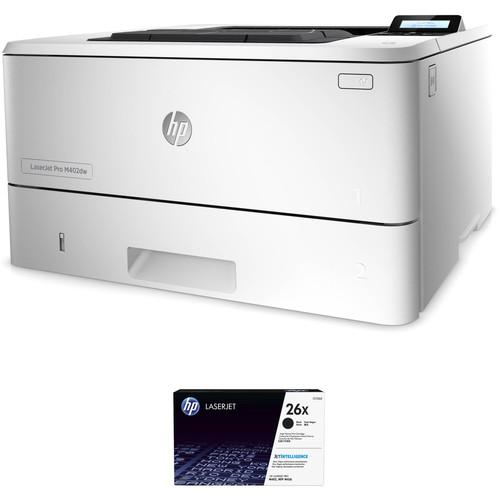 Contents of the user manual for the HP LaserJet Pro M402dw Monochrome Printer
- Product category: Laser Printers HP
- Brand: HP
- Description and content of package
- Technical information and basic settings
- Frequently asked questions – FAQ
- Troubleshooting (does not switch on, does not respond, error message, what do I do if...)
- Authorized service for HP Laser Printers
|
User manual for the HP LaserJet Pro M402dw Monochrome Printer contain basic instructions
that need to be followed during installation and operation.
Before starting your appliance, the user manual should be read through carefully.
Follow all the safety instructions and warnings, and be guided by the given recommendations.
User manual is an integral part of any HP product,
and if it is sold or transferred, they should be handed over jointly with the product.
Following the instructions for use is an essential prerequisite for protecting
health and property during use, as well as recognition of liability on the part of the manufacturer
for possible defects should you make a warranty claim. Download an official HP user manual in which you will find instructions on how to install, use, maintain and service your product.
And do not forget – unsuitable use of a HP product will considerably shorten its lifespan!
|
Product description This HP LaserJet Pro M402dw Monochrome Printer with Extra 26X Black Toner Kit put together by pairs the M402dw monochrome laser printer with a compatible 26X high yield black toner cartridge. This extra cartridge is in addition to the one already packaged with the printer, and more than doubles your initial page yield so you can focus more on your projects and less on your ink level. Together, the two toners yield approximately 12,100 pages. - HP LaserJet Pro M402dw Monochrome Laser Printer Securely and rapidly produce documents with the LaserJet Pro M402dw Monochrome Laser Printer from HP. Featuring a blazing fast print speed of 40 ppm and a resolution of 600 x 600 dpi, the M402dw will create sharp prints quickly. Adding to the speed is a first print out time of 6.4 seconds and furthering the unit's capabilities is automatic duplexing for two-sided prints. Mobile printing via Ethernet and Wi-Fi networking is enabled as well and NFC makes touch-to-print functionality possible.
Paper is handled with two input trays with a total capacity of 350 pages with the ability to work with documents from 3 x 5" to 8.5 x 14". Also, it has a 2-line backlit LCD for checking printer status along with a USB host port for directly printing from a portable drive. The printer has a monthly duty cycle of 80,000 pages for durability and in addition to the networking connections, it is equipped with a USB 2.0 option. - Save energy with HP Auto-On/Auto-Off Technology
- Numerous security features will keep your data and documents safe
- Manage devices using HP Web JetAdmin with numerous management features for checking printer status
- Print directly from mobile devices such as smartphones and tablets
- Print by tapping an NFC-capable device to the unit
- Access, print, and share resources with Ethernet and wireless networking
UPC: 888793328897 - HP 26X High Yield Black LaserJet Toner Cartridge Refresh your LaserJet Pro M402 or M426 series printer with this 26X High Yield Black LaserJet Toner Cartridge from HP. This version will offer users about 9,000 prints.
- Compatible Printers
- LaserJet Pro M402d
LaserJet Pro M402dn
LaserJet Pro M402n
LaserJet Pro M426dw
LaserJet Pro M426fdn
LaserJet Pro M426fdw UPC: 889296154778 In the Box - LaserJet Pro M402dw Monochrome Laser Printer ywrwqyfvzyaaxcysvesszzuxxq
- 26A LaserJet Black Toner Cartridge (~3,100 Pages)
- USB Cable
- Power Cord
- Software & Documentation CD-ROM
- Limited 1-Year Warranty
- 26X High Yield Black LaserJet Toner Cartridge
Table of Contents
|
Upload User Manual
Have you got an user manual for the HP LaserJet Pro M402dw Monochrome Printer with Extra 26X Black Toner Kit in electronic form? Please send it to us and help us expand our library of instruction manuals.
Thank you, too, on behalf of other users.
To upload the product manual, we first need to check and make sure you are not a robot. After that, your "Submit Link" or "Upload File" will appear.
Technical parameters - HP LaserJet Pro M402dw Monochrome Laser Printer
| | | Printing Technology | Laser; HP FastRes 1200, HP ProRes 1200, 600 dpi | | Maximum Resolution | 600 x 600 dpi (4800 x 600 enhanced dpi) | | Print Speed | 40 ppm | | First Print Out Speed | Ready: 6.4 sec
Sleep: 9.8 sec | | Print Color | Black | | Duplex Printing | Automatic | | Printer Duty Cycle | Monthly: 80,000 pages
Recommended Monthly Volume: 750-4,000 pages | | Print Features | Auto-duplex printing, N-up printing, collation, HP ePrint, Apple AirPrint, Google Cloud Print, Mopria-certified, Wireless direct printing, HP Auto Wireless Connect, NFC, Instant-on Technology, HP Auto-On/Auto-Off technology, JetIntelligence Cartridge Technology, Job Storage with PIN printing | | | | Paper Handling | Input tray 1
Input tray 2
Output bin | | Paper Types | Paper (plain, EcoEFFICIENT, light, heavy, bond, colored, letterhead, preprinted, prepunched, recycled, rough), envelopes, labels, transparencies | | Paper Sizes | Input Tray 1: 3 x 5" to 8.5 x 14" / 7.6 x 12.7 cm to 21.6 x 35.6 cm
Input Tray 2: 4.1 x 5.9" to 8.5 x 14" / 10.5 x 14.9 cm to 21.6 x 35.6 cm | | Media Weight | Tray 1: 16-47 lb
Tray 2: 16-32 lb | | Paper Capacity | Input Tray 1: 100 sheets
Input Tray 2: 250 sheets
Output Bin: 150 sheets | | | | Interface | USB 2.0
Ethernet
Wi-Fi with NFC | | USB Direct Printing | 1 x Easy-access USB port | | Wireless Printing Features | HP ePrint, Apple AirPrint, Google Cloud Print, Mopria-certified, wireless direct printing, NFC tap-to-print, mobile apps | | OS Compatibility | Windows XP SP3 (32/64-bit), Vista (32/64-bit), 7 (32/64-bit), 8/8.1 (32/64-bit), 10 (32/64-bit)
Mac OS X 10.8-10.10
iOS, Android, Windows 8/8.1/10 RT
Linux OS (In-OS HPLIP)
BOSS(3.0, 5.0)
DEBIAN (6.0, 6.0.1, 6.0.2, 6.0.3, 6.0.4, 6.0.5, 6.0.6, 6.0.7, 6.0.8, 6.0.9, 6.0.10, 7.0, 7.1, 7.2, 7.3, 7.4, 7.5, 7.6)
FEDORA (17, 18, 19, 20)
LINUX MINT(13, 14, 15, 16, 17)
SUSE LINUS (12.2, 12.3, 13.1)
UBUNTU (10.04, 11.10, 12.04,12.10, 13.04, 13.10, 14.04, 14.10)
MANDRIVA LINUX (2010.0, 2011.0)
MEPIS (6.0, 6.5, 7.0, 8.0)
PCLINUXOS (2006.0, 2006, 2007.0, 2007, 2008.0, 2008, 2009.0, 2009)
RED HAT (8.0, 9.0)
RED HAT ENTERPRISE LINUX (5.0, 6.0, 7.0)
SLACKWARE LINUX (9.0, 9.1, 10.0, 10.1, 10.2, 11, 12, 12.1)
GOS (8.04.1)
IGOS(1.0)
LINPUS LINUX (9.4, 9.5)
LINUX FROM SCRATCH
UNIX | | Processor | 1.2 GHz | | Memory | 128 MB | | Fonts | 84 scalable TrueType fonts | | Printer Language | HP PCL 5, HP PCL 6, HP postscript level 3 emulation, direct PDF (v 1.7) printing, URF, PCLM, PWG | | | | Control Panel | 2-line backlit LCD
Buttons (Ok, menu, cancel, back, Wi-Fi)
LED indicator lights (Attention, ready, Wi-Fi) | | Power Requirements | 110-127 VAC (±10%), 60 Hz (±3 Hz) | | Power Consumption | Active Printing: 591 W
Ready: 6.1 W
Sleep: 2.8 W
Auto-On/Off: 0.6 W
Off: 0.1 W | | Typical Power Consumption | 1.79 kWh/week | | Certifications | ENERGY STAR certified
Blue Angel
EPEAT Silver | | Acoustic Noise | Power Emissions (Active): 6.8 B(A)
Power Emissions (Ready): Inaudible
Pressure Emissions (Active): 54 dB(A)
Pressure Emissions (Ready): Inaudible | | Operating Conditions | Temperature: 59 to 90.5°F / 15 to 33°C
Humidity: 10 to 80%, relative non-condensing
Recommended Temperature: 63.5 to 77°F / 18 to 25°C
Recommended Humidity: 30 to 70%, relative non-condensing | | Storage Conditions | Temperature: -4 to 104°F / -20 to 40°C
Humidity: 10 to 90%, relative non-condensing | | Dimensions | 15.0 x 14.1 x 8.5" / 38.1 x 35.7 x 21.6 cm
Maximum: 15.0 x 25.0 x 9.5" / 38.1 x 63.5 x 24.1 cm | | Weight | 18.9 lb / 8.6 kg | | | | Box Dimensions (LxWxH) | 18.3 x 17.5 x 11.0" | - HP 26X High Yield Black LaserJet Toner Cartridge
| Printer Type | Laser Printers | | Container Type | Laser Toner Cartridge | | Color | Black | | Black Page Yield | 9000 Pages | | | | Box Dimensions (LxWxH) | 14.45 x 8.95 x 4.05" |
Rating72% users recommend this product to others. And what about you?

This product has already been rated by 31 owners. Add your rating and experience with the product.
Discussion
 Ask our technicians if you have a problem with your settings,
or if anything is unclear in the user manual you have downloaded.
You can make use of our moderated discussion.
The discussion is public and helps other users of our website who may be encountering similar problems.
Ask our technicians if you have a problem with your settings,
or if anything is unclear in the user manual you have downloaded.
You can make use of our moderated discussion.
The discussion is public and helps other users of our website who may be encountering similar problems.
The discussion is empty - enter the first post
Post a new topic / query / comment:
|
|


