|
User Manual for HP StoreEver LTO-6 Ultrium 6250 Tape Drive Click to enlarge the picture
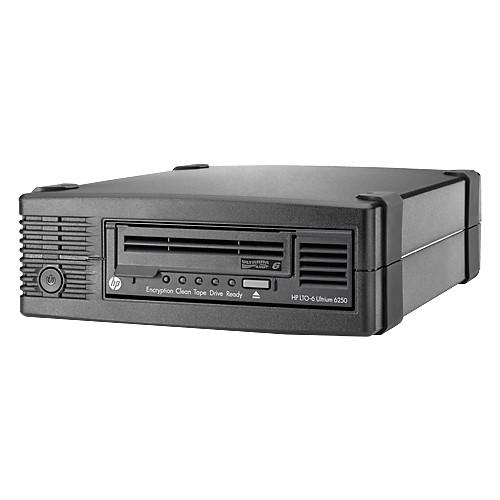 Contents of the user manual for the HP StoreEver LTO-6 Ultrium 6250 Tape
- Product category: Archiving Drives HP
- Brand: HP
- Description and content of package
- Technical information and basic settings
- Frequently asked questions – FAQ
- Troubleshooting (does not switch on, does not respond, error message, what do I do if...)
- Authorized service for HP Archiving Drives
|
User manual for the HP StoreEver LTO-6 Ultrium 6250 Tape contain basic instructions
that need to be followed during installation and operation.
Before starting your appliance, the user manual should be read through carefully.
Follow all the safety instructions and warnings, and be guided by the given recommendations.
User manual is an integral part of any HP product,
and if it is sold or transferred, they should be handed over jointly with the product.
Following the instructions for use is an essential prerequisite for protecting
health and property during use, as well as recognition of liability on the part of the manufacturer
for possible defects should you make a warranty claim. Download an official HP user manual in which you will find instructions on how to install, use, maintain and service your product.
And do not forget – unsuitable use of a HP product will considerably shorten its lifespan!
|
Product description Built with a 1U rackmount, half-height form factor and designed for server customers in direct attached storage (DAS) environments, the StoreEver LTO-6 Ultrium 6250 Tape Drive from HP uses LTO-6 tape drive technology to store up to 6.25TB per cartridge (compressed at 2.5:1), while also providing Enterprise tape drive monitor and tape management capabilities with HP's TapeAssure, which provides an intuitive and easy to use dashboard, as well as analytics for the performance, health, and utilization of tape drives, libraries, and cartridges. For those who are concerned about security, both LTFS and AES 256-bit hardward data encryption help protect sensitive data and prevent unauthorized access of tape cartridges. Using 2.5:1 compression, data transfer rates can reach up to 1.44TB per hour and HP's Data Rate Matching further helps to optimize performance by matching the speed of the host to keep drives streaming and increase the reliability of the drive and media. Additionally, for IT organizations with long-term data retention requirements, the Ultrium 6250's WORM (Write-Once, Read-Many) data protection offers a simple and secure method for archiving records as part of a compliance solution to meet industry regulations. The Ultrium 6250 provides users with investment protection, as it is fully read and write compatible with LTO-5 media and has the ability to read LTO-4 media. - LTO Ultrium Technology
- Linear Tape-Open technology was developed by three leaders in the storage industry - Hewlett Packard Enterprise, IBM, and Quantum - who brought together their combined expertise in tape technology to develop a format based on existing technologies. Because LTO Ultrium technology was a new format, it required no cumbersome support of legacy formats, so it could be designed without compromising on reliability or performance. The LTO Program, a consortium of the three technology provider companies, has developed a well-defined ten-generation roadmap. Ultrium LTO-3, LTO-4, LTO-5, and LTO-6 tape drive technologies from Hewlett Packard Enterprise use a linear format of 704 tracks, 896 tracks, 1,280 tracks, and 2,176 tracks (respectively), writing sixteen tracks simultaneously. Ultrium LTO-7 tape drive features a breakthrough in recording technology by writing thirty-two tracks simultaneously on a linear format of 3,584 tracks. The data is written in a serpentine pattern; the tape reverses direction after each set of tracks is written. This provides higher density recording, enabling customers to lower costs and increase efficiency by storing more data on a single tape in an industry standard format. The LTO standard for backward compatibility is to write back one generation and read back two generations.
- Hardware Based Encryption
- HPE LTO-4, 5, 6, and 7 LTO Ultrium tape drives support hardware-based encryption to enable greater levels of security:
- AES 256-bit Encryption
- Easy-to-enable encryption for a secure backup
- Helps prevent unauthorized accessed of tape media if cartridges are lost or stolen
- Eliminates the need to purchase and manage additional h/w
- No loss in performance of backup
- The Yosemite Server Backup Basic backup and recovery software supports LTO-4, LTO-5, LTO-6, and LTO-7 encryption and makes writing encrypted backups simple. A passphrase is entered and Yosemite Server Backup Basic creates and manages the encryption key
- Tape Assure
- HPE TapeAssure makes managing, optimizing and archiving on the HPE LTO Ultrium tape drives easier. This tool provides additional management and monitoring capabilities including:
- Life and health information for media and drives
- Information on media and drive utilization and operational performance
- Notifications of drive and media characteristics that fall below Hewlett Packard Enterprise recommended standards TapeAssure health reports and alerts give you peace of mind knowing the condition of the drives, the tapes and the data on each tape. TapeAssure monitors every backup to ensure the highest standards of reliability, sends alerts when these standards are not met, and ensures that you can maintain the drives and tapes used in an archive environment to have the highest integrity.
HPE TapeAssure is included as part of HPE Library and TapeTools for Windows users from LTT 5.0 onwards - Linear Tape File System (LTFS)
- While LTFS makes tape self-describing, file-based, and easy-to-use, it also provides users with the ability to use standard file operations on tape media for accessing, managing and sharing files with an interface that behaves just like a hard disk. In addition, LTFS provides the ability to share data across platforms, as you would with a USB drive or memory stick. Simply load a tape into the drive, mount it into the file system, and it becomes visible as a disk
- HPE StoreOpen Standalone
- HPE StoreOpen Standalone is a free software application that helps LTFS users to use and manage single tape drives.
Available for Windows and Mac environments, it provides a native GUI with a familiar look and feel. It is installed automatically as part of the LTFS package and it completely removes the need for low-level terminal commands by guiding users through the full process of select, prepare and mount an LTFS cartridge - Data Rate Matching
- Data Rate Matching combines sophisticated buffer management with HPE's exclusive Variable Tape Speed technology to allow the tape drive to match its transfer rate to the host speed dynamically and continuously across the wide range of transfer rates. This feature ensures that the tape drive continues to stream data regardless of the environment, and brings two big advantages:
- It optimizes backup performance, regardless of the speed of the host or the network
- It minimizes rewinding and repositioning of the tape, reducing wear and increasing reliability
- WORM (Write-Once, Read-Many) Drive and Media Support
- Critical to the success of data retention policies in highly regulated environments is the ability to store and manage data in an unalterable state. Following stringent guidelines set forth by regulatory agencies such as the SEC and HIPPA, IT organizations must now integrate new solutions and policies that can verify the integrity of stored data for periods that can extend well beyond seven years.
LTO generation 3 and higher tape drives feature the ability to archive and store data in a non-rewriteable format that meets the most stringent regulatory guidelines. Using a combination of integrated fail-safe features in the drive firmware, cartridge memory, and tape formatting, LTO Ultrium drives can archive large amounts of data for periods of up to 30 years in a secure, untampered state. Since all LTO generation 3 and higher tape drives include support for both rewritable and WORM media, IT organizations can now easily integrate a secure, long-term archiving solution into their current data protection strategy. As compared to other technologies that feature support for WORM storage, LTO tape drives offers the advantages of:
- A single drive to support all backup and archiving needs
- Two distinctive tape cartridges to easily distinguish and manage both rewriteable and WORM data cartridges
- A specially designed WORM data cartridge with multiple integrated fail-safe features to prevent accidental or intentional overwriting of data
- High-capacity, low-cost HPE WORM media that can store up to 15TB (LTO-7) of data on a single data cartridge
- Support from many backup and archiving software vendors, providing comprehensive and mainstream support
- The LTO open standard that offers greater choice and compatibility across all third generation Ultrium products
- Included Software
- The HPE Ultrium tape drives provide the option to download Yosemite Server Backup Basic backup and recovery software. It is an easy-to-use backup and recovery application that is installed in minutes and includes all the features needed to protect a single machine by backup to a HPE tape drive.
Yosemite Server Backup Basic includes pre-defined and customizable media rotation schemes so you can define when you backup and how long your backups are retained, while easily managing your LTO data cartridges. Up to 4 parallel data streams keep the high-speed Ultrium tape drives streaming. Yosemite Server Backup Basic supports all the features of the Ultrium tape drives. LTO generation 4 and higher data encryption can be specified for any backup job and is configured using the easy-to manage interface. Backup to LTO WORM media is supported. Backup data compression can be turned on or off as part of the backup job specifications.
If the HPE Ultrium tape drive is for a large environment that requires UNIX support and/or enterprise class application and feature support then HPE Data Protector is the recommended backup and recovery software. There is no upgrade path from Yosemite Server Backup Basic or Data Protector Express Basic or Data Protector Express to Data Protector. If current or future requirements will require Data Protector, this software should be installed from day 1 - HPE Ultrium Storage Media
- Hewlett Packard Enterprise recommends that you use HPE-branded cartridges in your HPE Ultrium tape drive to assure the high levels of protection for your valuable data. All HPE cartridges must satisfy a battery of additional tests that relate directly to real life situations, where real data and real businesses are at stake. The benefit of the HPE brand specification for media is consistent quality. Through the testing of thousands of HPE drives and HPE cartridges, the ideal formulation for backup performance is defined and then continuously monitored. This hugely resource-intensive process is unique to Hewlett Packard Enterprise and affords deep insight into the HPE+HPE backup solution for a wide range of environments and duty cycles
- Diagnostics
- HPE LTO Ultrium tape drives and automation are supported by HPE Library and Tape Tools (LTT). This tool is intended to help in the installation and maintenance of HPE tape drives and devices, including:
- Verifies installation of the drive
- Test/verify the health of the drive and media
- Provides Hewlett Packard Enterprise support with detailed device information
- Multiple options for finding and upgrading new firmware
- Performance optimization and recommendations
- Included with each Ultrium tape drive and available via free download supporting all HPE tape products
HPE Library and TapeTools includes HPE TapeAssure monitoring for Windows users from LTT 5.0 onwards - Compatibility
- Hewlett Packard Enterprise extensive compatibility testing program assures that your HPELTO Ultrium tape drive works with leading servers, operating systems, and backup applications - and not just those sold by HPE. HPE LTO Ultrium tape drives work seamlessly on many platforms, making them especially suitable if you have a mixed system environment. For the latest list of servers, workstations, operating systems, and backup software that support HPE Ultrium tape drives, check the tape backup compatibility pages on HPE's Web site
- Server Compatibility
- HPE Ultrium tape drives are supported on the following classes of HPE systems:
- HPE ProLiant DL servers
- HPE ProLiant ML servers
- HPE Integrity servers
- HPE 9000 servers
- HPE AlphaServers
- HPE Inc. workstations
HPE Ultrium tape drives are also supported on server platforms from third-party manufacturers including:
- Dell
- IBM
- Sun
- OS Support
- Microsoft Windows, HPE-UX, Tru64, Red Hat Linux, SUSE Linux, IBM-AIX, Sun Solaris, and other operating systems
- Backup Software Support
- Supported with HPE Data Protector, Yosemite Server Backup, ARCserve Backup, EMC NetWorker, EMC Retrospect, IBM Tivoli Storage Manager, Symantec NetBackup, Symantec Backup Exec, Symantec Backup Exec, BakBone NetVault, Commvault Simpana, Tolis Group BRU, Archiware P5, Qstar Archive Manager, and others
- SAS Installation
- HPE SAS tape drives are available as internal and external models. Both models are supplied with SAS cables that allows you to connect to an internal port (if available) on the embedded SAS controller inside the server.
Some server models will allow direct connect to a spare SAS connector on the native SAS controller. Other servers which do not have a spare connector might require you to reconfigure hard disk drive bays and in a few instances, you may also lose the use of one of the hard disk drive bays and will need to rebuild your RAID configuration. In these configurations the simple, recommended solution is connecting to an option SAS host bus adapter and optional SAS cable - Cables and Termination
- All cables required for a typical internal and external connection to HPE servers are provided with your tape drive. For non-HPE servers, please consult your manufacturers' server specifications to determine if the cable provided with your LTO Ultrium tape drive is appropriate for use with that server.
SAS-based HPE LTO Ultrium models ship with SAS cable which allows direct attach from the embedded SAS controller - Performance Tuning
- Device Performance Test - will run data to an LTO drive direct from memory to prove the drive is capable of high performance if the data supply rate is fast enough.
System Performance test for backup will read data from your primary storage device and tell you how fast the array can supply multiple streams of data.
System performance test for restore, this tool generates data of a known size and compressibility for benchmarking purposes In the Box HP StoreEver LTO-6 Ultrium 6250 Tape Drive All Cables Required for Typical Internal & External Server Connections 9x5 Phone Support for the Duration of the Warranty Limited Warranty for all Ultrium Tape Drives Limited 3-Year Next-Day Product Exchange Table of Contents
|
Upload User Manual
Have you got an user manual for the HP StoreEver LTO-6 Ultrium 6250 Tape Drive in electronic form? Please send it to us and help us expand our library of instruction manuals.
Thank you, too, on behalf of other users.
To upload the product manual, we first need to check and make sure you are not a robot. After that, your "Submit Link" or "Upload File" will appear.
Technical parametersHP C0L99SB Specs | | | Supported Tape Types | LTO-4, LTO-5, LTO-6 | | Supported Tape Capacities | 2.5 TB (Native)
6.25 TB (Compressed) | | | | Buffer Data Size | 512 MB | | Data Transfer Rate | 160 MB/s (Native)
400 MB/s (Compressed) | | Barcode Reader | No | | Connectivity | 1 x SFF-8482 (SAS 6 Gb/s)
2 x SFF-8088 (SAS 6 Gb/s) | | | | Power Consumption | 24.5 W (Typical)
4.1 W (Idle)
39 W (Maximum) | | AC Input Power | 100 to 240 VAC, 50 / 60 Hz at 0.8 A | | | | Operating Temperature | 50 to 95°F / 10 to 35°C | | Operating Humidity | 20 to 80% | | Storage Temperature | 50 to 104°F / 10 to 40°C | | Storage Humidity | 10 to 95% | | | | Form Factor | 5.25" Half-Height Drive | | Mean Time Between Failures (MTBF) | 250,000 Hours | | Status Monitoring | LED Indicator | | Dimensions | 3.0 x 8.8 x 11.7" / 7.7 x 22.3 x 29.5 cm | | Weight | 21 lb / 9.5 kg |
Rating70% users recommend this product to others. And what about you?

This product has already been rated by 78 owners. Add your rating and experience with the product.
Discussion
 Ask our technicians if you have a problem with your settings,
or if anything is unclear in the user manual you have downloaded.
You can make use of our moderated discussion.
The discussion is public and helps other users of our website who may be encountering similar problems.
Ask our technicians if you have a problem with your settings,
or if anything is unclear in the user manual you have downloaded.
You can make use of our moderated discussion.
The discussion is public and helps other users of our website who may be encountering similar problems.
The discussion is empty - enter the first post
Post a new topic / query / comment:
|
|
|
| Request for user manual |
You can’t find the operation manual you are looking for? Let us know and we will try to add the missing manual:
I’m looking for a manual / Request for manual
Current requests for instruction manuals:
Call Of Duty World War Two For Xbox...
controller stratus XL...
stratus XL...
smart whatch serie S11 42mm...
Allen & Heath SQ-6 manual...
|
| Discussion |
Latest contributions to the discussion:
AEW R 4100
Name: MAURICIO ANGARITA
Audio-Technica AEW-R4100 UHF Diversity Receiver for
AEW R 4100 has the mute function blocked and does not allow audio to pass. I tried several times to turn off the mute from the transmitter but it does nothing, the mute stays on. Solution?
Thank you...
Instructions for assembling the 2015 Forecast Image Master Consoles GC3-A
Name: mike elam
Forecast Consoles GC3-A ImageMaster Editing Console
Looking for instructions for assembling this console. ...
EMPTY TONER ERROR MESSAGE AFTER REPLACING TONER
Name: LINDA BAD YELLOW EYES
Brother TN223BK Standard-Yield Toner
I HAD TO CHANGE OUT ALL THREE TONERS DUE TO LEAKS IN THE YELLOW AND CYAN. AFTER I REPLACED THEM, THE MACHINE KEEPS GIVING ME AN EMPTY TONER ERROR MESSAGE. HELP!!...
PS480D 20/24 pin Switching 480W Power Supply
Name: swkargo
Logisys 480W Power Supply
This item states in can run -5vdc .It is NOT listed on the board or I beleive is r4 is missing the resitior. Any body have thid issue. Shawn
...
Help needed
Name: Ann Carter
SanDisk 1TB Extreme Portable USB 3.1
When I click the link to download the user manual for my Sandisk Extreme external hard drive, it gives me the manual for the LG Cricket. Can you please change the link so I can download the Sandisk manual and begin using this drive? Thank you....
|
|


