|
User Manual for HP Z2 G4 Series Tower Custom Workstation Click to enlarge the picture
 Contents of the user manual for the HP Z2 G4 Series Tower Custom
- Product category: PC Workstations HP
- Brand: HP
- Description and content of package
- Technical information and basic settings
- Frequently asked questions – FAQ
- Troubleshooting (does not switch on, does not respond, error message, what do I do if...)
- Authorized service for HP PC Workstations
|
User manual for the HP Z2 G4 Series Tower Custom contain basic instructions
that need to be followed during installation and operation.
Before starting your appliance, the user manual should be read through carefully.
Follow all the safety instructions and warnings, and be guided by the given recommendations.
User manual is an integral part of any HP product,
and if it is sold or transferred, they should be handed over jointly with the product.
Following the instructions for use is an essential prerequisite for protecting
health and property during use, as well as recognition of liability on the part of the manufacturer
for possible defects should you make a warranty claim. Download an official HP user manual in which you will find instructions on how to install, use, maintain and service your product.
And do not forget – unsuitable use of a HP product will considerably shorten its lifespan!
|
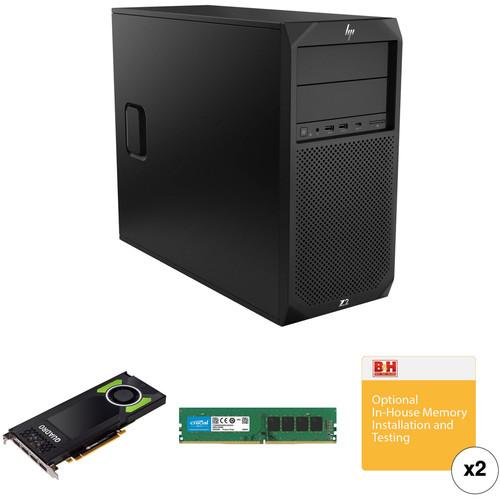
Product description This Custom Workstation combines the HP Z2 G4 Tower Workstation with 32GB of 2666 MHz DDR4 RAM in a 2 x 16GB configuration, an HP Quadro P4000 Graphics Card, and installation services. - HP Z2 G4 Tower Workstation Designed for BIM workloads and 3D CAD modeling and rendering, the Z2 G4 Tower Workstation from HP delivers server-grade power in the form factor of a desktop tower with plenty of room in the chassis for system expansion. Built for architects, product developers, and education labs, the Z2 G4 Tower is certified for Adobe, Avid, SolidWorks, Creo, Solid Edge, Bentley MicroStation, GRAPHISOFT ARCHICAD, Autodesk AutoCAD, Autodesk Revit, Autodesk Inventor, and Vectorworks.
The system is powered by a 3.2 GHz Intel Core i7-8700 Six-Core processor that will allow you to run multiple applications simultaneously and can be boosted up to 4.6 GHz. The 16GB of 2666 MHz DDR4 RAM helps to ensure smooth multitasking and also allows the computer to quickly access frequently used files and programs. While the current memory configuration is 2 x 8GB, there are four 288-pin DIMM memory slots that will allow the RAM to be upgraded to 64GB, using a 16GB chip in each of the four slots.
For storage of your files, a 512GB Z Turbo Drive PCIe M.2 SSD offers quick access to your data. For additional internal storage, there are two empty internal 3.5" drive bays, two external half-height 5.25" drive bays, and an M.2 slot for a PCIe SSD. If you want to add external storage drives or other peripherals, the Z2 G4 features six 5 Gb/s USB 3.0 Type-A ports, one of which doubles as a charging port, plus two USB 2.0 Type-A ports. The integrated Intel UHD Graphics 630 chipset delivers a sharp, clear picture, and features two DisplayPort 1.2 outputs which support two displays and a maximum resolution of 4096 x 2160 @ 60 Hz. Whether you are listening to music, watching a movie, or playing a game, the integrated Conexant CX20632 5.1 HDA codec outputs high definition audio and delivers higher fidelity than standard audio controllers.
The Z2 G4 Tower Workstation includes a USB keyboard, a USB mouse, and a power cord. It runs using a 500W power supply that is 90% efficient and operates using 90-269 VAC at 47-66 Hz. The installed operating system is Windows 10 Pro (64-bit).
Photo is an authorized HP reseller with professional in-house technicians available for upgrades & installations on these workstations and laptops. Built with power and speed in mind, the Z Series is designed to enhance audio and video post-production workflows and more. Each HP Z series workstation or laptop features a range of top-tier processors and large RAM loadouts. The workstations are built with graphics flexibility in mind as well so that the end consumer can configure the graphics options to their needs, and each unit includes a 3/3/3 warranty - 3 years limited warranty for parts, 3 years limited warranty for labor, and 3 years of repairs performed at customer site for those parts not eligible for Customer Self Repair (CSR). For 24/7 customer service, please call 1-800-334-5144. General Features - Architects
- Optimized for BIM and 3D CAD design, users can easily manipulate 3D shapes and render near-photographic models in real time.
- Product Developers
- Accelerate your 3D modeling design cycles with full, unthrottled performance. Get advanced rendering capabilities for quicker design visualization.
- Higher Education
- Bring real-world capabilities to your education labs with workstation-class power and certification for popular professional applications. Plus, rigorous testing means less downtime.
- Performance
- With up to 60% more graphics power and 13% smaller than last generation, the Z2 G4 Tower is equipped to handle heavy workloads.
- Built to Expand
- This expandable entry workstation is designed to grow with you to meet your ever-changing workload requirements.
- Secure and Manageable
- Get powerful protection from evolving malware threats with HP's self-healing, hardware-enforced security solutions. Plus, easily manage multiple devices with HP Manageability Integration Kit.
- 9.5mm Slim DVD Writer
- The 9.5mm Slim DVD Writer lets you read from and write to a variety of optical CD and DVD media.
- Gigabit Ethernet
- The system uses an integrated Intel I219-LM PCIe Gigabit controller for internet access when connected to a router, modem, or network switch. If you'd like to install a Wi-Fi/Bluetooth adapter, this is an empty M.2 2230 slot, which uses a PCIe 3.0 x1 interface.
- 6 x USB 3.0 Type-A | 2 x USB 2.0 Type-A
- The Z2 G4 Tower features six 5 Gb/s USB 3.0 Type-A ports, one of which doubles as a charging port, and two USB 2.0 Type-A ports that will allow you to connect external peripherals such as hard drives, printers, and memory card readers. These fast speeds mean you can spend less time waiting and more time focusing on the task at hand. Two of the USB 3.0 ports are in the front and four are in the rear, while both USB 2.0 ports are in the rear.
- Up to 64GB RAM
- Four 288-pin DIMM slots support up to 64GB of ECC or non-ECC unbuffered 2666 MHz DDR4 memory.
- Expansion Bays
- Expand or upgrade your system's drive bays with two internal 3.5" bays, two external 5.25" bays, and two M.2 2280 slots that use a PCIe 3.0 x4 interface.
- PCIe Slots
- Expand your system's components using one PCIe 3.0 x16/16 slot, one PCIe 3.0 x4/x16 slot, and two PCIe 3.0 x1/x4 slots. All PCIe slots are full-height and full-length.
Windows 10 - Start Menu
- After its hiatus in Windows 8, the Start Menu has returned. Utilizing a combination of the traditional menu system and Windows 8's Live Tiles, the improved Start Menu gives you more information at a glance, showing notification information alongside your applications and other pinned items.
- Cortana
- Microsoft's digital personal assistant, Cortana can answer your questions with information gleaned from both your device and the internet at large. You can type or even talk with her, if your system has a microphone. Using her Notebook, Cortana keeps track of your needs and wants, and she learns over time to improve her information gathering skills.
- Microsoft Edge
- After nearly 20 years, Microsoft has finally replaced its Internet Explorer web browser. With Microsoft Edge, users can write directly on web pages and share notes with friends and colleagues. It also improves the online reading experience by adding a distraction-free mode and read-it-later functionality. Edge also has built-in Cortana integration; you can have her help you find a restaurant, make a reservation, and pull up directions without leaving your browser.
- Windows Store
- For Windows 10, Microsoft has unified the Windows Store. Now, apps for PCs, tablets, and phones will all be accessible from one place. And with support for Universal Apps, one version of an app can work across all your compatible devices automatically.
- Windows Continuum
- Windows 10 was designed for a variety of screen sizes and input styles, and with its Continuum feature, it automatically adapts to fit your needs. A Windows 10 tablet on its own requires a touch-centric approach, but attaching a mouse and keyboard will shift everything to a more traditional interface. You can even attach an external monitor to your Windows 10 phone for a near-desktop experience. But it's not just the operating system; Windows Universal Apps take advantage of Continuum as well.
- Xbox on Windows 10
- Gaming is a big focus of Windows 10. Xbox integration allows for PC players to match up against Xbox One players on supported games, and if you have an Xbox One, you can even stream compatible titles to your PC. Native support for recording with the new Game DVR feature makes it easy to capture and share your gameplay. The new DirectX12 takes better advantage of multi-core processors, giving games a performance boost, even on older hardware. Windows 10 also features native support for virtual reality headsets, such as the Oculus Rift.
- Windows 10 Pro
- The Pro version of Windows 10 includes all of the features of Windows 10 Home plus many designed specifically for business users, including Hyper-V virtualization, BitLocker disk encryption, and remote desktop access. Devices will also be able to join domains and the Azure Active Directory, and they can even access a specialized version of the Windows Store featuring custom, company-specific applications.
UPC: 193015583979 - HP 1ME40AT Quadro P4000 Graphics Card Designed for efficient CAD, professional programming, VR production, and video editing and processing, the HP Quadro P4000 Graphics Card is based on NVIDIA's 16nm Pascal architecture. The GPU itself features 1792 CUDA cores coupled to 8GB of VRAM with a 256-bit memory bus providing a maximum of 5.3 TFLOPS of single-precision computing power. Using supported APIs and CUDA, that computing performance can translate into high resolution and realistic real-time 2D and 3D graphics rendering or improved computing speed with hardware acceleration. The output panel on this card features four DisplayPort terminals. Up to four monitors can be simultaneously supported by a single card, without any extra hardware, to create high-resolution video walls with your workstation or for more desktop real-estate to increase productivity. DisplayPort 1.4 support allows this card to drive UHD 5K displays as well. Included with the card is one DisplayPort to DVI-D SL adapter for connecting to legacy displays. Other separately available adapters can be used with this card to drive other kinds of displays and projectors. For cooling, an active fansink cooler uses a radial fan to force air through the card's heatsink, dissipating heat from the GPU and other internal components. This cooling configuration is best suited for cases with unrestricted airflow.
General Features - 3D Graphics Architecture
-
- Scalable geometry architecture
- Hardware tessellation engine
- NVIDIA Giga Thread with dual copy engines
- Up to 32K x 32K texture and render processing
- Transparent multisampling and super sampling
- 16x angle independent anisotropic filtering
- 32-bit per-component floating point texture filtering and blending
- 64x full scene antialiasing (FSAA), 128x supported in SLI configurations
- Decode acceleration for MPEG-2, MPEG-4 Part 2 Advanced Simple Profile, H.264, HEVC, MVC, VC1, DivX (version 3.11 and later), and Flash (10.1 and later)
- Dedicated H.264 and HEVC encoder
- Blu-ray dual-stream hardware acceleration (supporting HD picture-in-picture playback)
- Advanced Display Features
-
- Supports any combination of four compatible connected displays
- HDCP 2.2 support over DisplayPort, DVI, and HDMI connectors
- 12-bit internal display pipeline (hardware support for 12-bit scanout on supported panels, applications, and connection)
- NVIDIA 3D Vision technology, 3D DLP, Interleaved, and other 3D stereo format support
- Underscan/overscan compensation and hardware scaling
- DisplayPort and HDMI Digital Audio Support
- Codecs: Dolby Digital (AC3), DTS 5.1, Multi-channel (7.1) LPCM, Dolby Digital Plus (DD+), MPEG-2/MPEG-4 AAC
Data Rate: 44.1/48/88.2/96/176/192 kHz
Word Size: 16/20/24-bit GPU Performance Features - Pascal Microarchitecture
- Based on 16nm FinFET process technology with 1792 CUDA cores, the Quadro P4000 provides performance for computationally demanding design visualization or immersive design reviews with VR support.
- Simultaneous Multi-Projection
- Complete stereo rendering of geometry in a single pass to double the effective throughput for applications such as VR.
- Pascal VR-Centric Features
- Dynamic Load Balancing: Dynamically allocate GPU resources for graphics and compute tasks as needed to maximize resource utilization.
Preemption: Pixel level graphics preemption provides more granular control to better support time-sensitive tasks such as VR motion tracking. Compute preemption at the thread and instruction level provides finer grain control over compute tasks. - H.264 and HEVC Encode/Decode Engines
- Deliver faster than real-time performance for transcoding, video editing, and other encoding applications with a dedicated H.264 and HEVC encode engine and a dedicated decode engine that are independent of 3D/compute pipeline.
- NVIDIA GPU Boost 3.0
- Boosts the card's clock speed in real time based on the target temperature. If the card is running below the set target temperature, GPU Boost will increase the clock speed to improve performance. GPU Boost 3.0 adds granular control over the clock speed and voltage adjustments for performance increases.
Image Quality Features - Memory Compression
- Increase bandwidth by up to 20% by reducing the amount of data fetched from memory for each frame with fourth generation, lossless delta compression.
- NVIDIA Quadro MOSAIC Technology
- Transparently scale the desktop and applications across up to 4 GPUs and 16 displays from a single workstation while delivering full performance and image quality.
- DisplayPort 1.4 Support
- Support up to four 5K monitors at 60 Hz, or dual 8K displays per card. The P4000 supports HDR color for 4K at 60 Hz for 10/12-bit HEVC decode and up to 4K at 60 Hz for 10-bit HEVC encode. Each DisplayPort connector is capable of driving DCI 4K displays at 120 Hz with 30-bit color.
- NVIDIA NVIEW Advanced Desktop Software
- Configure single or multi-display environments for increased desktop workspace and productivity.
- OpenGL Quad Buffered Stereo Support
- Provide a smooth and immersive 3D Stereo experience for professional applications.
- 3D Stereo Synchronization
- Connect to a separately available compatible Quadro sync card for robust control of 3D effects.
Software Support - NVIDIA CUDA Parallel Computing Platform
- Natively execute standard programming languages like C/C++ and Fortran, and APIs such as OpenCL, OpenACC and Direct Compute to accelerate techniques such as ray tracing, video and image processing, and computation fluid dynamics. Dynamic Parallelism allows the GPU to dynamically spawn new processing threads without going back to the CPU, lowering processing latency.
- NVIDIA GPUDirect for Video
- GPUDirect for Video speeds communication between the GPU and video I/O devices by avoiding unnecessary system memory copies and CPU overhead.
- NVIDIA Enterprise-Management Tools
- Maximize system uptime, seamlessly manage wide-scale deployments and remotely control graphics and display settings for efficient operations. Multi-GPU Technology.
- NVIDIA Multi-GPU Technology
- Combine the visualization and interactive design capability of multiple GPUs by leveraging a mix of Quadro GPUs to dramatically improve the production workflow.
- NVIDIA SLI HB Technology
- Leverage multiple P4000 GPUs to dynamically scale graphics performance, enhance image quality, expand display real estate, and assemble a fully virtualized system.
UPC: 190781617167 - Crucial 16GB DDR4 2666 MHz UDIMM Memory Module With this 16GB DDR4 2666 MHz UDIMM Memory Module from Crucial, you can give your computer a significant performance boost, especially if you're replacing DDR3 memory. If you're upgrading from DDR3 modules, you'll enjoy an approximately 30% boost to speed and bandwidth. Even energy efficiency has been improved over DDR3 memory, with this module utilizing only 1.2V.
Even if you're not jumping from DDR3 to DDR4, the simple act of adding more RAM can make your system run smoother. More RAM means that the operating system can run side-by-side with more open programs simultaneously. It can also give you the ability to run more demanding applications. UPC: 649528780096 - 2 x Photo Video In-house Memory Installation & Testing Service Select In-house Additional Computer Memory Installation and Testing when you want B&H to do the installation of additional memory - when purchased on the same order of the computer. The Additional Memory Installation and Testing is done by a certified technician in our Computer Service Center, so that it is assured that the original manufacturer's warranty on the computer continues on throughout the warranty period.This item doesn't include software installation. If you also need software installation use B&H item code # BHWEBPCC. Note: The only warranty on the additional memory is the warranty provided by the manufacturer of the additional memory.
- Certified Technician
- The install is done by a certified technician who knows the do's and don'ts of installation, so that the manufacturer's original warranty on the computer continues on and doesn't get voided by unwanted moves.
- Expert Testing
- Testing is done on the computer to check if the system recognizes and allocates the additional memory.
- Get to Work Immediately
- The Installation and Testing will allow you to start working on your new computer as soon as you get it.
In the Box - Z2 G4 Tower Workstation dttadtyc
- USB Keyboard & Mouse
- Power Cord
- Limited 3-Year Warranty for Parts
- Limited 3-Year Warranty for Labor
- 3 Years of Repairs Performed at Customer Site for Those Parts Not Eligible for Customer Self Repair (CSR)
- For 24/7 Customer Service, Please Call 1-800-334-5144
- 1ME40AT Quadro P4000 Graphics Card
- Crucial - 16GB DDR4 2666 MHz UDIMM Memory Module
- 2 x B&H Photo Video - In-house Memory Installation & Testing Service
Table of Contents
|
Upload User Manual
Have you got an user manual for the HP Z2 G4 Series Tower Custom Workstation in electronic form? Please send it to us and help us expand our library of instruction manuals.
Thank you, too, on behalf of other users.
To upload the product manual, we first need to check and make sure you are not a robot. After that, your "Submit Link" or "Upload File" will appear.
Technical parameters - HP Z2 G4 Tower Workstation
| Operating System | Windows 10 Pro (64-Bit) | | | | Chipset | Intel C246 | | CPU Socket | LGA 1151 | | CPU | 3.2 GHz Intel Core i7-8700 6-Core | | Maximum Boost Speed | 4.6 GHz | | L3 Cache | 12 MB | | Memory Type | 2666 MHz DDR4 | | Total Installed Memory | 16 GB | | Memory Configuration | 2 x 8 GB (User-Replaceable) | | Maximum Memory Capacity | 64 GB | | Memory Slot Type | 288-Pin DIMM | | Available Memory Slots | 2 | | Graphics Type | Integrated | | GPU | Intel UHD Graphics 630 | | | | Total Drive Bays | 2 x 3.5" (Internal)
2 x 5.25" (External) | | SSD Slots | 1 x M.2 22110 PCIe (Available)
1 x M.2 22110 PCIe (In Use) | | Total Installed Capacity | 512 GB | | Solid State Storage | 1 x 512 GB M.2 NVMe PCIe | | PCI Expansion | 1 x PCIe Gen 3 x16 (x16 Mechanical)
1 x PCIe Gen 3 x4 (x16 Mechanical)
2 x PCIe Gen 3 x1 (x4 Mechanical)
1 x M.2 2230 (E-Key) | | Optical Drive | Tray-Load SuperMulti DVD Burner with Dual Layer Support | | | | Ports | 6 x USB Type-A (USB 3.1 Gen 1)
2 x USB Type-A (USB 2.0) | | Display | 2 x DisplayPort 1.2 | | Audio | 1 x 1/8" / 3.5 mm Headphone/Microphone Input/Output
1 x 1/8" / 3.5 mm Line Input
1 x 1/8" / 3.5 mm Line Output | | Built-In Speakers | 1 | | | | Ethernet | 1 x RJ45 (Gigabit) | | | | Keyboard | Full-Size Keyboard with Number Pad | | Pointing Device | USB Mouse | | | | Security | Kensington Lock Slot, Infineon TPM Software Professional Package | | Power Supply | 500 W | | AC Input Power | 100 to 240 VAC, 50 / 60 Hz at 6 A | | Operating Temperature | 40 to 95°F / 4 to 35°C | | Operating Humidity | 10 to 85% | | Dimensions | 17.1 x 14 x 6.7" / 43.43 x 35.56 x 17.02 cm | | Weight | 18 lb / 8.2 kg | | | | Box Dimensions (LxWxH) | 23.0 x 19.5 x 11.0" | - HP 1ME40AT Quadro P4000 Graphics Card
| GPU | NVIDIA Quadro P4000:
CUDA Cores: 1792
Node Size: 16 nm
Architecture: Pascal | | Interface | PCI Express 3.0 x16 | | Memory | Interface Width: 256-bit
Interface: GDDR5
Bandwidth: 243 GB/s
Configuration: 8 GB | | Floating Point | Single Precision Performance: 5.3 TFLOPS
Double Precision Performance: 165 GFLOPS | | Outputs | 4 x DisplayPort 1.4 | | Maximum Resolution | DisplayPort: 5120 x 2880
Dual-link DVI: 2560 x 1600
Single-link DVI: 1920 x 1200 | | APIs | Graphics:
Shader Model 5.1
OpenGL: 4.5
DirectX: 12
Vulkan 1.0
Compute:
CUDA
DirectCompute
OpenCL | | Form Factor | Width: Single-slot
Length: 9.5" / 241 mm
Form Factor: Full-height, full-length | | Power Consumption | 105 W | | Compliance | Not Specified by Manufacturer | | System Requirements | Power Supply: Not Specified by Manufacturer
CPU: Intel Core i5/i7/Xeon or newer, AMD Phenom/Opteron or newer
PCI Slots: 1 x PCI Express 3.0 x16
RAM: 2 GB (8 GB recommended)
Storage: 200 MB of available disk space
OS: Microsoft Windows 7/8/8.1/10, Server 2008/2012/2012 R2 64/2016, Linux
Optical Drive: Blu-ray or DVD-ROM drive for software installation (downloads also available) | | | | Box Dimensions (LxWxH) | 16.8 x 8.5 x 3.3" | - Crucial 16GB DDR4 2666 MHz UDIMM Memory Module
| Capacity | 16 GB | | Kit Configuration | 1 x 16 GB | | Speed | PC4-21300 (2666 MHz) | | Memory Type | DDR4 | | DIMM Type | 288-Pin DIMM | | Buffered/Registered | No | | Error Correction (ECC) | Non-ECC | | Voltage | 1.2 V | | CAS Latency | CL19 | | Memory Rank | Dual Rank | | | | Box Dimensions (LxWxH) | 6.4 x 1.7 x 0.6" | - 2 x Photo Video In-house Memory Installation & Testing Service
| | | Box Dimensions (LxWxH) | 1.0 x 1.0 x 1.0" |
Rating70% users recommend this product to others. And what about you?

This product has already been rated by 81 owners. Add your rating and experience with the product.
Discussion
 Ask our technicians if you have a problem with your settings,
or if anything is unclear in the user manual you have downloaded.
You can make use of our moderated discussion.
The discussion is public and helps other users of our website who may be encountering similar problems.
Ask our technicians if you have a problem with your settings,
or if anything is unclear in the user manual you have downloaded.
You can make use of our moderated discussion.
The discussion is public and helps other users of our website who may be encountering similar problems.
The discussion is empty - enter the first post
Post a new topic / query / comment:
|
|
|
| Request for user manual |
You can’t find the operation manual you are looking for? Let us know and we will try to add the missing manual:
I’m looking for a manual / Request for manual
Current requests for instruction manuals:
Call Of Duty World War Two For Xbox...
controller stratus XL...
stratus XL...
smart whatch serie S11 42mm...
Allen & Heath SQ-6 manual...
|
| Discussion |
Latest contributions to the discussion:
AEW R 4100
Name: MAURICIO ANGARITA
Audio-Technica AEW-R4100 UHF Diversity Receiver for
AEW R 4100 has the mute function blocked and does not allow audio to pass. I tried several times to turn off the mute from the transmitter but it does nothing, the mute stays on. Solution?
Thank you...
Instructions for assembling the 2015 Forecast Image Master Consoles GC3-A
Name: mike elam
Forecast Consoles GC3-A ImageMaster Editing Console
Looking for instructions for assembling this console. ...
EMPTY TONER ERROR MESSAGE AFTER REPLACING TONER
Name: LINDA BAD YELLOW EYES
Brother TN223BK Standard-Yield Toner
I HAD TO CHANGE OUT ALL THREE TONERS DUE TO LEAKS IN THE YELLOW AND CYAN. AFTER I REPLACED THEM, THE MACHINE KEEPS GIVING ME AN EMPTY TONER ERROR MESSAGE. HELP!!...
PS480D 20/24 pin Switching 480W Power Supply
Name: swkargo
Logisys 480W Power Supply
This item states in can run -5vdc .It is NOT listed on the board or I beleive is r4 is missing the resitior. Any body have thid issue. Shawn
...
Help needed
Name: Ann Carter
SanDisk 1TB Extreme Portable USB 3.1
When I click the link to download the user manual for my Sandisk Extreme external hard drive, it gives me the manual for the LG Cricket. Can you please change the link so I can download the Sandisk manual and begin using this drive? Thank you....
|
|


