|
User Manual for HP Z8 G4 Series Tower Custom Workstation Click to enlarge the picture
 Contents of the user manual for the HP Z8 G4 Series Tower Custom
- Product category: PC Workstations HP
- Brand: HP
- Description and content of package
- Technical information and basic settings
- Frequently asked questions – FAQ
- Troubleshooting (does not switch on, does not respond, error message, what do I do if...)
- Authorized service for HP PC Workstations
|
User manual for the HP Z8 G4 Series Tower Custom contain basic instructions
that need to be followed during installation and operation.
Before starting your appliance, the user manual should be read through carefully.
Follow all the safety instructions and warnings, and be guided by the given recommendations.
User manual is an integral part of any HP product,
and if it is sold or transferred, they should be handed over jointly with the product.
Following the instructions for use is an essential prerequisite for protecting
health and property during use, as well as recognition of liability on the part of the manufacturer
for possible defects should you make a warranty claim. Download an official HP user manual in which you will find instructions on how to install, use, maintain and service your product.
And do not forget – unsuitable use of a HP product will considerably shorten its lifespan!
|
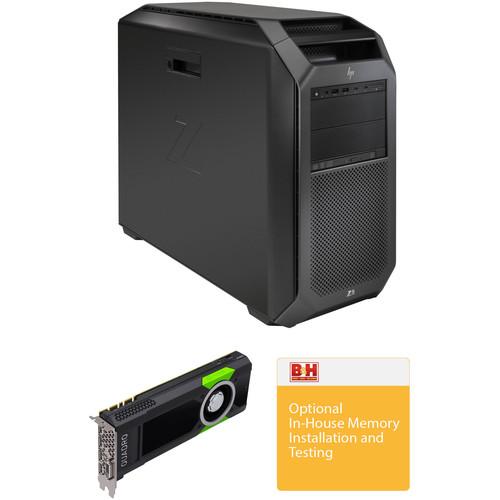
Product description This Custom Workstation combines the HP Z8 G4 Series Tower Workstation with an HP Quadro P5000 graphics card and installation services. - HP Z8 G4 Series Tower Workstation Built to fuel the creativity of those who reimagine our world, the VR-ready Z8 G4 Series Tower Workstation from HP has been designed to run complex simulations, process huge amounts of data, edit 8K video in real time, work in edge-computing environments, and be used for other intensive tasks. Its exterior provides tool-free access to a modular interior, and strategically placed vents and ducts throughout the system help streamline airflow for quiet performance. The system is powered by a 2.2 GHz Intel Xeon Silver 4114 Ten-Core processor and 13.75MB of L3 cache, all of which will allow you to run multiple applications simultaneously and provide significant performance gains when running multi-threaded tasks. If more power is needed, the CPU can deliver extra performance by increasing its clock speed up to 3.0 GHz utilizing Intel's Turbo Boost 2.0 technology.
The 8GB of 2666 MHz DDR4 ECC Registered RAM comes in a 1 x 8GB configuration, allowing the computer to run multiple applications simultaneously and to quickly access frequently-used files and programs. As this RAM features ECC technology, it is able to help detect and correct the most common kinds of internal data corruption. This RAM is also registered, and registered memory modules, also known as buffered memory modules, place less electrical load on the memory controller and allow single systems to remain stable with more memory modules than they would have otherwise.
For long-term storage of your files, this system is equipped with a 500GB 7200 rpm SATA III 3.5" hard drive. If you want to add external storage drives, optical drives, printers, memory card readers, or other peripherals, the Z8 G4 features eight 5 Gb/s USB 3.1 Gen 1 Type-A ports (two front and six rear), one of which doubles as a charging port, as well as two front-mounted 10 Gb/s USB 3.1 Gen 2 Type-C ports that each deliver up to 15W of power (3A / 5V) when the system is running. There is also one serial port and two PS/2 ports. For users who wish to add additional components to the drive bays, the Z8 G4 features four internal 3.5" drive bays that support 2.5" drives using adapters, and two external 5.25" drive bays. No integrated or dedicated graphics controllers are included with this system, allowing the user to select a dedicated graphics card of their choice. Whether you are listening to music, watching a movie, or playing a game, the integrated Realtek HD ALC221 audio controller outputs high-definition audio and delivers higher fidelity than standard audio controllers. Network connectivity is achieved using dual integrated Gigabit Ethernet ports, and HP's Slim DVD Writer can be used to read from and write to optical media.
The Z8 G4 Series Tower Workstation includes a USB keyboard, a USB mouse, and a power cord. The installed operating system is Windows 10 Pro for Workstations (64-bit), which scales up for machines with a high number of logical processors and large amounts of RAM for server-grade hardware and power users.
Photo is an authorized HP reseller with professional in-house technicians available for upgrades & installations on these workstations and laptops. Built with power and speed in mind, the Z Series is designed to enhance audio and video post-production workflows and more. Each HP Z series workstation or laptop features a range of top-tier processors and large RAM loadouts. The workstations are built with graphics flexibility in mind as well so that the end consumer can configure the graphics options to their needs, and each unit includes a 3/3/3 warranty - 3 years limited warranty for parts, 3 years limited warranty for labor, and 3 years of repairs performed at customer site for those parts not eligible for Customer Self Repair (CSR). For 24/7 customer service, please call 1-800-334-5144. HP Z8 G4 Workstation Features - Mobility & Flexibility
- With full grip front and rear aluminum carrying handles and slick feet, the system can be moved to a new location or to gain better access. The system can be used in desktop/deskside orientations or rack-mounted using HP's enterprise-class, fully extendable rails.
- Interior Design & Cooling
- The interior is organized with a consistent user access strategy. All user-serviceable components are identified with blue touchpoints. The service label located on the left access panel provides users with system board and memory loading information and quick access to diagnostic information. Cables are hidden or efficiently routed, providing better component access and airflow management.
The chassis is designed to maximize fresh air inlet to the system, and direct cool air where it's needed. The CPU and memory ducting has a design to help maximize fresh air inlet to both the memory and CPU, and keeps the memory airflow separated from the CPU airflow. The memory ducting has a patent-pending multi-channel design that directs cooler air from the inlet to both the front and rear DIMM banks, as well as to separate segments along the length of the DIMMs. The zone between the front and rear CPUs is divided by a baffle to direct fresh air to both CPUs and prevent preheated exhaust air from the front CPU cooler from entering the rear CPU cooler. - Designing the Experience
- Due to the tool-free ease of use, HP understands system and component security may be a concern. Therefore, several security features have been incorporated. The left side access panel includes a key lock and the right side panel can be secured with the HP BPC Security Lock or Kensington security device. An optional system intrusion switch is also available. The rear access power supply is unlocked by default but can be secured by removing the PSU and enabling the locking mechanism on the side cover of the power supply.
- DDR4 Memory Supported
- The HP Z8 G4 supports up to 768GB using RDIMM modules (8, 16, and 32GB), and up to 3TB using LRDIMM modules (64, 128, and 256GB). While the system has 24 total RAM slots, all 24 slots are only supported in systems with dual processors. Systems with single processors only support 12 RAM slots. Additionally, the system will only work with DDR4 memory, you cannot mix LRDIMMs with RDIMMs, and dual processor configurations with memory modules installed for only one processor is not supported.
- PCI Express Connectors
- Seven PCIe Gen3 slots provide expandability supporting up to four PCIe storage devices with optional slots, including Thunderbolt 3 cards and RAID controllers.
Slot 1
PCIe Gen3 x4 (transforms to PCIe Gen3 x8 when a second CPU is installed)
Slot 2
PCIe Gen3 x16
Slot 3
PCIe Gen3 x16 (available only when a second CPU is installed)
Slot 4
PCIe Gen3 x16
Slot 5
PCIe Gen3 x4
Slot 6
PCIe Gen3 x16 (available only when a second CPU is installed)
Slot 7
PCIe Gen3 x4
Note: The PCIe x4 and PCIe x8 connectors are all open ended, allowing a PCIe x16 card to be seated in the slot - Front I/O
- This HP Z8 G4 is configured with the Premium Front I/O option and is equipped with two 10 Gb/s USB 3.1 Gen 2 Type-C ports that each deliver up to 15W of power (3V / 5A), two 5 Gb/s USB 3.1 Gen 1 Type-A ports (the left-most supports battery charging), a combo headset/microphone jack, and the option for an SD card reader.
- Internal I/O
- Internal Slot 1 (CPU 1)
PCIe Gen3 x8 (always available, for M.2 storage)
Internal Slot 2 (CPU 2)
PCIe Gen3 x8 (available only when a second CPU is installed, for M.2 storage)
2 USB 2.0 ports available with a single 2x5 header
1 USB 2.0 port available with a 1x6 header
1 USB 3.0 and 1 USB 2.0 port available with a 2x6 header
Note: The 2x5 header can be converted to a standard USB 2.0 Type-A port using HP's Internal USB Bus Port Kit, which uses half of the 2x5 header. The 1x6 header can be converted to USB 2.0 Type-A using the same kit and uses 5 pin positions on the header, and the 2x6 header can also be converted to USB 2.0 Type-A using the same kit, which takes up half of the 2x6 header. Additionally, the USB 3.0 header is available with a single 20-pin shrouded connector for a USB media card reader. - Rear I/O
- In the rear I/O area, the HP Z8 G4 provides six 5 Gb/s USB 3.0 Type-A ports, dual Gigabit Ethernet LAN ports, support for two additional Ethernet ports via a separately sold module, a 3.5mm audio line-in/mic-in jack, a 3.5mm audio line-out jack, two PS/2 ports, and a serial port. Additional rear I/O ports can be added via PCIe add-in cards.
Windows 10 Pro - Start Menu
- After its hiatus in Windows 8, the Start Menu has returned. Utilizing a combination of the traditional menu system and Windows 8's Live Tiles, the improved Start Menu gives you more information at a glance, showing notification information alongside your applications and other pinned items.
- Cortana
- Microsoft's digital personal assistant, Cortana can answer your questions with information gleaned from both your device and the internet at large. You can type or even talk with her, if your system has a microphone. Using her Notebook, Cortana keeps track of your needs and wants, and she learns over time to improve her information gathering skills.
- Microsoft Edge
- After nearly 20 years, Microsoft has finally replaced its Internet Explorer web browser. With Microsoft Edge, users can write directly on web pages and share notes with friends and colleagues. It also improves the online reading experience by adding a distraction-free mode and read-it-later functionality. Edge also has built-in Cortana integration; you can have her help you find a restaurant, make a reservation, and pull up directions without leaving your browser.
- Windows Store
- For Windows 10, Microsoft has unified the Windows Store. Now, apps for PCs, tablets, and phones will all be accessible from one place. And with support for Universal Apps, one version of an app can work across all your compatible devices automatically.
- Windows Continuum
- Windows 10 was designed for a variety of screen sizes and input styles, and with its Continuum feature, it automatically adapts to fit your needs. A Windows 10 tablet on its own requires a touch-centric approach, but attaching a mouse and keyboard will shift everything to a more traditional interface. You can even attach an external monitor to your Windows 10 phone for a near-desktop experience. But it's not just the operating system; Windows Universal Apps take advantage of Continuum as well.
- Xbox on Windows 10
- Gaming is a big focus of Windows 10. Xbox integration allows for PC players to match up against Xbox One players on supported games, and if you have an Xbox One, you can even stream compatible titles to your PC. Native support for recording with the new Game DVR feature makes it easy to capture and share your gameplay. The new DirectX12 takes better advantage of multi-core processors, giving games a performance boost, even on older hardware. Windows 10 also features native support for virtual reality headsets, such as the Oculus Rift.
- Windows 10 Pro
- The Pro version of Windows 10 includes all of the features of Windows 10 Home plus many designed specifically for businesses users, including Hyper-V virtualization, BitLocker disk encryption, and remote desktop access. Devices will also be able to join domains and the Azure Active Directory, and they can even access a specialized version of the Windows Store featuring custom, company-specific applications.
UPC: 192018109421 - HP Quadro P5000 Graphics Card Designed for generating high-resolution graphics and large datasets for VR, graphic design, and advanced calculations, HP's Quadro P5000 Graphics Card can beef up your workstation to increase performance. Based on NVIDIA's 16nm Pascal architecture, the Quadro P5000 features 2560 CUDA cores coupled to 16GB of VRAM with a 256-bit memory bus providing a maximum of 8.9 TFLOPS of single-precision computing power. Using supported APIs and CUDA, that computing performance can translate into high resolution and realistic real-time 2D and 3D graphics rendering or improved computing speed with hardware acceleration. The output panel on this card features four DisplayPort terminals and a dual-link DVI-D port. Up to four monitors can be simultaneously supported by a single card, without any extra hardware, to create high-resolution video walls with your workstation or for more desktop real-estate to increase productivity. DisplayPort 1.4 support allows this card to drive UHD 5K displays as well. The DVI port can be used for connecting to legacy hardware while separately available adapters can be used with this card to drive other kinds of displays and projectors. For cooling, the P5000 uses a blower-style cooler. This cooler uses a radial fan to force air through the card's heatsink and out through the rear of the case. This cooling configuration can be used in crowded workstation environments with multiple GPUs or where space between computer components can be a concern, as hot air is not recirculated back into the case.
- CUDA
- NVIDIA's parallel computing platform which enables an increase in computing performance by harnessing the parallel nature of GPU processing. CUDA compatible applications can assign intensive parallel computing tasks, such as real-time video rendering, to the GPU to process, freeing up the computer's CPU to run other tasks.
- GPUDirect Support
- Using GPUDirect, multiple GPUs, third party network adapters, solid-state drives (SSDs), and other devices can directly read and write CUDA host and device memory, eliminating unnecessary memory copies, dramatically lowering CPU overhead, and reducing latency, resulting in significant performance improvements in data transfer times for applications.
- Quadro Sync II
- By connecting up to four compatible Quadro GPUs to a separate Quadro Sync board you can perfectly synchronize the display outputs of all the connected GPUs for critical video wall and extended desktop applications utilizing multiple displays. Quadro Sync also enables NVIDIA Quadro Mosaic technology on those synchronized displays and projectors, providing an easy way to scale the resolution of any application. Quadro Sync II allows for two Quadro Sync cards to be used in the same system, enabling support for up to 32 displays with stereoscopic visuals and support for projector overlap, and WMI (Windows Instrumentation Management).
- Mosaic
- Leverage multiple displays to easily span any application across multiple displays or projectors from a single workstation, without sacrificing performance or power. Combined with NVIDIA's nView desktop management software you also get bezel correction and projector overlap for seamless multi-display exhibition.
UPC: 190780612514 - Photo Video In-house Memory Installation & Testing Service Select In-house Additional Computer Memory Installation and Testing when you want B&H to do the installation of additional memory - when purchased on the same order of the computer. The Additional Memory Installation and Testing is done by a certified technician in our Computer Service Center, so that it is assured that the original manufacturer's warranty on the computer continues on throughout the warranty period.This item doesn't include software installation. If you also need software installation use B&H item code # BHWEBPCC. Note: The only warranty on the additional memory is the warranty provided by the manufacturer of the additional memory.
- Certified Technician
- The install is done by a certified technician who knows the do's and don'ts of installation, so that the manufacturer's original warranty on the computer continues on and doesn't get voided by unwanted moves.
- Expert Testing
- Testing is done on the computer to check if the system recognizes and allocates the additional memory.
- Get to Work Immediately
- The Installation and Testing will allow you to start working on your new computer as soon as you get it.
In the Box - Z8 G4 Series Tower Workstation darzttbddcwavdytzdrtfcvdwwztfscqwsfa
- USB Keyboard and Mouse
- Power Cord
- Limited 3-Year Warranty for Parts
- Limited 3-Year Warranty for Labor
- 3 Years of Repairs Performed at Customer Site for Those Parts Not Eligible for Customer Self Repair (CSR)
- Quadro P5000 Graphics Card darzttbddcwavdytzdrtfcvdwwztfscqwsfa
- B&H Photo Video - In-house Memory Installation & Testing Service
Table of Contents
|
Upload User Manual
Have you got an user manual for the HP Z8 G4 Series Tower Custom Workstation in electronic form? Please send it to us and help us expand our library of instruction manuals.
Thank you, too, on behalf of other users.
To upload the product manual, we first need to check and make sure you are not a robot. After that, your "Submit Link" or "Upload File" will appear.
Technical parameters - HP Z8 G4 Series Tower Workstation
| Operating System | Windows 10 Pro for Workstations (64-Bit) | | | | Chipset | Intel C622 | | CPU Socket | LGA 3647 | | CPU | 2.2 GHz Intel Xeon Silver 4114 10-Core | | Maximum Boost Speed | 3.0 GHz | | L3 Cache | 13.75 MB | | Memory Type | 2666 MHz DDR4 | | Total Installed Memory | 8 GB | | Memory Configuration | 1 x 8 GB (User-Replaceable) | | Maximum Memory Capacity | 3 TB | | Memory Slot Type | 288-Pin DIMM | | Available Memory Slots | 23 | | Buffered Memory | Yes | | ECC Memory | Yes | | Graphics Type | None | | | | Total Drive Bays | 2 x 5.25" (External)
4 x 2.5/3.5" (Internal) | | SSD Slots | 2 x M.2 | | Hard Disk Storage | 1 x 1 TB 3.5" SATA (7200 rpm) | | PCI Expansion | 4 x PCIe Gen 3 x16 (x16 Mechanical)
3 x PCIe Gen 3 x8 (x16 Mechanical)
2 x PCIe Gen 3 x4 (x16 Mechanical) | | Optical Drive | Tray-Load SuperMulti DVD Burner with Dual Layer Support | | | | Ports | 1 x DE-9 (Serial)
2 x PS/2
8 x USB Type-A (USB 3.1 Gen 1) | | USB Type-C Ports | 2 x USB 3.1 Gen 2 | | Audio | 1 x 1/8" / 3.5 mm Headphone/Microphone Input/Output
1 x 1/8" / 3.5 mm Line Output
1 x 1/8" / 3.5 mm Line Input | | Media Card Slots | None | | | | Ethernet | 2 x RJ45 (Gigabit) | | Wi-Fi | None | | Bluetooth | None | | | | Keyboard | 104-Key Full-Size Keyboard with Number Pad | | Pointing Device | USB Mouse | | | | Dimensions | 8.5 x 17.5 x 21.7" / 21.6 x 44.5 x 55.1 cm | | Weight | 49.4 lb / 22.4 kg | | | | Box Dimensions (LxWxH) | 29.0 x 25.0 x 13.0" | - HP Quadro P5000 Graphics Card
| GPU | NVIDIA Quadro P5000:
CUDA Cores: 2560
Node Size: 16 nm
Architecture: Pascal | | Interface | PCI Express 3.0 x16 | | Memory | Interface Width: 256-bit
Interface: GDDR5X
Bandwidth: 288 GB/s
Configuration: 16 GB | | Floating Point | Single Precision Performance: 8.9 TFLOPS | | Outputs | 4 x DisplayPort 1.4
1 x DVI-D DL | | Maximum Resolution | DisplayPort: 5120 x 2880
Dual-link DVI: 2560 x 1600
Single-link DVI: 1920 x 1200 | | APIs | Graphics:
Shader Model 5.1
OpenGL: 4.5
DirectX: 12
Vulkan 1.0
Compute:
CUDA
DirectCompute
OpenCL | | Form Factor | Width: Dual-slot
Length: 10.5" / 267 mm
Form Factor: Full-height, full-length | | Power Consumption | 180 W | | Compliance | Not Specified by Manufacturer | | System Requirements | Power Supply: Not Specified by Manufacturer
CPU: Intel Core i5/i7/Xeon or newer, AMD Phenom/Opteron or newer
PCI Slots: 1 x PCI Express 3.0 x16
RAM: 2 GB (8 GB recommended)
Storage: 200 MB of available disk space
OS: Microsoft Windows 7/8/8.1/10, Server 2008/2012/2012 R2 64/2016, Linux
Optical Drive: Blu-ray or DVD-ROM drive for software installation (downloads also available) | | | | Box Dimensions (LxWxH) | 16.7 x 8.7 x 3.3" | - Photo Video In-house Memory Installation & Testing Service
| | | Box Dimensions (LxWxH) | 1.0 x 1.0 x 1.0" |
Rating80% users recommend this product to others. And what about you?

This product has already been rated by 87 owners. Add your rating and experience with the product.
Discussion
 Ask our technicians if you have a problem with your settings,
or if anything is unclear in the user manual you have downloaded.
You can make use of our moderated discussion.
The discussion is public and helps other users of our website who may be encountering similar problems.
Ask our technicians if you have a problem with your settings,
or if anything is unclear in the user manual you have downloaded.
You can make use of our moderated discussion.
The discussion is public and helps other users of our website who may be encountering similar problems.
The discussion is empty - enter the first post
Post a new topic / query / comment:
|
|
|
| Request for user manual |
You can’t find the operation manual you are looking for? Let us know and we will try to add the missing manual:
I’m looking for a manual / Request for manual
Current requests for instruction manuals:
Call Of Duty World War Two For Xbox...
controller stratus XL...
stratus XL...
smart whatch serie S11 42mm...
Allen & Heath SQ-6 manual...
|
| Discussion |
Latest contributions to the discussion:
AEW R 4100
Name: MAURICIO ANGARITA
Audio-Technica AEW-R4100 UHF Diversity Receiver for
AEW R 4100 has the mute function blocked and does not allow audio to pass. I tried several times to turn off the mute from the transmitter but it does nothing, the mute stays on. Solution?
Thank you...
Instructions for assembling the 2015 Forecast Image Master Consoles GC3-A
Name: mike elam
Forecast Consoles GC3-A ImageMaster Editing Console
Looking for instructions for assembling this console. ...
EMPTY TONER ERROR MESSAGE AFTER REPLACING TONER
Name: LINDA BAD YELLOW EYES
Brother TN223BK Standard-Yield Toner
I HAD TO CHANGE OUT ALL THREE TONERS DUE TO LEAKS IN THE YELLOW AND CYAN. AFTER I REPLACED THEM, THE MACHINE KEEPS GIVING ME AN EMPTY TONER ERROR MESSAGE. HELP!!...
PS480D 20/24 pin Switching 480W Power Supply
Name: swkargo
Logisys 480W Power Supply
This item states in can run -5vdc .It is NOT listed on the board or I beleive is r4 is missing the resitior. Any body have thid issue. Shawn
...
Help needed
Name: Ann Carter
SanDisk 1TB Extreme Portable USB 3.1
When I click the link to download the user manual for my Sandisk Extreme external hard drive, it gives me the manual for the LG Cricket. Can you please change the link so I can download the Sandisk manual and begin using this drive? Thank you....
|
|


