User Manual for Icon Pro Audio QCon Pro G2 Control Surface Click to enlarge the picture
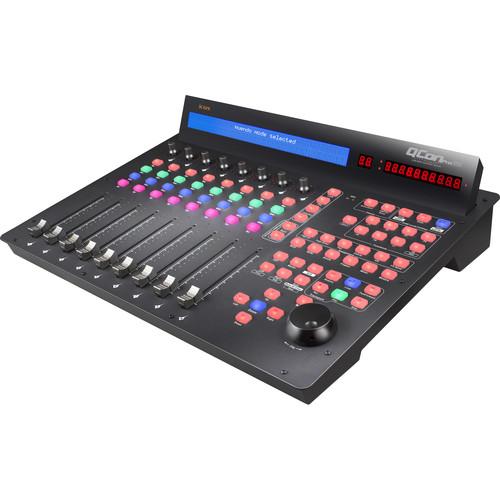 Contents of the user manual for the Icon Pro Audio QCon Pro G2
- Product category: Control Surfaces Icon Pro Audio
- Brand: Icon Pro Audio
- Description and content of package
- Technical information and basic settings
- Frequently asked questions – FAQ
- Troubleshooting (does not switch on, does not respond, error message, what do I do if...)
- Authorized service for Icon Pro Audio Control Surfaces
 |
User manual for the Icon Pro Audio QCon Pro G2 contain basic instructions
that need to be followed during installation and operation.
Before starting your appliance, the user manual should be read through carefully.
Follow all the safety instructions and warnings, and be guided by the given recommendations.
User manual is an integral part of any Icon Pro Audio product,
and if it is sold or transferred, they should be handed over jointly with the product.
Following the instructions for use is an essential prerequisite for protecting
health and property during use, as well as recognition of liability on the part of the manufacturer
for possible defects should you make a warranty claim. Download an official Icon Pro Audio user manual in which you will find instructions on how to install, use, maintain and service your product.
And do not forget – unsuitable use of a Icon Pro Audio product will considerably shorten its lifespan!
|
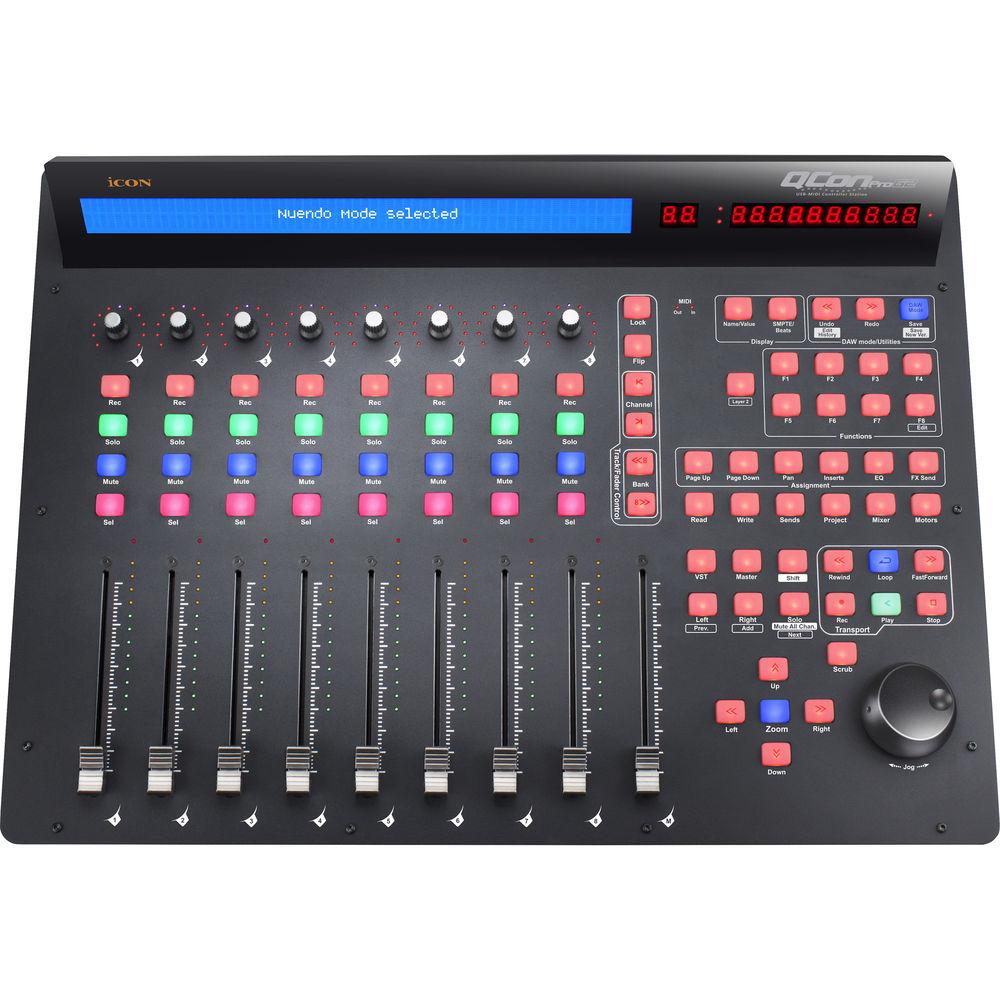
Product description The QCon Pro G2 Control Surface from iCON is an eight-channel universal control surface with Mackie Control and HUI emulation to support most major DAWs. It can be used for tracking or mixing and provides intuitive tactile control over your session, which allows you to set levels, fine tune your EQs and effects, record automation, punch in and punch out of recordings, all with your fingers.The QCon G2 sports nine motorized faders, eight multipurpose push encoders, 78 buttons, jog shuttle wheel, and 2 foot-pedal connectors. Twelve-segment LED level meters are provided for each channel, and a large backlit LCD screen displays channel names and parameter values. A 12-segment LED display is also provided for SMPTE or MIDI beat clock info.Furthermore, the QCon Pro G2 utilizes Mackie Control and HUI emulation that controls your favorite digital audio workstation and includes overlays for most popular DAWs including Cubase/Nuendo, Logic Pro, Ableton Live, ProTools, Studio One, Digital Performer, FL Studio, Samplitude, Reaper, Bitwig, Reason, Sonar, and Audition. A user defined mode is also included to create custom presets and MIDI mapping. The QCon Pro G2 is compatible with Windows XP, Vista, Windows 7, 8, and 10, and Max OS X, and features a high-speed USB 2.0 connection. - 8 touch-sensitive motorized channel faders
- 12-segment LED level metering for channels
- 1 touch-sensitive motorized fader for master channel
- 8 dual function encoder knobs (enter & rotate)
- 11-segment LED surrounding the encoders to indicate the rotating position
- Large backlit LCD to display channel name, control values, etc. for each channel
- 12-segment LED display showing time location of your project in either SMPTE or MIDI beat clock (bars, beats, and ticks) format
- 78 assignable buttons for user defined mode
- Jog wheel shuttle for fast search and control
- Illuminated buttons for each channel including Rec-enable, Solo, Mute, Select, and Monitor
- 6 illuminated transport buttons including Play, Stop, Rec, Rewind, Fast Forward, and Loop
- Illuminated zoom key with 4 direction keys
- Mackie Control and HUI Universal emulation
- iMap self MIDI mapping software is provided for user-defined mode (MIDI Learn)
- Expandable to 32-channel control surface with 3 units of QCon EX G2 (sold separately)
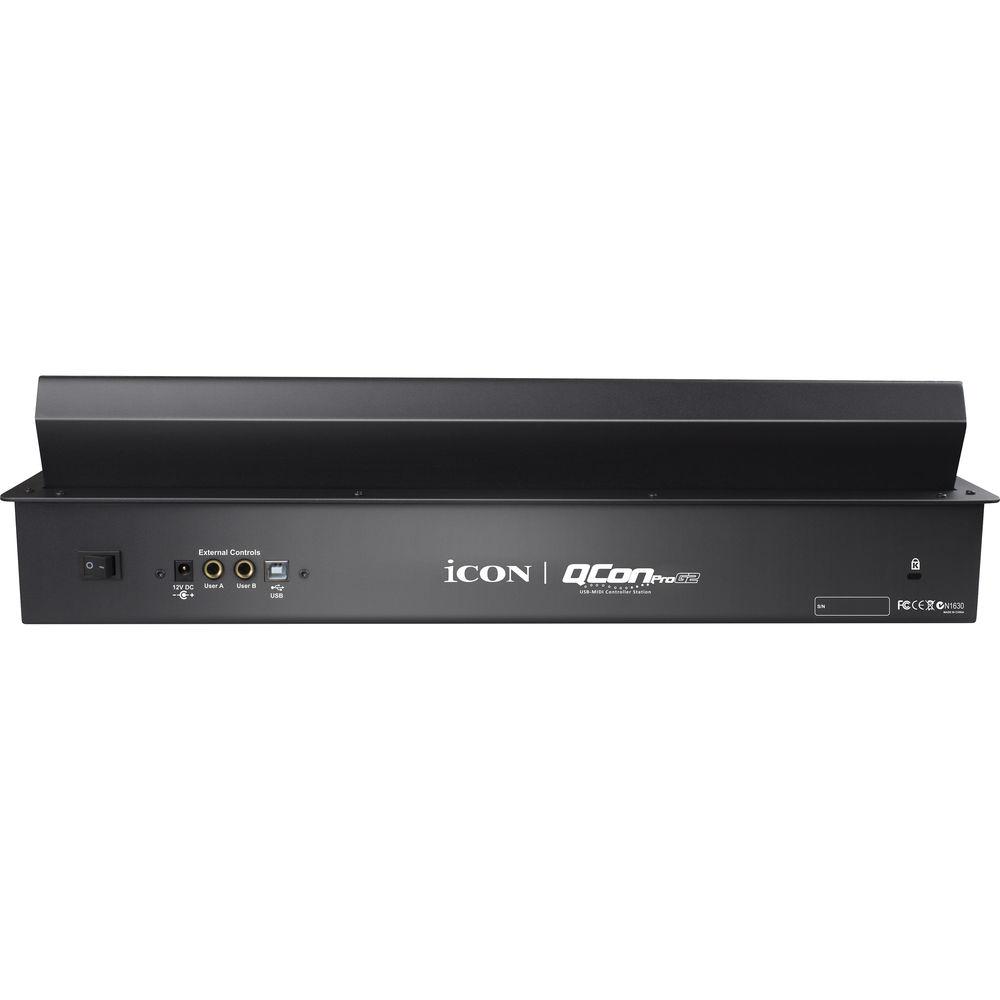
- User A & User B 1/4" TRS connectors for connecting with pedals
- Class-compliant with Windows XP, Vista (32-bit), Windows 7/8/10 (32-bit & 64-bit), and Mac OS X (Intel Mac)
- USB 2.0 high-speed connectivity
- Firmware upgrade available simply via USB connection and iMap software
- Different DAW overlays are included - Cubase/Nuendo, Logic Pro, Digital Performer, FL Studio, Samplitude, Reaper, Studio One, Bitwig, Reason, ProTools, Sonar, Audition, Ableton Live, and User Define mode
- Robust aluminum and metal casing with Kensington lock port
In the Box Icon Pro Audio QCon Pro G2 Control Surface Limited 1-Year Warranty Table of Contents
|
Upload User Manual
Have you got an user manual for the Icon Pro Audio QCon Pro G2 Control Surface in electronic form? Please send it to us and help us expand our library of instruction manuals.
Thank you, too, on behalf of other users.
To upload the product manual, we first need to check and make sure you are not a robot. After that, your "Submit Link" or "Upload File" will appear.
Technical parametersIcon Pro Audio Pro G2 Specs | OS Compatibility | Mac OS X 10.10 or Later
iOS Not Compatible
Windows XP, Vista, 7, 8, and 10 | | Computer Connection | USB 2.0 Connector (Standard Type)
USB Type-B Connector to Extender | | Power Supply | 12 VDC, 2.5 A | | Current Consumption | 2 A or Less | | Dimensions (L x W x H) | 20.1 x 14.8 x 5.4" / 51.0 x 37.5 x 13.6 cm | | Weight | 14.0 lb / 6.36 kg |
Rating80% users recommend this product to others. And what about you?

This product has already been rated by 77 owners. Add your rating and experience with the product.
Discussion
 Ask our technicians if you have a problem with your settings,
or if anything is unclear in the user manual you have downloaded.
You can make use of our moderated discussion.
The discussion is public and helps other users of our website who may be encountering similar problems.
Ask our technicians if you have a problem with your settings,
or if anything is unclear in the user manual you have downloaded.
You can make use of our moderated discussion.
The discussion is public and helps other users of our website who may be encountering similar problems.
The discussion is empty - enter the first post
Post a new topic / query / comment:
|
|


