User Manual for IK Multimedia SampleTank 3 SE - Sample-Based Virtual Instrument Plug-In Click to enlarge the picture
 Contents of the user manual for the IK Multimedia SampleTank 3 SE -
- Product category: Virtual Instruments IK Multimedia
- Brand: IK Multimedia
- Description and content of package
- Technical information and basic settings
- Frequently asked questions – FAQ
- Troubleshooting (does not switch on, does not respond, error message, what do I do if...)
- Authorized service for IK Multimedia Virtual Instruments
|
User manual for the IK Multimedia SampleTank 3 SE - contain basic instructions
that need to be followed during installation and operation.
Before starting your appliance, the user manual should be read through carefully.
Follow all the safety instructions and warnings, and be guided by the given recommendations.
User manual is an integral part of any IK Multimedia product,
and if it is sold or transferred, they should be handed over jointly with the product.
Following the instructions for use is an essential prerequisite for protecting
health and property during use, as well as recognition of liability on the part of the manufacturer
for possible defects should you make a warranty claim. Download an official IK Multimedia user manual in which you will find instructions on how to install, use, maintain and service your product.
And do not forget – unsuitable use of a IK Multimedia product will considerably shorten its lifespan!
|
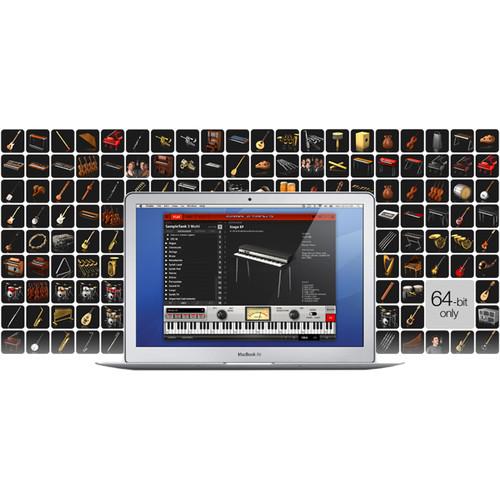
Product description IK Multimedia SampleTank 3 SE is a sample-based instrument and groove workstation designed to give you a taste of the broad sonic versatility available in the full version of SampleTank 3. This introductory version allows you to experiment with the fully functional software and a 6.5GB library of high-quality instruments, loops, and MIDI patterns, ideal for layering, mixing, and editing your own original sounds and grooves.SampleTank 3 SE comes with 400 sampled instruments arranged in 20 categories that stretch across a wide variety of genres and styles. Instruments include pianos, drums, basses, guitars, synthesizers, brass, strings, vocals, and exotic sounds. In addition, the built-in MIDI engine offers a collection of 250 loops and 150 MIDI patterns recorded by some of the world's finest drummers and percussionists.A 16-channel mixer, three sample engines, 57 effects and amp simulations, and other advanced features combine to provide you with virtually unlimited sound-sculpting options. The software can operate as a plug-in or a standalone. - Key Features
-
- Works as a multi-platform plug-in and as a standalone application
- Content structured in instruments, multis, and MIDI patterns
- Fully compatible with Mac OS X and Windows
- Supported plug-in formats: AAX, VST, and Audio Units
- 16-part multitimbral
- 16-channel mixer with individual stereo outputs
- Info view with specific information and 3D icon for each instrument
- Mix view and full mix parameters control
- Live mode for instantaneous sound loading is organized in set lists and songs
- Expandable instrument library via the company's Custom Shop
- Pad interface enables the launch of patterns, loops, or single notes seamlessly from iRig Pads or any MIDI controller
- 57 high-quality effects
- Part Range controls allows for creating splits and layers
- Edit view for in-depth editing of all synth engine parameters, independently for all the elements or articulations included in the instrument
- Instrument browsing
- BPM-syncable time-based effects, audio loop instruments, and LFOs
- Four play modes including mono legato with portamento.
- Zone switch allows you to edit individual key-zones for the selected sound elelement or articulation
- Seamlessly load Syntronik individual sounds or 4-part layers and splits with arpeggiators
- Multi Articulation and Key Switch instrument control
- Easy-to-use MIDI control assignable to any parameter with MIDI Learn
- Save instruments and multis
- Convenient search function for instruments, multis, and patterns
- Compatible with all previous Powered by SampleTank sound modules and sounds (can import all previous sounds and combinations)
- Import feature allows users to import .wav and .aiff samples
- Sounds
-
- 6.5GB of samples
- 400 instruments with 20 instrument categories covering the entire span of acoustic, electric, and electronic sounds
- Over 250 drum, percussion, and full construction-kit loops played by world-renowned artists
- 150 MIDI files in a wide variety of musical categories
- Synth Engines
-
- STRETCH
- Pitch-Shift / Time-Stretch
- Resampling
- Effects
-
- Full Amps: American Vintage T, Amp Combo, British Tube Lead 2, Jazz Amp 120, Modern Tube Lead, SVT Classic
- Amp Components: Cabinet, Preamp, Tone Control
- Distortion: Overscream, Distortion, Crusher, Overdrive
- EQ and Dynamics: Channel Strip, Black 76, Model 670, White 2A, Vintage EQ-1A, Compressor, Parametric EQ, EQ Comp, Limiter
- Modulation: Ensemble, Chorus C1, Opto Tremolo, Electric Flanger, Rotary Speaker, Uni-V, Small Phazer, AM Modulation, Multi Chorus, Chorus, Phaser, Env Flanger, Tremolo, Flanger, FM Modulation
- Reverb and Delay: Acoustic Resonance, Tape Echo, Hall Reverb, ConvoRoom, Plate Reverb, Reverb, Ambience, Reverb Delay, Delay, Spring Reverb
- Other: Piano Lid, Stereo Imager, Auto Pan, Multi Filter, LFO Filter, Phonograph, Env Filter, Slicer, Lo-Fi, Wah
- Analog-Modeled Filters: C-Type low-pass, R-Type low-pass, O-Type low-pass, high-pass, band-pass, notch
Table of Contents
|
Upload User Manual
Have you got an user manual for the IK Multimedia SampleTank 3 SE - Sample-Based Virtual Instrument Plug-In in electronic form? Please send it to us and help us expand our library of instruction manuals.
Thank you, too, on behalf of other users.
To upload the product manual, we first need to check and make sure you are not a robot. After that, your "Submit Link" or "Upload File" will appear.
Technical parametersIK Multimedia Sampletank Specs | Mac System Requirements | Intel Core 2 Duo
4 GB of RAM (8 GB recommended)
OS X 10.7 or later (64-bit only)
34 GB of hard-drive space | | Windows System Requirements | Intel Core 2 Duo or AMD Athlon 64 X2
4 GB of RAM (8 GB recommended)
Windows 7, 8, or 10 (64-bit only)
34 GB of hard-drive space
ASIO compatible sound card | | Plug-In Compatibility | Mac Supported Plug-In Formats (64-Bit): AU, VST2, VST3, AAX
Windows Supported Plug-In Formats (64-Bit): VST2, VST3, AAXStandalone |
Rating70% users recommend this product to others. And what about you?

This product has already been rated by 81 owners. Add your rating and experience with the product.
Discussion
 Ask our technicians if you have a problem with your settings,
or if anything is unclear in the user manual you have downloaded.
You can make use of our moderated discussion.
The discussion is public and helps other users of our website who may be encountering similar problems.
Ask our technicians if you have a problem with your settings,
or if anything is unclear in the user manual you have downloaded.
You can make use of our moderated discussion.
The discussion is public and helps other users of our website who may be encountering similar problems.
The discussion is empty - enter the first post
Post a new topic / query / comment:
|
|


