|
User Manual for ikan 15" Teleprompter and SDI to HDMI Converter with Pneumatic Pedestal System for Cameras Weighing up to 18 Pounds Click to enlarge the picture
 Contents of the user manual for the ikan 15" Teleprompter and SDI to
- Product category: Teleprompters ikan
- Brand: ikan
- Description and content of package
- Technical information and basic settings
- Frequently asked questions – FAQ
- Troubleshooting (does not switch on, does not respond, error message, what do I do if...)
- Authorized service for ikan Teleprompters
|
User manual for the ikan 15" Teleprompter and SDI to contain basic instructions
that need to be followed during installation and operation.
Before starting your appliance, the user manual should be read through carefully.
Follow all the safety instructions and warnings, and be guided by the given recommendations.
User manual is an integral part of any ikan product,
and if it is sold or transferred, they should be handed over jointly with the product.
Following the instructions for use is an essential prerequisite for protecting
health and property during use, as well as recognition of liability on the part of the manufacturer
for possible defects should you make a warranty claim. Download an official ikan user manual in which you will find instructions on how to install, use, maintain and service your product.
And do not forget – unsuitable use of a ikan product will considerably shorten its lifespan!
|
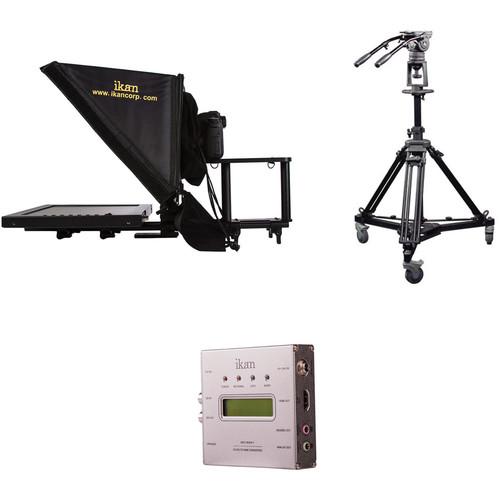
Product description Anatomy of a Teleprompter Read More This Kit consists of ikan's PT-3500 Rod Based Teleprompter for 15mm LWS Rods, IKC-S2H1 3G-SDI to HDMI Converter and one E-Image EI-7902-A Pedestal Kit with Head & Dolly, which provides you a ready to go studio teleprompting solution that can quickly be moved and adjusted as you need, just add a camera and computer (not included). The Teleprompter system features a 15" diagonal glass reflector, that folds down for transport and supports cameras ranging from DSLRs to midsize cameras. The included monitor features HDMI, VGA, and composite video inputs, providing flexibility in input choices. This makes a useful combination for sending and displaying teleprompting signals over longer distances than is supported by HDMI.
Combining the teleprompter with the converter makes for a useful pairing for studio situations where the prompter system is in a central location and the prompter feed travels to the studio over SDI, or when on remotes with a long SDI prompter feed. The converter accepts the SDI signal, converts it to HDMI, and feeds it to the teleprompters monitor. The included pedestal features 18" of pneumatic assisted center column height adjustment so you can raise and lower the teleprompter and optional camera while the pedestal helps support the weight. The fluid head features three grades of pan and tilt drag, as well as dual pan handles. The pedestal, teleprompter, and your camera all mount into a rolling spreader that allows you to easily move the entire arrangement over smooth floors. - ikan PT3500 15" Rod Mounted Teleprompter for Location and Studio
- Ikan PT3500 / 3700 Rod Based Teleprompter
Designed to be used in the field as well as in the studio, the ikan 15" Rod Mounted Teleprompter is lightweight, and quick to set up. Right out of the box, you can use the teleprompter with almost any camcorder that has a flat base. To use with a DSLR camera, or any other camera with a shorter footprint, the included special DSLR shelf can be fastened to the end of the camera base-plate in order to move your camera's lens closer to the prompter glass for optimal performance. The PT3500 Teleprompter's hardware is based on 15mm rods. This allows the monitor, the prompter glass, and the camera baseplate to be set up quickly, without requiring tools. Each component can easily be moved individually to adjust for different setups. To accommodate cameras with different heights, ikan includes 5" and 8" rods for mounting the baseplate. For editing and displaying prompter text, PrompterPro3 software is included. To ensure compatibility with different workflows, the software works with both PC and Mac computers. The monitor has Composite BNC, VGA, and HDMI inputs to accept video signals from your computer and other video sources as well. - Adjustable Glass Frame
- The adjustable glass frame on the PT3500 allows for fast and easy set up. The frame can also be folded to make the teleprompter compact and easy to transport.
- Dual Purpose Base Plate Design
- The Dual Purpose Base plate supports various cameras, DSLR's and small to midsized cameras. The base plate comes with a DSLR Shelf which allows you to put a DSLR camera at the very edge of the base plate to get closer to the glass if needed.
- Height Adjustment Rods
- The PT3500 includes 5" and 8" height adjustment rods for the baseplate, making the teleprompter more versatile for various sized cameras.
- 15mm Rod System Design
- The PT3500 is based on a 15mm rod system design, making it lightweight, easy to use, and quick to set up.
- High Quality 70/30 Teleprompter Glass
- The high quality 70/30 teleprompter glass provides a balance between reflection and pass-through without distorting the image. This high quality glass allows your camera to have a clear picture, while providing reflection you need to read the text.
- Ships in Reusable Foam
- The PT3500 is shipped in reusable custom cut foam which will help keep the kit safe and organized when you set it up or break it down. The custom cut foam can also be repurposed to perfectly fit in the SKB I Series 2918-10 Waterproof Hard Case.
- Includes Software for Mac or PC
- The PrompterPro3 Teleprompting software for Mac and PC are included with this kit. This software offers a full text editor, vertical and horizontal screen flip, real-time text updates and live prompter mode for optimal control. The software is compatible with Mac OSX 10.7 and up (with 64-bit processor), as well as Windows XP, Vista, 7, and 8.
UPC: 847983011490 - E-Image EI-7902-A Pedestal Kit with Head & Dolly
- Ikan PT3500 / 3700 Rod Based Teleprompter
Rolling to your next camera position is a lot easier than picking up your tripod and carrying it, especially with a camera in studio configuration, and with the E-Image EI-7902-A Pedestal Kit you can do just that. This pedestal kit provides you with a tripod system and rolling spreader suitable for using an optional ENG/EFP/compact camcorder in a studio configuration. The legs feature a pneumatic center column with 18" of travel that supports and pneumatically assists with raising/lowering the height of optional cameras and accessories weighing up to 33 pounds.
The included fluid head features a 100mm half ball for quick leveling on the legs' center column, and it features 8 steps of counterbalance for optional cameras weighing between 8 and 33 pounds. The head features 3 grades of drag adjustment for both pan and tilt helping you achieve smooth pans and tilts. The head's included sliding balance plate features almost 3" of balance adjustment, and is indexed so you can quickly reset the balance as you change configurations. The two included panhandle feature telescoping length adjustment. Rounding out the pedestal kit is the rolling spreader, which supports the legs, head and your camera, and features non-marring wheels with individual foot activated wheel locks. The kit packs away into the included soft sided travel case so you can pack everything up and take it with you. - The center column is pneumatic, using a cushion of air to help support the head as you raise and lower it. The column features a ring at the top, which can be used as a handhold to adjust the position of the camera, and also for a handhold for raising and lowering the pedestal.
- The head features fluid drag for pan and tilt, and eight steps of counterbalance settings. The included sliding balance plate features 2.7": of travel for balance adjustment, and is indexed so you can quickly reset the position on the head for different configurations. The dual panhandle rosettes support the two included telescoping panhandles, which will support optional studio style follow focus and zoom units.
- The Pedestal including wheeled spreader, tripod legs with center column, and fluid heads weighs in at only 44 pounds total, and packs up for transport into the included soft travel case.
UPC: 847983006694 - ikan IKC-S2H1 3G-SDI to HDMI Converter
- Ikan PT3500 / 3700 Rod Based Teleprompter
ikan's IKC-S2H1 3G-SDI to HDMI Converter is a rugged unit built into a CNC machined aluminum housing making it suitable for location or studio work. It features a two line LCD text display with information about the input signal and audio level meters. It supports SD/HD/3G-SDI in with auto format detection; it converts the input signals to HDMI video, and loops through the signal to the SDI output. The converter supports 16 channels of Audio in the SDI stream, and makes two channels of audio available via AES/EBU or analog audio.
The video conversion process is automatic, with manual control only necessary to change the LCD display, or audio input, via DIP switches on the side of the unit. A USB 2.0 port allows you to upgrade the firmware, if that becomes necessary, and the unit powers from 6 to 24VDC, although 6 to 12VDC is preferred. The power in port features a threaded collar, allowing you to secure the power connectors to the unit, and the included mounting plates allow you to mount the unit to a wall or other surface. - LCD Display
- The two line LCD display can be configured to display a variety of information about your input signal by adjusting DIP switches.
- 1. LCD Backlight: Off / On
- 2. LCD display: Resolution / Level Meters
- 3. Output Format: YCbCr 4:2:2 / RGB 4:4:4
- 4. Headphone AMP Gain: Low / High
- 5. Audio Group: CH 1-8 / CH 9-16
- DE-Embedded Audio Out CH Select
- CH1/2 (9/10) 6-off / 7-off
- CH3/4 (11/12) 6-off / 7-on
- CH5/6 (13/14) 6-on / 7-off
- CH7/8 (15/16) 6-on / 7-on
- LED Indicators
- The front of the unit features four LED indicators for :
- Power
- No Signal
- Lock
- Audio
UPC: 847983012404 In the Box - PT3500 15" Rod Mounted Teleprompter for Location and Studio wvdtseftwffbxtqutcatyfvxy
- Teleprompter Base Assembly with Glass
- Camera Mount Assembly
- PrompterPro3 Software Disc
- LCD Monitor with Power Supply
- Hood
- 2 x 15mm Rods (8")
- 2 x 1/4"-20 D-Ring Camera Mount Screws
- 4 x Cork Strips
- 5/32 Hex Key
- Limited 1-Year Warranty
- E-Image - EI-7902-A Pedestal Kit with Head & Dolly wvdtseftwffbxtqutcatyfvxy
- IKC-S2H1 3G-SDI to HDMI Converter
Table of Contents
|
Upload User Manual
Have you got an user manual for the ikan 15" Teleprompter and SDI to HDMI Converter with Pneumatic Pedestal System for Cameras Weighing up to 18 Pounds in electronic form? Please send it to us and help us expand our library of instruction manuals.
Thank you, too, on behalf of other users.
To upload the product manual, we first need to check and make sure you are not a robot. After that, your "Submit Link" or "Upload File" will appear.
Technical parameters - ikan PT3500 15" Rod Mounted Teleprompter for Location and Studio
| | | Reading Range | 20' / 6.1 m | | | | Size (Diagonal) | 15" / 38.1 cm | | Maximum Brightness | 350 cd/m2 | | Native Resolution | 1024 x 768 | | Aspect Ratio | 4:3 | | Contrast Ratio | 500:1 | | Viewing Angle (H x V) | 160 x 140° | | Input | 1 x HDMI
1 x VGA
1 x Composite (BNC) | | Output Voltage | 12 VDC at 4 A | | Power Consumption | 10 W | | | | Dimensions | 25.0 x 14.5 x 14.0" / 63.5 x 36.8 x 35.5 cm | | | | Box Dimensions (LxWxH) | 29.5 x 18.5 x 10.5" | - E-Image EI-7902-A Pedestal Kit with Head & Dolly
| | | Load Capacity | 18 to 33 lb / 8.2 to 14.7 kg | | Bowl Diameter/Thread | 100 mm | | Folded/Transport Length | 41" / 104.1 cm | | Height Range | 46 to 87" / 116.8 cm to 221 cm | | Weight | Head: 8 lb / 3.6 kg
Legs: 20 lb / 9.1 kg
Spreader: 16 lb / 7.3 kg | | | | Load Capacity | 18 to 33 lb / 8.2 to 14.7 kg | | Head Fitting | 100 mm bowl | | Counterbalance Steps | 0 to 8 | | Tilt Range | - 60 to 90° | | Tilt Drag | 3 grades | | Pan Drag | 3 grades | | Sliding Balance Plate Travel | 2.3" / 60 mm | | Rosettes | 2 x (L/R) | | | | Center Column | Type: Pneumatic Air Assist
Travel: 18" / 45.7 cm | | | | Working Diameter | 39" / 99 cm | | Wheel Lock | Individual | | | | Box Dimensions (LxWxH) | 46.0 x 13.0 x 12.0" | - ikan IKC-S2H1 3G-SDI to HDMI Converter
| Display | 2 x Line LCD text display | | Inputs | SD/HD/3G-SDI: 1 x BNC | | Outputs | HDMI (1.3): 1 x HDMI (Type A)
SD/HD/3G-SDI: 1 x BNC
AES/EBU(SDI de-embedded): 1 x 3.5mm stereo mini-jack(2-Channel support)
Analog : 1 x 3.5mm stereo mini-jack(2-Channel support) | | Firmware Updates | Mini-USB Port | | Signal System | NTSC, PAL | | Video Formats | 1920 x 1080p: 23.98/24/25/29.97/30/50/59.94/60
1920 x 1080i: 50/59.94/60
1280 x 720p: 50/59.94/60 | | Supported Audio | SDI embedded 16ch audio support. | | LCD Display | 2-Line
Input resolution
2Ch audio level meter
Input audio type
Input audio frequency
60-level bar-graph/digital value 2ch audio level meter (Range: -60dBFS to 0dBFS)
2Ch AES/EBU or SPDIF external audio input support
HDMI luminance range select (0-255/16-235) | | Power | 6 to 24 VDC (6 to 12 VDC recommended) | | Dimension | Housing Only: 3.9 x 3.7 x 0.98" / 100 x 95 x 25 mm
Including Connector: 4.6 x 3.7 x 0.98" / 118 x 95 x 25 | | Weight | 0.49 lb / 220 g | | | | Box Dimensions (LxWxH) | 10.0 x 6.5 x 2.2" |
Rating90% users recommend this product to others. And what about you?

This product has already been rated by 06 owners. Add your rating and experience with the product.
Discussion
 Ask our technicians if you have a problem with your settings,
or if anything is unclear in the user manual you have downloaded.
You can make use of our moderated discussion.
The discussion is public and helps other users of our website who may be encountering similar problems.
Ask our technicians if you have a problem with your settings,
or if anything is unclear in the user manual you have downloaded.
You can make use of our moderated discussion.
The discussion is public and helps other users of our website who may be encountering similar problems.
The discussion is empty - enter the first post
Post a new topic / query / comment:
|
|
|
| Request for user manual |
You can’t find the operation manual you are looking for? Let us know and we will try to add the missing manual:
I’m looking for a manual / Request for manual
Current requests for instruction manuals:
Call Of Duty World War Two For Xbox...
controller stratus XL...
stratus XL...
smart whatch serie S11 42mm...
Allen & Heath SQ-6 manual...
|
| Discussion |
Latest contributions to the discussion:
AEW R 4100
Name: MAURICIO ANGARITA
Audio-Technica AEW-R4100 UHF Diversity Receiver for
AEW R 4100 has the mute function blocked and does not allow audio to pass. I tried several times to turn off the mute from the transmitter but it does nothing, the mute stays on. Solution?
Thank you...
Instructions for assembling the 2015 Forecast Image Master Consoles GC3-A
Name: mike elam
Forecast Consoles GC3-A ImageMaster Editing Console
Looking for instructions for assembling this console. ...
EMPTY TONER ERROR MESSAGE AFTER REPLACING TONER
Name: LINDA BAD YELLOW EYES
Brother TN223BK Standard-Yield Toner
I HAD TO CHANGE OUT ALL THREE TONERS DUE TO LEAKS IN THE YELLOW AND CYAN. AFTER I REPLACED THEM, THE MACHINE KEEPS GIVING ME AN EMPTY TONER ERROR MESSAGE. HELP!!...
PS480D 20/24 pin Switching 480W Power Supply
Name: swkargo
Logisys 480W Power Supply
This item states in can run -5vdc .It is NOT listed on the board or I beleive is r4 is missing the resitior. Any body have thid issue. Shawn
...
Help needed
Name: Ann Carter
SanDisk 1TB Extreme Portable USB 3.1
When I click the link to download the user manual for my Sandisk Extreme external hard drive, it gives me the manual for the LG Cricket. Can you please change the link so I can download the Sandisk manual and begin using this drive? Thank you....
|
|


