User Manual for Individual Software Anytime Organizer 16 Click to enlarge the picture
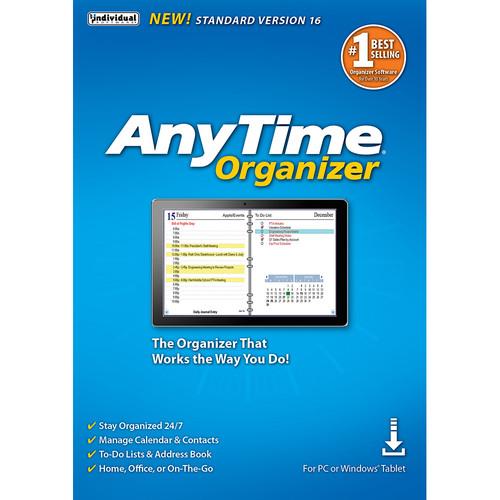 Contents of the user manual for the Individual Software Anytime Organizer 16
- Product category: Home & Office Individual Software
- Brand: Individual Software
- Description and content of package
- Technical information and basic settings
- Frequently asked questions – FAQ
- Troubleshooting (does not switch on, does not respond, error message, what do I do if...)
- Authorized service for Individual Software Home & Office
|
User manual for the Individual Software Anytime Organizer 16 contain basic instructions
that need to be followed during installation and operation.
Before starting your appliance, the user manual should be read through carefully.
Follow all the safety instructions and warnings, and be guided by the given recommendations.
User manual is an integral part of any Individual Software product,
and if it is sold or transferred, they should be handed over jointly with the product.
Following the instructions for use is an essential prerequisite for protecting
health and property during use, as well as recognition of liability on the part of the manufacturer
for possible defects should you make a warranty claim. Download an official Individual Software user manual in which you will find instructions on how to install, use, maintain and service your product.
And do not forget – unsuitable use of a Individual Software product will considerably shorten its lifespan!
|
Product description Organize your life with Anytime Organizer 16 (Standard). This organizational software is designed to simplify your life with extensive calendar management capabilities, including support for multiple calendars, event scheduling, task and appointment management, and more, all of which can be printed or emailed as a PDF document. If that's not enough, you can spice up your calendar by adding sports schedules, lunar calendars, famous birthdays, and more to your calendar.
In addition to taking on the task of organizing your calendar, this software gives you the ability to choose from more than 3,000 layout designs. You can also manage your address book, contacts, create to-do lists, create reminders with electronic sticky notes, create special event reminders, get driving directions, and create timers using AnyTime Clocks. Furthermore, data can be imported and exported to and from a variety of office applications including Microsoft Outlook, Sidekick, Lotus Organizer, and others. - Organize Your Calendar, To-Do's, and Contacts
- Organize your calendar for work, personal, or other groups. Schedule events, calls, tasks, and appointments. Increase your productivity and prioritize and manage your To-Do lists. Keep a detailed record of every contact.
- Calendars
- • View schedule by day, week, month, or year
• Add recurring and repeating events
• Drag-and-drop to reschedule
• Print or e-mail a PDF of schedule - Layout Designer
- Take advantage of exclusive layouts like Weekend Planner, 3-Day Travel Planner, and Tri-Fold Address Book. Create a PDF of any layout and e-mail your schedule to others.
- Downloadable Calendar
- Add-in your favorite NFL, NBA, NHL, MLB, PGA, and NASCAR season schedule to your daily planner. Have fun with the Lunar Calendar, Famous Birthdays, International Holidays, and Word-of-the-Day.
- Design Layout Share and Print
- • More than 3,000 layout design combinations
• Choose from 15 base themes or create your own design
• Exclusive layouts include Weekend Planner, 3-Day Travel Planner, and Tri-Fold Address Book
• Print to popular day planner sizes including 8.5 x 11", 5.5 x 8.5", 3.75 x 6.75", and 3.5 x 6"
• Print or send as PDF - Address Book & Contacts
- • Keep a detailed record of every contact
• Remember birthdays and anniversaries - even prepare a holiday card mailing
• Keep a history of meetings, tasks, and notes
• Simply drag-and-drop to schedule calls
• Date and time stamps are added automatically
• Add photos for each person as a quick visual - To-Do-Lists
- • Keeps record of accomplished tasks
• Set deadlines, track, prioritize, sub-prioritize, and add alarms and important notes for to-do's
• Assign tasks to categories
• View completed versus non-completed to-do's - Electronic Sticky Notes
- • Add colorful reminders to desktop with one click
• Visible while working in other applications
• Display in front of or behind open applications
• Choose note sizes, colors, and fonts - Special Event Reminders
- • Keep track of special events tied to each contact (e.g. birthdays, anniversaries)
• Set event alarms - Alarms & Reminders
- • Use MP3 music as alarm ringtones
• Snooze alarms by hours, days or weeks
• Send text message and e-mail reminders - Driving Directions
- Get maps and driving directions for any entry in address book
- Import & Export
- Import data seamlessly from Microsoft Outlook, Sidekick, Lotus Organizer, Day-Timer Organizer, previous versions of AnyTime, and other organizers. You can also import addresses, phone numbers, and contacts.
- AnyTime Clocks
- • Unlimited number of simultaneous clocks and timers
• Add to desktop
• World Clock to track date and time in any time zone
• Countdown timer
• Elapsed timer to monitor events and tasks, or capture billable time Table of Contents
|
Upload User Manual
Have you got an user manual for the Individual Software Anytime Organizer 16 in electronic form? Please send it to us and help us expand our library of instruction manuals.
Thank you, too, on behalf of other users.
To upload the product manual, we first need to check and make sure you are not a robot. After that, your "Submit Link" or "Upload File" will appear.
Technical parametersIndividual Software Anytime Organizer 16 Specs | | | Supported OS Versions | Windows 10, 7, 8, XP | | Storage Requirements | 45 MB | | Processor Requirement | Intel Pentium | | Minimum Display Resolution | 800 x 600 |
Rating70% users recommend this product to others. And what about you?

This product has already been rated by 88 owners. Add your rating and experience with the product.
Discussion
 Ask our technicians if you have a problem with your settings,
or if anything is unclear in the user manual you have downloaded.
You can make use of our moderated discussion.
The discussion is public and helps other users of our website who may be encountering similar problems.
Ask our technicians if you have a problem with your settings,
or if anything is unclear in the user manual you have downloaded.
You can make use of our moderated discussion.
The discussion is public and helps other users of our website who may be encountering similar problems.
The discussion is empty - enter the first post
Post a new topic / query / comment:
|
|


