|
User Manual for Intel Single-Port Gigabit Ethernet Server Adapter I210 Click to enlarge the picture
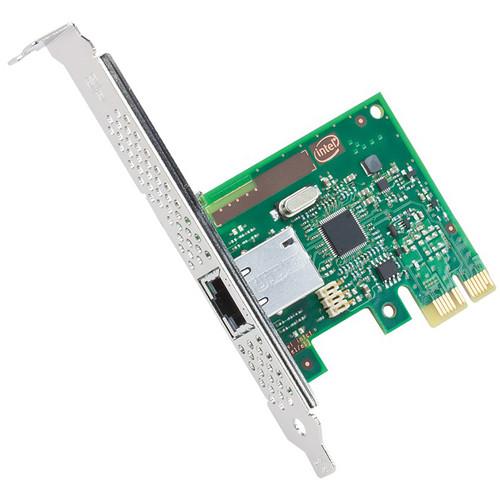 Contents of the user manual for the Intel Single-Port Gigabit Ethernet Server Adapter
- Product category: Network Interface Cards & Adapters Intel
- Brand: Intel
- Description and content of package
- Technical information and basic settings
- Frequently asked questions – FAQ
- Troubleshooting (does not switch on, does not respond, error message, what do I do if...)
- Authorized service for Intel Network Interface Cards & Adapters
|
User manual for the Intel Single-Port Gigabit Ethernet Server Adapter contain basic instructions
that need to be followed during installation and operation.
Before starting your appliance, the user manual should be read through carefully.
Follow all the safety instructions and warnings, and be guided by the given recommendations.
User manual is an integral part of any Intel product,
and if it is sold or transferred, they should be handed over jointly with the product.
Following the instructions for use is an essential prerequisite for protecting
health and property during use, as well as recognition of liability on the part of the manufacturer
for possible defects should you make a warranty claim. Download an official Intel user manual in which you will find instructions on how to install, use, maintain and service your product.
And do not forget – unsuitable use of a Intel product will considerably shorten its lifespan!
|
Product description The Single-Port Gigabit Ethernet Server Adapter I210 (Single Pack) from Intel is a low-halogen PCIe 10/100/1000 Ethernet adapter, designed for entry-level servers and audio-video applications. It offers innovative power management features, including Energy Efficient Ethernet (EEE), DMA Coalescing, ultra-compact design, and a ventilated bracket for increased efficiency and reduced power consumption. It supports PCIe Gen 2.1 (2.5 GT/s) and IEEE 802.1Qav Audio-Video Bridging (AVB) for tightly controlled media stream synchronization, buffering, and reservation. The I210 Ethernet Controller supports IEEE 802.1Qav Audio-Video Bridging (AVB) for customers requiring tightly controlled media stream synchronization, buffering, and reservation. 802.1Qav is part of the AVB specification, which provides a way to bounded latency and latency variation for time sensitive traffic. AVB includes timing and synchronization for time specific applications, (802.1AS) Stream Reservation (SR) protocol, to guarantee the resources needed for Audio/Video (AV) streams (802.1Qat). It also includes forwarding and queuing enhancements for time sensitive streams (802.1Qav). The adapter is low halogen and completely lead-free to reduce the environmental impact. It maximizes airflow and cooling with a ventilated bracket. This server adapter contains four transmit and four receive queues. These queues offer ECC memory for improved data reliability. The adapter efficiently manages packets with minimum latency by combining parallel and pipelined logic architectures, optimized for these independent transmit and receive queues. These queues, combined with Receive Side Scaling (RSS) and Message Signal Interrupt Extension (MSI-X) support, optimize the performance on servers with multi-core processors. Energy Efficient Ethernet (EEE) reduces the power consumption of an Ethernet connection during periods of low network activity by negotiating with a compliant EEE switch port to transition to a Low Power Idle (LPI) state. EEE is supported for both 1000BASE-T and 100BASE-TX. DMA request is initiated to place the packet into host (or server) memory, when a packet arrives at the adapter. This transaction wakes up the processor, memory, and other system components from a lower power state in order to perform the tasks required to handle the incoming packet. Based on the configurable DMAC settings, incoming packets are buffered momentarily before any DMA calls are made. This enables the controller to intelligently identify opportunities to batch multiple packets together, so that when components are wakened from lower power states, they can efficiently handle the batched packets at the same time. It also enables the platform components to remain in lower power states longer, which can reduce platform energy consumption. DMAC synchronizes DMA calls across all controller ports to ensure maximum power savings. Ethernet Features - Audio-Video Bridging (AVB) Support (802.1Qav)
- Dedicated Tx and Rx queues for AVB traffic
- Supports forwarding and queuing enhancements for time-sensitive streams
- Supports time-based transmission
- IEEE 802.3 Auto-Negotiation
- Automatic link configuration for speed duplex and flow control
- Compliant with 1 Gb/s Ethernet IEEE 802.3, 802.3u, 802.3ab PHY Specifications
- Robust operation over installed base of Cat 5 twisted-pair cabling
- Integrated PHY for 10/100/1000 Mb/s for Multi-Speed, Full, and Half-Duplex
- Smaller footprint and lower power dissipation compared to multiple discrete MAC and PHYs
- IEEE 802.3x and IEEE 802.3z Compliant
- IEEE 802.3x and IEEE 802.3z compliant flow control support, with software-controllable Rx thresholds and Tx pause frames
- Local control of network congestion levels
- Frame loss reduced from receive overruns
- Automatic Cross-Over Detection Function (MDI/MDI-X)
- The PHY automatically detects which application is being used and configures itself accordingly
- IEEE 1588 Protocol and 802.1AS Implementation
- Time-stamping and synchronization of time sensitive applications
- Distribute common time to media devices
Power Management - IEEE 802.3az
- Power consumption by the PHY is reduced by 50% approximately
- Link transitions to Low Power Idle (LPI) state as defined in the IEEE 802.3az standard
- DMA Coalescing
- Reduces platform power consumption by coalescing, aligning, and synchronizing DMA
- Enables synchronizing port activity and power management of memory, CPU and RC internal circuitry
- Smart Power Down (SPD) at S0 No Link/Sx No Link
- PHY powers down circuits and clocks that are not required for detection of link activity
- Active State Power Management (ASPM)
- Optionality Compliance bit enables ASPM or runs ASPM compliance tests to support entry to L0s
- LAN Disable Function
- Option to disable the LAN port and/or PCIe function. Disabling just the PCIe function but keeping the LAN port that resides on it fully active (for manageability purposes and BMC pass-through traffic)
Full Wake up Support - Advanced Power Management (APM) Support
- Designed to receive a broadcast or unicast packet with an explicit data pattern (Magic Packet), and assert a signal to wake up the system
- Advanced Configuration and Power Interface (ACPI) Specification v2.0c
- PCIe power management based wake-up, that can generate system wake-up events from a number of sources
- Magic packet wake-up enabled with unique MAC address
- ACPI Register Set and Power Down Functionality Supporting D0/D3 States
- A power-managed link speed control lowers link speed (and power) when high link performance is not required
- MAC Power Management Controls
- Power management controls in the MAC/PHY enable the device to enter a low-power state
- Low Power Link Up - Link Speed Control
- Enables a link to come up at low-speed in cases, where the power is more important than the performance
- Power Management Protocol Offload (Proxying)
- Avoid spurious wake-up events and reduce system power consumption, when the device is in D3 low power state, and system is in S3 or S4 low power states
Stateless Offloads and Performance Features - TCP/UDP, IPv4 Checksum Offloads (Rx/Tx/Large-Send), Extended Tx Descriptors
- Checksum and segmentation capability extended to new standard packet type
- IPv6 Support for IP/TCP and IP/UDP Receive Checksum Offload
- It improves CPU usage
- Transmit Segmentation Offloading (TSO) (IPv4, IPv6)
- Increased throughput and lower processor usage
- Interrupt Throttling Control
- Limits maximum interrupt rate and improves CPU usage
- Legacy and Message Signal Interrupt (MSI)
- Interrupt mapping
- Message Signal Interrupt Extension (MSI-X)
- Dynamic allocation of up to 5 vectors per port
- Intelligent Interrupt Generation
- Enhanced software device driver performance
- Receive Side Scaling (RSS) for Windows
- Up to four queues per port
- Scalable I/O for Linux Environments (IPv4, IPv6, TCP/UDP)
- Improves the system performance related to handling of network data on multiprocessor systems
- Jumbo Frames
- Support for packets up to 9.5KB and enables faster, and more accurate throughput of data
- Low Latency Interrupts
- Based on the sensitivity of incoming data, the controller can bypass the automatic moderation of time intervals between the interrupts
- Header/Packet Data Split in Receive
- Helps the driver to focus on the relevant part of the packet without the need to parse it
- PCIe v2.1 TLP Processing Hint Requester
- Provides hints on a per transaction basis to facilitate optimized processing
Remote Boot Option Features - Preboot eXecution Environment (PXE) Flash Interface Support
- Enables system boot up via the EFI (32 and 64-bit)
- Flash interface for PXE 2.1 option ROM
- Intel iSCSI Remote Boot for Windows, Linux, and VMware
- Enables system boot up via iSCSI
- Provides additional network management capability
- Intel Boot Agent Software
- Enables networked computer to boot using a program code image supplied by a remote server, complies with the Preboot eXecution Environment (PXE) version 2.1 specification 1
Please Note: Linux boot via PXE or BOOTP, Windows Deployment Services, or UEFI close - Descriptor Ring Management Hardware for Transmit and Receive
- Optimized descriptor fetch and write-back for efficient system memory, and PCIe bandwidth usage
Manageability Features - DMTF Network Controller Sideband Interface (NC-SI) Pass-Through
- Supports pass-through traffic between BMC and controller's LAN functions
- Meets RMII specification, revision 1.2 as a PHY-side dev
- Intel System Management Bus (SMBus) Pass-Through
- Enables BMC to configure the controller's filters and management related capabilities
- Management Component Transport Protocol (MCTP) Over SMBus and PCIe
- Used for baseboard management controller (BMC) communication between add-in devices
- OS2BMC Traffic Support
- Transmission and reception of traffic internally to communicate between the OS and local BMC
- Private OS2BMC Traffic Flow
- BMC may have its own private connection to the network controller and network flows are blocked
- Firmware Based Thermal Management
- Can be programmed via the BMC to initiate thermal actions and report thermal occurrences
- IEEE 802.3 MII Management Interface
- Enables the MAC and software to monitor and control the state of the PHY
- MAC/PHY Control and Status
- Enhanced control capabilities through PHY reset, link status, duplex indication, and MAC Dx power state
- Watchdog Timer
- Defined by the FLASHT register to minimize flash updates
- Extended Error Reporting
- Messaging support to communicate multiple types/severity of errors
- Controller Memory Protection
- Main internal memories are protected by Error Correcting Code (ECC) or parity bits
- Vital Product Data (VPD) Support
- Support for VPD memory area
UPC: 735858257817 In the Box Intel Single-Port Gigabit Ethernet Server Adapter I210 (Single Pack) Low-Profile Bracket Limited Lifetime Warranty Table of Contents
|
Upload User Manual
Have you got an user manual for the Intel Single-Port Gigabit Ethernet Server Adapter I210 in electronic form? Please send it to us and help us expand our library of instruction manuals.
Thank you, too, on behalf of other users.
To upload the product manual, we first need to check and make sure you are not a robot. After that, your "Submit Link" or "Upload File" will appear.
Technical parametersIntel I210 T1 Specs | Controller | Processor: Intel Ethernet Controller I210 | | Connector | 1 x RJ-45 | | IEEE Standards/Network Topology | EEE 802.3/10BASE-T, 100BASE-TX, 1000BASE-T | | Cabling | Category-3 or higher for 10BASE-T operation
Category-5 or higher for 100BASE-TX operation
Category-5e or higher for 1000BASE-T operation | | Data Transfer Rate | 10/100/1000 Mb/s | | Bus Type | PCIe 2.1 (2.5 GT/s) | | Bus Width | 1-lane PCIe, operable in x1 or greater slots | | Interrupt Levels | INTA, INTB, INTC, INTD, MSI, MSI-X | | Power Consumption | Active: 0.81 W (typical) | | Hardware Certifications | FCC B, UL CE, VCCI, BSMI, CTICK, KCC | | LED Indicators | Link/Activity LED:
Off - No Link
On - Link
Blinking - Activity
Speed LED:
Not illuminated - 10 Mb/s
Green - 100 Mb/s
Amber - 1 Gb/s | | Temperature | Operating: 32 to 131°F (0 to 55°C)
Storage: -40 to 158°F (-40 to 70°C) | | Relative Humidity | Operating: 90% (non-condensing) at 95°F (35°C) | | End Bracket Height | Full-Height: 4.7" (12.0 cm)
Low-Profile: 3.1" (8.0 cm) | | Dimensions (L x W) | 2.6 x 0.7" (6.7 x 1.8 cm) | | | | Package Weight | 0.25 lb | | Box Dimensions (LxWxH) | 6.8 x 5.7 x 1.2" |
Rating80% users recommend this product to others. And what about you?

This product has already been rated by 27 owners. Add your rating and experience with the product.
Discussion
 Ask our technicians if you have a problem with your settings,
or if anything is unclear in the user manual you have downloaded.
You can make use of our moderated discussion.
The discussion is public and helps other users of our website who may be encountering similar problems.
Ask our technicians if you have a problem with your settings,
or if anything is unclear in the user manual you have downloaded.
You can make use of our moderated discussion.
The discussion is public and helps other users of our website who may be encountering similar problems.
The discussion is empty - enter the first post
Post a new topic / query / comment:
|
|
|
| Request for user manual |
You can’t find the operation manual you are looking for? Let us know and we will try to add the missing manual:
I’m looking for a manual / Request for manual
Current requests for instruction manuals:
Call Of Duty World War Two For Xbox...
controller stratus XL...
stratus XL...
smart whatch serie S11 42mm...
Allen & Heath SQ-6 manual...
|
| Discussion |
Latest contributions to the discussion:
AEW R 4100
Name: MAURICIO ANGARITA
Audio-Technica AEW-R4100 UHF Diversity Receiver for
AEW R 4100 has the mute function blocked and does not allow audio to pass. I tried several times to turn off the mute from the transmitter but it does nothing, the mute stays on. Solution?
Thank you...
Instructions for assembling the 2015 Forecast Image Master Consoles GC3-A
Name: mike elam
Forecast Consoles GC3-A ImageMaster Editing Console
Looking for instructions for assembling this console. ...
EMPTY TONER ERROR MESSAGE AFTER REPLACING TONER
Name: LINDA BAD YELLOW EYES
Brother TN223BK Standard-Yield Toner
I HAD TO CHANGE OUT ALL THREE TONERS DUE TO LEAKS IN THE YELLOW AND CYAN. AFTER I REPLACED THEM, THE MACHINE KEEPS GIVING ME AN EMPTY TONER ERROR MESSAGE. HELP!!...
PS480D 20/24 pin Switching 480W Power Supply
Name: swkargo
Logisys 480W Power Supply
This item states in can run -5vdc .It is NOT listed on the board or I beleive is r4 is missing the resitior. Any body have thid issue. Shawn
...
Help needed
Name: Ann Carter
SanDisk 1TB Extreme Portable USB 3.1
When I click the link to download the user manual for my Sandisk Extreme external hard drive, it gives me the manual for the LG Cricket. Can you please change the link so I can download the Sandisk manual and begin using this drive? Thank you....
|
|


