|
User Manual for Intel X520 Ethernet Converged Network Adapter Click to enlarge the picture
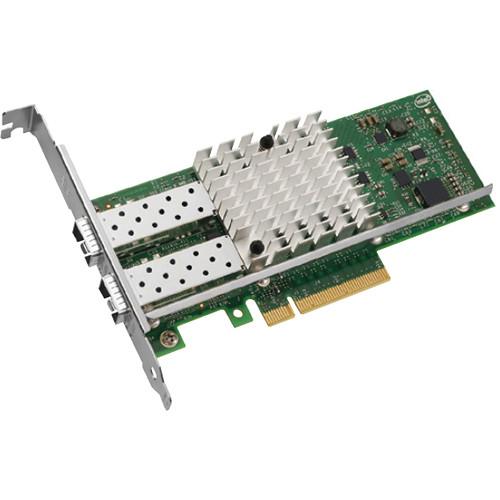 Contents of the user manual for the Intel X520 Ethernet Converged Network Adapter
- Product category: Network Interface Cards & Adapters Intel
- Brand: Intel
- Description and content of package
- Technical information and basic settings
- Frequently asked questions – FAQ
- Troubleshooting (does not switch on, does not respond, error message, what do I do if...)
- Authorized service for Intel Network Interface Cards & Adapters
|
User manual for the Intel X520 Ethernet Converged Network Adapter contain basic instructions
that need to be followed during installation and operation.
Before starting your appliance, the user manual should be read through carefully.
Follow all the safety instructions and warnings, and be guided by the given recommendations.
User manual is an integral part of any Intel product,
and if it is sold or transferred, they should be handed over jointly with the product.
Following the instructions for use is an essential prerequisite for protecting
health and property during use, as well as recognition of liability on the part of the manufacturer
for possible defects should you make a warranty claim. Download an official Intel user manual in which you will find instructions on how to install, use, maintain and service your product.
And do not forget – unsuitable use of a Intel product will considerably shorten its lifespan!
|
Product description The Intel X520 Ethernet Converged Network Adapter is a dual and single-port 10 Gigabit SFP+ adapter that provides flexibility and scalability in virtual and unified storage environments. Powered by Intel’s third-generation 10 GbE network controller, the Intel Ethernet 82599 10 Gigabit Ethernet Controller, the X520 adapter addresses the demanding needs of the next-generation data center by providing virtualization features, flexibility for LAN and SAN networking, and proven, reliable performance. The adapter solves networking bottlenecks in virtualized environments. It enables network-intensive applications to achieve the performance expected in a virtualized environment. Whether the physical port is configured in an emulation mode using the virtual switch in the Virtual Machine Monitor (VMM), or is directly assigned to a virtual machine, the adapter delivers excellent output. In the emulation mode, Intel’s I/O technology, Virtual Machine Device queues1 (VMDq) optimizes network performance by offloading data sorting and copying from the software Virtual Switch in the VMM to the Intel Ethernet 82599 10 Gigabit Controller. This configuration is well suited for a large number of VMs running standard applications that have limited bandwidth and latency requirements. For mission-critical applications, where dedicated I/O is required for maximum network performance, users can assign a dedicated virtual adapter port to a VM. Using the PCI-SIG SR-IOV capability on the adapter provides direct VM connectivity and data protection across VMs. SR-IOV technology enables the data to bypass the software virtual switch and provides near-native performance. It assigns either physical or virtual I/O ports to individual VMs directly. This technology is used for applications that demand high I/O throughput and low latency performance such as database, storage, financial and other applications. The adapter delivers the same functionality and throughput as 10 dual-port, one gigabit adapter, saving cost, power, and complexity. It lowers your data center total cost of ownership (TCO) by providing the ability to route LAN and SAN traffic over a single fabric. It offers FCoE hardware acceleration to provide performance comparable to FC HBAs. The adapter supports Data Center Bridging, also known as Converged Enhanced Ethernet (CEE), which enables customers to configure traffic classes and priorities to deliver a lossless Ethernet fabric. It reduces TCO by eliminating redundant fabrics and saves the cost of expensive FC HBAs and FC switch ports. The adapter provides complete support for proven native OS and VMM iSCSI initiators as well as iSCSI boot. It delivers everything; 10 Gigabit LAN, FCoE, and iSCSI; truly delivering on the promise of unified networking. The adapter supports IPsec offload for Microsoft’s Network Access Protection (NAP), Active Directory, and future security capabilities in Windows 7. The adapter enables customers to run a secure network environment without sacrificing performance. The PCIe v2.0 (5 GT/s) support enables customers to take full advantage of 10 GbE by providing a maximum of 20 Gb/s bi-directional throughput per port on a single dual port card. Support for technologies such as multiple queues, receive-side scaling, multiple MSI-X vectors, and Low Latency Interrupts enable the X520 adapter to provide high-performance, 10 Gigabit connectivity in multi-core server blades. These technologies distribute network processing across multiple CPU cores, improving overall performance. - Energy-efficient design for next-generation 10 Gigabit performance and multi-core processors
- Adapter with SFP+ connection supports 10GBASE-SR, 10GBASE-LR and SFP+ Copper Direct Attach physical media
- Low-profile design enables higher bandwidth and throughput from standard and low-profile PCIe slots and servers
- Increases performance on multi-processor systems by efficiently balancing network loads across CPU cores when used with Receive-Side Scaling (RSS) from Microsoft or Scalable I/O on Linux
- Provides centralized storage area network (SAN) management at a lower cost than other iSCSI solutions
- Includes FCoE Boot and Data Center Bridging
- Enables widespread deployment
- Complies with the European Union directive 2002/95/EC to reduce the use of hazardous materials
- Intel PROSet Utility for Windows Device Manager provides point-and-click management of individual adapters, advanced adapter features, connection teaming, and virtual local area network (VLAN) configuration
- Time Sync enables networked Ethernet equipment to synchronize internal clocks according to a network master clock; endpoint can then acquire an accurate estimate of the master time by compensating for link latency
- Intel Direct Cache Access (DCA) enables the adapter to pre-fetch the data from memory, avoiding cache misses and improving application response time
- MSI-X support minimizes the overhead of interrupts and also allows load-balancing of interrupt handling between multiple cores/CPUs
- Low Latency Interrupts based on the sensitivity of the incoming data, the adapter can bypass the automatic moderation of time intervals between the interrupts
- Header Splits and Replication in receive helps the driver focus on the relevant part of the packet without the need to parse it
- Network packet handling without waiting or buffer overflow providing efficient packet prioritization
- Lower processor usage and checksum and segmentation capability extended to new standard packet type
- Receive and Transmit Side Scaling for Windows environment and Scalable I/O for Linux environments enables the direction of the interrupts to the processor cores in order to improve the CPU usage rate
- Offloads IPsec capability onto the adapter instead of the software to significantly improve I/O throughput and CPU usage (for Windows 2008 Server, Vista, Windows 2008 Server R2, and Windows 7)
- VMDq
- Offloads the data-sorting functionality from the Hypervisor to the network silicon, improving data throughput and CPU usage, provides QoS feature on the Tx data by providing round-robin servicing and preventing head-of-line blocking, and sorts based on MAC addresses and VLAN tags
- Next-Generation VMDq1 (64 queues per port)
- Enhanced QoS feature by providing weighted round-robin servicing for the Tx data
Provides loopback functionality, where data transfer between the virtual machines within the same physical server need not go out to the wire and come back in, improving throughput and CPU usage
Supports replication of multicast and broadcast data - PC-SIG SR-IOV Implementation (64 virtual functions per port)
- Provides an implementation of the PCI-SIG standard for I/O Virtualization. The physical configuration of each port is divided into multiple virtual ports. Each virtual port is assigned to an individual virtual machine directly by bypassing the virtual switch in the Hypervisor, resulting in near-native performance.
Integrated with Intel® VTI for Directed I/O (VT-d) to provide data protection between virtual machines by assigning separate physical addresses in the memory to each virtual machine. - Virtual Machine Load Balancing (VLMB)
- Virtual Machines Load Balancing (VMLB) provides traffic load balancing (Tx and Rx) across Virtual Machines bound to the team interface, as well as fault tolerance in the event of switch, port, cable, or adapter failure.
- Advanced Packet Filtering
- 24 exact-matched packets (unicast or multicast)
4096-bit hash filter for unicast and multicast frames
Lower processor usage
Promiscuous (unicast and multicast) transfer mode support
Optional filtering of invalid frames - VLAN support with VLAN tag insertion, stripping and packet filtering for up to 4096 VLAN tags
UPC: 735858260763 In the Box Intel X520 Ethernet Converged Network Adapter Limited Lifetime Warranty Table of Contents
|
Upload User Manual
Have you got an user manual for the Intel X520 Ethernet Converged Network Adapter in electronic form? Please send it to us and help us expand our library of instruction manuals.
Thank you, too, on behalf of other users.
To upload the product manual, we first need to check and make sure you are not a robot. After that, your "Submit Link" or "Upload File" will appear.
Technical parametersIntel E10G42BTDABLK Specs | Connector | One or two LC fiber-optic connectors, SFP+ Direct Attach cables (E10G42BTDA) | | Network Standards | IEEE 802.3: 10GBASE-SR (E10G41BFSR, E10G42BFSR), 10GBASE-LR (E10G41BFLR)
SFF-8431: 10GSFP+Cu (Direct Attach) (E10G42BTDA) | | Adapter | Intel PROSet Utility for easy configuration and management
Plug and play specification support: standard
Receive Side Scaling: Multiple Rx queues enable the efficient distribution of network receive processing across multiple CPUs in multiprocessor systems
Direct Cache Access (DCA): The I/O device activates a pre-fetch engine in the CPU that loads the data into the CPU cache ahead of time, before use, eliminating cache misses and reducing CPU load | | Data Rate Supported Per Port | Optical: 1 GbE/10 GbE, Direct Attach: 10 GbE | | Bus Type | PCI Express 2.0 (5 GT/s) | | Bus Width | 4-lane PCI Express and 8-lane PCI Express | | Interrupt Levels | INTA, MSI, MSI-X | | Hardware Certifications | FCC B, UL, CE, VCCI, BSMI, CTICK, KCC | | Controller-Processor | Intel 82599 Ethernet Controller | | Compatibility | Windows 7, Linux SLES 11 SP1, Windows Vista SP2, Windows Server 2003 SP2, Windows Server 2008 SP2, Windows Server 2008 SP2 Core, Linux Stable Kernel version 2.6, Linux RHEL 4.8, Linux RHEL 5.5, Linux SLES 10 SP3, Linux SLES 11, FreeBSD 8.0 | | Power Consumption | Dual-port 10GBASE-SR/1000BASE-SX: Maximum: 6.8 W, Typical: 6.5 W
Dual-port 10GBASE-LR/1000BASE-LX: Maximum: 7.0 W, Typical: 6.6 W
Dual-port direct attached twinax: Maximum: 6.2 W, Typical: 5.8 W
Single-port 10GBASE-SR/1000BASE-SX: Maximum: 4.8 W, Typical: 4.5 W
Single-port 10GBASE-LR/1000BASE-LX: Maximum: 4.8 W, Typical: 4.5 W
Single-port direct attached twinax: Maximum: 4.6 W, Typical: 4.3 W | | Operating Temperature | 32 to 131°F (0 to 55°C) | | Storage Temperature | -40 to 158°F (-40 to 70°C) | | Air Flow | Minimum of 100 LFM required | | Storage Humidity | Maximum: 90% non-condensing relative humidity at 95°F (35°C) | | LED Indicators | Link (solid) and Activity (blinking) Link Speed (green = 10 Gb/s; yellow = 1 Gb/s) | | Length | 5.73" (14.55 cm) measured without PCIe bracket | | | | Package Weight | 0.4 lb | | Box Dimensions (LxWxH) | 9.3 x 7.2 x 4.3" |
Rating90% users recommend this product to others. And what about you?

This product has already been rated by 13 owners. Add your rating and experience with the product.
Discussion
 Ask our technicians if you have a problem with your settings,
or if anything is unclear in the user manual you have downloaded.
You can make use of our moderated discussion.
The discussion is public and helps other users of our website who may be encountering similar problems.
Ask our technicians if you have a problem with your settings,
or if anything is unclear in the user manual you have downloaded.
You can make use of our moderated discussion.
The discussion is public and helps other users of our website who may be encountering similar problems.
The discussion is empty - enter the first post
Post a new topic / query / comment:
|
|
|
| Request for user manual |
You can’t find the operation manual you are looking for? Let us know and we will try to add the missing manual:
I’m looking for a manual / Request for manual
Current requests for instruction manuals:
Call Of Duty World War Two For Xbox...
controller stratus XL...
stratus XL...
smart whatch serie S11 42mm...
Allen & Heath SQ-6 manual...
|
| Discussion |
Latest contributions to the discussion:
AEW R 4100
Name: MAURICIO ANGARITA
Audio-Technica AEW-R4100 UHF Diversity Receiver for
AEW R 4100 has the mute function blocked and does not allow audio to pass. I tried several times to turn off the mute from the transmitter but it does nothing, the mute stays on. Solution?
Thank you...
Instructions for assembling the 2015 Forecast Image Master Consoles GC3-A
Name: mike elam
Forecast Consoles GC3-A ImageMaster Editing Console
Looking for instructions for assembling this console. ...
EMPTY TONER ERROR MESSAGE AFTER REPLACING TONER
Name: LINDA BAD YELLOW EYES
Brother TN223BK Standard-Yield Toner
I HAD TO CHANGE OUT ALL THREE TONERS DUE TO LEAKS IN THE YELLOW AND CYAN. AFTER I REPLACED THEM, THE MACHINE KEEPS GIVING ME AN EMPTY TONER ERROR MESSAGE. HELP!!...
PS480D 20/24 pin Switching 480W Power Supply
Name: swkargo
Logisys 480W Power Supply
This item states in can run -5vdc .It is NOT listed on the board or I beleive is r4 is missing the resitior. Any body have thid issue. Shawn
...
Help needed
Name: Ann Carter
SanDisk 1TB Extreme Portable USB 3.1
When I click the link to download the user manual for my Sandisk Extreme external hard drive, it gives me the manual for the LG Cricket. Can you please change the link so I can download the Sandisk manual and begin using this drive? Thank you....
|
|


