|
User Manual for iOptron IEQ45-AZ Pro Dual EQ AZ GoTo Mount with 2" Tripod Click to enlarge the picture
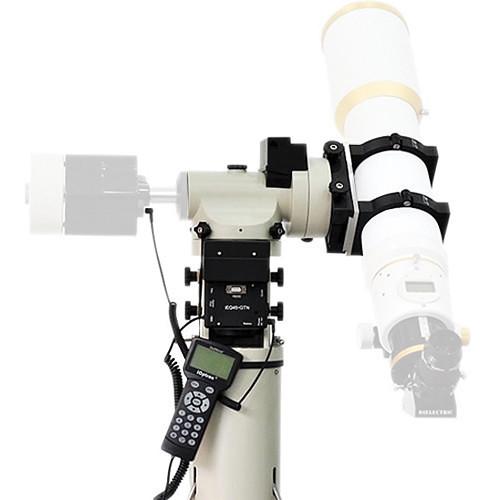 Contents of the user manual for the iOptron IEQ45-AZ Pro Dual EQ AZ
- Product category: Mounts iOptron
- Brand: iOptron
- Description and content of package
- Technical information and basic settings
- Frequently asked questions – FAQ
- Troubleshooting (does not switch on, does not respond, error message, what do I do if...)
- Authorized service for iOptron Mounts
|
User manual for the iOptron IEQ45-AZ Pro Dual EQ AZ contain basic instructions
that need to be followed during installation and operation.
Before starting your appliance, the user manual should be read through carefully.
Follow all the safety instructions and warnings, and be guided by the given recommendations.
User manual is an integral part of any iOptron product,
and if it is sold or transferred, they should be handed over jointly with the product.
Following the instructions for use is an essential prerequisite for protecting
health and property during use, as well as recognition of liability on the part of the manufacturer
for possible defects should you make a warranty claim. Download an official iOptron user manual in which you will find instructions on how to install, use, maintain and service your product.
And do not forget – unsuitable use of a iOptron product will considerably shorten its lifespan!
|
Product description Conceived, designed, and built for entry-level to intermediate astrophotographers, the IEQ45-AZ Pro Dual EQ/AZ GoTo Mount from iOptron is outfitted with precision stepper motors, zero-backlash gears, the ability for you to program out the Periodic Error Correction (PEC) common to all worm gears, and a computer controller to provide an ideal platform for imaging. Its unique mounting capabilities allow it to be set up in an equatorial configuration for the smooth and accurate single-axis tracking required for long-exposure astrophotography, or as an alt-azimuth mount to make setup and alignment fast and easy so you can get observing quicker. An additional advantage of using the EQ mode for astrophotography, versus alt-az, is that when tracking in this configuration there is no field rotation, so the image won't shift over time, for clearer images without star streaks.The mount has a dual dovetail saddle that fits both Losmandy- and Vixen-style plates to make it compatible with the two most popular mounting configurations on the market. It has a maximum payload capacity of 45 pounds in EQ mode or 55 + 35 pounds when dual-mounted in alt-az mode, and it can easily hold large telescopes, counterweights, and accessories. A built-in 32-channel GPS receiver sends your date/time/location information directly to the Go2Nova hand controller, so the telescope can be set up quickly.The included dark-field illuminated AccuAligning polar axis scope installs through the body of the mount for accurate EQ alignment and alignment verification and correction during observation and imaging sessions.The dual-axis stepper motors are controlled by the Go2Nova hand controller. This system has an internal database of 358,000+ celestial objects, with 60 user-defined objects to program yourself. The hand controller has updatable firmware through the built-in serial port. With nine slew speeds and automatic tracking capabilities, finding and keeping objects centered in the field of view is easy no matter whether you're viewing the fast-moving Moon or much slower deep-space subjects. An adjustable-height stainless steel tripod is included for the mount and your telescope. - Mount
-
- Dual mount configuration: Mount a single optical tube assembly (OTA) in Equatorial mode to enable smooth and accurate single-axis tracking for long-exposure astroimaging; Alt-az mode allows for mounting one or two OTAs, with fast and accurate GoTo observations plus fast setup and alignment
- Payload capacity of 45 pounds, excluding counterweights, in EQ mode when properly balanced, or 55 pounds + 33 pounds in the dual-mount alt-az mode
- 6" Losmandy/Vixen dual saddle accepts the two most popular mounting plate options
- AccuAligning polar scope with dark-field illumination for easy and fast polar alignment
- Gear switches on both right ascension (RA) and declination (dec) axes enable convenient movement by hand
- Built-in 32-channel GPS receiver communicates accurate day/date/time/location information to the Go2Nova controller
- Accurate tracking with temperature-compensated crystal oscillator (TCXO)
- Integrated bubble level
- Two 11-pound counterweights to properly balance load in EQ mode
- Motors and Gears
-
- Precision 128x microstep stepper motor with 0.09 arcsecond accuracy for quiet, smooth, and precise GoTo capability with accurate tracking
- FlexiTouch, zero-gap RA and dec worm gears ensure perfect gear meshing with no backlash
- Precision 256-tooth RA and 228-tooth dec aluminum worm wheels
- Screw/worm-type latitude adjuster for precision adjustments, 5-70° range
- Slew speed and direction controlled via Go2Nova controller
- 110-240 VAC and 12 VDC car plug power adapters included
- Go2Nova 8407+ Hand Controller
-
- User-friendly menu-driven interface
- Tracking rates: Sidereal, Solar, Lunar, King's, and User-defined (variable from 0.99x to 1.01x sidereal)
- 9-speed slew control with quiet mode
- 358,000+ object database includes stars, constellations, and eight astronomical catalogs including Messier and NCG IC
- Alignment: Solar System, One-Star, Two-Star, Three-Star, Polar Iterate
- Permanent Periodic Error Correction (PPEC) removes inaccuracies inherent in gears and allows for more accurate tracking, especially for long-exposure astrophotography
- Enter specific RA and dec coordinates of objects for immediate GoTo
- 8-line, 21-character/line red-light backlit LCD screen
- Updatable firmware through built-in serial port
- Computer control with planetarium software
- Integrated ST-4 autoguiding port capable of reverse guiding with auto-protection
- Built-in heater for wider operating temperature range
- Database details:
- Solar System: Planets, Moon, and Sun
- 60 popular deep-sky objects with the common names
- All 110 Messier objects
- 7840 NGC catalog objects
- 5386 IC catalog objects
- 12,921 UGC catalog objects
- 30,642 MCG catalog objects
- 109 Caldwell catalog objects
- 4076 Abell catalog objects
- 400 Herschel catalog objects
- 195 named stars
- 210 binary stars
- 38,528 GCVS variable stars
- 258,997 SAO catalog objects
- 15 comets
- 116 asteroids
- 88 modern constellations with their names
- Up to 60 user-defined objects, including comets, to easily find your favorites
- Tripod
-
- 2" stainless steel legs
- 6" mounting platform
- Adjustable height of 30-52"
- Metal spikes on the feet ensure a firm foothold on soft or uneven ground
- Metal accessory tray
In the Box iOptron IEQ45-AZ Pro Dual EQ/AZ GoTo Mount with 2" Tripod Go2Nova 8407+ Hand Controller RS232 to RJ9 Cable 12 VDC Car/Vehicle Power Adapter xqbbyctvrddqaawvrb 2 x 11 lb Counterweight for iEQ45/CEM60 EQ Mounts Counterweight Shaft 2" Steel Tripod for iEQ45 and CEM60 Limited 2-Year Warranty Table of Contents
|
Upload User Manual
Have you got an user manual for the iOptron IEQ45-AZ Pro Dual EQ AZ GoTo Mount with 2" Tripod in electronic form? Please send it to us and help us expand our library of instruction manuals.
Thank you, too, on behalf of other users.
To upload the product manual, we first need to check and make sure you are not a robot. After that, your "Submit Link" or "Upload File" will appear.
Technical parametersiOptron 8000E-AZ Specs | Mount Type | Combination German equatorial and alt-azimuth | | Payload Capacity | EQ Mode: 45.0 lb / 20.4 kg
Dual-Mount, Alt-Az Mode: 55.0 lb / 25.0 kg + 33.0 lb / 15.0 kg | | Right Ascension Axis | Worm Wheel: 130mm-diameter, 256 teeth aluminum
Shaft: 50mm-diameter, steel
Bearing: 80mm-diameter ball bearing
Worm Gear: 17mm-diameter, brass | | Declination Axis | Worm Wheel: 116mm-diameter, 228 teeth aluminum
Shaft: 40mm-diameter, steel
Bearing: 68mm-diameter ball bearing
Worm Gear: 17mm-diameter, brass | | Motor | Dual 128x stepper motors
Resolution: 0.09 arcsecond | | Adjustment Range | Latitude: 5 to 70°
Azimuth: ±6° | | GPS | Internal 32-channel receiver | | GoTo Capability | Yes, Go2Nova 8407+ hand controller | | Polar Axis Scope | Yes, AccuAlign G2 polar scope with dark-field illumination | | Includes Tripod/Pier | Tripod with 2.0" (5.1 cm) diameter legs
Adjustable Height: 30.0 - 52.0" / 76.0 - 132.0 cm
Stainless steel leg sections | | Operating Temperature | -4 to 104°F / -20 to 40°C | | Power Requirement | 10 - 14 VDC, 2 A
Consumption: 0.45 A when tracking; 0.75 A using GoTo | | Dimensions | Not specified by manufacturer | | Weight | Mount: 25.0 lb / 11.3 kg
Tripod: 16.5 lb / 7.5 kg |
Rating100% users recommend this product to others. And what about you?

This product has already been rated by 54 owners. Add your rating and experience with the product.
Discussion
 Ask our technicians if you have a problem with your settings,
or if anything is unclear in the user manual you have downloaded.
You can make use of our moderated discussion.
The discussion is public and helps other users of our website who may be encountering similar problems.
Ask our technicians if you have a problem with your settings,
or if anything is unclear in the user manual you have downloaded.
You can make use of our moderated discussion.
The discussion is public and helps other users of our website who may be encountering similar problems.
The discussion is empty - enter the first post
Post a new topic / query / comment:
|
|
|
| Request for user manual |
You can’t find the operation manual you are looking for? Let us know and we will try to add the missing manual:
I’m looking for a manual / Request for manual
Current requests for instruction manuals:
Call Of Duty World War Two For Xbox...
controller stratus XL...
stratus XL...
smart whatch serie S11 42mm...
Allen & Heath SQ-6 manual...
|
| Discussion |
Latest contributions to the discussion:
AEW R 4100
Name: MAURICIO ANGARITA
Audio-Technica AEW-R4100 UHF Diversity Receiver for
AEW R 4100 has the mute function blocked and does not allow audio to pass. I tried several times to turn off the mute from the transmitter but it does nothing, the mute stays on. Solution?
Thank you...
Instructions for assembling the 2015 Forecast Image Master Consoles GC3-A
Name: mike elam
Forecast Consoles GC3-A ImageMaster Editing Console
Looking for instructions for assembling this console. ...
EMPTY TONER ERROR MESSAGE AFTER REPLACING TONER
Name: LINDA BAD YELLOW EYES
Brother TN223BK Standard-Yield Toner
I HAD TO CHANGE OUT ALL THREE TONERS DUE TO LEAKS IN THE YELLOW AND CYAN. AFTER I REPLACED THEM, THE MACHINE KEEPS GIVING ME AN EMPTY TONER ERROR MESSAGE. HELP!!...
PS480D 20/24 pin Switching 480W Power Supply
Name: swkargo
Logisys 480W Power Supply
This item states in can run -5vdc .It is NOT listed on the board or I beleive is r4 is missing the resitior. Any body have thid issue. Shawn
...
Help needed
Name: Ann Carter
SanDisk 1TB Extreme Portable USB 3.1
When I click the link to download the user manual for my Sandisk Extreme external hard drive, it gives me the manual for the LG Cricket. Can you please change the link so I can download the Sandisk manual and begin using this drive? Thank you....
|
|


