User Manual for IQinVision IQD30SVB7 Alliance-Mini H.264 Megapixel Dome IP Camera Click to enlarge the picture
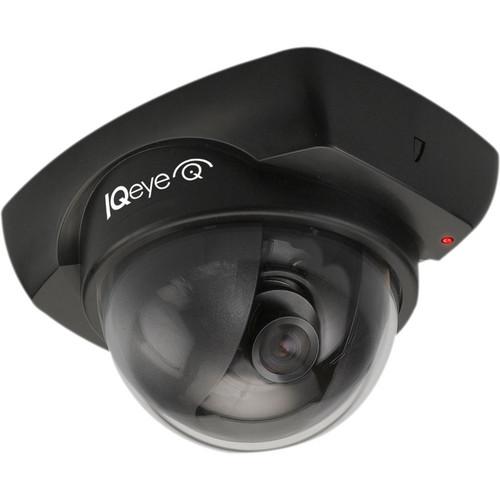 Contents of the user manual for the IQinVision IQD30SVB7 Alliance-Mini H.264 Megapixel Dome
- Product category: Wired IP Cameras IQinVision
- Brand: IQinVision
- Description and content of package
- Technical information and basic settings
- Frequently asked questions – FAQ
- Troubleshooting (does not switch on, does not respond, error message, what do I do if...)
- Authorized service for IQinVision Wired IP Cameras
|
User manual for the IQinVision IQD30SVB7 Alliance-Mini H.264 Megapixel Dome contain basic instructions
that need to be followed during installation and operation.
Before starting your appliance, the user manual should be read through carefully.
Follow all the safety instructions and warnings, and be guided by the given recommendations.
User manual is an integral part of any IQinVision product,
and if it is sold or transferred, they should be handed over jointly with the product.
Following the instructions for use is an essential prerequisite for protecting
health and property during use, as well as recognition of liability on the part of the manufacturer
for possible defects should you make a warranty claim. Download an official IQinVision user manual in which you will find instructions on how to install, use, maintain and service your product.
And do not forget – unsuitable use of a IQinVision product will considerably shorten its lifespan!
|
Product description The IQinVision IQD30SVB7 Alliance-Mini H.264 Megapixel Dome IP Camera offers good image quality in a tiny, versatile, and attractive package. With only 2.78” (70.61mm) in height, this camera is designed for discreet indoor use, and is ideal for retail, education, gaming, and healthcare environments. This lightweight and vandal-resistant camera can be easily mounted onto ceilings or walls, and true 3-Axis Gimbal, locking shroud, and Power over Ethernet features help save time and money on installation and maintenance. The Alliance-Mini camera also supports streaming audio, allowing 2-way communication between the camera and remote / monitoring locations. ONVIF- and PSIA-compliant APIs provide the flexibility to ensure compatibility with popular VMS platforms. - Resolutions up to HD 1080p
- H.264 main profile and MJPEG compression
- 3 to 6mm varifocal, wide-angle lens
- Two-way audio with built-in microphone
- Lightgrabber II low-light feature
- Power over Ethernet capable
- Direct-to-Storage feature
In the Box IQinVision IQD30SVB7 Alliance-Mini H.264 Megapixel Dome IP Camera IQD4-PB-5 IQeye Alliance-mini Pendant Mount Adapter (5 Pack, Black) IQD4-WB IQeye Alliance-mini Dome Wall Mount (Black) IQD-GBA Alliance Mini Dome Gang Box Adapter Limited 5-Year Warranty Table of Contents
|
Upload User Manual
Have you got an user manual for the IQinVision IQD30SVB7 Alliance-Mini H.264 Megapixel Dome IP Camera in electronic form? Please send it to us and help us expand our library of instruction manuals.
Thank you, too, on behalf of other users.
To upload the product manual, we first need to check and make sure you are not a robot. After that, your "Submit Link" or "Upload File" will appear.
Technical parametersIQinVision IQD30SV Specs | | | Compression | H.264 and MJPEG
JPEG Compression Quality Settings: User configurable | | Maximum Resolution | SD480p: 720 x 480 | | Rating | Megapixel Rating: 0.3 MP | | H.264 Profile | Main | | Sensor | 1/3" CMOS | | Lens | 1/3" M12 (format) | | Shutter Speed | 1/12,000
Auto / programmable / fixed | | Image Settings | Saturation, contrast, brightness, sharpness, Lightgrabber II | | Exposure | User configurable | | White Balance | Auto / programmable | | Backlight Compensation | Auto | | | | Motion Detection | User configurable windows | | Features | Time Lapse Recording: User configurable
On-Camera IQapps: IQaccess
Event-Based Recording: User configurable | | Flip and Rotate | 180°, horizontal, vertical | | Audio Support | 2-way G.711 PCM 8 kHz | | System Integration | ONVIF, PSIA, IQfinder, IQmanager, IQsentry, IQevent, Direct-to-Storage | | Network | Supported Protocols: TCP/IP, HTTP, HTTPS, DHCP, UDP, RTP, RTSP, DNS, ARP, ICMP, NTP, UpnP, ZeroConf, APIPA, UDP multicast, SNMP, FTP, SMTP, Telnet, CIFS
Password Protection: Secure multi-level | | | | Input Power | Power over Ethernet 802.3af class 1 | | Power Consumption | <3.8 W (typical) | | Lighting | AC Lighting: 50 / 60 Hz selectable | | Network Interface | RJ45 10Base-T / 100Base-TX | | Audio I/O | Built-in microphone, mic/line in, line out | | | | Certifications | FCC, CE, cUL | | Temperature Range | 32 to 104˚F (0 to 40˚C) | | Field of View | Wide: 55 to 93° | | Compatible Lenses | F1 Wide-Angle Lens 1/3" M12, 4.2 mm, F1.8
F2 Wide Angle Lens 1/3" M12, 2.8 mm, F2.6
F3 Telephoto Lens 1/3" M12, 8 mm, F1.8 | | Maximum Frame Rate | 60 fps | | Minimum Illumination | 0.1 lux (color) | | Dynamic Range | 74 dB | | Dimensions (H x W x D) | 2.78 x 3.54 x 4.53" (70.7 x 90 x 115 mm) | | Weight | SI: 8.92 oz (253 g)
SV: 10.51 oz (298 g) |
Rating90% users recommend this product to others. And what about you?

This product has already been rated by 76 owners. Add your rating and experience with the product.
Discussion
 Ask our technicians if you have a problem with your settings,
or if anything is unclear in the user manual you have downloaded.
You can make use of our moderated discussion.
The discussion is public and helps other users of our website who may be encountering similar problems.
Ask our technicians if you have a problem with your settings,
or if anything is unclear in the user manual you have downloaded.
You can make use of our moderated discussion.
The discussion is public and helps other users of our website who may be encountering similar problems.
The discussion is empty - enter the first post
Post a new topic / query / comment:
|
|


