User Manual for iZotope Vocal Chain Bundle - Software for Mixing & Producing Vocals Click to enlarge the picture
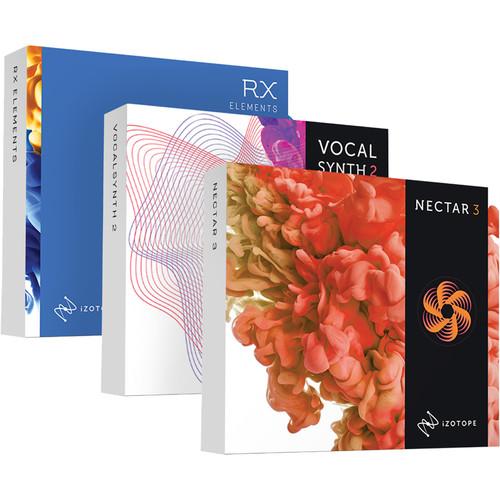 Contents of the user manual for the iZotope Vocal Chain Bundle - Software
- Product category: Virtual Processor Plug-Ins iZotope
- Brand: iZotope
- Description and content of package
- Technical information and basic settings
- Frequently asked questions – FAQ
- Troubleshooting (does not switch on, does not respond, error message, what do I do if...)
- Authorized service for iZotope Virtual Processor Plug-Ins
|
User manual for the iZotope Vocal Chain Bundle - Software contain basic instructions
that need to be followed during installation and operation.
Before starting your appliance, the user manual should be read through carefully.
Follow all the safety instructions and warnings, and be guided by the given recommendations.
User manual is an integral part of any iZotope product,
and if it is sold or transferred, they should be handed over jointly with the product.
Following the instructions for use is an essential prerequisite for protecting
health and property during use, as well as recognition of liability on the part of the manufacturer
for possible defects should you make a warranty claim. Download an official iZotope user manual in which you will find instructions on how to install, use, maintain and service your product.
And do not forget – unsuitable use of a iZotope product will considerably shorten its lifespan!
|
Product description Designed to help you mix vocals quickly and effectively, the iZotope Vocal Chain Bundle is a package of software available for download. It includes Nectar 3, a channel strip intended to polish and produce your vocals with equalization, as well as compression, saturation, pitch-correction, harmony effects, and more.
All of these processes are tailored to vocal applications. One handy feature is the Vocal Assistant, which automatically analyzes and processes vocal material. Another handy feature is Follow EQ, which automatically tracks resonances as they move through the frequency spectrum, attenuating them accordingly.
Also included is VocalSynth 2, a polyphonic synthesizer that can be used as a vocoder, talkbox, and more. Using VocalSynth 2, you can turn vocal tracks into synthesizers that have their own sound. Conversely, you can give guitars, synths, and other instruments words, piping in the formants of a lead vocal to sculpt the timbre of the instrument.
Rounding out the Vocal Chain Bundle are: RX Elements, for repairing common noise issues in vocal recordings; RX Breath Control, for minimizing unnecessary breaths; and Melodyne 4 Essential, an industry-stalwart pitch correction software for tuning notes. Note: This is an upgrade item from Nectar 3, Music Production Suite 1, or Music Production Suite 2. You must have previously purchased one of these items to qualify for this pricing. - Nectar 3 - Vocal Production Channel Strip Software for (Download) Available for download, iZotope Nectar 3 is a channel strip plug-in developed for vocal mixing and polishing. Compression, equalization, saturation, vocal harmonies, and more are provided in the channel strip.
Nectar 3 takes many features available in version 2 of Nectar and expands upon them, updating them both in aesthetics and processing. Many new features are offered in Nectar 3, such as a Vocal Assistant, which creates a custom preset for your specific vocal after analyzing it.
You'll also note the unmask feature, which carves out of the way any competing instruments, letting the vocal shine through the mix. A dynamic EQ has been added that can follow unwelcome resonances as they move up and down the frequency range, intelligently curtailing nasty blooms of sound so you don't have to automate them yourself, or split them onto different tracks.The new Dimension module provides chorus, flanging, and more, while Reverb and Delay modules have been redesigned to give you new and exciting kinds of delay. The Harmony section has been updated. Automatic Level Mode, on the input fader, quickly adjusts the levels of your vocals in a transparent manner, mitigating the need for corrective dynamics processing. A limiter, at the end of the chain, can ensure you don't go over your desired level and can also impart a meaty feeling upon the sound.
Included with Nectar 3 are several other plug-ins that are quite helpful. Melodyne is world-renowned pitch-correction software, and Nectar 3 comes with Melodyne 4 Essential. RX 7 Breath Control is on hand for taking out unwanted breaths. Relay ensures inter-plug-in communication: put Relay on a guitar track that competes with the vocal's midrange, and the Vocal Assistant can now target that guitar, changing its EQ to keep it out of the vocal's way.
This software is compatible with Mac and Windows platforms. It is included in AU, AAX, VST, and RTAS formats. - New Features over Version 2
-
- Vocal Assistant provides custom presets utilizing machine learning technology to help your vocals fit in the mix
- Unmask carves away competing mix elements directly from Vocal Assistant’s menu screen, allowing your vocals to cut through the mix
- Dynamic EQ with Follow EQ Mode tracks down pesky resonances and removes them in real time
- Auto Level Mode adjusts the level of vocals before any processing, minimizing the need for corrective dynamics or riding the fader
- Nectar 3 utilizes inter-plug-in communication to interface with other iZotope plug-ins in your session, seamlessly addressing mix issues, tonal balance, masking, and more
- Use the included Relay module to use Nectar 3's unmasking mode with tracks that don't have iZotope plug-ins on them
- RX 7 Breath Control is included for reducing unwanted breaths without sacrificing audio quality
- Melodyne 4 Essential for renowned time- and pitch-correction
- Hundreds of professionally designed presets for music and dialogue applications
- Redesigned and Updated Modules
-
- Corrective and Creative Dynamic EQs
- Compression
- Harmony
- Pitch
- De-Esser
- Saturation
- Reverb
- Gate
- Dimension (chorus and other modulations)
- Improvements in the Following Areas
-
- Delay: Two brand new modes and new independent controls for stereo support
- De-Esser: New interactive threshold design experience that can be auto-set with Vocal Assistant
- Saturation: Two new Saturation modes, Decimate, and Distort
- Harmony: Increased number of voices you can add from 4 to 8, improvements to MIDI mode experience for easier playability
- EQ: Ability to add two EQ instances of up to 24 bands with Dynamic processing for frequency and pitch.
- Compressor: Ability to add two compressors. New interactive threshold design with interactive visualization
- Reverb: Additional third EQ node for additional shaping flexibility; immersive visual display
- Dimension: New Chorus and Phaser modes with interactive UI
- VocalSynth 2 - Vocal Resynthesis and Harmony Generation Software (Download) Featuring a complete graphical redesign and a whole new voice-modeling module, iZotope VocalSynth 2 is a tool designed to transform an input signal—usually a vocal—into a creative, synthetic sound. An instance of this plug-in provides access to five separate vocal engines. You get the four modules from the original Vocalsynth (Vocoder, Talkbox, Polyvox, & Compuvox), and a whole new one called Biovox.
Biovox utilizes scientific modeling of the human vocal tract, allowing you to change aspects like formants, vowel shapes, and nasality in a smooth manner. Use Biovox for subtly-changed vocal doubles when you've only got a single vocal track, or utilize this module as an eccentric sound-design tool.
The effects section has been updated to provide better sound quality, and two new stompbox-style modules have been added to the mix: Chorus and Ring Mod, the latter also serving as an idiosyncratic tremolo effect. As with the previous version of VocalSynth, you can use the plug-in in various modes, including Auto Mode (requiring no MIDI or sidechaining), MIDI Mode (imparting the consonants, formants, and vowels of a sidechain inpun upon the MIDI synth); and Sidechain Mode (applying the quality of the vocal to an audio source, say a guitar for example).
This plug-in also allows for inter-communication between iZotope plug-ins, meaning you can seamlessly integrate VocalSynth 2 with Neutron 2, Ozone 8, and Tonal Balance Control. VocalSynth 2 can be seen and manipulated within Neutron 2's Visual Mixer and Masking Meter as well. This software is compatible with Mac and Windows platforms, and supports AU, VST, and AAX formats. - 5 Vocal Processing Engines
- VocalSynth 2 provides separate engines for Vocoder, Talkbox, Polyvox, Compuvox, and now Biovox. Use any of these to emulate the tones of classic records or to achieve something truly new.
- Stompbox Style Effects
- VocalSynth 2's effects include two brand new pedal-style effects: Chorus and Ring Mod with a tremolo effect. Now drag to re-order all seven effects including an improved Shred with sequencer as well as Distort, Filter, Transform, and Delay.
- 3 Modes
- VocalSynth 2 is built to be flexible, giving you three ways to interact and create: Auto Mode, MIDI Mode, and Sidechain Mode.
- Inter-Plugin Communication
- Use VocalSynth 2 within Neutron 2's Visual Mixer and Masking Meter, as well as Tonal Balance Control for a bird's eye view of your music production at all times.
- Improvements Over Original
- Improvements have been made to the Vocoder module, as well as Talkbox, Polyvox, and Compuvox. These improve usability, CPU utilization, and sound quality.
- Melodyne Essential 4 - Pitch Shifting/Time Stretching Software (Download) Melodyne Essential 4 from Celemony is pitch/time shifting software that provides the ability to tune and rhythmically realign notes that don't quite make the cut, either in monophonic or polyphonic situations. It's also useful for time-stretching and tempo-shifting entire mixes, if need be. The software is available in 32- and 64-bit usages, and works in stand-alone or plug-in modes.
With an adaptable single-window user interface, editing is intuitive, and is made even more flexible with the addition of ancillary browser and inspector windows. The audio is displayed in the form of "blobs" spaced out in time and representing the position and dynamics of individual notes. Simply move an audio note to a different pitch or a different position. Make notes longer or shorter, louder or softer. Conform notes to certain scale shapes or add new notes to source material, thereby creating melodic, harmonic, and rhythmic variations. - New to Melodyne Essential 4
-
- 64-bit
- Streamlined user-interface
- Enhanced key commands
- Universal time-shifting algorithm
- Tempo Intelligence: map tempo fluctuations within a recording
- Basic Features
-
- Suitable for monophonic and rhythmic/complex audio material
- Good for extensive sound design
- Transfer melodies from track to track
- Works as a plug-in or in stand-alone mode
- Connect via ReWire to compatible DAWs
- Supports ARA Audio Random Access in compatible DAWs
- Applications
-
- Adjust pitch center, position, length, and note separations
- Cut, copy, and paste material
- Manual or automatic correction of intonation and timing errors
- Refashioning of melodies, timing, and rhythm
- Transposition, including adjustment to scale
- In-depth editing of the timing of a single note
- Pitch shifting and time stretching
- Re-quantization
- RX Elements Version 7 - Audio Restoration and Enhancement Software (Download) Designed to introduce users to the powerful possibilities of editing audio within the RX platform, iZotope’s RX Elements Version 7 comprises four of the real-time modules inside of RX 7 alongside their standalone audio editor. This provides the ability to use the spectrograph to visualize audio, whereupon you can use the four tools provided to process specific segments of the audio spectrum.The four modules, which double as single plug-ins, are De-click, De-clip, De-hum, and Voice De-noise. De-click allows you to eliminate troublesome clicks or pops that can arise from any number of errant issues. De-clip can significantly improve the quality of audio that has been pushed past the digital ceiling into the realms of unpleasant distortion. De-hum is useful in eliminating unwanted droning elements from recordings (such as refrigerator hums). The zero-latency Voice De-noise has been designed to focus on dialogue and vocals, giving you an optional Adaptive mode that can adjust to a changing noise floor in real time. There are also optimization modes for dialogue and music. When optimized for music, Voice De-noise can attenuate unwanted background noise from air conditioners, or street noise from vocals in apartment-recording scenarios.New to Elements is RX's Repair Assistant. This tool automatically detects noise, clipping, clicks and pops, and more. Simply select the audio you need to process, click on the Repair Assistant button, and let the program analyze your audio. It will offer you three options for processing (light, medium, and aggressive), and you can choose among them after auditioning each one. Next, click Render, and RX Elements will automatically fix the issue. Offline editing is also possible with RX Elements. In the standalone audio editor, you can use the module chain to quicken your flow, normalize audio, address its polarity, change its gain, and more. This software is available for download and can operate either as a standalone application or as a plug-in for Mac- or Windows-based DAWs. It is compatible with RTAS, AU, VST and AAX formats.
In the Box Bundle Items Nectar 3 - Vocal Production Channel Strip Software for (Download) tqvwcaxaxadzbeazzwafq - Melodyne Essential 4 - Pitch Shifting/Time Stretching Software (Download)
VocalSynth 2 - Vocal Resynthesis and Harmony Generation Software (Download) Melodyne Essential 4 - Pitch Shifting/Time Stretching Software (Download) RX Elements Version 7 - Audio Restoration and Enhancement Software (Download)
Also Includes - RX 7 Breath Control Module
Table of Contents
|
Upload User Manual
Have you got an user manual for the iZotope Vocal Chain Bundle - Software for Mixing & Producing Vocals in electronic form? Please send it to us and help us expand our library of instruction manuals.
Thank you, too, on behalf of other users.
To upload the product manual, we first need to check and make sure you are not a robot. After that, your "Submit Link" or "Upload File" will appear.
Technical parameters - Nectar 3 - Vocal Production Channel Strip Software for (Download)
| System Requirements (Mac) | For Nectar 3
OS X 10.8 and later, macOS 10.12 (Sierra)
For Melodyne 4 Essential
Intel Dual-Core Processor (Quad-Core or faster recommended)
macOS 10.6.8 and 10.11 to 10.13
4 GB of RAM (8 GB or more recommended) | | System Requirements (Windows) | For Nectar 3
Windows 7, 8, and 10
For Melodyne 4 Essential
Intel or AMD Dual-Core Processor (Quad-Core or faster recommended)
Windows 7, 8.1, or 10 (64-bit recommended)
4 GB of RAM (8 GB or more recommended)
ASIO-compatible audio hardware | | Plug-In Formats | VST 2, VST 3, AudioUnit, AAX (Real-time and AudioSuite, 64-bit only), RTAS (Real-time and Audiosuite DPM, 32-bit only) | | Activation | Online, iLok, Challenge/Response (Offline), and our iZotope Product Portal application. Melodyne 4 essential is only computer-based. Internet access is required for activation. | - VocalSynth 2 - Vocal Resynthesis and Harmony Generation Software (Download)
| System Requirements (Mac) | Mac OS X 10.8.5 to macOS 10.13
Graphics card with Open GL 2.0 support | | System Requirements (Windows) | Windows 7 to Windows 10
Graphics card with Open GL 2.0 support | | Plug-In Formats | AAX (64-bit), AAX AudioSuite (64-bit), RTAS (32-bit), DPM AudioSuite (32-bit), VST2, VST3, and Audio Units | | Host Compatibility | Logic Pro X, Ableton Live 9 and 10, Pro Tools 10, Cubase 9.5, FL Studio 12, Studio One 3, Reason 10, Reaper 5, Bitwig Studio 2 | - Melodyne Essential 4 - Pitch Shifting/Time Stretching Software (Download)
| Mac System Requirements | Intel Dual Core processor (Quad Core or better recommended)
4 GB RAM (8 GB or more recommended)
OS X 10.6.8 and 10.9.5 or newer
| | Windows System Requirements | Intel or AMD Dual Core processor (Quad Core or better recommended)
4 GB RAM (8 GB or more recommended)
Windows XP (SP3, 32-bit)
Windows 7, 8 or 10 (64-bit recommended)
ASIO-compatible audio hardware | - RX Elements Version 7 - Audio Restoration and Enhancement Software (Download)
| System Requirements | OS X 10.8.5 to 10.13
Host software that supports AAX Native (64-bit), Audio Units (32- / 64-bit), AudioSuite DPM, RTAS (32-bit), VST2 (32- / 64-bit), or VST3 (32- / 64-bit) plug-in formats
Windows 7, 8, and 10
Host software that supports AAX Native (64-bit), AudioSuite DPM, RTAS (32-bit), VST2 (32- / 64-bit), or VST3 (32- / 64-bit) plug-in formats |
Rating100% users recommend this product to others. And what about you?

This product has already been rated by 05 owners. Add your rating and experience with the product.
Discussion
 Ask our technicians if you have a problem with your settings,
or if anything is unclear in the user manual you have downloaded.
You can make use of our moderated discussion.
The discussion is public and helps other users of our website who may be encountering similar problems.
Ask our technicians if you have a problem with your settings,
or if anything is unclear in the user manual you have downloaded.
You can make use of our moderated discussion.
The discussion is public and helps other users of our website who may be encountering similar problems.
The discussion is empty - enter the first post
Post a new topic / query / comment:
|
|


