|
User Manual for Jabra Motion UC MS USB Wireless Headset with Dongle Click to enlarge the picture
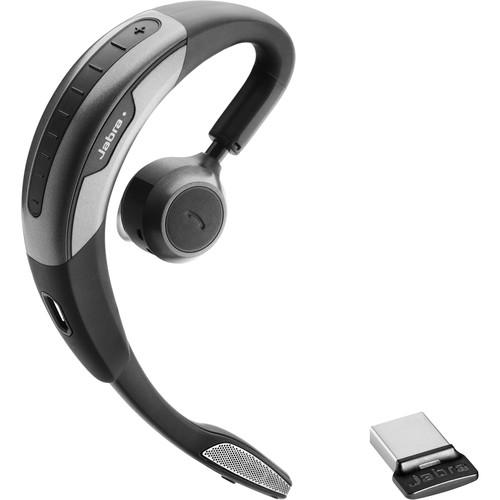 Contents of the user manual for the Jabra Motion UC MS USB Wireless
- Product category: VoIP Headsets Jabra
- Brand: Jabra
- Description and content of package
- Technical information and basic settings
- Frequently asked questions – FAQ
- Troubleshooting (does not switch on, does not respond, error message, what do I do if...)
- Authorized service for Jabra VoIP Headsets
|
User manual for the Jabra Motion UC MS USB Wireless contain basic instructions
that need to be followed during installation and operation.
Before starting your appliance, the user manual should be read through carefully.
Follow all the safety instructions and warnings, and be guided by the given recommendations.
User manual is an integral part of any Jabra product,
and if it is sold or transferred, they should be handed over jointly with the product.
Following the instructions for use is an essential prerequisite for protecting
health and property during use, as well as recognition of liability on the part of the manufacturer
for possible defects should you make a warranty claim. Download an official Jabra user manual in which you will find instructions on how to install, use, maintain and service your product.
And do not forget – unsuitable use of a Jabra product will considerably shorten its lifespan!
|
Product description With the Motion UC MS USB Wireless Headset from Jabra you can use a single headset for multiple phones and even transfer calls between your deskphone and mobile phone. This Skype for Business certified headset features intuitive call controls including the ability to automatically adjust call volume, advanced noise cancellation technology to nearly eliminate background noise, and a range of up to 300' making it easy to roam around while on your call. - Busylight
- Jabra Busylight helps you to cope with the open office environment challenges and let people clearly know you are on the phone. The indicator turns red when you are on a call to keep you from being interrupted.
- Call Assist
- Jabra's intelligent Call Assist lets you take a call without a click. Built in Motion Sensor technology turns the headset on when you pick it up or touch it, and automatically answers the call when you place it on your ear. If you are already wearing the headset, you can accept or reject a call using just your voice.
- HD Voice - Wideband Audio
- Enjoy high-definition sound with HD Voice and get clear, intelligible communication. You get life-like, vibrant conversations where you can focus on the content and don't have to struggle to understand what the person on the other end of the line is saying.
- HiFi Streaming
- Jabra Bluetooth devices featuring A2DP allow you to stream music, podcasts, and even GPS directions in HiFi quality to give you enhanced sound experience.
- Intelligent Volume Control
- With Jabra Intelligent Volume Control, you are now free from touching the volume control. The audio level adapts automatically to the interference noise around you, allowing you to hear what is being said wherever you are.
- Jabra Connect
- The Jabra Connect app interacts actively with your headset and lets you customize your user experience to suit your preferences as well as control all your calls on multiple devices.
- Noise Blackout
- Jabra Noise Blackout technology eliminates disturbing background noise such as wind, surrounding conversations or traffic to enhance your voice. So you can now talk freely without raising your voice excessively.
- PeakStop
- PeakStop technology immediately removes potentially harmful loud sounds or tones before they reach your ears and keeps the sound level within the safe range to protect your hearing.
- Power Nap Mode
- With Jabra Power Nap Mode, you can now leave your headset in the car or on your desk for days and still have it ready when you are. Your device automatically goes into sleeping mode when inactive. A great power management feature that gives you more talk-time, less charging.
- SafeTone
- Jabra SafeTone includes Jabra PeakStop and Jabra IntelliTone, the enhanced hearing protection technology. Benefit from clear, crisp and automatic limitation of average volume exposure during your workday according to acoustic standards and regulations. A feature that offers you significant confidence, safety and comfort while enhancing the quality of your communication.
- Tap-to-Connect
- Near Field Communication technology (NFC) makes it easy for your Jabra device to instantly connect and interact with phones, tablets, and interactive tags. It requires no more than a simple touch. Just tap the phone and the Jabra device together and you are ready to talk or stream your music.
- Voice Controls
- Jabra Voice Controls cover both Voice Commands and Voice Guidance functionalities. With Voice Commands, you can answer/reject a call, play music, call back, and so on. Your own words control your device. Voice Guidance verbally notifies you of crucial status updates, such as connectivity and low battery.
- Wind Noise Protection
- Wind Noise Protection enables you to keep the thread of your conversation in open air environments without any interference. Walk, bike, run, work outside and talk with no need to raise your voice or shout to be heard.
- 8-Hour Battery Life
- A wireless audio device would not be a useful tool without an incredible battery life. Even with so much performance packed into such a small space, it still lasts up to 8 hours on a single charge.
- Jabra Software Applications
- Customize and control your audio device settings with Jabra's software applications. You get full integration and remote call control with the latest generation of softphones.
- Multi-Device Connectivity
- Multi-device connectivity technology lets you manage phone calls from several different devices such as desk phones, tablets, PCs and smartphones, with one single headset. You get greater flexibility and enhanced user experience.
- Remote Asset Management
- Configure and implement the company's audio devices 100% remotely from one central point. You get the latest features and functionalities on one go with Jabra Xpress, a web-based solution. You can also get a complete overview of all Jabra audio devices installed in the IT network with Jabra Xpress' asset management component.
- UC Plug-and-Play
- Jabra devices feature intuitive call control and seamless connection to all leading UC applications and softphones. They are easy to set up and easy to use, leaving you free from any installation expertise or extensive training requirement.
- Up to 300' Wireless Freedom
- Featuring Bluetooth Class 1, your Jabra device enables you to connect to a vast range of devices from smart phones and tablets to laptop computers. You get a wireless mobility up to 100 meters/300 feet giving you full control of your handsfree Jabra voice solutions. You can call and multitask on your terms.
- Hot Desking
- Save time, money and office space and give mobile employees a more flexible work environment. Jabra Motion Office enables multiple employees to use the same office space at different times. Just plug in your headset to any Jabra Motion Office base and you're ready to work.
UPC: 706487013570 In the Box Jabra Motion UC MS USB Wireless Headset with Dongle Soft Pouch Limited 1-Year Warranty Table of Contents
|
Upload User Manual
Have you got an user manual for the Jabra Motion UC MS USB Wireless Headset with Dongle in electronic form? Please send it to us and help us expand our library of instruction manuals.
Thank you, too, on behalf of other users.
To upload the product manual, we first need to check and make sure you are not a robot. After that, your "Submit Link" or "Upload File" will appear.
Technical parametersJabra Motion UC Specs | | | Earpiece Design | In-Ear | | Listening Mode | Monaural | | | | Wireless Range | 300' / 91 m | | Host Connection | 1 x USB Type-A | | | | Package Weight | 0.45 lb | | Box Dimensions (LxWxH) | 7.1 x 3.7 x 1.6" |
Rating100% users recommend this product to others. And what about you?

This product has already been rated by 21 owners. Add your rating and experience with the product.
Discussion
 Ask our technicians if you have a problem with your settings,
or if anything is unclear in the user manual you have downloaded.
You can make use of our moderated discussion.
The discussion is public and helps other users of our website who may be encountering similar problems.
Ask our technicians if you have a problem with your settings,
or if anything is unclear in the user manual you have downloaded.
You can make use of our moderated discussion.
The discussion is public and helps other users of our website who may be encountering similar problems.
The discussion is empty - enter the first post
Post a new topic / query / comment:
|
|
|
| Request for user manual |
You can’t find the operation manual you are looking for? Let us know and we will try to add the missing manual:
I’m looking for a manual / Request for manual
Current requests for instruction manuals:
Call Of Duty World War Two For Xbox...
controller stratus XL...
stratus XL...
smart whatch serie S11 42mm...
Allen & Heath SQ-6 manual...
|
| Discussion |
Latest contributions to the discussion:
AEW R 4100
Name: MAURICIO ANGARITA
Audio-Technica AEW-R4100 UHF Diversity Receiver for
AEW R 4100 has the mute function blocked and does not allow audio to pass. I tried several times to turn off the mute from the transmitter but it does nothing, the mute stays on. Solution?
Thank you...
Instructions for assembling the 2015 Forecast Image Master Consoles GC3-A
Name: mike elam
Forecast Consoles GC3-A ImageMaster Editing Console
Looking for instructions for assembling this console. ...
EMPTY TONER ERROR MESSAGE AFTER REPLACING TONER
Name: LINDA BAD YELLOW EYES
Brother TN223BK Standard-Yield Toner
I HAD TO CHANGE OUT ALL THREE TONERS DUE TO LEAKS IN THE YELLOW AND CYAN. AFTER I REPLACED THEM, THE MACHINE KEEPS GIVING ME AN EMPTY TONER ERROR MESSAGE. HELP!!...
PS480D 20/24 pin Switching 480W Power Supply
Name: swkargo
Logisys 480W Power Supply
This item states in can run -5vdc .It is NOT listed on the board or I beleive is r4 is missing the resitior. Any body have thid issue. Shawn
...
Help needed
Name: Ann Carter
SanDisk 1TB Extreme Portable USB 3.1
When I click the link to download the user manual for my Sandisk Extreme external hard drive, it gives me the manual for the LG Cricket. Can you please change the link so I can download the Sandisk manual and begin using this drive? Thank you....
|
|


